How much better are people finding Aion to be vs Apollo? I’m noticing that for me it’s roughly 3x slower and I’m not sure in what situations I should opt for it instead.
1 Like
This Beta isn´t working good.
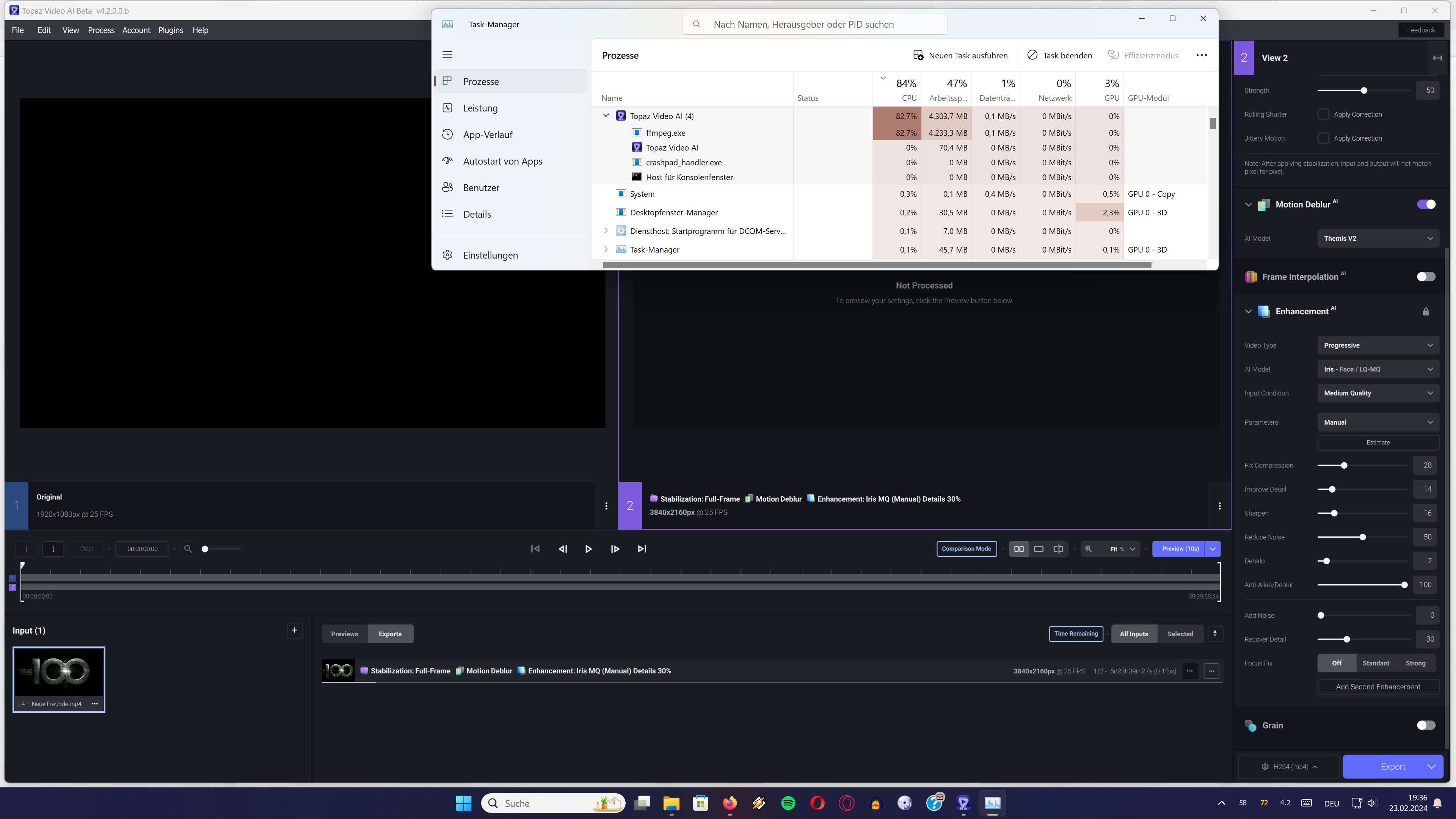
I am upscaling “The 100” to 4K and normally one episode is finished after about 6-8 hours…
After 10 hours this Beta show it would take another 6 days !!! to complete using nearly no GPU.
logsForSupport.zip (13.2 MB)
Try manually selecting your 3060 Ti in the Preferences → Processing menu.
1 Like
I never had this issue before…
I will give it a try tomorrow…
1 Like
Yeah I’ve been getting that sort of behavior from the GUI a lot lately. I click away from the preview to the original and all the settings get reset. It’s confusing at best, and frustrating at worst.
I have some plans to try it on some longer movies, but I don’t want to wait for it to finish.
I say it’s on par with Apollo 8 for increasing frame rate. It’s behind for slow motion though. It makes grainy patterns in objects in motion.
1 Like
I’d strongly suggest a DMG install if you’re on the Mac. That way you won’t get remnants of older versions and/or model files.
Preview is extremely jerky while the encoding is still active.
Only after it has finished encoding it runs smooth.
Other than that no major issues here.
This is on a Mac Studio M2 Ultra / 64GB with Sonoma 14.4.
Oh, and when can we expect Iris on the Mac to be as fast as it could be (and also was) again? There was an improvement some time ago but since then nothing and especially the 2x model is still underperforming.
Topaz Video AI Beta  v4.2.0.0.b
System Information
OS: Mac v14.04
CPU: Apple M2 Ultra  64 GB
GPU: Apple M2 Ultra  48 GB
Processing Settings
device: 0 vram: 1 instances: 1
Input Resolution: 1920x1080
Benchmark Results
Artemis		1X: 	15.89 fps 	2X: 	10.05 fps 	4X: 	02.92 fps
Iris		1X: 	11.11 fps 	2X: 	04.66 fps 	4X: 	02.10 fps
Proteus		1X: 	16.80 fps 	2X: 	10.64 fps 	4X: 	03.27 fps
Gaia		1X: 	06.01 fps 	2X: 	03.83 fps 	4X: 	02.70 fps
Nyx		1X: 	04.81 fps 	2X: 	05.15 fps
Nyx Fast		1X: 	15.82 fps
4X Slowmo		Apollo: 	16.96 fps 	APFast: 	66.31 fps 	Chronos: 	05.76 fps 	CHFast: 	07.66 fps 	Aion: 	04.75 fps
Kudos with the resolve plugin!
Unfortunately that damned bug which disables manual FPS input is irritating, yes, it seems you cannot input frame rates…
Use GPU-Z to see how much GPU is being used as Task Manager does not show real usage.
Regarding the Davinci OFX plugin.
Testing it on Studio 18.6.5 Build 7 in color with nodes.
Firstly when I disable the node with enhancer in A/B mode it does not show any change.
It’s not basically showing what it’s doing so any other nodes I add are irrelevant.
When I try to go thro a video either playing or manually selecting timeline it crashes.
First test with the Davinci Resolve plugin with the studio version 18.6.5 (WIN11).
- Source 18fps clip
- Project DVR and TL: 25 fps
Width: 1,728 pixels
Height: 1,296 pixels
Plugin panel: topaz is active: ok
- Color page: only one node with the plugin
- Model Proteus, the other default parameters
- Reading start: frozen screen: no message but I think the time of the Download of the model … I am waiting and the program stops: popup Davinci resolve indicating a crash.
Restart Davinci Resolve and the project. Color page: Reading: OK
- Modification of parameters via minipanel: crash
Restart Davinci Resolve and the project. Color page: Stabilization: OK
Delivery page: export of an extract codec FFV1 at ~6fps: OK
General
Full name: H: \ temp \ test.mov
Format: MPEG-4
Format profile: Quicktime
Codec identifier: QT 0000.02 (QT)
File size: 1.63 GIO
Duration: 54s 400 ms
Global speed type: variable
Average overall flow: 258 Mb/s
Images per second: 25,000 IM/s
Date of encoding: 2024-02-25 09:27:43 UTC
Maintenance date: 2024-02-25 09:27:43 UTC
Application used: Blackmagic Design Davinci Resolve Studio

Video
ID: 1
Format: FFV1
Format version: version 3.4
Format parameters, GOP: n = 1
Settings format, Slice Count: 4 Slices PER Framme
Codec identifier: FFV1
Duration: 54s 400 ms
Flow type: variable
Flow: 256 Mb/s
Width: 1,728 pixels
Height: 1,296 pixels
Screen format: 4/3
Image type/s: Constant
Images per second: 25,000 IM/s
Color space: Yuv
Chrominance subchanting: 4: 2: 2
Color depth: 8 bits
Type of scanning: progressive
Compression mode: lossless
Bits/(pixel*image): 4.581
Flow size: 1.62 GIO (99%)
Date of encoding: 2024-02-25 09:27:43 UTC
Maintenance date: 2024-02-25 09:27:43 UTC
Chromaticity contact details: Bt.709
Matrix coefficients: Bt.709
Gamma: 2,400
Coder_Type: Range Coder
ERRODETECTIONTYPE: PER SLICE
Box Configuration Codec: GLBL

Audio
ID: 2
Format: PCM
Format parameters: Little / Signed
Codec identifier: LPCM
Duration: 54s 400 ms
Type of flow: Constant
Flow: 1,536 kb/s
Canals: 2 channels
Channel Layout: L R
Sampling: 48.0 kHz
Depth of colors: 16 bits
Flow size: 9.96 Mio (0%)
Default: Yes
Alternate Group: 1
Date of encoding: 2024-02-25 09:27:43 UTC
Maintenance date: 2024-02-25 09:27:43 UTC

Other
ID: 3
Type: Time Code
Format: Quicktime TC
Duration: 54s 400 ms
Images per second: 25,000 IM/s
Time Code of the first image: 01: 00: 29: 02
TIME CODE OF LAST FRAME: 01: 01: 23: 11
time code, calculated: yes
English language
Date of encoding: 2024-02-25 09:27:43 UTC
Maintenance date: 2024-02-25 09:27:43 UTC
It is encouraging in simple operating mode. Lots of stability problems.
If i enbable/disable the node/plugin, Parade and other oscillo change (?) : What color space awaits and delivery this plugin? My Project and TL are color space is DWG, ODT : Rec.709.
I continue the tests.
Did use the Resolve plugin, the ram did get filled until resolve did crash.
The second time, i did remove the plugin while ram fill and then needed to turn off the PC, bc it was not responding anymore.
I have 64 GB RAM and the performance panel tells me that I use 43GB RAM.
GPU VRAM use: 7GB/24GB.
Details:
Page Effects :
0: Stabilization: Persective
Node 1: Deflicker (because of the S8 scanner)
Node 2: Some LGG
Node 3: TPZ Proteus Manual => Estimate works. Addition more decompression (source .MP4) + Addition more noise reduction.
Rendering speed = 6fps.
Big positive point: the preview is no longer to be calculated: the result of the settings is visualizable live. If in addition you have a decklink + a large monitor behind, you can finely adjust the effect. Very big saving potential time in productivity. Appreciated.
To be continued. 
Thanks so much for these tests! We have an updated build with many fixes for the Resolve crashes and we expect to have this out in the main release this week.
Internally, the plugin converts to RGB48 (16 bits-per-channel) for model processing and is then returned to the project colorspace for display/export.
3 Likes
It’s likely that on the initial run of the plugin the model download/initialization is still running and showing no change when disabling the node. We will look into ways of messaging this startup process and prevent timeline crashes when playing during initialization.
1 Like
Confirmed fixed for the release this week!
3 Likes
I was using nyx, now with proteus it does work and is a whole new level compared to TVAI, bc i can work direct on the RAW video.
1 Like
For next release, I hope can we have also the Premiere Pro plug-in 
1 Like
Sorry if this has been asked before but what’s the story behind ProRes 4444 and ProRes 4444+alpha not being included?
