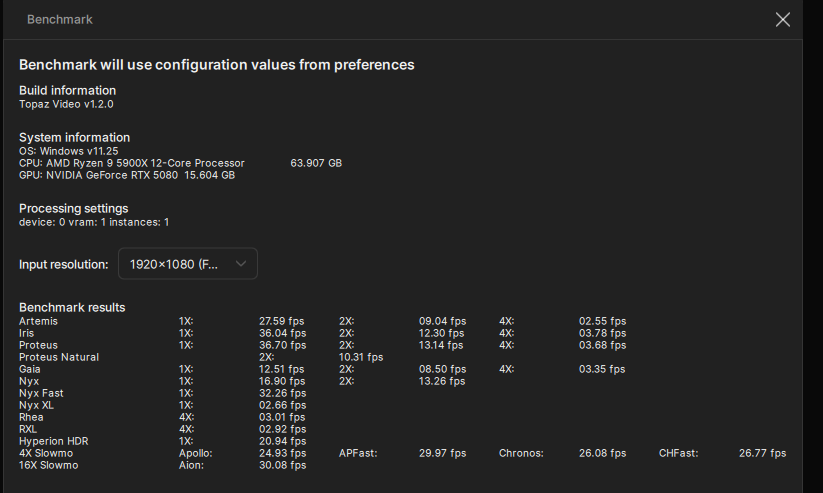
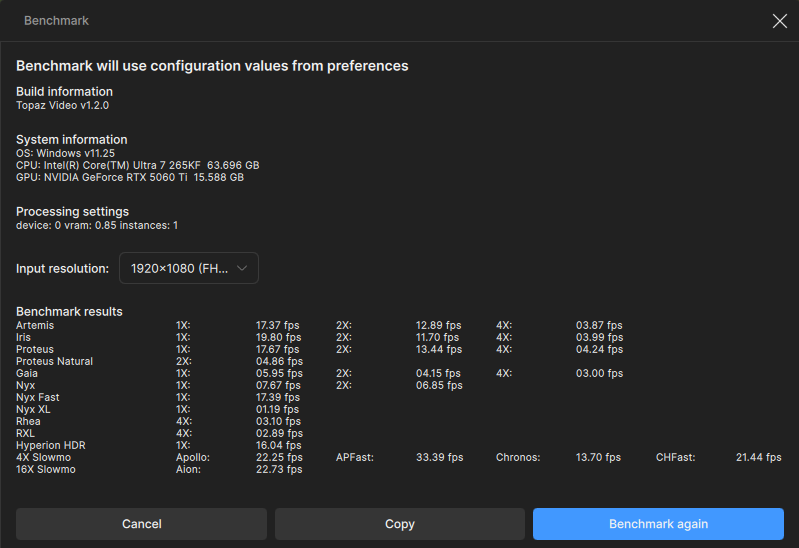
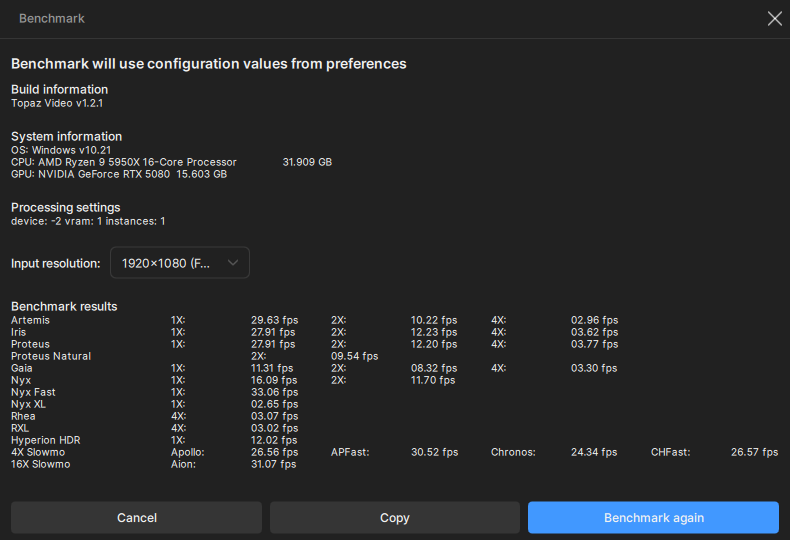
Topaz Video 1.2.x - user benchmarking results

What do you mean?
Because with PAL (0.44 million pixels) you get 4.5 times the speed than if you enter 4.5 times the pixel resolution (Full HD)?
That’s mathematics.

… I would suggest that regardless of the resolution you work with—I usually use 4K, for example—you should only use Full HD for comparison purposes, otherwise it becomes too confusing…

kind regards

Habilitando resizeble bar on nvidia inspector.

I mean that the benchmarks are too inconsistent with quite some variation from run to run.

Oh, and P.S.: all those FHD benchmarks are (maybe except for 1x) vastly irrelevant as this is NOT the common use case. I guess only few people use Topaz to upscale FHD to 4k.

So, really, we should be posting more SD→(F)HD benchmarks (which likely is the by far most used scenario).

3 Likes
```
Topaz Video  v1.2.0
System Information
OS: Windows v10.22
CPU: AMD Ryzen 9 5900X 12-Core Processor              31.925 GB
GPU: NVIDIA GeForce RTX 5070 Ti  15.622 GB
Processing Settings
device: 0 vram: 0.95 instances: 1
Input Resolution: 1920x1080
Benchmark Results
Artemis		1X: 	23.90 fps 	2X: 	10.54 fps 	4X: 	02.72 fps 	
Iris		1X: 	24.00 fps 	2X: 	10.99 fps 	4X: 	03.00 fps 	
Proteus		1X: 	29.27 fps 	2X: 	11.17 fps 	4X: 	02.82 fps 	
Proteus Natural		2X: 	07.58 fps 	
Gaia		1X: 	09.08 fps 	2X: 	06.45 fps 	4X: 	02.51 fps 	
Nyx		1X: 	13.65 fps 	2X: 	10.82 fps 	
Nyx Fast		1X: 	27.33 fps 	
Nyx XL		1X: 	02.23 fps 	
Rhea		4X: 	02.49 fps 	
RXL		4X: 	02.55 fps 	
Hyperion HDR		1X: 	20.13 fps 	
4X Slowmo		Apollo: 	21.07 fps 	APFast: 	47.29 fps 	Chronos: 	21.86 fps 	CHFast: 	22.84 fps 	
16X Slowmo		Aion: 	35.32 fps 	

```
Topaz Video  v1.2.0
System Information
OS: Windows v11.23
CPU: Intel(R) Core(TM) i7-6950X CPU @ 4.20GHz  31.925 GB
GPU: NVIDIA GeForce RTX 4080  15.674 GB
Processing Settings
device: -2 vram: 1 instances: 1
Input Resolution: 1920x1080
Benchmark Results
Artemis		1X: 	27.84 fps 	2X: 	11.23 fps 	4X: 	03.49 fps 	
Iris		1X: 	34.09 fps 	2X: 	15.38 fps 	4X: 	03.85 fps 	
Proteus		1X: 	29.56 fps 	2X: 	15.09 fps 	4X: 	04.37 fps 	
Proteus Natural		2X: 	08.24 fps 	
Gaia		1X: 	10.84 fps 	2X: 	07.52 fps 	4X: 	04.02 fps 	
Nyx		1X: 	16.02 fps 	2X: 	13.27 fps 	
Nyx Fast		1X: 	28.99 fps 	
Nyx XL		1X: 	02.22 fps 	
Rhea		4X: 	03.39 fps 	
RXL		4X: 	03.70 fps 	
Hyperion HDR		1X: 	12.06 fps 	
4X Slowmo		Apollo: 	26.60 fps 	APFast: 	73.62 fps 	Chronos: 	23.52 fps 	CHFast: 	27.03 fps 	
16X Slowmo		Aion: 	27.72 fps 	

Updated results with Aion

Hi,

Can you explain why you had an AION error before and now you don’t?

Was a bug (which only occurred with the RTX 50xx) fixed?

kind regards

Not sure what changed, I ran this second benchmark when I went to lunch and was not on my system doing anything else, whereas the first one was run while actively using my system.

I definitely need an upgrade !

Using my Dell XPS 17 Laptop

Topaz Video v1.2.0

System Information

OS: Windows v11.25

CPU: Intel(R) Core™ i9-10885H CPU @ 2.40GHz 63.751 GB

GPU: NVIDIA GeForce RTX 2060 with Max-Q Design 5.8154 GB

GPU: Intel(R) UHD Graphics 0.125 GB

Processing Settings

device: 0 vram: 1 instances: 1

Input Resolution: 1920x1080

Benchmark Results

Artemis 1X: 05.38 fps 2X: 04.07 fps 4X: 01.62 fps

Iris 1X: 02.66 fps 2X: 01.32 fps 4X: 00.37 fps

Proteus 1X: 05.58 fps 2X: 04.27 fps 4X: 01.77 fps

Proteus Natural 2X: 01.57 fps

Gaia 1X: 01.93 fps 2X: 01.31 fps 4X: 00.89 fps

Nyx 1X: 02.60 fps 2X: 02.31 fps

Nyx Fast 1X: 06.17 fps

Nyx XL 1X: 00.07 fps

Rhea 4X: 00.59 fps

RXL 4X: 00.99 fps

Hyperion HDR 1X: 11.65 fps

4X Slowmo Apollo: 07.61 fps APFast: 28.42 fps Chronos: 01.21 fps CHFast: 02.41 fps

16X Slowmo Aion: 08.84 fps

Topaz Video needs a lot of work on Blackwell.

• Asus ROG STRIX B350-F GAMING

• AMD R9 5950X

• G.Skill Trident Z F4-3600C16D-32GTZNC 32GB RAM 2x16GB DDR4 3600MHz

• Gigabyte RTX 5080 WINDFORCE OC SFF 16 GB

• Windows 10 IoT Enterprise LTSC 2021 Version 21H2

Topaz Video  v1.2.0
System Information
OS: Mac v26.03
CPU: Apple M4 Max  64 GB
GPU: Apple M4 Max  51.84 GB
Processing Settings
device: 0 vram: 1 instances: 1
Input Resolution: 1920x1080
Benchmark Results
Artemis		1X: 	13.32 fps 	2X: 	08.29 fps 	4X: 	03.00 fps 	
Iris		1X: 	12.79 fps 	2X: 	05.33 fps 	4X: 	02.03 fps 	
Proteus		1X: 	13.86 fps 	2X: 	08.98 fps 	4X: 	02.55 fps 	
Proteus Natural		2X: 	01.31 fps 	
Gaia		1X: 	04.12 fps 	2X: 	02.99 fps 	4X: 	02.21 fps 	
Nyx		1X: 	05.18 fps 	2X: 	06.41 fps 	
Nyx Fast		1X: 	11.99 fps 	
Nyx XL		1X: 	00.10 fps 	
Rhea		4X: 	01.18 fps 	
RXL		4X: 	01.19 fps 	
Hyperion HDR		1X: 	86.33 fps 	
4X Slowmo		Apollo: 	14.26 fps 	APFast: 	39.87 fps 	Chronos: 	05.68 fps 	CHFast: 	09.29 fps 	
16X Slowmo		Aion: 	15.83 fps 	

Topaz Video  v1.2.0
System Information
OS: Mac v26.03
CPU: Apple M4 Max  64 GB
GPU: Apple M4 Max  51.84 GB
Processing Settings
device: 0 vram: 1 instances: 1
Input Resolution: 720x480
Benchmark Results
Artemis		1X: 	13.77 fps 	2X: 	12.99 fps 	4X: 	09.49 fps 	
Iris		1X: 	13.72 fps 	2X: 	13.04 fps 	4X: 	06.35 fps 	
Proteus		1X: 	74.53 fps 	2X: 	55.81 fps 	4X: 	10.11 fps 	
Proteus Natural		2X: 	07.77 fps 	
Gaia		1X: 	23.26 fps 	2X: 	16.67 fps 	4X: 	13.20 fps 	
Nyx		1X: 	22.51 fps 	2X: 	20.98 fps 	
Nyx Fast		1X: 	54.55 fps 	
Nyx XL		1X: 	00.65 fps 	
Rhea		4X: 	07.55 fps 	
RXL		4X: 	08.06 fps 	
Hyperion HDR		1X: 	14.27 fps 	
4X Slowmo		Apollo: 	34.68 fps 	APFast: 	242.42 fps 	Chronos: 	16.08 fps 	CHFast: 	23.40 fps 	
16X Slowmo		Aion: 	85.05 fps 	

I don’t understand why 1x Artemis and 1x Iris didn’t increase in fps when I changed input resolutions to a lower setting.

I was just thinking exactly the same. Is the 26.3 OS the final release, rather than the release candidate? I’ve been concentrating on testing Starlight recently so haven’t checked how 26.3 might affect other models. I really hope this isn’t going to be an issue. Virtually all my sources are SD.

Thanks.

Andy

Edit: just tried on my M3 Ultra and setting max mem % to 10% (rather than 100%) has a positive effect on some models but the reverse on others.

It always was like that.

Topaz Video  v1.2.0
System Information
OS: Windows v11.25
CPU: AMD Ryzen Threadripper 9960X 24-Cores            127.35 GB
GPU: NVIDIA GeForce RTX 5090  31.349 GB
Processing Settings
device: 0 vram: 0.9 instances: 1
Input Resolution: 1920x1080
Benchmark Results
Artemis		1X: 	47.24 fps 	2X: 	22.99 fps 	4X: 	06.38 fps 	
Iris		1X: 	55.05 fps 	2X: 	25.16 fps 	4X: 	06.62 fps 	
Proteus		1X: 	52.86 fps 	2X: 	23.58 fps 	4X: 	06.48 fps 	
Proteus Natural		2X: 	17.42 fps 	
Gaia		1X: 	18.99 fps 	2X: 	12.62 fps 	4X: 	05.74 fps 	
Nyx		1X: 	26.20 fps 	2X: 	21.09 fps 	
Nyx Fast		1X: 	54.30 fps 	
Nyx XL		1X: 	04.36 fps 	
Rhea		4X: 	05.83 fps 	
RXL		4X: 	06.13 fps 	
Hyperion HDR		1X: 	31.41 fps 	
4X Slowmo		Apollo: 	44.91 fps 	APFast: 	39.32 fps 	Chronos: 	38.08 fps 	CHFast: 	44.06 fps 	
16X Slowmo		Aion: 	39.80 fps


I have the same RTX5080 as you (ok, ASUS), but I’m about 1/3 faster everywhere.
The reason will be your motherboard and the speed of your RAM.
For an RTX50xx, you need PCie4 (you only have PCie3)…
and DDR4 at least 4000 MT/s or DDR5 with 8000 MT/s.
(I have DDR4 with 4400 MT/s).
Best regards

I know the limitations of PCIe 3.0.
While my older motherboard does introduce a slight bottleneck, a full 33% performance gap across the board doesn’t really align with the hardware math here.
Dropping from PCIe 4.0 to PCIe 3.0 x16 typically only results in about a 5% to 10% performance penalty in AI video workloads, nowhere near 33%.
Even with DDR5 at 8000 MT/s on a modern platform, the performance scaling in Topaz Video AI is not linear enough to produce that kind of gap solely from memory.
Topaz Video 1.2.x needs a lot of work on Blackwell.
Right now, it’s leaving a lot of power on the table.