no, when i stopping a process, nothing is cleared, the program just keep open and PC put to sleep. When the PC resume, all the file still there and it didn’t continue from where it stopped. Instead it started from beginning.
Are you referring to the pause process option? Stopping a process, terminates it and ends the process all together and it would need to be resubmitted later on.
Pausing a process, should hold the process at the point where it last wrote out a chunk of the video and will allow it to restart when chosen or when the app is launched again.
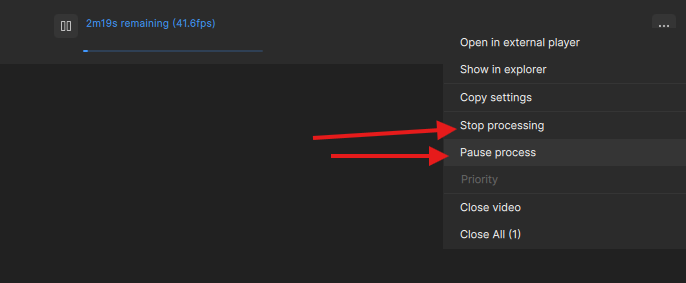
SLM & SLS have no “pause”, when you click “stop” encoding breaks and is not resume able. If you mean pausing and the video doesn’t resume when you click it again, that’s annoying. In my experience, there’s always a small risk that it won’t resume when you pause it. But I would generally turn off power saving into OS; just turning off the screen after x minutes is fine
1 Like
if i save it as image sequence, the pause option just isn’t available. Is this a known limitation? I thought save it as image sequence is much safer and can continue from where it stopped in case PC crash/blackout.
For now, the safest method for resuming an encoding session, which also works for SLM & SLS, is as follows:
- Navigate to Preferences > Timecode > Timecode display format and select “Frame number” from the dropdown menu. This ensures you can precisely identify the correct starting frame when you resume.
- Select your desired Enhancement Model, then go to Codec Settings. Set the Output type to “Image seq.” and choose your preferred format (e.g., PNG). Pay attention to the “Frame numbers” box; this is where you will input the starting frame when resuming a previously stopped session. For your initial run, leave this value at 0.
- You can now begin encoding and safely stop the process at any time.
- To pick up where you left off, check your output folder and note the frame number (the file name) of the very last image generated.
- In the Frame # field just above the timeline, enter the last frame number +1 (e.g., if the last file was 827, enter 828). Click the “Mark In” button to set this as your new start point. Note: If the frame number shifts after clicking “Mark In”, simply re-enter the correct number and click the “Mark In” button again until it registers correctly.
- Ensure you are using the same Enhancement Model and image format as before. In the “Image seq.” pane, enter the same starting frame number into the Frame numbers box (where it says Start #). Note: When starting the export, ensure the Start # in the Export Settings matches your intended frame. If it does not update automatically, you must enter the correct frame number here as well. This appears to be a bug, as the value entered in the “Image seq.” settings should ideally carry over to this field.
You are now ready to continue your encoding, just ensure you have a lot of free disk space. Once the image sequence is complete, you can easily build your video with FFmpeg.
2 Likes
Thanks for the guide. Yeah, that’s the method similar to how i encode in ComfyUI as well.
I am very glad for the authentication fix. Like this release a lot. Well done, Topaz. 
(I only use Starlight Mini at this point, so have no idea about anything else)
Does the app automatically reissue the token before it expires, or do I need to log in again once it has expired?
You will need to log back in to refresh the token and the app will prompt that login when you launch it.
Does that mean that if Topaz Video is currently processing 10 videos and the time limit expires, the program will start adding watermarks again or stop processing?
I don’t know, but before you start 10 vids renderings, you could logout and re-auth. then you should have 30-days left, or I’m wrong?
If the app is still open and actively processing, it should not swap to applying a watermark.
However, as Mayday mentioned, a good option would be to log out and then log back into the app before queueing up a bunch of renders to be safe.
A post was split to a new topic: Remember email and password button with login window
Even more important would be fixing their broken face processing for faces in the background, it is a train wreck, look like Picasso. Would be better if faces in the background were just ignored. Makes starlight only slightly useable.
10 Likes
I just did a fresh install to try this new version and when I load the program, it shows my last project. How is that possible? I uninstalled the program and I removed everything in the programdata folder and everything in the users local/roaming folder? I want to make sure EVERYTHING is erased, so I can start fresh. How do I do that?
Check it out in 4K! Very pleased with the Starlight Mini results! (It was blended with Starlight Sharp and with different types of additional sharpening added in Resolve Studio).
Did this when I was about 13 years old, shooting on Video8 (I am now 47):

I used my brothers and sister, and had a lot of fun doing it! Everything was edited on-the-fly in camera, as I had no proper editing equipment at that point. Sound effects and stuff will be added later. R2’s sounds were produced on a cassette recorder and played back live, with me making all the sounds myself.
The lasers and explosion were animated in Mario Paint and superimposed live using a 45-dergree positioned glass screen. The ship capture is of course the model plastered on my mother’s TV screen using plastilina, with the previously shot Starderstroyer being played back on VHS….
Also will do some additional cropping and digital cleanup and stuff going forward….
Yups, I am one of those ‘‘special’’ Exennials, who grew up with analog stuff and transitioned into digital, while the brain was still taking shape…
(Was planning on putting this in the ‘‘show-off’’ section, but I did not find it, thanks to the Saturday night beers)… 
10 Likes
After Topaz deinstall, delete everything called “Topaz…” into following locations:
C:\Program Files
C:\Program Files\Common Files\Adobe\Plug-Ins
C:\ProgramData
C:\Users\All Users
%username%\Documents
%username%\AppData\Roaming
%username%\AppData\Local
%username%\AppData\Local\NVIDIA\NvBackend...topaz…
Registry
HKEY_CURRENT_USER\SOFTWARE\Topaz Labs LLC\HKEY_LOCAL_MACHINE\SOFTWARE\Topaz Labs LLC\
But you can use Registry-Cleaner. Since they started “CCleaner” monetizing it’s become awful. I use the Windows app “Wise Registry Cleaner” which is available for free in the Microsoft Store.
2 Likes
Is the export preview working for anyone when you run starlight sharp? When I run starlight mini I can now preview the video inside topaz so I can compare it to the original (it was broken in previous versions and I’m super happy it’s fixed now). But starlight sharp is just a black screen and the video never shows up. I can still open the temp file to see what it looks like, but I do like being able to compare inside topaz so I can quickly see if this model will work best for me.
This is awesome! Crazy production actually if you were just 13. Looks like a movie set. I like how you put paper up on the walls and it doesn’t just look like a normal house. It looks like a movie set.
3 Likes
Thanks man! You know, the Deathstar walls also move like they are made of paper material in some shots. Because they actually are. George Lucas revealed EVERYTHING in the movie because of “glitches”, and I sucked it all up like the nerdy teenage loner sponge that I was…
1 Like
