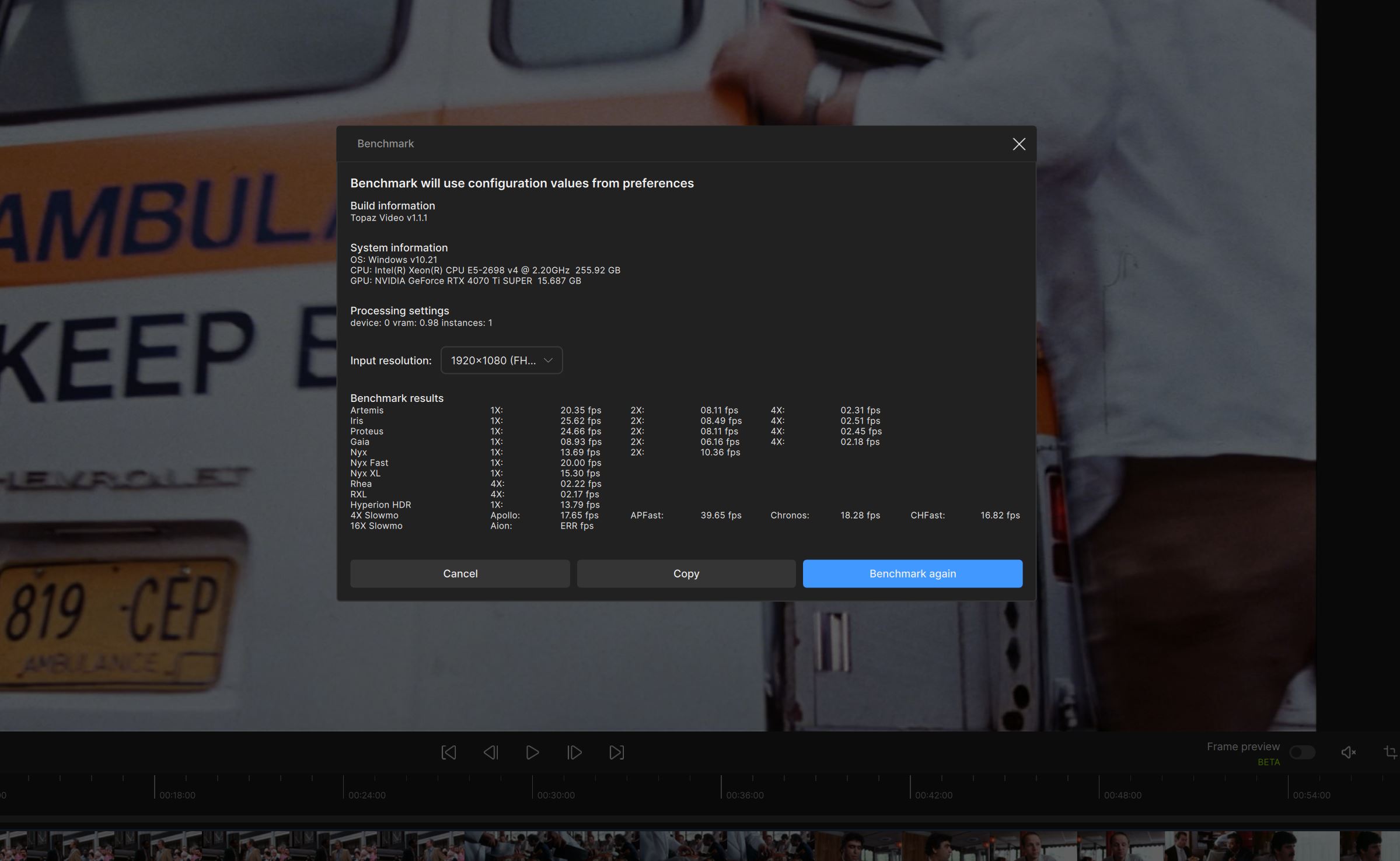
Mine runs at 2400MHz. But the quite huge amount (256GB) actually matters more for some future highly detailed photogrammetry projects of mine than the speed… And the HP Z840 system is super-stable, so that matters a lot also.
For me 1.1.1 runs a bit faster than 1.1.0 with all models in the benchmark. With Starlight Mini I get a little bit faster testults with 1.1.1 also (1.1.0 on top, 1.1.1 below):
My system is also PCIe 3 and the RAM even running slower, but it still runs a bit faster than his. You think 5070 Ti runs worse that 4070 Ti Super on a PCIe 3 system, because of the bigger generational gap?
“Do you think the 5070 Ti will perform worse than the 4070 Ti Super on a PCIe 3 system because the generation gap is bigger?”
First off, I’m not a developer.
But no, I don’t think so. Emphasis on “think.”
When I switched from RTX4070Super to RTX5080, the gain was 1:1.7.
(same task from 5 fps to 8.5 fps, both PCIe4)
I think PCIe3 could be sufficient for RTX40xx, with the possible exception of the 4090?
There’s a benchmark here for a 5070 Ti (PCIe4 or 5 ?) that comes damn close, I think within 10%, to my 5080. That would probably give it the best price-performance ratio.
The overall package always has to be right!
Fastest possible RAM and PCIe.
The computing power of the CPU, on the other hand, seems pretty insignificant*, but it must have a fast RAM controller and support modern PCIe.
As you can see in the neighboring benchmark thread, my 11900 is just as fast as a 12900, 14900, 265, or 285…
(I’m not arguing about 2 or 3 percent).
Subject: Clarification on High PCIe Bus Usage Reporting for RTX 50-series GPUs
Regarding the concerns about unusually high PCIe bus usage on the new NVIDIA 50-series (Blackwell) cards:
NVIDIA representatives have confirmed that this is a reporting error rather than a physical performance issue.
The discrepancy stems from the fact that the monitoring API used by many third-party tools (like HWInfo or MSI Afterburner) had not yet been updated for the specific architecture of the 5000-series at launch.
As a result, these tools are misinterpreting the data flow, showing high bus saturation even when the card is idle or under light load.
NVIDIA has stated that there is no actual excessive data traffic on the PCI bus and performance in applications like Topaz Photo AI or Video AI is not negatively affected by this bug.
Recommendation: Make sure to update to the latest NVIDIA Game Ready/Studio Drivers and use the most recent versions of your monitoring software, as updates are being rolled out to address this API reporting glitch.
regarding changes in performance, see my note here.
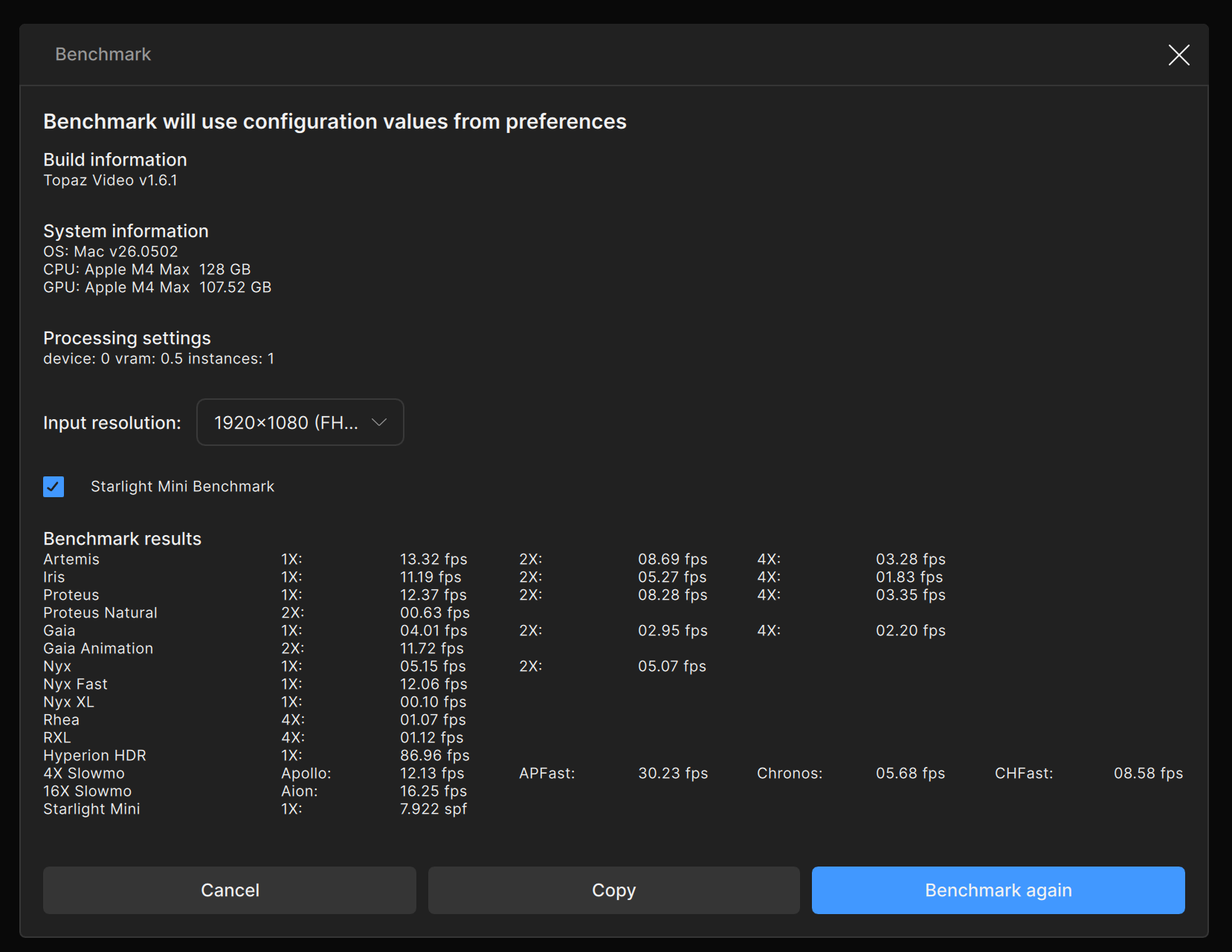
For Nyx XL specifically, the irregular frequency at which the model outputs frames was causing our old method of calculating FPS to vastly overrate the model’s throughput.
Testing my RTX A4000 in a HP Elite Tower G9 vs Arc A770 in a DIY box and , both running 32GB DDR5 Crucial ram.
I may need to swap video cards between the boxes with better cooling in the DIY box as the A4000 has a little fan on it compared to the larger fans on the A770 and lack of fans in the HP Elite tower.
Interesting that Nyx XL and Aion are both faster with the Arc card.
I’ve also found in the past that even putting all 4x 16GB ram sticks into one machine doesn’t seem to make much of a difference with the ARC card. I should probably try with the A4000 and see if what happens.
Kinda bummed that I missed out on 96GB ram before the price hikes.. *sigh
More testing today, but as we understand, actual processing performance is different from benchmarks.
 But the quite huge amount (256GB) actually matters more for some future highly detailed photogrammetry projects of mine than the speed… And the HP Z840 system is super-stable, so that matters a lot also.