Why do I think that Topaz Video Ai is not really trying to use the Mac Neural Engine on Apple Silicon combined with the power of the Gpu and Cpu cores. Wouldn’t that help speed up a lot to finish the task!
1 Like
Topaz Video  v1.1.0
System Information
OS: Windows v11.25
CPU: 13th Gen Intel(R) Core(TM) i9-13900K  47.691 GB
GPU: NVIDIA GeForce RTX 5090  31.433 GB
Processing Settings
device: 0 vram: 1 instances: 1
Input Resolution: 1920x1080
Benchmark Results
Artemis		1X: 	47.12 fps 	2X: 	21.89 fps 	4X: 	05.95 fps
Iris		1X: 	52.98 fps 	2X: 	20.50 fps 	4X: 	05.62 fps
Proteus		1X: 	52.88 fps 	2X: 	20.90 fps 	4X: 	05.65 fps
Gaia		1X: 	19.21 fps 	2X: 	12.98 fps 	4X: 	05.15 fps
Nyx		1X: 	27.55 fps 	2X: 	21.66 fps
Nyx Fast		1X: 	43.85 fps
Nyx XL		1X: 	35.24 fps
Rhea		4X: 	05.33 fps
RXL		4X: 	05.35 fps
Hyperion HDR		1X: 	29.02 fps
4X Slowmo		Apollo: 	36.55 fps 	APFast: 	82.62 fps 	Chronos: 	39.11 fps 	CHFast: 	36.62 fps
16X Slowmo		Aion: 	45.51 fps
If I may ask, how did you get your results to post like that with the proper formatting? When I copy and paste my results out of Topaz, they paste unformatted for some reason.
- Next to the smiley, click the + circle
- Select preformatted text. It will add a gray line
- Use the copy button in topaz benchmark window to copy the run results
- paste the results into the gray line of your post
- next to the “A” there is a button M with a down arrow that allows you to see the preview on the right of your post and confirm the formatting before you post it
The icon for preformatted text on my system is </>
New Nvidia Studio Driver released (591.74)
No real differences here.
```
Topaz Video  v1.1.0
System Information
OS: Windows v11.25
CPU: AMD Ryzen 7 9800X3D 8-Core Processor             63.556 GB
GPU: NVIDIA GeForce RTX 5070 Ti  15.62 GB
Processing Settings
device: 0 vram: 1 instances: 1
Input Resolution: 1920x1080
Benchmark Results
Artemis		1X: 	30.71 fps 	2X: 	16.08 fps 	4X: 	04.22 fps
Iris		1X: 	33.08 fps 	2X: 	17.87 fps 	4X: 	04.71 fps
Proteus		1X: 	32.00 fps 	2X: 	18.08 fps 	4X: 	04.85 fps
Gaia		1X: 	09.59 fps 	2X: 	06.78 fps 	4X: 	04.61 fps
Nyx		1X: 	13.38 fps 	2X: 	11.46 fps
Nyx Fast		1X: 	33.64 fps
Nyx XL		1X: 	31.70 fps
Rhea		4X: 	04.40 fps
RXL		4X: 	04.26 fps
Hyperion HDR		1X: 	34.31 fps
4X Slowmo		Apollo: 	35.37 fps 	APFast: 	85.08 fps 	Chronos: 	21.72 fps 	CHFast: 	30.86 fps
16X Slowmo		Aion: 	ERR fps

```
```
Topaz Video  v1.1.0
System Information
OS: Windows v11.25
CPU: AMD Ryzen Threadripper 9960X 24-Cores            127.38 GB
GPU: NVIDIA GeForce RTX 5090  31.433 GB
Processing Settings
device: 0 vram: 1 instances: 1
Input Resolution: 1920x1080
Benchmark Results
Artemis		1X: 	49.69 fps 	2X: 	22.22 fps 	4X: 	06.19 fps
Iris		1X: 	55.19 fps 	2X: 	22.79 fps 	4X: 	06.40 fps
Proteus		1X: 	52.31 fps 	2X: 	23.49 fps 	4X: 	06.72 fps
Gaia		1X: 	18.24 fps 	2X: 	12.27 fps 	4X: 	06.45 fps
Nyx		1X: 	25.95 fps 	2X: 	21.36 fps
Nyx Fast		1X: 	50.61 fps
Nyx XL		1X: 	40.71 fps
Rhea		4X: 	06.25 fps
RXL		4X: 	06.24 fps
Hyperion HDR		1X: 	31.99 fps
4X Slowmo		Apollo: 	47.61 fps 	APFast: 	99.82 fps 	Chronos: 	36.42 fps 	CHFast: 	41.91 fps
16X Slowmo		Aion: 	40.64 fps

```
1 Like
Topaz Video  v1.1.1
System Information
OS: Windows v11.24
CPU: AMD Ryzen 9 9950X3D 16-Core Processor            95.641 GB
GPU: NVIDIA GeForce RTX 5090  31.433 GB
Processing Settings
device: 0 vram: 1 instances: 1
Input Resolution: 1920x1080
Benchmark Results
Artemis		1X: 	45.54 fps 	2X: 	18.35 fps 	4X: 	04.62 fps
Iris		1X: 	56.10 fps 	2X: 	19.50 fps 	4X: 	05.08 fps
Proteus		1X: 	51.95 fps 	2X: 	19.24 fps 	4X: 	05.22 fps
Gaia		1X: 	18.71 fps 	2X: 	12.67 fps 	4X: 	05.04 fps
Nyx		1X: 	26.70 fps 	2X: 	21.40 fps
Nyx Fast		1X: 	47.09 fps
Nyx XL		1X: 	30.90 fps
Rhea		4X: 	04.89 fps
RXL		4X: 	04.91 fps
Hyperion HDR		1X: 	30.35 fps
4X Slowmo		Apollo: 	39.76 fps 	APFast: 	80.66 fps 	Chronos: 	35.67 fps 	CHFast: 	37.93 fps
16X Slowmo		Aion: 	38.94 fps
Topaz Video  v1.1.1
System Information
OS: Windows v11.23
CPU: AMD Ryzen 9 5900X 12-Core Processor              31.922 GB
GPU: NVIDIA GeForce RTX 3080 Ti  11.803 GB
Processing Settings
device: 0 vram: 1 instances: 1
Input Resolution: 1920x1080
Benchmark Results
Artemis		1X: 	22.30 fps 	2X: 	10.02 fps 	4X: 	02.63 fps
Iris		1X: 	24.34 fps 	2X: 	12.18 fps 	4X: 	03.16 fps
Proteus		1X: 	23.76 fps 	2X: 	13.26 fps 	4X: 	03.45 fps
Gaia		1X: 	08.42 fps 	2X: 	05.75 fps 	4X: 	03.24 fps
Nyx		1X: 	12.27 fps 	2X: 	09.95 fps
Nyx Fast		1X: 	25.73 fps
Nyx XL		1X: 	17.24 fps
Rhea		4X: 	02.57 fps
RXL		4X: 	02.89 fps
Hyperion HDR		1X: 	22.32 fps
4X Slowmo		Apollo: 	29.35 fps 	APFast: 	69.75 fps
 	Chronos: 	16.44 fps 	CHFast: 	25.87 fps
16X Slowmo		Aion: 	    37.82 fps
Effectively no change.
```
Topaz Video  v1.1.1
System Information
OS: Windows v11.25
CPU: AMD Ryzen 7 9800X3D 8-Core Processor             63.556 GB
GPU: NVIDIA GeForce RTX 5070 Ti  15.62 GB
Processing Settings
device: 0 vram: 1 instances: 1
Input Resolution: 1920x1080
Benchmark Results
Artemis		1X: 	30.97 fps 	2X: 	16.39 fps 	4X: 	04.27 fps
Iris		1X: 	33.39 fps 	2X: 	17.54 fps 	4X: 	04.69 fps
Proteus		1X: 	32.36 fps 	2X: 	18.63 fps 	4X: 	04.85 fps
Gaia		1X: 	09.68 fps 	2X: 	06.91 fps 	4X: 	04.55 fps
Nyx		1X: 	13.62 fps 	2X: 	11.68 fps
Nyx Fast		1X: 	33.96 fps
Nyx XL		1X: 	31.32 fps
Rhea		4X: 	04.39 fps
RXL		4X: 	04.25 fps
Hyperion HDR		1X: 	33.19 fps
4X Slowmo		Apollo: 	35.81 fps 	APFast: 	83.57 fps 	Chronos: 	21.95 fps 	CHFast: 	31.57 fps
16X Slowmo		Aion: 	44.32 fps

```
```
Topaz Video  v1.1.1
System Information
OS: Windows v11.24
CPU: AMD Ryzen 9 5950X 16-Core Processor              127.91 GB
GPU: NVIDIA GeForce RTX 5090  31.432 GB
Processing Settings
device: 0 vram: 1 instances: 0
Input Resolution: 1920x1080
Benchmark Results
Artemis		1X: 	23.26 fps 	2X: 	08.73 fps 	4X: 	02.33 fps
Iris		1X: 	24.43 fps 	2X: 	11.96 fps 	4X: 	03.36 fps
Proteus		1X: 	31.48 fps 	2X: 	12.88 fps 	4X: 	03.30 fps
Gaia		1X: 	15.66 fps 	2X: 	09.93 fps 	4X: 	03.01 fps
Nyx		1X: 	21.80 fps 	2X: 	15.95 fps
Nyx Fast		1X: 	35.50 fps
Nyx XL		1X: 	19.32 fps
Rhea		4X: 	03.01 fps
RXL		4X: 	03.03 fps
Hyperion HDR		1X: 	33.06 fps
4X Slowmo		Apollo: 	31.84 fps 	APFast: 	57.06 fps 	Chronos: 	31.97 fps 	CHFast: 	30.35 fps
16X Slowmo		Aion: 	34.19 fps

```
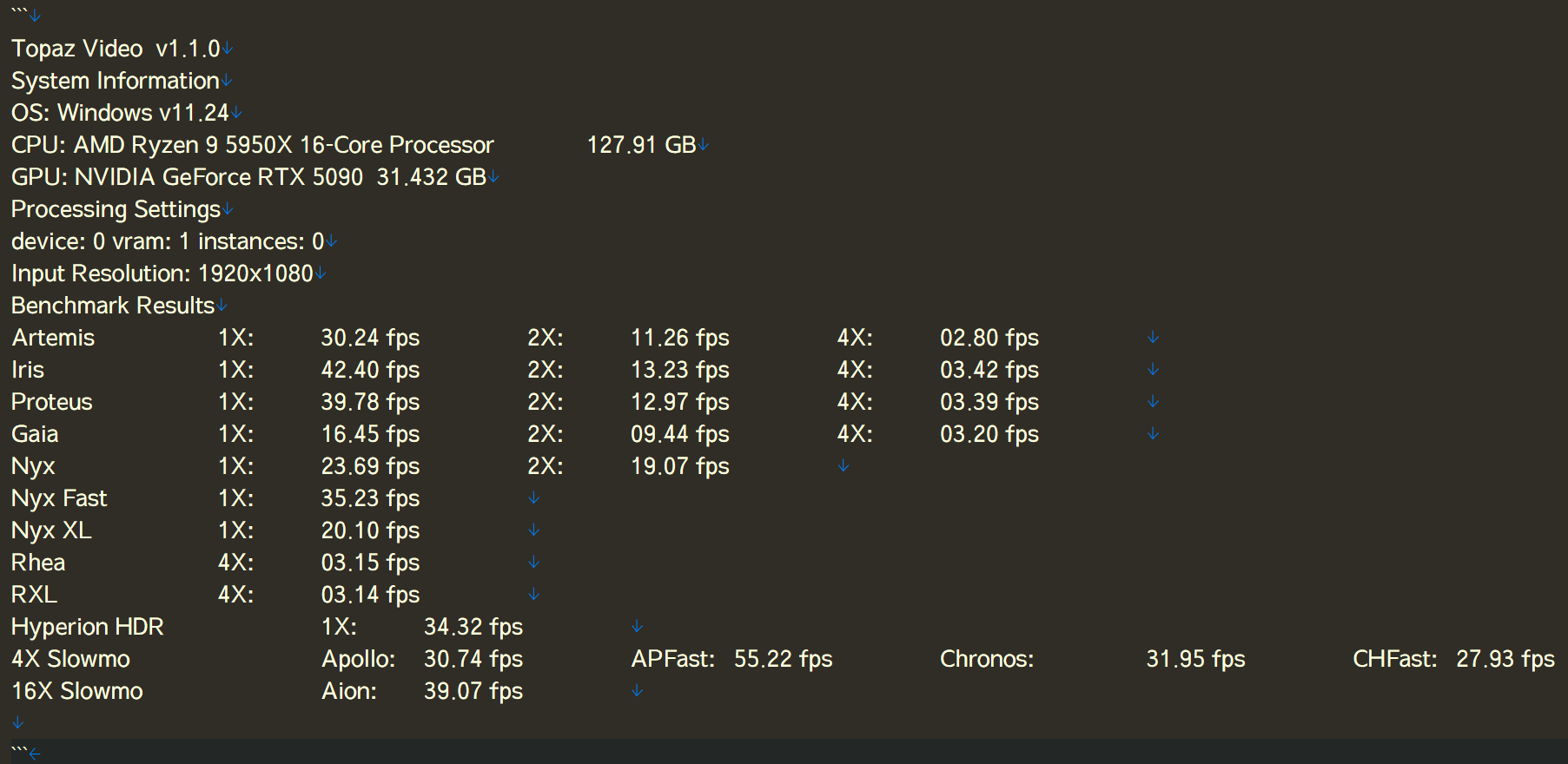
I don’t understand what’s going on.
After updating from v1.1.0 to v1.1.1, processing speed has noticeably slowed down.
Nothing has changed on my system.
I only updated Topaz Video.
Was there a major change in v1.1.1 that I’m unaware of?
That’s very odd…my results were very similar between 1.1.0 and 1.1.1 and I also have a 5090 card.
The one thing bottlenecking you is your CPU (the 5950X) but even with that, I’d expect your results shouldn’t swing from 1.1.0 to 1.1.1 the way they did…
Your speeds are similar to mine with a 3080ti. That’s really weird for any 5090.
Your speed was already slow before.
I would recommend using https://www.userbenchmark.com/ for a quick performance comparison with other systems with the same components to identify the bottleneck (CPU, GPU, RAM,..)
I know that there are some good reasons not to like userbenchmark . com (they probably got paid to skew their benchmarks towards Intel) but for a quick comparison of the same PC components I haven’t found a good alternative.
Topaz Video  v1.1.1
System Information
OS: Windows v11.25
CPU: AMD Ryzen 9 7950X3D 16-Core Processor              63.118 GB
GPU: NVIDIA RTX PRO 6000 Blackwell Workstation Edition  94.336 GB

Processing Settings
device: 0 vram: 1 instances: 1
Input Resolution: 1920x1080
Benchmark Results
Artemis		1X: 	48.54 fps 	2X: 	16.67 fps 	4X: 	04.67 fps
Iris		1X: 	48.29 fps 	2X: 	19.76 fps 	4X: 	05.37 fps
Proteus		1X: 	57.16 fps 	2X: 	20.02 fps 	4X: 	05.54 fps
Gaia		1X: 	25.73 fps 	2X: 	16.29 fps 	4X: 	05.13 fps
Nyx	    	1X: 	20.92 fps 	2X: 	15.71 fps
Nyx Fast	1X: 	42.53 fps
Nyx XL		1X: 	31.23 fps
Rhea		4X: 	04.88 fps
RXL		    4X: 	04.80 fps
HyperionHDR 1X: 	30.17 fps

4X Slowmo	Apollo: 	39.33 fps 	APFast: 	84.32 fps 	Chronos: 	29.13 fps 	CHFast: 	37.04 fps
16X Slowmo		Aion: 	42.09 fps
Topaz Video  v  1.1.1
System Information
OS: Windows v11.25
CPU: 11th Gen Intel(R) Core(TM)  i9-11900K  @ 3.50GHz  31.828 GB, 4400 MT/s DDR4
GPU: NVIDIA GeForce RTX 5080  15.603 GB
Processing Settings
device: 0 vram: 1 instances: 1
Input Resolution: 1920x1080
Benchmark Results
Artemis		1X: 	31.52 fps 	2X: 	16.38 fps 	4X: 	04.33 fps
Iris		1X: 	38.48 fps 	2X: 	16.86 fps 	4X: 	04.62 fps
Proteus		1X: 	35.61 fps 	2X: 	16.66 fps 	4X: 	04.76 fps
Gaia		1X: 	12.26 fps 	2X: 	08.51 fps 	4X: 	04.17 fps
Nyx		1X: 	16.67 fps 	2X: 	13.52 fps
Nyx Fast		1X: 	37.27 fps
Nyx XL		1X: 	27.34 fps
Rhea		4X: 	04.19 fps
RXL		4X: 	04.10 fps
Hyperion HDR		1X: 	27.51 fps
4X Slowmo		Apollo: 	33.28 fps 	APFast: 	67.82 fps 	Chronos: 	25.41 fps 	CHFast: 	33.02 fps
16X Slowmo		Aion: 	51.00 fps
But even your values of Topaz 1.1 are poor for an RTX5090.
Either it’s your processor, as already mentioned, but I’m guessing it’s more likely to be slow RAM:
How much MT/s does your RAM deliver?
kind regards seifenchef
Topaz Video v1.1.0
System Information
OS: Windows v10.22
CPU: Intel(R) Core™ i7-10700 CPU @ 2.90GHz 31.834 GB
GPU: NVIDIA GeForce RTX 5070 Ti 15.534 GB
GPU: Intel(R) UHD Graphics 630 0.125 GB
Processing Settings
device: -2 vram: 1 instances: 1
Input Resolution: 1920x1080
Benchmark Results
Artemis 1X: 14.79 fps 2X: 07.16 fps 4X: 02.13 fps
Iris 1X: 21.52 fps 2X: 08.73 fps 4X: 02.48 fps
Proteus 1X: 20.86 fps 2X: 08.82 fps 4X: 02.57 fps
Gaia 1X: 07.64 fps 2X: 05.39 fps 4X: 02.44 fps
Nyx 1X: 11.37 fps 2X: 08.02 fps
Nyx Fast 1X: 22.60 fps
Nyx XL 1X: 15.61 fps
Rhea 4X: 02.40 fps
RXL 4X: 02.23 fps
Hyperion HDR 1X: 10.43 fps
4X Slowmo Apollo: 21.71 fps APFast: 46.77 fps Chronos: 17.83 fps CHFast: 18.71 fps
16X Slowmo Aion: 33.42 fps
Hi,
The bottleneck in your system is definitely the Intel CPU—not because of i7, but because of the 10th generation.
This does not have/support PCI e4.
You don’t necessarily need PCI e5 today for Topaz and RTX50xx, but it should be PCI e4.
And faster RAM: 4000 MT/s DDR4 or 8000 MT/s DDR5 …
… above is a test where the 5070Ti runs significantly faster …
kind regards
1 Like
Thank you. I have a 2666 DDR4 RAM, which is… I know: slow.
