Great. Thanks it works! 
1 Like
Just a data point for others to see. Using 3.3.2 standalone I loaded a 20mp JPEG that was a bit out of focus. I tried Super Focus with Sharpen strength Low and Focus boost None. M2 Pro 12/19/16 32gb, Ventura 13.7.1 Mac. I clicked on Render and was timing it. After almost 3 minutes of processing it finally said that the ETA was 27 minutes, so I guess that means 27 + 3 = 30? I waited another minute and then aborted it since I was mostly just trying to find out how long it would take. The small sample windows looked pretty good and better than the regular sharpen models. I do hope Super Focus will get faster.
2 Likes
On my Win 11 PC I have the same experience wrt it taking at least 3-5 minutes for an ETA time to be generated & appear.
The processing time beyond that varies by image - the fastest I’ve had processing complete is 20 minutes beyond the initial ETA calc.
1 Like
If you want to PM me your test image I can test it for time on THE BEAST.
1 Like
It’s late here now. And, I’ve been trying to work out art looks from photos in Ps. I’ll send tomorrow (Sat.). Thx!!! I assume you mean the image I was wondering if could be improved from GAI post…it’s nothing to write home about aesthetically, but I was wondering how/if it would handle the various details in a realistic way.
I’ve started looking at Lenovo models and ROG Strix (which may be getting way out of my budget…but I was just looking at specs to start - then I’ll have the heart attack when I see the prices).
It is late but I’m remoting to the 4090 and testing out stuff… I can do some renders for you if you want to see how things might look or how long they take on this particular hardware, etc.
We can do some tomorrow or later on, I’m off next week 
Apologies if this has been said already, but PAI still crashes when you apply the same enhancements twice…
This time I ran SuperFocus on a photo (sorry, can’t share it since it’s been ages since I even spoke with some of the subjects in the photo), applied preserve text to some fingers (that one still does wonders to fingers & toes that get mutilated by AI). I then realized I needed to preserve some actual text as well that I didn’t see the first time so I added the enhancement one more time to separate the two corrections. Crash!
2024-11-23-17-13-15.tzlog (430.2 KB)
Edit - I called it Recover text… it’s called Preserve text.
Thanks for the reply and information. My bottom line is this, really. What I have now is working and is very stable. And while I appreciate upgrades that may perhaps add some benefit, I want stability first and foremost. When I read about rendering times taking many minutes, it does not make me want to pursure it. I have a quality PC with an Nvidia 4070Ti GPU that works well, but I do not want either excessive export times or instability. For now I will choose to wait and see if these issues improve with time. John
1 Like
I’m looking at newer laptops as possible purchase. Potentially with NVIDIA 4070.
If you don’t mind my asking …
Are you typically pleased with the processing speed with that 4070 processor? How much VRAM can your system support with that 4070?
Do you use Photoshop and any of the AI gen fill or gen expand features either in Ps or other generative AI programs?
I mostly work with photography. But have been supplementing it with some gen AI and I want to be doing more 3D content gen starting in the new year.
To do that I need to radically upgrade from my current (very old, very low end initially just to give PPT talks) Win 10 laptop. I won’t change my Win 11 Pro desktop (which is AMD and can nowhere in a reasonable amt of time run the latest Topaz AI models). I also want to maintain my desktop for my current Ps implementation (the production version) and try the Adobe beta products on the newer laptop - to keep them segregated.
Thx for any insights you might have to share from working with the 4070.
There are so many system requirements that it is becoming unreasonable. I had a 8 G DDR and upgraded to 14 G DDR to keep up with the new update. Then when I got home it said i couldn’t download because my system did not have AVX requirments… Like I just bought a new laptop and still can’t download. I want my money back
1 Like
Can I get into it when I see “4070”? I have a laptop “HP Victus by HP Gaming Laptop 16-r1xxx” (I describe it from Device Manager). 32 GB RAM, GPU Nvidia GeForce RTX 4070 Laptop with 8 GB dedicated memory and 14.9 GB shared GPU memory. Windows 11 Home. I was not satisfied with the Acer laptop with GPU Nvidia GeForce GTX 1660 Ti (6 GB dedicated memory), i.e. with photo editing (otherwise it’s an OK laptop, although nothing new). The HP Victus is certainly nothing highly professional, but for my amateur experiments with photos and videos with birds, etc., it’s enough for me (occasional non-extreme use, no photo business). Especially the transition from GTX1660 Ti to GeForce RTX 4070 was very positively noticeable – with Topaz software it went from hours to minutes. And for me, a kind of middle ground between performance and price (those “real” GPUs cost a lot of money). I don’t use Ps, I only have Affinity Photo 2, Luminar Neo, HitPaw FotorPea, and something else quite common (nothing with a subscription). I don’t make a living editing photos, so it’s enough for me, even if it’s not optimal. So I’m a fairly satisfied amateur with my computer. So that’s my (not very valuable) description of the laptop with 4070. I think I saw the HP Victus somewhere with a better GPU (maybe a 4080 or 4090), but I don’t remember exactly.
1 Like
That still does not explain why it worked before and suddenly stopped working with the upgrade. I apparently had enough VRAM before the upgrade, though it was slow, but suddenly I do not. Did you change the VRAM requirement with v3.3.2?
It also does not explain why this bug also happens on the new mac I just purchased yesterday after reading your response. Please fix this bug.
I’ve started to see a decline in the quality of Topaz Photo AI. It’s disheartening. Punting a bug over a VRAM requirement further drives my budding interest in finding a better solution. I think you can do better. I am eagerly anticipating your fix.
Please note that the RTX 4070 Laptop GPU differs significantly from the RTX 4070 Desktop GPU. Nvidia intentionally uses the same name to mislead potential buyers.
For instance, consider Cyberpunk 2077: the RTX 4070 Desktop averages 137 fps, whereas the RTX 4070 Laptop only reaches an average of 98 fps, similar to the Desktop RTX 4060’s 92 fps.
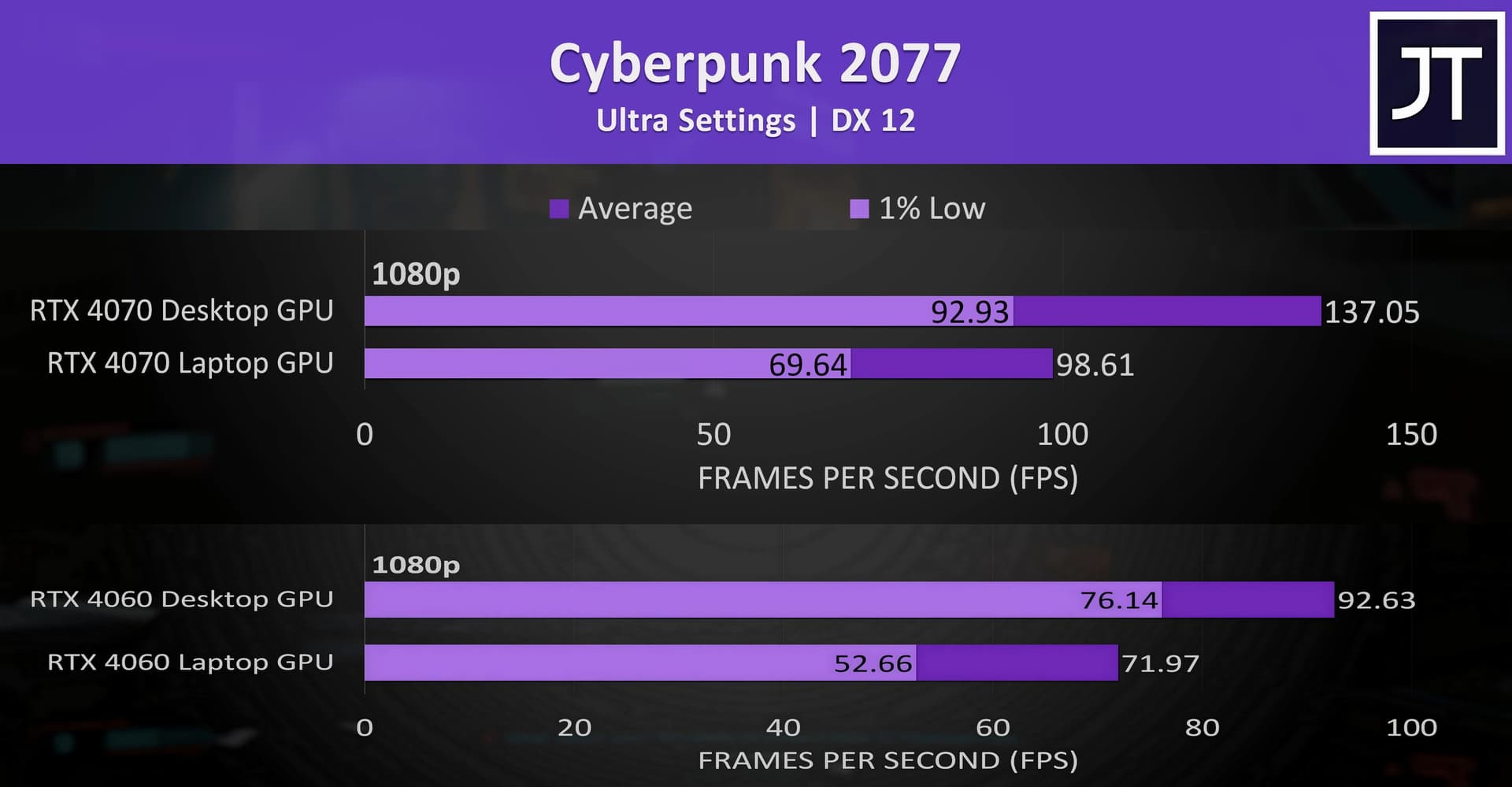
The primary distinction lies in the memory configurations. The RTX 4070 Desktop utilizes GDDR6X memory with a 192-bit 504GB/s bandwidth, while the RTX 4070 Laptop employs GDDR6 memory with a 128-bit 256GB/s bandwidth, making it slower than even the Desktop RTX 4060 at 272GB/s.

4 Likes
Another data point. Using 3.3.2 standalone I loaded a 20mp JPEG that was a bit out of focus. I tried Super Focus with Sharpen strength Low and Focus boost None. Ryzen 7840U with 780M iGPU and Ryzen AI NPU, 16gb, Windows 11. I clicked on Render and was timing it. After about 7 minutes of processing it finally said that the ETA was 125 minutes, so I guess that means 125 + 7 = 132?
Remove Object decided to put a cat in… 
Is there any way to tell Photo AI to use a more realistic model? Like, never throw in a random cat?


7 Likes
Thank you! That’s helpful to know.
I’ve been told by Adobe (and I also use Boris FX products and want to start using the Adobe Substance 3D products too) that I need minimum 16GB VRAM and at least 32GB RAM (I have 64GB RAM on my desktop PC) for the types of processing I do. Plus, I’m curious to see if I can actually process anything with the newer Topaz models if on a newer NVIDIA processor… My desktop PC was custom built for me almost 2 yrs ago - I explicitly told them not to use NVIDIA b/c the Topaz forums were teeming with complaints that their NVIDIA processors weren’t working with the products and crashing or whatever. That’s why I told them to build my system with AMD.
That helps to know how much you improved your processing speeds. Sometimes just looking at stats & specs isn’t as good as hearing from ppl using the gear in real life! So I appreciate your insights. B/c it will be a pricey investment for me as someone not working and a serious hobbyist with no one to bill to cover the costs.
Thx again for the note.
I’m afraid that no matter what I buy it won’t run the models released 2 wks later …
1 Like
Thank you! I would have had no idea. I assumed a 4070 was a 4070.
I was looking at one option (now I forget if Lenovo or ROG) and it was a laptop touting an NVIDIA 4090. Well, in the comments for the video review of it one of the commenters said that whichever of those mfrs it was was being misleading b/c it was really a 4080. And now, I know that that’s not even comparable to a desktop 4080.
It’s good to learn that processor numbers are meaningless if diff. specs. and stds. Geez. I’m not uber tech so I would have assumed parity.
Thx.
1 Like
Maybe an addition: the Nvidia RTX 4070 in the HP Victus laptop heats up to a maximum of 168°F/76°C, while that GTX reaches a much higher temperature, up to 198°F/92°C. So also less electricity (if it runs for several hours or overnight), less wear on the laptop’s interior. Even so, I prefer to put it on a pad with a fan. Especially the rendering acceleration in the case I described was (relatively) surprisingly high and (absolutely) very pleasant. (Data observed by me on my laptop.)
1 Like
Is there any type of built in fan or cooling system I should be looking for wrt a laptop if the heat can go up high? Is one more efficient and/or less noisy than another?
