In previous versions when “none” for masking was selected in the preferences (aka default), sharpening was applied to the whole image. Thus something was changed either intentionally or not.
Thanks for the clarification. I have to admit I have not watched your video. I will do so today. I have watched others of yours.
1 Like
We beta testers invest the time we do for free.
6 Likes
Just to throw in something positive, here.
It turns out that I am running Photo AI on a computer that falls significantly short of the claimed minimum system requirements. I suppose I should count myself lucky that it runs at all on my system, but it is, of course, very slow to run, very demanding of resources relative to what my computer has, and it has a very significant impact on my ability to use my computer for anything else while it is running.
Now, as I said before, I really, really, really hate the new user interface, and it turns out that I am not alone about that, though after a few days, I think I see the intent, and have to say that it’s a positive intent, just very badly executed.
But back to performance; while this program is very demanding on my outdated hardware, it does seem to be noticeably less so than previous versions. It performs better, on my computer, than 2.3.0 or any of the 2.2.x versions did. It runs faster, and has less impact on my ability to otherwise use my computer while it is running. So, somewhere between 2.3.0 (skipping 2.3.1 and 2.3.2 which I did not use because of the face-detection bug), it seems that you did something right. Perhaps you don’t care about how this software performs on hardware below the level at which you want to support it, but if it performs better on my computer, it must perform better on computers that you consider up to the task of running it.
1 Like
Hi there. I really like Topaz Photo since the first days. But I have got a problem when it comes to batch processing of several hundreds of pictures (Windows 11, 64GB RAM, CPU at 20% usage, GPU at 20% usage (related to time being used and time without work) and temperature below 50°C, images with 12 to 16 MPixel). It starts fast (3 to 6 images a minute) but after 100 pictures I see two problems
- One picture only after three minutes (and the UI being unresponsible. Windows dialog says: Wait for it or stop the program)
- Memory consumption increases by every picture’s conversion. 10-20GB more used after 100 pictures. (Memory hole?)
It would be very nice to get this two problems fixed.
PS: Is it possible to change the default setting of enhancements?
-
Applying effects in our own order sounds great but is really difficult to use when you can’t drag and drop that order. Essentially, we have to come up with a list of actions, try them, then delete everything and start over to see how different orders would work, making this function unusable.
-
Changing a mask on one layer seems to impact other layers. Example: when face correction is turned on, if I apply sharpening to the rest of the subject to bring the two corrections in line, too much sharpening is then applied to the face. In this case I would like to unmask the face in the sharpening layer but when I do that I find that other effects are not applied to the face, in this case light correction even though the light correction layer shows that the entire image is masked.
-
There needs to be an on off toggle for each layer so that we don’t have to lose adjustments in order to see changes or try different things.
-
I likely won’t be using Photo AI until there is an update.
3 Likes
When placing raw images into Topaz Photo autopilot checks the image before I can crop, upon cropping the settings do not alter to allow for auto checking for upscaling and re-running autopilot means you restart the process again without crop being applied. Could it not go back to autopilot treating the cropped image as a new image or allowing the crop to be carried out prior to autopilot being run
1 Like
New User of Photo AI 2.4 as of today, purchased for specific upscaling project of 80K + lowres images at 100px wide to 500px wide.
Loaded test set of 20 of these images into the application started applying Preserve Text on a small selection and then Upscale to 500px wide.
When on about the 10th image (and these are tiny images) the Application just crashes out without warning or message. Have to reload application and start all over again.
So Application dropout, I am running my ANTS profiler on the RAM to see if I can spot why this might be happening, but nothing specific shown at the moment.
As a suggestion could there be an option similar to working with RAW files in the likes of DxO Photolab that the adjustments selected could be saved in a .DOP file or similar so that the settings applied to a batch of images could be retained. This may just be me as a new user and maybe just getting to grips with it. I am hoping to use a batching process once I understand the settings and how these affect the results more.
Many thanks
R
Did we lose the ability to copy/paste during batch processing with version 2.4?
I guess you have to select the images you want to apply the settings to first. It seems a little awkward.
I love that we can choose the order of operations, but we need to be able to reorder the list with drag and drop. Otherwise, I’m starting over from the beginning every time I want to try a different order.
4 Likes
I’ve never had crashes in the past versions, but 2.4.0 seems to have a program stability issue with the text enhancement function. Additionally, the outcome of the text enhancement is considerably worse (stylized squiggly lines instead of formed letters) than it was in previous versions.
1 Like
Thanks for the details Andy, I’m also finding other glitches at the mo. Not sure Ive made the right decision with this product. 
Trying to run a Batch process via the CLI on 4032 files, gets through the list but find that only 647 files have been processed. Big gaps, I now have to figure out which have processed or haven’t processed and retry the routine again.
From what I have read on the forum, it seems previous version was more stable, better workflow and worked.
Need to figure out why it is missing out files during this routine, verbose listing doesn’t overly show anything specific. Just skipped for some reason.
Small sample set shows the highlighted files that processed OK.
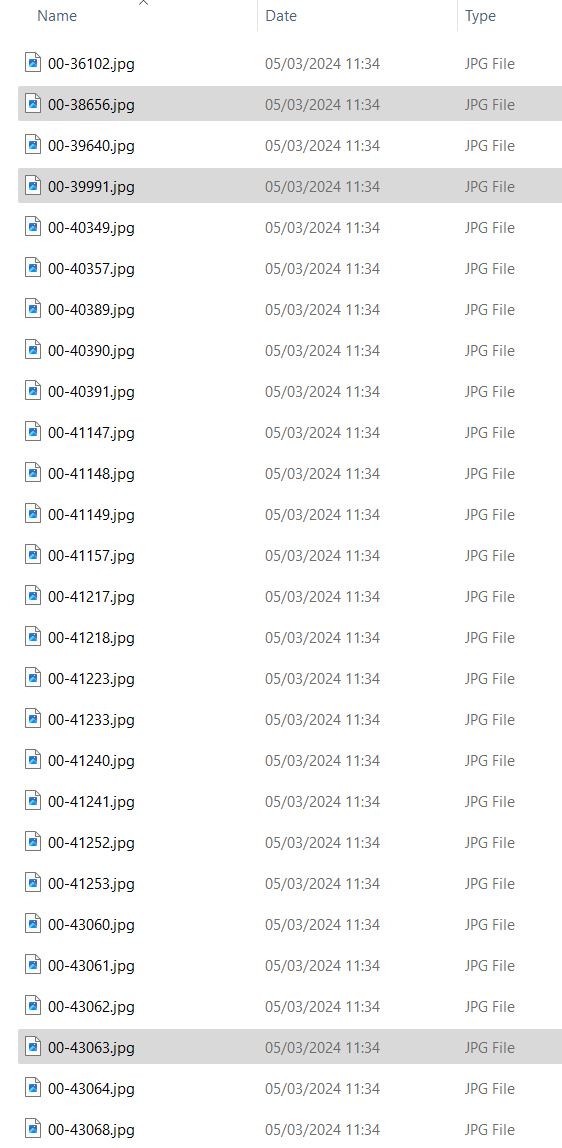
Hey ho, only 80365 files to go…
Is there a link to get previous version?
@richard.judge - here you go.
1 Like
Thanks Kathy
I am a newbie of about 4 hours ago with this software so just finding my way around and trying to battle what would seem to be inherent problems with the latest version.
Thanks Again
2 Likes
I’m with you (I think…). I felt that PAI was steadily improving. But, definitely had features that needed tweaking (or, adding). It has been a completely new direction from the legacy, creative Topaz products we all loved for over a decade, so it’s been evolving.
But this 2.4 release went off the rails (for me) both wrt to:
- The new UI design (which I’d submitted unambiguous comments/rationale about disliking in alpha/beta). BTW, I think of the UI as separate from some of the new capabilities like masking across all processing types (denoising, sharpening) & repeatability of denoising/sharpening with diff. settings. To me it’s the base or foundation the ‘house’ of features is built upon. If that foundation is wrong, for me at least, the house will be a goner.
- The unreliability of features working as they should.
I hope the UI either reverts to the “classic” layout/streamlined, efficient usability approach (and also doesn’t influence GAI’s layout directions) or, at minimum, does what several others have suggested and provides a Preference for us to select (and, maintain upon every new session) the “classic” UI or the new “boxy, multi-click-oriented” UI with elements overlaid on one’s images; whichever each user prefers to suit their workflow (& possibly profit intentions…).
4 Likes
While I personally enjoy using the UI I can tell that I am the exception and not the rule. The one component I really like is the layering/stacking and the ability to work an image without having to save the current workflow and open it again to fine tune smaller portions of an image.
Personally I thought this single component was brilliant and reduced my workflow exponentially.
6 Likes
People who work for free, usually call volunteers. Beta Tester Volunteer is a proper name, if you work for free, but I think everyone should be paid.
-
Are you really finally agreed, that Topaz ahead of every Software Company on the market, who design a programs for photographers for Denoise, Sharpening, Enhance & Upscale ?
-
Even Adobe? How many light years ahead Topaz?
-
You probably meant Photoshop, not Adobe.
-
OK, and what? Topaz Labs in 2008. Ford Company in 1903, and should be the best cars in a world, but BMW, Mercedes, Porsche, Lamborghini in 1963, Bugatti in 1909, and finally baby just born … Tesla!
No one can compete with Ford, right? Sorry, but you are completely wrong in your statement, on that one. In general, older people, with more experience, usually smarter, but Steve Jobs, Steve Wozniak, Bill Gates, Steve Balmer were kids, when they revolutionize computer industry. What about Elon Mask? -
Do you really know what light years means. Years are plural, and it starts from number 2.
-
1 light year = 5.88 Trillion miles x 2 = 11.76 Trillion miles, you claim, Topaz Labs behind Adobe.
-
You’ve got that wrong too. From the time I wrote my first post, Topaz website is one of many of my favourite sites.
-
I read thousands and thousands of posts on that forum, just to follow development of PAI, and your several posts, lost in that ocean.
-
So many good people on that forum, and I have a joy of reading their posts, not yours, sorry.
-
Your posts usually very arrogant and very demanding, and please, stop telling in your posts every time, how many followers you have, because it’s still sounds like threat to the Topaz company.
-
Anthony Morganti has half of the Million subscribers, 10 times more than you, and probably read some forum posts, before to give his, respectful to Topaz Labs and his viewers, professional opinion, as well as Dave Kelly, and many, more. You need to learn from them.
- Again accusation. Show me where.
- Again you are wrong. You are in a public domain. Every one can see how you look, how you talk, how you arrange your sentences in your speech, tone of your voice, your facial expression, your eye movement and the rest of your body language etc., can tell lot of things about you.
From your 4 days ego post:
“I have 50K YouTube views per month that are now obsolete with this update (thanks Topaz). It will be interesting to see how many of my affiliate sales are rejected due to refunds.”
-
In Plain English: Thanks Topaz, you just ruin my business! You are worry more about rejected sales, than try to understand Topaz decision.
-
You, as a teacher, not supposed to be in a panic. You have responsibilities to your students. Capitan of the Cruise Ship and his team, have responsibilities to prevent panic, not to initiate one, as well as school teachers, plane pilots, buss drivers etc.
-
Take a second look at PAI new design, with both eyes, not just one, and you might be able to see a beauty in Topaz Team innovation.
3 Likes
I watched a YouTube video, then read these forum posts. I then tried v2.4 as a C1 > Affinity > Topaz ai as an Affinity plug-in, expecting to hate it.
To my surprise, I liked it. My use case is only processing selected photos.
I let autopilot do its thing and check the results.
I like the fact that I can brush out the areas it mistakes for noise.
I found that clicking the ‘layer’ (tab) makes the pop-up disappear. No big deal for me.
I think being able to add and remove adjustment tabs (layers) is tidier than the previous version, but it would be good to be able to turn them on and off.
I agree that a bloated program that tries to mimic the likes of Luminar would be a retrograde step. I hope that Topaz concentrates on providing and improving what they are good at. Which is software that makes tweaks to improve photo quality.
Things I would like to see are a nuanced brush where the flow can be adjusted, rather than all or nothing. I would also like to see a blur tap, so I can blur backgrounds.
2 Likes
