Nothing put in will preview or export. I did install. and reinstall both the OS and the
Can you share your app’s logs?
To gather logs, please open the app and select Help > Logging > Get Logs for Support and attach the zip file to your reply.
Feel free to email us help@topazlabs.com
Here is one of the several attempts made.
(attachments)
logsForSupport.zip (870 KB)
The error is happening because your ProRes file is missing required color metadata (color primaries and transfer characteristics are not defined). When Topaz tries to process the clip, it can’t properly interpret the color space, so it fails immediately.
Unsupported input (Operation not supported): fmt:yuv422p10le csp:bt709 prim:reserved trc:reserved → fmt:rgb48le csp:gbr prim:reserved trc:reserved
I did just find a way using Shutter Encoder to retain ProRes and add those metadata color tags. Here are the steps:
-
Download and open Shutter Encoder
-
Import your file
-
Choose Apple ProRes
-
Select the same flavor as your source (4444 or 422HQ)
-
Go to Colorimetry
-
Enable Convert colorspace
-
If you know the correct colorspace of your footage, select it
-
If not, Rec.709 is the most common for SDR footage
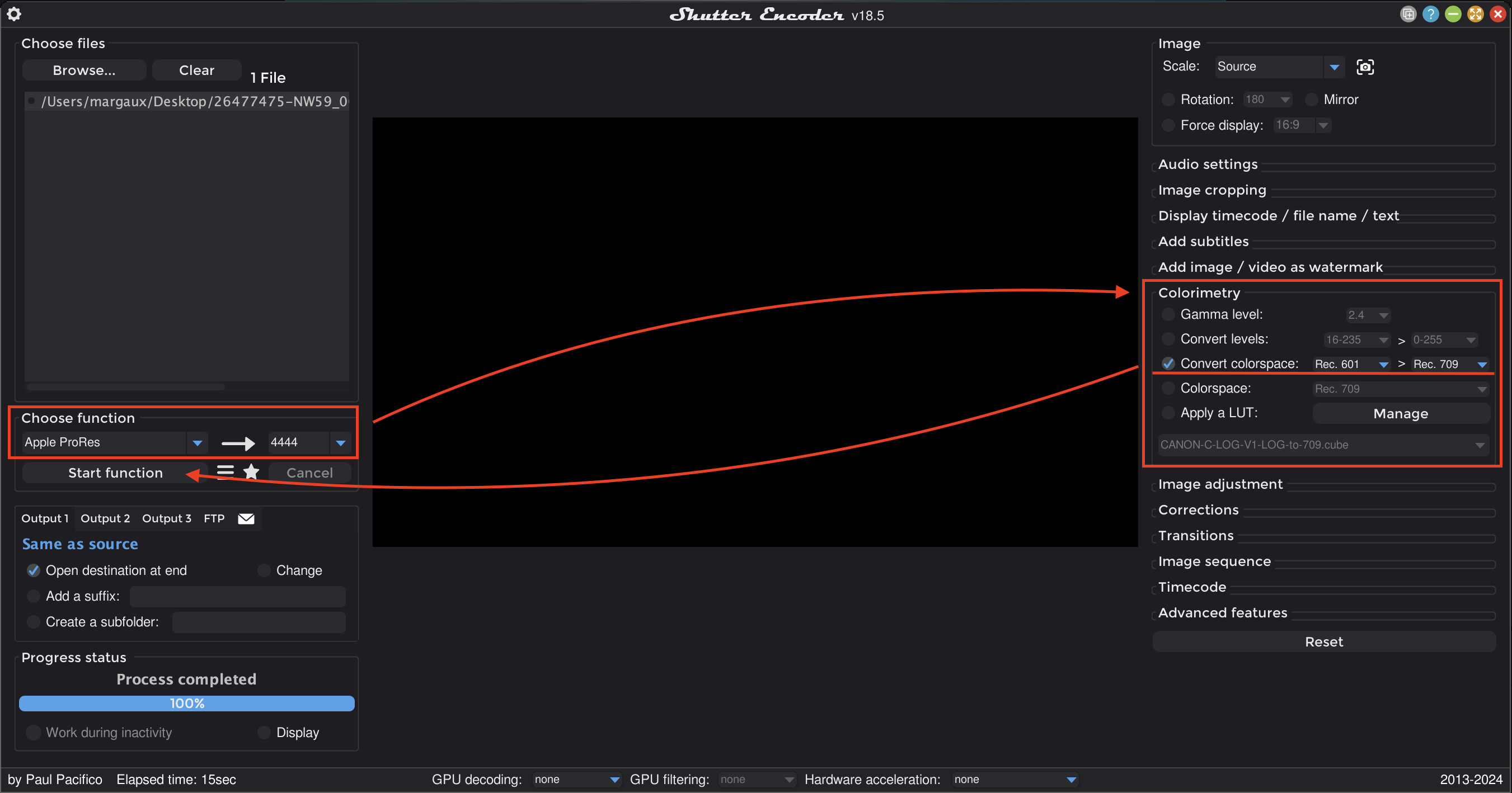
I got some great help from Kyle, thankyou so much.
Shutter was not helpful on my system; but exporting from PPro via Media Encoder first worked great!
1 Like
Hi Margaux
So often I see this same scenario where so much time is wasted by the user and Topaz support because the FFmpeg error message isn’t displayed to the user. Instead, it’s hidden away in the log file where the average user can’t be expected to check.
I have made the suggestion at least a year ago that Topaz should display the FFmpeg error to the user, in case it is of help to them. But no, Topaz continue to ignore that suggestion and make extra work for themselves.
There is one possible reason - Topaz actually WANT as many log files as possible because it’s of some benefit to you. What other explanation can there be for you not to clearly show the FFmpeg error message?
Thanks.
Andy
Hi Andy, I hear you on this, and you’re not wrong — better visibility into FFmpeg errors would save time on both sides.
Improving error messaging is something the team is actively looking into, including surfacing more useful details directly in the UI instead of only in the logs.
In the meantime, we rely on logs because they usually contain the full context needed to diagnose issues, but I agree that making those key errors more visible upfront would be a big improvement.
Thanks for continuing to push on this — feedback like this helps reinforce the need for it.
