Hello! We’re rolling out an update focused on performance and reliability. Large-image previews are now faster, minimizing workflow delays, and a few UX refinements. Compatibility investigation for the M6 is ongoing, please share your logs with the support team to report any issues encountered.
thank you for your feedback! this update had pretty significant changes from the backend for performance so we believe this aligns with the version number.
if you have interest to share what kind of updates you’re looking for, please let us know. thank you again!
appreciate your feedback - if you have anything you’d like to share that you think would be interesting to see in Gigapixel or in Topaz Labs we’d be curious =)
Hi! Yes we did fix a faint grid outline that was coming across users running Wonder 3.5 on Mac. We believe we’ve minimized that issue but if it is still happening for you please let us know.
We are actively working to improve the quality for the newer machines. thank you!
We want new models, such as the Wonder 4 or new Redefine models, as the current Redefine models need a lot of improvement. Or shared models for those of us who have Gigapixel and Photo installed.
I went ahead and installed the update yesterday, just for the sake of having the latest version, hahaha. I ran a few quick tests on the models I use most often (Wonder, in particular), and everything seems to be working just as it did in the previous version.
It’s true that a “Wonder 4” would be nice, offering even finer and more precise details than Wonder 3.5 in certain scenarios—even though Wonder 3.5 is already a major improvement.
Newly restored poster. I started by using Wonder 3.5 (High setting) with a 4x upscale. Then, in Photoshop, I adjusted the white balance—removing the yellowing caused by age—and took out a few scratches and paper creases. Finally, I ran it through Wonder 3.5 (High setting) once more to increase the resolution to 14043x9853.
The restoration of the poster is well done, with nice details and lettering. The yellow water caught my eye—an interesting choice by the original creator.
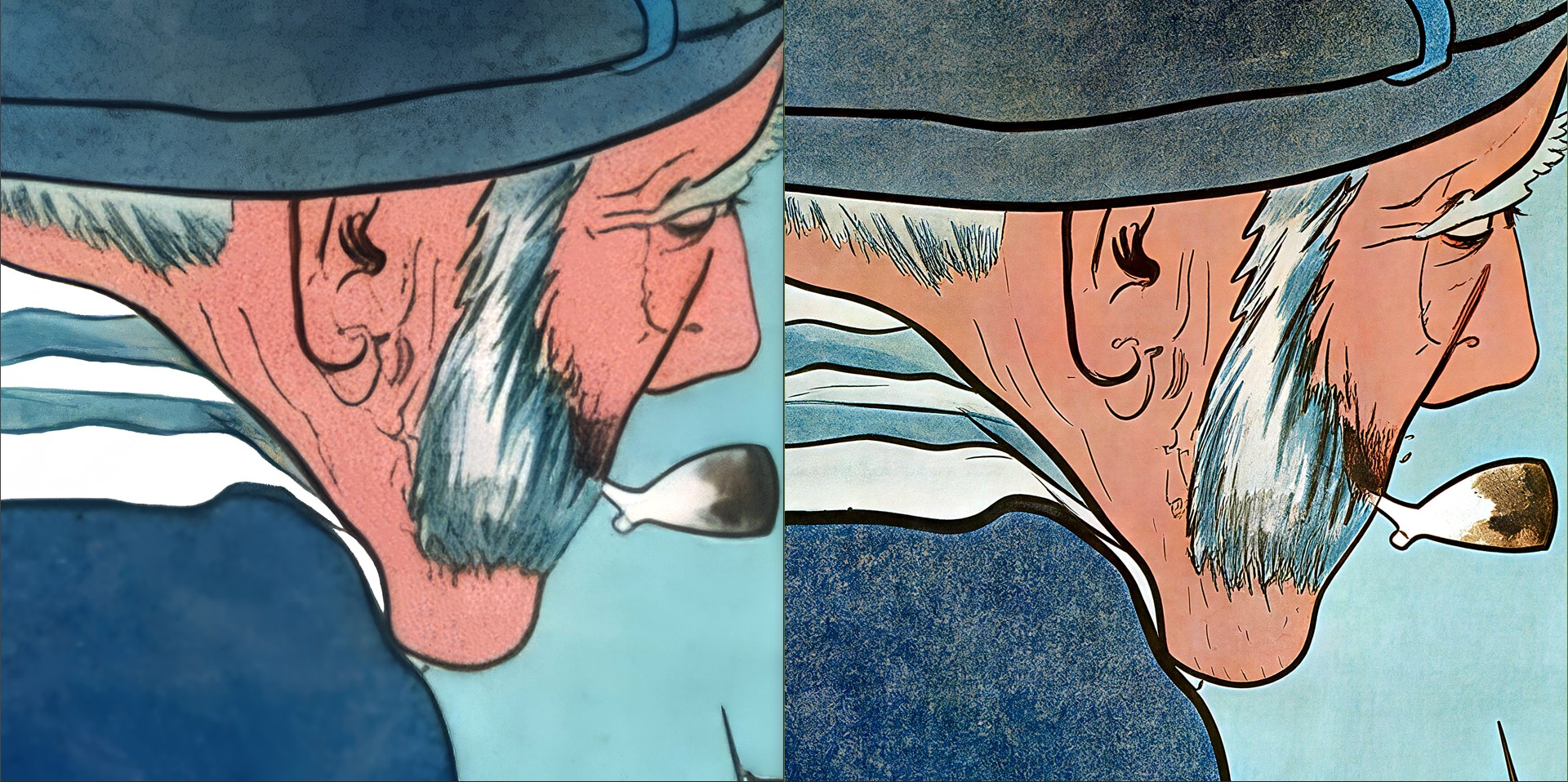
Here is a comparison of the first restored poster. On the left is the initial restoration from 2024, and on the right is the version redone a few days ago using Wonder 3.5. The difference is striking.
We really need a definite ETA on shared model folders. They are taking up so much space I don’t know if I’ll be able to keep up anymore with current storage pricing.
Hi, here is another vintage poster that has been restored and enhanced through extensive repair work to return it to a like-new condition.
First, I performed an upscale using Wonder 3.5 (high setting) to reach a resolution approaching A0 size. I then ran a pass through Topaz Photo using the standard Sharpen model at a strength of +/- 53%.
Next, I corrected all the damaged areas in Photoshop and readjusted the white balance. Naturally, I kept the original printing flaws. I also used the true colors of the Belgian flag to remain as faithful as possible to how it would have looked before the poster yellowed.
Here is the final result of the completely refurbished poster:
 (This is from Google Translate.)
 .
 .