Hello and welcome. I recommend checking first it’s interlaced or not, Hi8/DV8 I think it is, but check this optically. Download and install Virtualdub2 if not already done. Drag the video into VDub and add filter “deinterlace”, check if it is “keep top field” or “bottom field” try both, in this sample it was “top field”

Close VDub, download and install Hybrid

Drag your video into source field, select lossless codec “ffv1”, select container “mkv”, click on destination and select output path and enter name (do not enter file extension, Hybrid does it)
open register “Filtering” and Deinterlace Tab, choose Vaporsynth QTGMC, select checkbox “overwrite input scan”, choose “topfield first” or “bottom field”, the one you find out in the prevous Virtualdub step. Select preset “very slow”, it’s very import deinterlacing happens slowly which gives the amazing results.
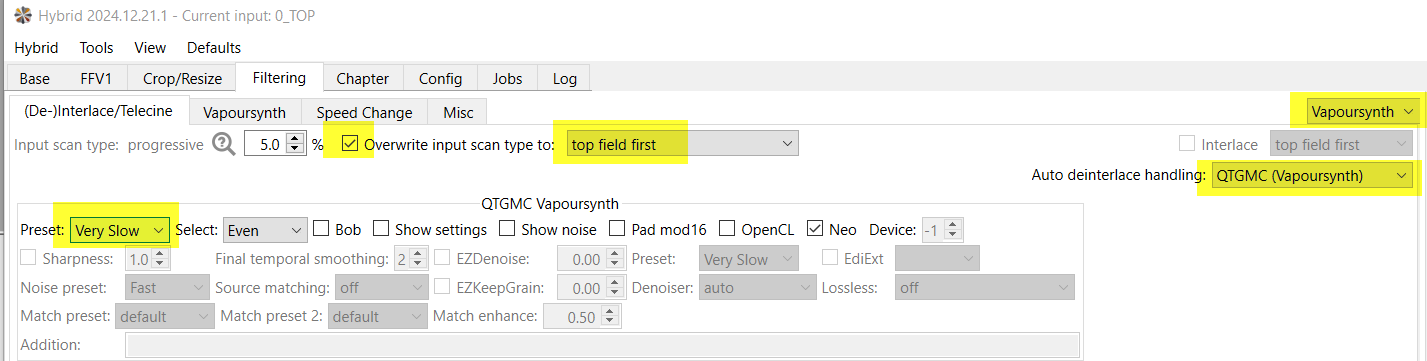
Go to the base Tab and start the job (when it does not start click two times on the icon or check register “jobs”)

I know this has nothing to do with TVAI, it’s pre-processing, optimal preparation of sources is very important. I recommend do every step with source files lossless. You can also import the hybrid result into Virtualdub again and there do things like resize a little bit and/or croping when needed and export it as AVI or ffv1. check here my posting Because it is SD, lossless pathway with source files is manageable, means file size gets not that huge you can’t storage it. After upscale with TVAI you can delete this process files.
