I tested the Sharp model. When the model runs, it creates a directory called .triton_cache, where it records all analyses and the model it will run in JSON files. I analyzed it and came to some conclusions.
I have a 5070 TI 16GB GPU, the kernel is using the TF32 model, and it ran at 1.37 fps for the original output.
I analyzed the JSON files in ChatGPT, which gave me these results:
-
Backend: CUDA (intended for NVIDIA GPUs).
-
Architecture (Arch): sm120 → This indicates the code is compiled for your RTX 5070 Ti card’s “compute capability 12.0” support.
-
Warp Size: 32 (standard for NVIDIA GPUs).
-
Number of Warps (num_warps): 16 → Each kernel block uses 16 warps (totaling 512 threads).
-
Number of CTAs (num_ctas): 1 → Only one CTA (Cooperative Thread Array or thread block) is launched. This implies very limited parallelism.
-
Number of Stages (num_stages): 1 → The number of pipeline stages is very low, indicating no overlapped computation.
-
Shared Memory: 9216 B (~9 KB) → Very little shared memory is utilized, which means the GPU’s capabilities are not being fully leveraged.
-
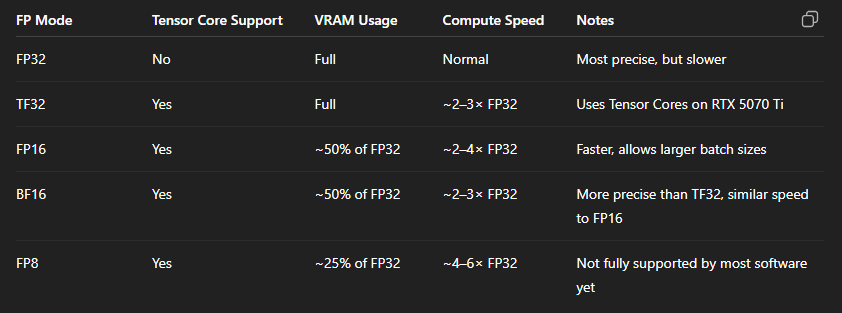
Default Dot Input Precision: tf32 → Computations are performed in TensorFloat32 format. This is a format similar to FP32 but optimized for Tensor Cores.
-
Supported FP8 Dtypes: fp8e4b15, fp8e4nv, fp8e5 → This shows that your GPU supports FP8 (8-bit float), but the current kernel is not using it.
-
Allowed Dot Input Precisions: [“tf32”, “tf32x3”, “ieee”] → Only FP32 and its Tensor Core variants are in use. Formats like FP16, BF16, and FP8 are not active.
-
Max Registers (maxnreg): None → The number of registers is not limited, but the compiler has used very few.
-
Temporary Memory (tmem_size, global_scratch_size): 0 → No additional temporary memory is being used.
 Conclusion (In Terms of GPU Performance)
-
GPU Utilization: Although the GPU is at 99% usage, this primarily reflects the activity of the compute units (CUDA cores).
-
VRAM: 7.8 GB / 16 GB → The kernel does not require a very large model or batch, so the memory is not fully utilized. This is normal.
-
Tensor Cores: Not being used to their full potential. The JSON file indicates that only the TF32 format is active, whereas your RTX 5070 Ti also supports FP16 (half precision), BF16, and FP8.
-
Parallelism: It is weak (num_ctas=1, num_stages=1), which means the card’s full throughput is not being achieved.
 Recommendations to Increase GPU Utilization
-
Enable FP16 or BF16: This step reduces VRAM usage by about half and unlocks the full potential of the Tensor Cores.
-
Increase the Batch Size: Loading more data onto the GPU simultaneously will ensure a more balanced workload for both VRAM and the CUDA cores.
-
Kernel Optimization: By increasing the num_ctas and num_stages values, you can add more blocks and stages to load the GPU more efficiently.
-
Enable FP8 Support: If the software you are using supports it (for instance, Topaz AI might add this in the future), enabling this format can further boost performance.