I have some footage shoot on 16mm at 24fps. It was then telecined to HD at 25fps for PAL format.
It is a music promo with a singer. The 25fps footage is out of sync and so needs to be sped up to 122% in order for it to sync up to the song.
When I speed up the footage by 122% in Resolve, I get choppy playback due to discarded frames or, if I try Optical Flow I get noticeable morphing.
Is there a way I can speed the footage up with Topaz to get new generated frames without these unwanted flaws? I can only see how to slow footage down but not speed footage up smoothly.
As an editor, this is, unfortunately, a problem that is fairly common.
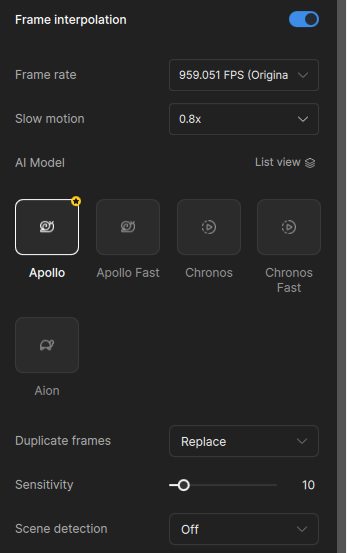
The frame interpolation models within the Topaz Video app are not specifically trained to increase the playback speed, but you can manually enter a value in the slow motion box that is less than 1, and it can process it out. It will not accept below .1 though, and we are not sure how well the export will playback, as we have not really tested that thoroughly.
The slow-mo fractional speed tip from Topaz is an excellent one (i often use it), but in this case you need to check if the HD telecine is actually 25P or 50 fields per second (using MediaInfo to see if it is interlaced or not). If it is 50 fields per second you could try the deTelecine function in ShutterEncoder to get back to the original 24 original frames per second (and combine correct sound and footage on a 24P timeline). The 24 frames can then be processed in Topaz (i would suggest Starlight Precise 2.5)