SLP Launcher Lite v1.7.0
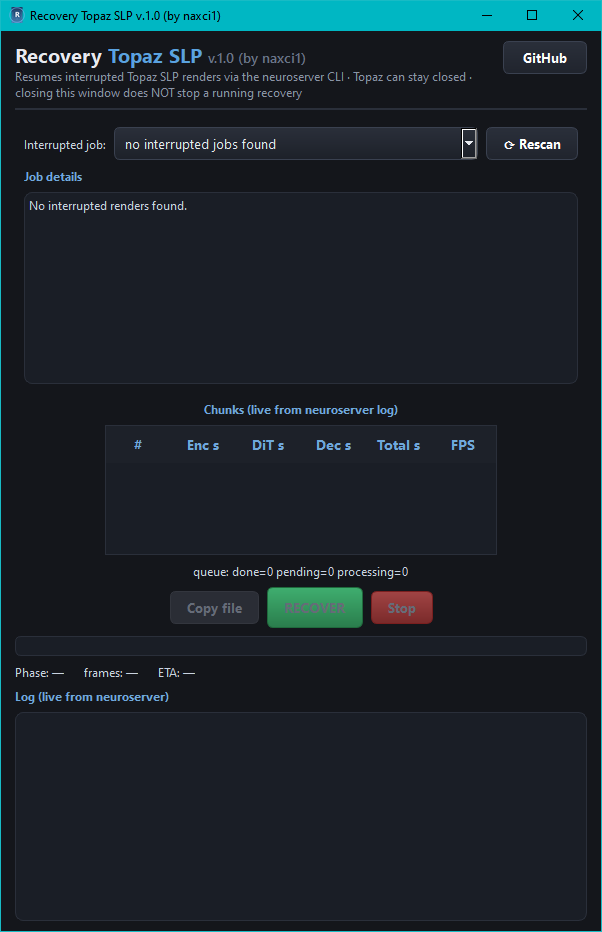
 Recovery Topaz SLP — new standalone recovery tool, now embedded in the setup
Interrupted render? Crash, freeze, closed Topaz mid-export? Recovery Topaz SLP v1.0 now ships embedded in the SLP Launcher Lite setup and finishes the job:
- Installed to
<install folder>\recovery\RecoveryTopazSLP.exe; open it from the new green Recovery button at the bottom of SLP Lite, or run it directly — it is a fully independent application. - Automatic scan of the Topaz Video logs finds exports that started but never finished — newest first, with completion %.
- Detailed job info: source video (resolution, fps, frames, codec), partial output (frames written, %), the exact crop filter Topaz used, start time and remaining frames.
- True resume: copies the partial + source into a
recovery_topaz_slp\folder (originals are never touched), cuts the remaining frames losslessly and renders them with the exact parameters Topaz used for that job — model filters, output size, upscale factor, preproc crop and encoder flags are replicated 1:1 from the log. - Smart merge: verifies the new segment matches the partial file’s resolution, then concatenates and adds the original audio — producing
<source name>_slp.mp4, exactly the name Topaz itself would create. - Live chunk statistics like SLP Lite:
# / Enc s / DiT s / Dec s / Total s / FPSper chunk, aqueue:summary line, progress bar and ETA. - Copy file button (just copy the partial), Stop button, finish dialog with a Folder button that opens the output folder.
 Startup warning: Topaz must stay closed during a recovery — if Topaz opens, it deletes the half-finished file and it cannot be brought back.
- The render runs detached: closing the Recovery window does not stop it; orphan renders are detected on the next launch.
**For the full guide see the new “Recovery Topaz SLP” section in the README.
**