false positive
Only 20% increase? Did you enable cuDNN 9.24 also? You should see at least 50% combined increase.
VCD-> 1280*960, I get 1.7fps → 2.2+fps with 5090D, cuDNN 9.24 is involved, I set vae encode disable,VAE decode 780,trunk 409,attention-window group 1,Dit Block Trunk -1,the other is the same with 32GB preset…if using the 32gb preset,i get ~2.1fps, set trunk to 721, ~2.4fps
Like all apps without reputation yet
This is the problem since all kind of AV use IA to report patterns
But no one report a TRUE virus, worm or anyhting else
I doubt @skv89 is here to try any scam considering his knowledges level on this subject
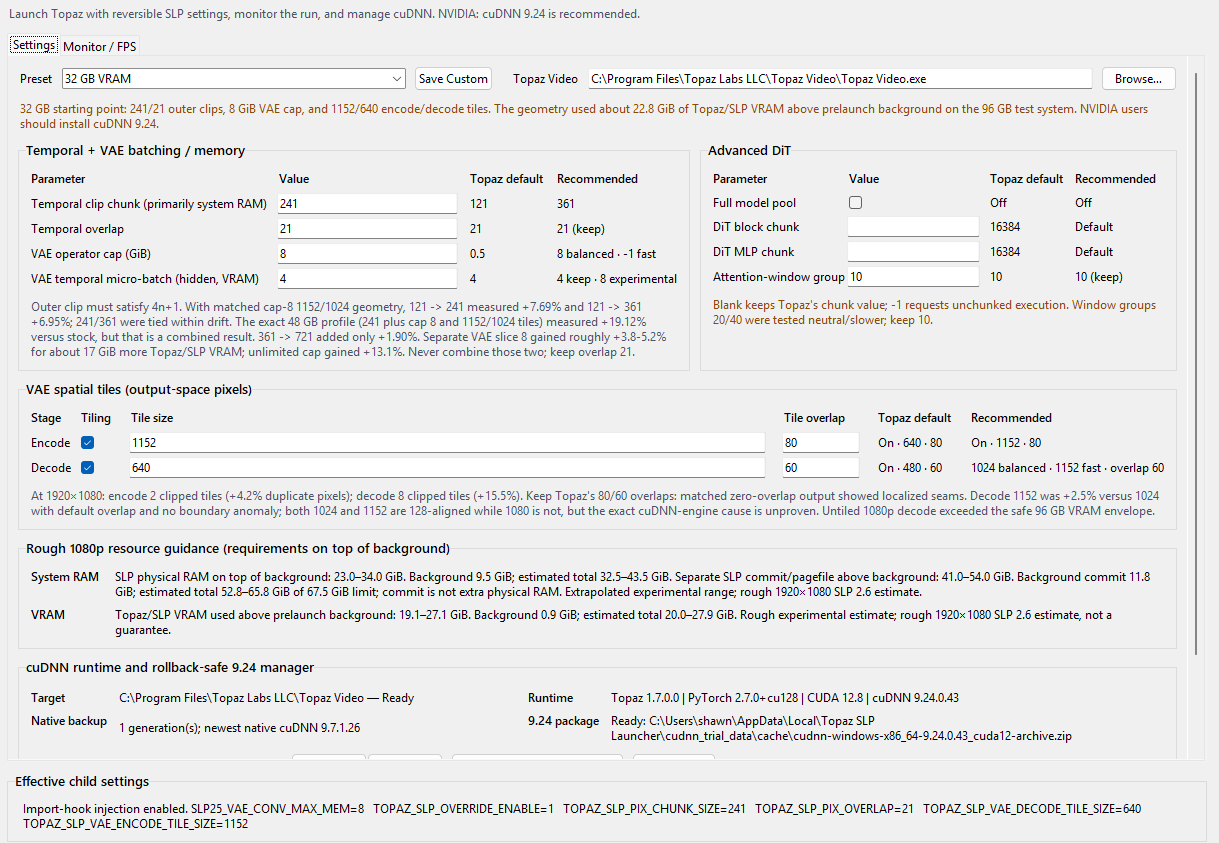


Could you share your settings? I used the default settings but curious if you did anything different since we have the same card?
Would it possible for you to do something similar for Starlight Mini (SLM)?
exactly. putting so much effort into making an app only a handful of not-very rich users use would be stupidity. Scammers make piracy cracks that likely don’t work and and put on torrent sites where tens of thousands would download for every one of their cracks. They can put out dozens of virus infested piracy cracks in a day
I really can’t say what is missed as it is all about experimenting different settings at this point since I haven’t tested them all myself. I do have an unproven theory that the encode and decode tiles work better with numbers divisible by 128 as it is could be more optimal for the tensor shapes. So if you are processing a 1920x1080 file, first you would want to use a number to minimize the number of tiles. Choosing 1080 means a 1080x1080 square and that would require only 2 tiles but 1080 is not divisible by 128. The next number up that is divisible by 128 is 1152.
The current Topaz default Temporal overlap of 21 frames is also very high, which means 21 frames of extra processing for each temporal batch but I don’t quite yet understand how the temporal batches are actually sized as Topaz’s implementation of SEEDVR2 is not the same as either the SEEDVR2 CLI version or the new Native ComfyUI implementation of SEEDVR2. This overlap smooths out the transitions between the batches. Earlier versions of SLP probably had temporal overlap set to 0 so users were complaining about abrupt jumps every second or so of their videos. But from my own SEEDVR2 experience, temporal overlap beyond 8 doesn’t seem to improve smoothness noticeably. I haven’t done any comparisons with SLP but I think they “should” be similar. You can also try increasing the size of the temporal clip chunk. I think you should be able to squeeze out much more performance gains than that. User Gemini above achieved 62% boost above stock speeds and he only has 16gb vram.
No because I don’t use SLM and SLM quality is really not good for small faces. SLP is better in every way with the only exception that SLM produces much smoother footages and heavy denoise. However, Hyperion 2 is also ultra smooth and I found out it is also based on SEEDVR2 so I might create a separate launcher for Hyperion 2. If we can get Hyperion 2 at speeds at least as fast as SLM, I see ZERO reason to use SLM as it is also very smooth but looks much better than SLM. I will see if there is a way to enable/disable HDR so we can just use Hyperion 2 for video enhancement. Topaz really did an amazing job at optimizing the image quality of SEEDVR2 with their SLP and Hyperion2 models. I never thought Hyperion2 was also based on SEEDVR2 as it looks nothing like the SEEDVR2 models I tested.
Cool cool.  SLP 2.6 is pretty amazing for sure.
@skv89 My Topaz is installed in a custom location. How can I point the tuner to the correct location so cuDNN installs properly?

I could be wrong, but I think you just use the ‘Browse’ button next to the preset options at the top of the screen.
You’re right, the launcher currently hardcoded C:\Program Files\Topaz Labs LLC\Topaz Video to the cuDNN installer so even if you manually set the current path to your custom installed Topaz folder, it will still not work. I am currently fixing this issue along with adding new features that should be released soon.
But in the meantime, I released my cuDNN loader for Topaz that I use to test different versions of cuDNN. It actually automatically detects your Topaz installed folders so you can apply different versions of cuDNN for testing. I wasn’t going to release this because I’m afraid users might install the wrong cuDNN version but just know that currently, the fastest version of cuDNN “that I tested” is 9.24 so as long as you install that version, you are good.
@skv89 I read your posts very carefully. Although I’m unable to try your app because I’m stuck on 7.0.2, I can applause with both hands all the efforts you put into optimization.
It’s blindingly obvious that Topaz has been dead lazy when it comes to pipeline optimization.
You basically unclogged their entire plumbing through pure, hands-on empirical engineering, and the performance gains speak for themselves.
As a fellow dev, I can only applaud your work… while calling out Topaz for spending far too much time polishing their bloated Electron UI instead of fixing what actually runs under the hood.
Absolute 5-star work, keep up the great work mate!
One extra suggestion for future builds : Quick tip for power users on your setup: if you trigger your pipeline via headless RDP, Windows unloads dwm.exe from the dedicated GPU framebuffer.
That instantly reclaims around 1.5 GB of VRAM that was wasted on desktop composition—perfect for pushing higher batch sizes or heavier models without OOM errors.
I wanted to stay on the conservative side and I thought Topaz already fully optimized neuroserver for 16gb vram cards but your whopping 62% gain proves otherwise.
I am very skeptical about this  … have you explored any bypass ? overiding ?
Thank you for the compliment. I am passionate about these “personal” projects so I put real effort into achieving my goal whereas Topaz engineers likely don’t even upscale videos themselves so for them it is just a job so they get paid. Without the passion, there is less motivation as working on Topaz is a necessity rather than a hobby. It’s understandable that most folks work just enough so they don’t get fired. But Topaz did do a remarkable job at tuning the enhancement quality of SeedVR2 that I didn’t think was possible.
As for expecting Topaz to optimize their app to run faster or adding user requested features, I actually don’t care that much anymore. As long as Topaz don’t decide to modify their code in future Topaz versions to block my app from accelerating Topaz, I am happy. I have many more ideas for this app in the future that will make Topaz SLP a joy to use!
Spot on. That’s the classic gap between engineers doing a job and power users solving their own friction.
I can only understand you, driven by the same passion.
As long as they keep the core binaries unblocked, community tools like yours will always be 3 steps ahead of their official UI. Looking forward to seeing what else you build into the launcher!
Thank you so much! I will try this ASAP.
Probably need to have people start including what kind of GPU they are using if we want to establish any kind of a baseline here. I’m on an RTX 5090 paired with a 9950X3D processor with 64 GB of RAM. I selected the 32GB preset and basically left everything at the recommended values and kicked off a cropped 4K file where I’m just focusing on a specific part of the frame using the X,Y parameters in the crop menu of Topaz. The video length is 8 min 51 sec and outside of the launcher, I’m used to seeing about 0.2-0.3fps when using SLP 2.6. Since this is a portion of a longer video, I’m pretty familiar with how long on average these segments take to process and I’ve averaged about 36hrs per file so far and the estimates offered by Topaz are actually somewhat accurate as the file processes.
With this new launcher active, I’m actually not seeing any real improvement in the fps at all. In fact, I might actually be seeing negative impacts as it seems slower now given that 0.1 fps is frequently showing up during the VAE encode phases and Topaz’s own estimate is showing 6d-- to complete, which has never happened before. Despite this, my GPU usage is pretty much maxed at 100% most of the time. Not sure if I’m using this incorrectly or if I need to use a different preset, but I’m going to cancel my render for now and wait for feedback from others before attempting again.
After doing testing all day, the settings I have found gets me the best results before OOM are using the default settings for 32gb but changing the following: TCC=361, Decode Tile Size=768, this pushed my Vram a little higher and in the end, I get a solid 30% increase. Also, I am getting this from a 480p source going to 960p, so that prob explains why it’s 30% and not 50-60%, as the lower starting point of 480p is already pretty efficient. Oddly enough, when I try to upscale to 1080p using just about every model, then try to do a slp, I get worse results as far as quality. FPS was around 2.2 to 2.4, so not bad considering it is doing a 2x upscale at the same time.

