I am converting a VHS capture to 1080 with Starlight. I was told for local models you want to make sure it’s progressive so I made the 29.97 interlaced file 59.94 progressive file. Is this also true for Starlight? Am I paying for the extra frames I made when converting to starlight? Will starlight make it 30p in the end?
Thanks
Yes, Starlight and Starlight Mini will not process interlaced videos correctly at this time. We recommend de-interlacing them within Video AI or another app first before sending them to be processed with either of those models.
I see that this wasn’t addressed in the Topaz Labs response. I can’t say with any certainty, but my experience with the weekly 10-second samples suggests that the doubled framerate may well incur additional cost. I say this because one of my first preview upscales was a 59.94fps file that I was only able to submit 5 seconds of.
Hoping that there may be clarification from someone at Topaz Labs on this.
There are several methods bring 29.97 to 30fps. You can use Avisynth or TS-Muxer and speed up video from 29.97 to 30fps, does not re-encode but then audio is out of sync. You can also speed up audio I use clever FFmpeg GUI, but needs audio re-encode and when its DTS/Atmos/AC3 you loose sourround.
Second method is keeping video duration by add or drop frames. You can do it with avisynth, but I do no scripting, I use filter “Resample” from Avidemux.
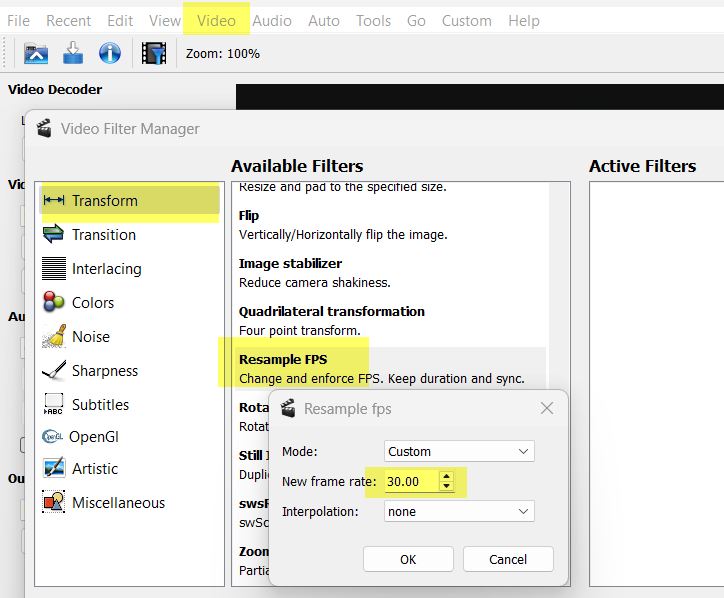
Then do the deinterlace with your new 30fps source. I use QTGMC into Hybrid, with settings to keep details/grain.

BOB (doubling frame rate) or not, pends on source, most of the time it’s better doing it, but I had also sources where the additional frames were no benefit, because there was zero motion in it and by optical check, this frames looked worse. So visually check the result frame by frame can make sense.
