I keep getting an error msg saying "you can’t put images in a post. Yet I see other images here. I wanted to post a 900pix wide image of the problem with Sharp 3.0.2, but can’t. It uploads image successful, but when I click REPLY button, msg says “can’t load images to a post.” Ridiculous!
I use a 3rd party host, in my case Flickr, and put a link to the photo in the post.
1 Like
Just updated 3.02, still have problem with Lightroom. Sometimes work, but sometimes still can’t save back to Lightroom.
A few issues I have found with 3.02.
-
I just tried using mask in 3.01 and found that the option to use the mouse wheel to change the radius etc of the brush has been lost. Still broke in 3.02. It was there in 2.n and all the betas. This is a feature I regularly used as the sliders are far too coarse to make fine adjustments.
-
A second bug fix that is lost in 3.02 (that I believe was fixed towards the end of the betas and maybe in 3.0) is that with auto update OFF, at the end of a brush stroke to modify a mask, the software still tries to do the auto-update (preview bar scrolls) and fails. This wastes all the time that should be saved by disabling auto-update. Same unnecessary update is attempted when the selected area of the image is changed.
-
With the control panel on the right and in Split view, if you leave the split divider near the left of the screen and then make the whole window narrower, the screen divider vanishes from view. I did this without realizing and was very confused for a while. Ended up restarting the app to get it back.
-
Also found that moving the SAI window from one of my screens to another sometimes blanks out the image but not always. Moving the selected area always brings it back
All in all I am happy with the performance of the software but rather frustrated by these irritating workflow related issues that come and go .
To my mind, performance is much better than 2.n. I am on W10 standalone and using the All GPUs option
Anthony, Please adopt a consistent standard DSN Naming Convention for your product update files. I tried to upload an image of my Download folder to demonstrate the issue, but this forum thread won’t allow it, yet it has the “image upload” icon on the top banner of the posting panel. Now I’m told by a user that I much load image to a 3rd-party server and then import with the Link icon. (This is the 21st century now!). So I’ll merely type the contents of the un-uploadable image in Download folder.
Yesterday I downloaded Sharpen3.0.2 and the file DSN was:
"TopazSharpenAI-Full-Installer"
And since it didn’t have a version# in DSN, I couldn’t be certain it was the correct file. So today I repeated the 3.0.2 download and the file DSN was:
"TopazSharpenAI-3.0.2-windows-x64-Full-Installer"
How can the same file have two different DSNs? I replicated the download proc for both downloads? And remember, I have documented evidence w image capture of my download folder reflecting the two diff DSNs. I previously sent Eric a note gently suggesting implementation of a standard and consistent DSN naming convention, but obviously it slipped thru the cracks, was voted down, or people just aren’t following it. How can you guys or users keep track of update files w/o version numbers in the DSN? Especially since Topaz has had occasion to have users back-out the newest version and replace it w an older one for tech reasons.
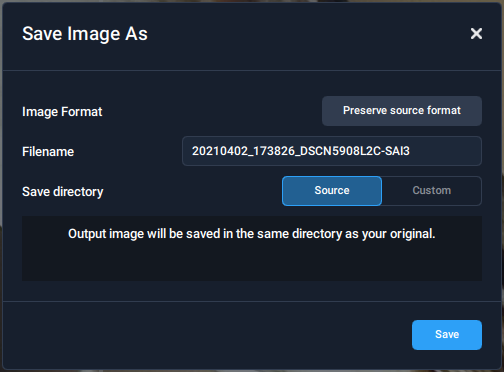
One more issue that has returned in 3.02. The File Save dialog is not displaying the full set of options when saving some jpg files. This is the very first issue I came across when I purchased SAI several years ago. I lived with it all through 2.n but voila, in the 3.0 beta, it was fixed. I was so happy but now in 3.02 it is again broken.
It is only jpg files from my Nikon Coolpix P900 that exhibit this behaviour.
3.02 save dialog
3.0 Beta save dialog
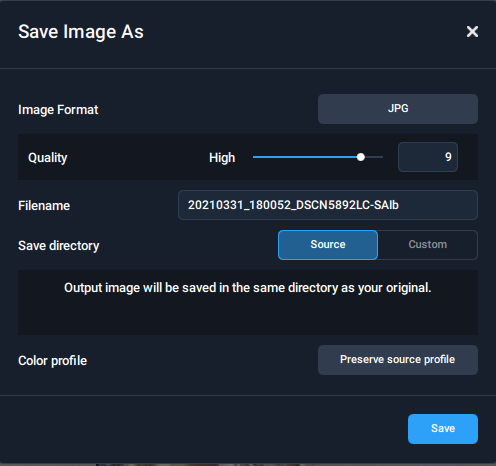
Another issue I would like to highlight in this dialog is if you click the Source button while it is highlighted then it changes to select Custom. Surely clicking of an already selected option should not change its state. Also an issue in Beta version.
And one more issue. After using the in-app upgrade to 3.02, a second TSAI icon was added to my desktop.
Just choose “JPG” instead of “Preserve source format” under “Image Format” and then you will get the same options.
1 Like
The same problem. In addition, the main subject is no longer correctly recognized. For example, a house wall with rough plaster is sanded smooth because the program considers the plaster to be noise.
Haven’t there been different installers rolled out recently that map to different OS’s?
There seem to be a mix of online & full installers and those seem to be further segmented by >=Win 10, < Win 10 (legacy OS’s vs current) & Mac.
But it would be preferable if each installer includes the rel number in the name! Vs a generic product name. That’s true for all Topaz products & not just SAI, imo.
Yes, I understand, but I don’t think you should need to do that.
We Need the sliders back.
most of us are professionals and want total control of what we use.
1 Like
I know what you mean but there are the same slider count as in the version before.
The only difference is that the denoise switch is now above instead of below and we have a model for higher sharpening/refocus.
2 Likes
Just installed Sharpen AI v3.0 in the middle of a photo processing session. It now does PROGRAM NOW DOES NOT EXECUTE. Either from Lightroom OR stand-alone. Have restarted PC (Win 10) and this has had no effect, Sharpen has become extreemly BLUNT.
Please sort your error asap! Les
1 Like
Updated to 3.0.3 just now (Windows 10), and the program is not starting at all. Neither as standalone, nor as Photoshop plugin! Why are the versions released if they are not tested? I dont remember a single version which was released without any bug
4 Likes
Same for me, the program is not starting at all. No errors in eventlogs.
Rollllllllllling back
Same with me, the program will not open either as Lightroom plugin or standalone 
How to roll back?
Me too, 3.03 doesn’t work, nor standalone neither Photoshop plugins. For now I solved reinstalling 3.02.
My graphic info:
Application & Version: Topaz Sharpen AI Version 3.0.2
Operating System: Windows 10 Version 2009
Graphics Hardware: GeForce GTX 1050 Ti/PCIe/SSE2
OpenGL Driver: 3.3.0 NVIDIA 461.92
CPU RAM: 16304 MB
Video RAM: 4096 MB
Preview Limit: 5887 Pixels
- Uninstall
- Download the version which was operationnal at the top of this page Sharpen AI v3.0
- Install
1 Like
The Current version of Sharpen AI has a memory leak when batch processing photos using the CPU, systems with 64GB memory are running out of RAM after about 4 hours and the program stops working.
As for CPU vs GPU it should be Intel CPU vs AMD CPU vs GPU.
In terms of quality: Intel CPU, AMD CPU and lastly GPU
In terms of speed: GPU, AMD CPU and lastly Intel CPU
Sharpen AI must be utilizing some technology baked into the Intel CPU’s that GPU’s and AMD CPU’s don’t have.
1 Like
