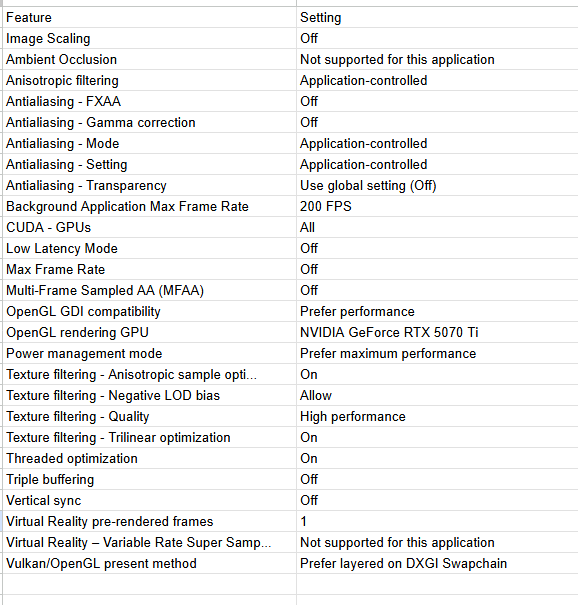
Nvidia settings for Topaz Video. Currently, the Nvidia driver does not support Topaz Video. I hope that in the near future, it will. I am doing some home videos using Proteus, with a 1080 output, focus fix (normal), and SDR to HDR. By changing some settings in the Nvidia app, it went from about 2.0 FPS to 9.0FPS. Are there any recommended settings?
CPU AMD Ryzen 7 9800X3D
32 GB RAM
Nvidia 5070 12GB RAM
```
Topaz Video  v1.0.4
System Information
OS: Windows v11.25
CPU: AMD Ryzen 7 9800X3D 8-Core Processor             63.556 GB
GPU: NVIDIA GeForce RTX 5070 Ti  15.534 GB Without GSP Enabled
Processing Settings
device: 0 vram: 1 instances: 1
Input Resolution: 1920x1080
Benchmark Results
Artemis		1X: 	30.29 fps 	2X: 	16.46 fps 	4X: 	04.33 fps
Iris		1X: 	33.16 fps 	2X: 	17.53 fps 	4X: 	04.71 fps
Proteus		1X: 	31.90 fps 	2X: 	17.17 fps 	4X: 	04.82 fps
Gaia		1X: 	09.88 fps 	2X: 	06.80 fps 	4X: 	04.56 fps
Nyx		1X: 	13.38 fps 	2X: 	11.44 fps
Nyx Fast		1X: 	34.36 fps
Nyx XL		1X: 	31.30 fps
Rhea		4X: 	04.37 fps
RXL		4X: 	04.24 fps
Hyperion HDR		1X: 	31.40 fps
4X Slowmo		Apollo: 	35.41 fps 	APFast: 	87.19 fps 	Chronos: 	21.68 fps 	CHFast: 	30.77 fps
16X Slowmo		Aion: 	ERR fps

```
```
Topaz Video  v1.0.4
System Information
OS: Windows v11.25
CPU: AMD Ryzen 7 9800X3D 8-Core Processor             63.556 GB
GPU: NVIDIA GeForce RTX 5070 Ti  15.307 GB With GSP Enabled
Processing Settings
device: 0 vram: 1 instances: 1
Input Resolution: 1920x1080
Benchmark Results
Artemis		1X: 	30.68 fps 	2X: 	15.54 fps 	4X: 	04.22 fps
Iris		1X: 	33.15 fps 	2X: 	18.04 fps 	4X: 	04.69 fps
Proteus		1X: 	32.11 fps 	2X: 	18.01 fps 	4X: 	04.80 fps
Gaia		1X: 	09.89 fps 	2X: 	06.81 fps 	4X: 	04.56 fps
Nyx		1X: 	13.40 fps 	2X: 	11.51 fps
Nyx Fast		1X: 	34.38 fps
Nyx XL		1X: 	32.56 fps
Rhea		4X: 	04.38 fps
RXL		4X: 	04.30 fps
Hyperion HDR		1X: 	33.06 fps
4X Slowmo		Apollo: 	35.19 fps 	APFast: 	85.26 fps 	Chronos: 	21.71 fps 	CHFast: 	30.72 fps
16X Slowmo		Aion: 	42.35 fps

```
It looks like Enabling the GPU System Processor (GSP) helps a little bit here and there but it’s probably within the repeatability error of these benchmarks.
SkyDude
November 27, 2025, 3:14am
3
I think you should try and use the Studio drivers. If you have the Nvidia App you probably use the gaming drivers, and they might not be (as) supported. Either way, I do not think overriding stuff using the Nvidia App should be done at all for Topaz.
Gemini
November 27, 2025, 8:17am
5
Topaz Video AI Performans Settings
1 Like
Which version of NVIDIA driver is installed at your system?
Remember, you have to manually install NVIDIA drivers after Windows installation.
Windows drivers are very outdated.
I have the latest studio driver.
I have the lates studio driver.
I have the Nvidia App set to install the Studio Drivers.
On the Drivers tab, at the top right, there is a drop down triangle that lets you select which type of diver to install.
1 Like
Thank you. I have the latest studio driver.
Maybe you try to find special settings for Topaz Video in Nvidia driver panel?
If so, Topaz is not a game that is easy to recognize, and you have to add Topaz Video manually for memory allocation tweaking.