Terminology & Conventions
To ensure maximum precision—especially when dealing with anamorphic or interlaced content—this script follows these specific ratio conventions:
- PAR (Pixel Aspect Ratio): Defines the shape of an individual pixel. Not all pixels are square! This is crucial for correctly interpreting legacy formats (like DVD or DV).
- DAR (Display Aspect Ratio): The final intended shape of the image when viewed on a screen (e.g., 16:9 or 4:3).
- SAR (Storage Aspect Ratio): Refers strictly to the pixel dimensions stored in the container (e.g., 720x576).
Why I don’t use the FFmpeg convention: Standard FFmpeg documentation often uses SAR to mean Sample Aspect Ratio (which is technically the same as PAR). This creates unnecessary confusion between “Sample” and “Storage.”
By sticking to PAR / DAR / SAR as defined above, the script eliminates ambiguity and ensures that your final HDR10 output maintains its correct geometry, regardless of the source’s original format.
VUI Mismatch Breakdown
To maintain absolute signal integrity, the script monitors three critical parameters. A mismatch in any of these will trigger the color_tags_mismatch flag:
1. Primaries Mismatch (Color Gamut)
- What it is: Defines the coordinates of the Red, Green, and Blue “reference” points (e.g., BT.709 for HD or BT.2020 for Ultra HD/HDR).
- The Risk: If you encode a BT.709 source into a BT.2020 container without proper signaling, the TV will map the colors incorrectly, leading to dull, undersaturated, or “shifted” colors.
- The Check: The script detects if your output gamut differs from the source, ensuring you don’t accidentally “mislabel” the color space.
2. Transfer Mismatch (EOTF / Gamma curve)
- What it is: The mathematical curve that dictates how digital values are converted into visible light (e.g., SDR Gamma vs. HDR PQ/ST.2084).
- The Risk: This is the most visible error. If the metadata says “SDR” but the stream is “HDR” (or vice versa), the image will appear either heavily “washed out” (low contrast) or completely “blown out” (crushed highlights).
- The Check: It ensures the luminance behavior of your file matches the intended display standard.
3. Matrix Mismatch (YUV to RGB Conversion)
- What it is: The coefficients used to transform the video’s YUV data back into RGB for your screen.
- The Risk: A mismatch here causes a “Color Shift.” Even if brightness is correct, hues will be off—skin tones might look slightly green or purple because the TV is using the wrong math to calculate the color.
- The Check: It guarantees that the mathematical “recipe” used to decode the color remains consistent from input to output.
4. Color Range & Levels Validation
This logic handles one of the most common “silent killers” in video encoding: Color Range (Limited vs. Full). It ensures that black and white levels are correctly interpreted between the source and the final encode to avoid contrast issues.
- Standardized Translation: It maps
ffprobe string outputs (tv or pc) into a clear, unified format: Limited (16-235) or Full (0-255).
- MPEG-2 Legacy Fail-safe: The script includes an implicit rule for MPEG-2. Since MPEG-2 is almost strictly Limited Range by standard, the script automatically fills the metadata if it’s missing, preventing “Unknown range” errors.
5.Smart DAR Analysis & Fallback Logic
This section ensures that the Display Aspect Ratio (DAR) is always accurately identified, even when the source file metadata is missing or malformed.
- Intelligent Calculation (The Fallback): If the DAR isn’t defined in the file headers, the script doesn’t give up. It triggers a mathematical fallback
- Standard Ratio Lookup: It references a pre-defined list of industry-standard ratios (from classic 4:3 to ultra-wide 32:9) to prepare for further validation or snapping.
6.Resolution & Field Order Management
The script handles the spatial transformation of the video and tracks the scan type (Progressive vs. Interlaced) to ensure a clean transition to the final AV1 output.
- Scan Type Detection (Field Order): The script identifies the input’s field order (
i, tt, p).
- Visual Cues: Interlaced sources are flagged in yellow (i) as they require special attention, while progressive sources are marked in blue (p).
- The “?” Safety: If the metadata is missing, a yellow question mark appears, alerting the user that the scan type is undetermined.
- Smart Scaling Detection:
- Dynamic
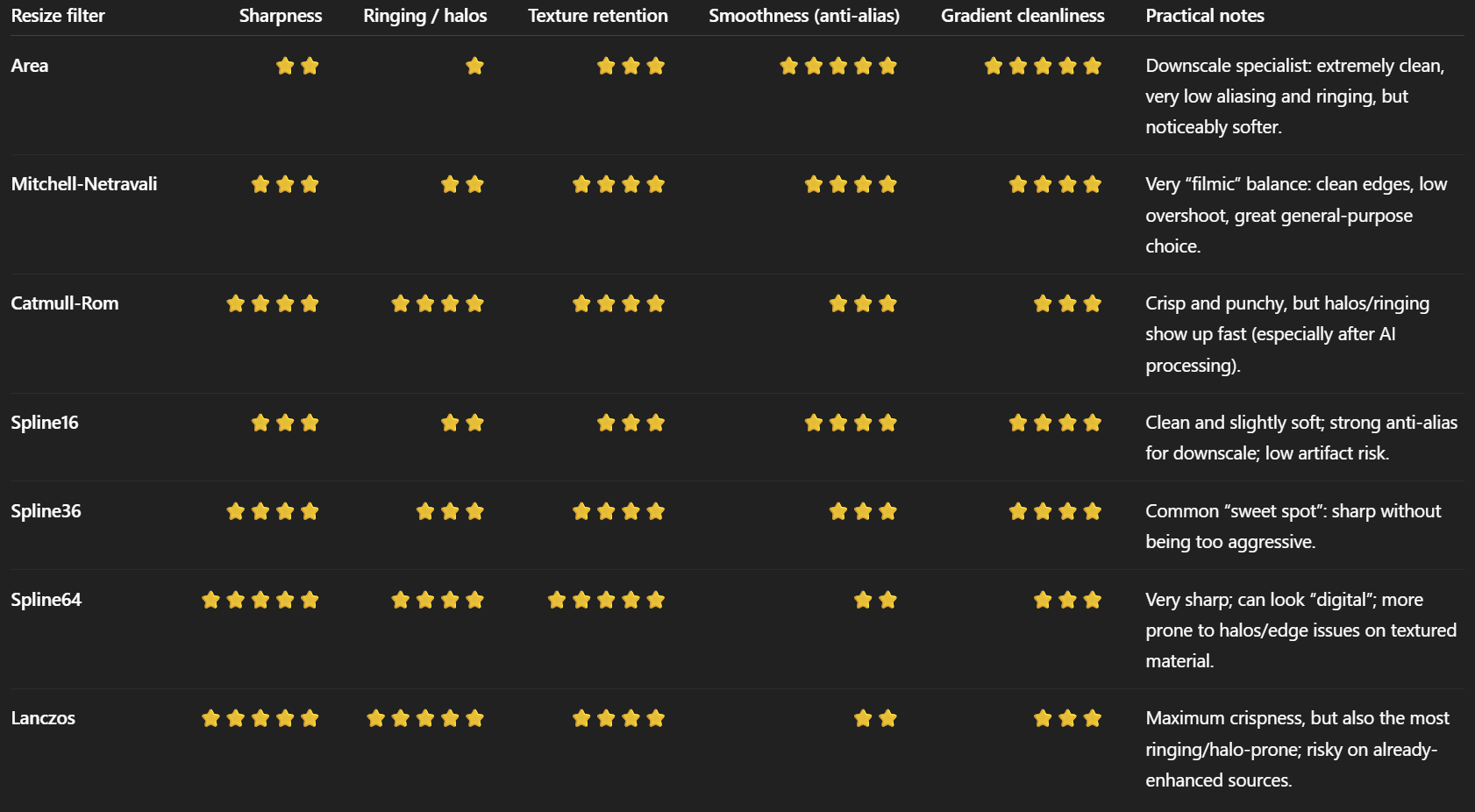
vf Construction: If the output resolution differs from the source, the script automatically injects the zscale filter into the FFmpeg chain.
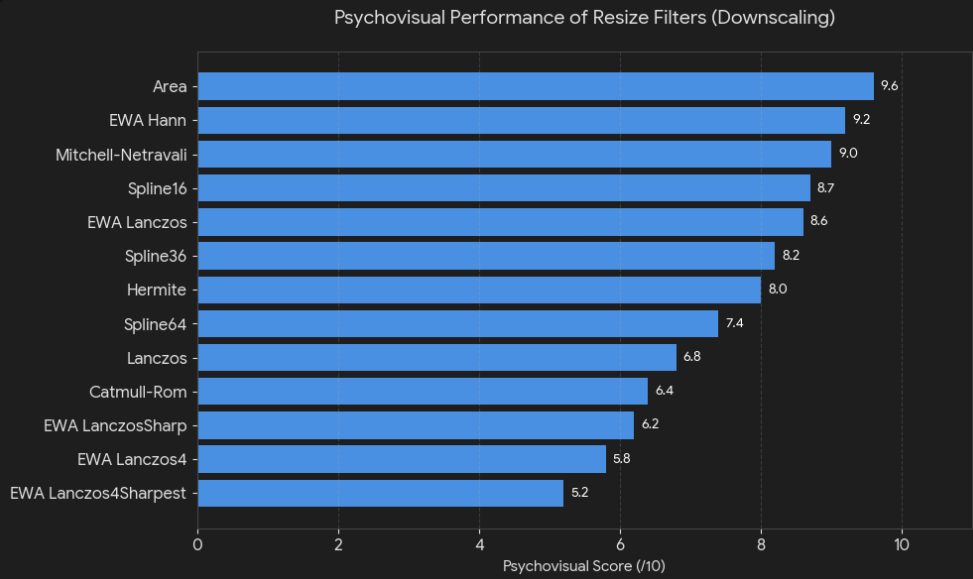
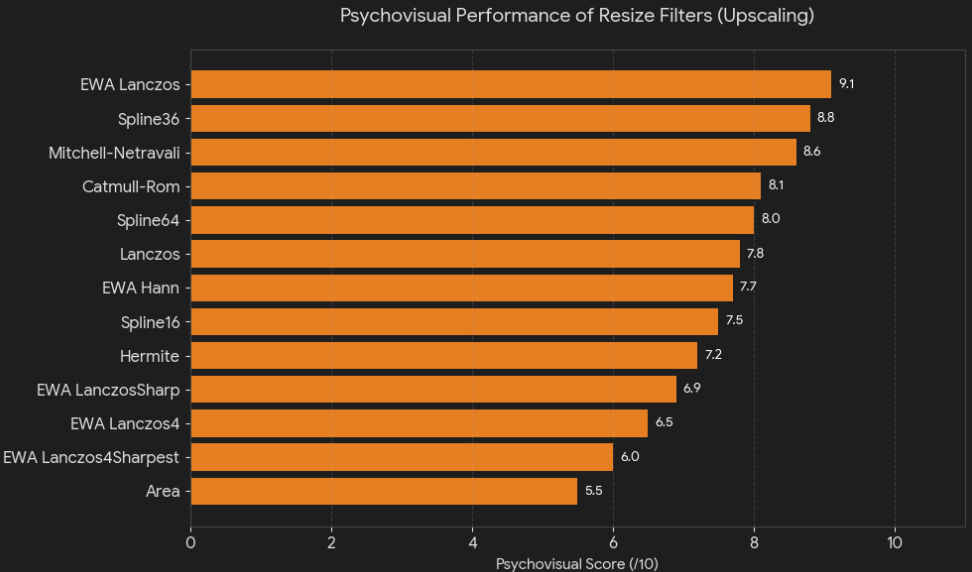
- Directional Arrows: It calculates the pixel count to determine if you are Upscaling (↑) or Downscaling (↓), providing immediate visual context.
- Algorithm Labeling: The script translates technical filter names into more readable labels (e.g.,
Spline 36p² or Lanczos3), making the summary table more professional and explicit.
- In an HDR10/AV1 workflow, proper scaling is vital. By using zscale (ZImg library) instead of the standard
swscale, the script maintains higher bit-depth precision and avoids common “ringing” or “aliasing” artifacts. Furthermore, explicitly flagging interlaced input prevents the common mistake of encoding interlaced content directly into AV1, which is a progressive-only codec.
7.PAR Standard Validation & Lookup
The scriptfocuses on the Pixel Aspect Ratio (PAR), ensuring that non-square pixel sources (common in SD/Anamorphic content) are correctly identified and handled.
- Standard Ratio Lookup: The script maintains a lookup table of industry-standard PARs (e.g., 8:9, 10:11, 16:11, etc.). These correspond to PAL and NTSC standards for both 4:3 and 16:9 content.
- Integrity Check: It cross-references both the input and output PAR against this table. If a ratio isn’t found, it flags it as non-standard (
par_in_std=n), alerting you to potentially malformed metadata.
- Human-Readable Descriptions: Instead of just showing numbers like
10:11, the script calls a lookup function to provide context (e.g., “NTSC 4:3” or “PAL 16:9”).
- Dynamic Labeling: If the PAR remains unchanged, it shows a clean blue status.
- If a PAR conversion is happening (e.g., conforming anamorphic content to Square Pixels 1:1), it displays a clear transformation path (Source ► Target) in yellow.
8.SAR Computation & Validation
This final stage of the aspect ratio logic computes the SAR (Storage Aspect Ratio). As defined in this script’s convention, SAR represents the raw pixel resolution (e.g., 720x576 or 1920x1080) derived from the relationship between the Display Aspect Ratio (DAR) and the Pixel Aspect Ratio (PAR).
- Mathematical Derivation: The script calls a dedicated function to calculate the SAR based on the previously validated DAR and PAR values. This ensures that the three values ($DAR$, $PAR$, $SAR$) remain mathematically consistent ($DAR = SAR \times PAR$).
- Input vs. Output Tracking: It computes both the source SAR and the target SAR to monitor any changes in the underlying pixel grid.
- Smart Labeling: * If the storage ratio remains identical, it displays a clean status in blue.
- If a change is detected (e.g., during an upscale or a crop/resize operation), it displays a transformation path (Source ► Target) in yellow.
- Verification: By calculating the SAR independently, the script acts as a final “check-sum” for your geometry settings. If the computed SAR doesn’t match your intended output resolution, you know immediately that your PAR or DAR values are incorrect.
- Bulletproof Metadata: This logic ensures that when the video is muxed into the final container (MKV/MP4), the relationship between the stored pixels and the display dimensions is perfectly calibrated, preventing any “squashed” or “stretched” images on playback devices.
The Comprehensive Encoding Dashboard
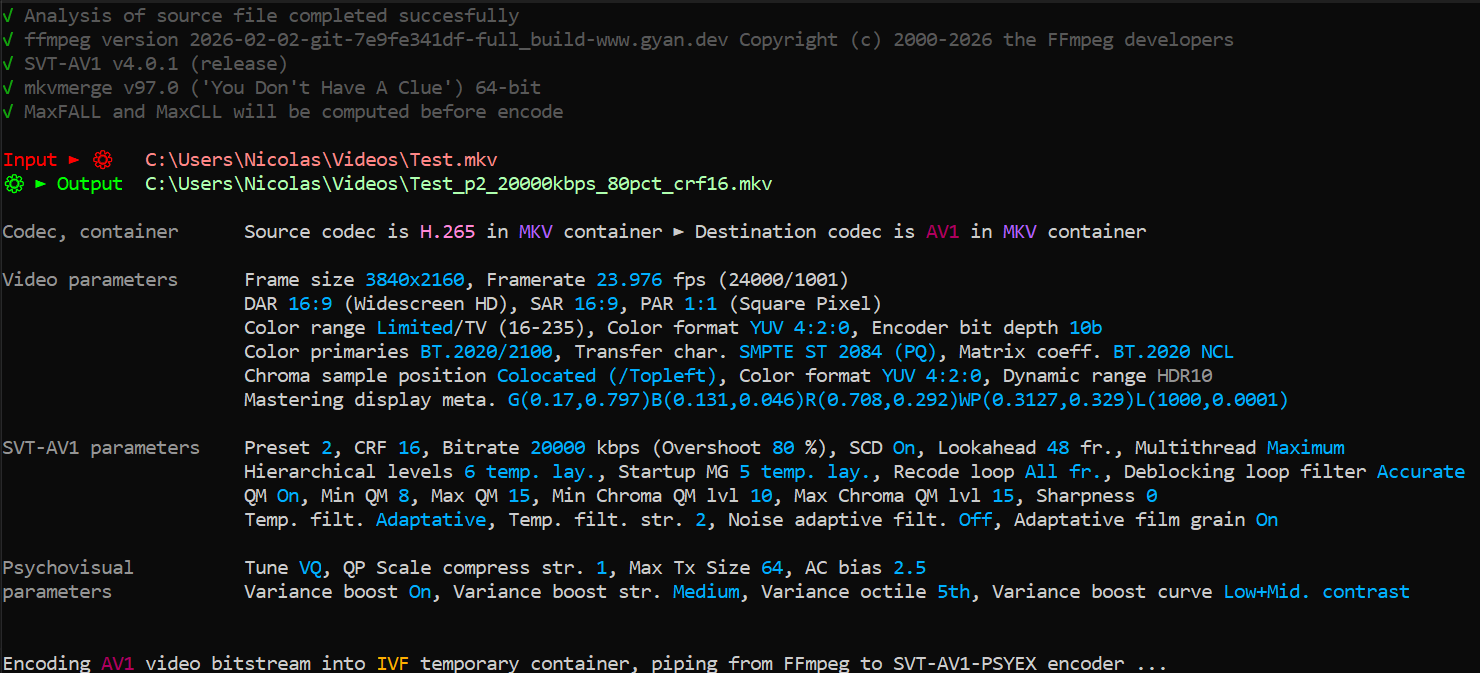
Just before the encoding begins, the script displays a detailed Technical Summary. This isn’t just a list of settings; it’s a dynamic dashboard that shows the “Transformation Journey” from source to destination.
- Workflow Visualization: A clear Input ► Processing ► Output header that immediately shows the source container and the target AV1 bitstream.
- Unified Video Parameters: This section groups all core video attributes (Resolution, FPS, Aspect Ratios, Color Range, and Metadata). It uses the “Comparison Labels” we saw earlier (e.g., Source ► Output), making any change (upscaling, frame rate conversion, etc.) impossible to miss.
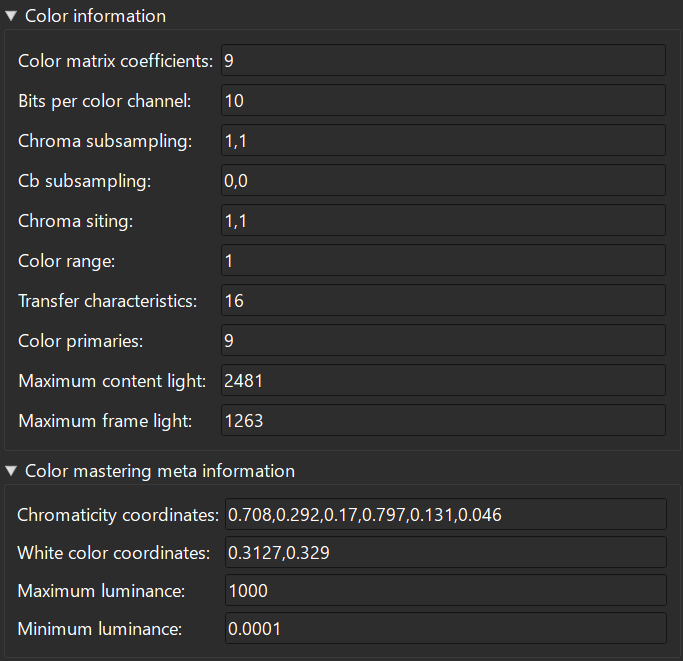
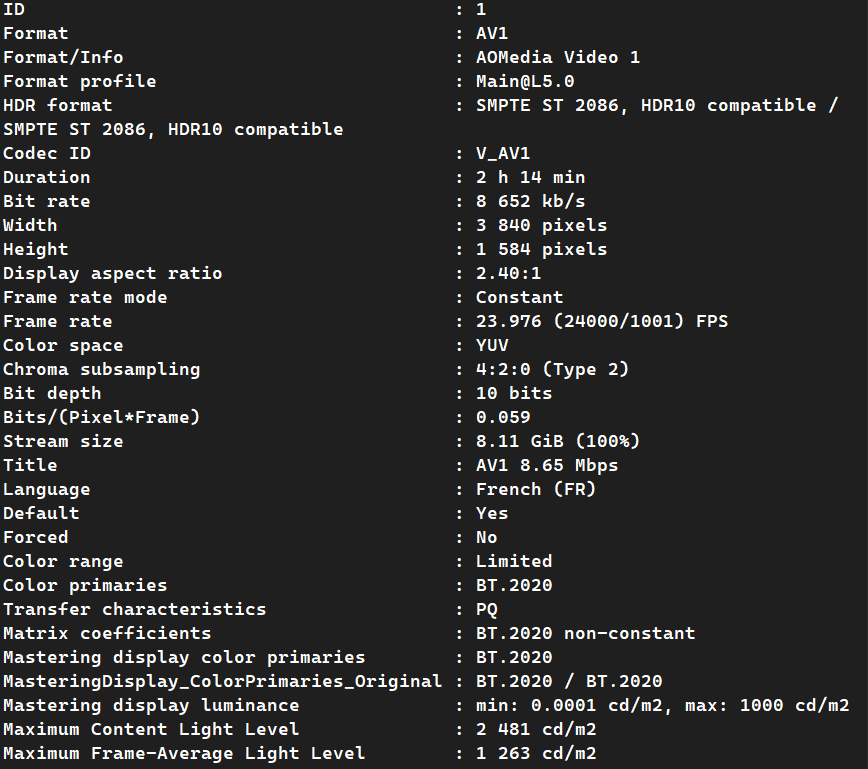
- Deep Color & HDR Metadata: It explicitly lists the VUI tags (Primaries, Transfer, Matrix) and Mastering Display Metadata. This is crucial for HDR10 to ensure the encoder is correctly receiving the brightness and color gamut targets.
- Advanced SVT-AV1-PSY Tuning: This is the “Engine Room.” The dashboard exposes high-level SVT-AV1 parameters (CRF, Preset, Lookahead) but also dives into advanced Psychovisual (PSY) and Variance Boost settings.
- It tracks everything from Quantization Matrices (QM) to Hierarchical Levels, giving power users full visibility over how the encoder will prioritize grain, sharpness, and motion.
- PSYEX Specifics: Highlights the unique parameters of the SVT-AV1-PSYEX fork, such as
Complex HVS and Psycho RD, which are key to achieving superior visual fidelity compared to the standard encoder.
This dashboard serves as the final Quality Gate. In one glance, an encoder can verify that their bitstream is compliant, their HDR tags are correct, and their psychovisual tuning is exactly as intended. It eliminates the “black box” feeling of command-line encoding and ensures a professional, predictable result every time.
Pro-Active Warning System & Pre-Flight Checks
Before the encoding process starts, the script runs a comprehensive Pre-Flight Check. It uses the flags generated in previous steps to display human-readable warnings. This prevents the most common “encoding disasters” by alerting the user to potential issues.
- Spatial & Temporal Mismatch: Alerts the user if the resolution or FPS is being changed, explicitly stating which Resizing Algorithm (e.g., Spline36) and Resize Type (Upscaling/Downscaling) will be used.
- Color Range Awareness: This is a standout feature. The script doesn’t just say “Range Mismatch”; it explains the visual consequence:
- TV ► PC: Warns about crushed blacks and oversaturated colors.
- PC ► TV: Warns about washed-out colors and lifted blacks.
- VUI Metadata Integrity:
- It handles the “Unknown/Unspecified” (Value 2) edge case. If tags are missing from an MKV source, it tells the user that the mismatch is “Potential” but not confirmed, avoiding false positives.
- For confirmed mismatches, it lists exactly which tag is problematic (Primaries, Transfer, or Matrix).
- Aspect Ratio Validation: Flags any DAR (Display Aspect Ratio) that deviates from the source or fails to match industry standards, preventing stretched images.
- Interlace Guard: Since SVT-AV1-PSY (and AV1 in general) is designed for progressive content, the script issues a high-priority warning if an interlaced source is detected, recommending external deinterlacing (like QTGMC) for optimal results.
This system turns a “blind” command-line tool into an expert assistant. By surfacing these technical nuances before the first frame is processed, the script ensures that the user is fully aware of every transformation, guaranteeing a consistent, high-grade HDR10/AV1 output.
Post-Process Metadata & Bitrate Refinement
Once the encoding is complete, the script performs a final pass to extract and format technical metadata. This ensures that the generated file isn’t just a video stream, but a fully documented asset compliant with professional playback standards.
- Precision Bitrate Calculation:
- Instead of relying on rough estimates, the script queries the final file using
ffprobe to get the exact raw bitrate.
- Batch Arithmetic Hack: Since Windows Batch doesn’t support floating-point numbers, the script uses a clever
/10000 and modulo logic to reconstruct a precise decimal value (e.g., converting 15420000 bps into a readable 15.42 Mbps).
- It includes a fallback warning if the bitrate metadata is missing, ensuring the user is never left with an “n/a” without explanation.
- HDR Mastering Metadata Conversion (The “Translator”):
- FFmpeg to MKV bridge: FFmpeg reports Mastering Display Metadata in a specific string format (e.g.,
R(x,y) G(x,y)...). However, muxers like mkvmerge or HDR10 signaling require a different coordinate string.
- String Parsing: The script uses
for loops and custom delimiters to “strip” the parentheses and labels, extracting the raw coordinates for Red, Green, Blue, and the White Point.
- Coordinates Mapping: It reconstructs the
chroma_coord and white_coord variables. This is the “secret sauce” that allows the HDR10 metadata to be correctly injected into the final MKV container, ensuring your TV knows exactly how to map the colors based on the original mastering monitor.
This is the difference between a “file that plays” and a “Master-grade file.” By meticulously re-formatting the Mastering Display Metadata, the script guarantees that the high-dynamic-range information is preserved through the entire pipeline. It prevents the loss of HDR signaling that often occurs when simply piping raw streams into containers.
HDR10 Metadata Injection & Final Muxing
This final stage uses mkvmerge to package the AV1 stream into a permanent MKV container. Rather than a simple mux, the script performs a surgical injection of HDR10 parameters to ensure 100% compatibility with HDR displays.
- Dynamic Track Labeling: The video track is automatically named with its actual bitrate (e.g.,
"AV1 15.42 Mbps"). This provides immediate technical info to the user during playback via media players like MPC-HC or VLC.
- Low-Level Signal Correction: The script forces specific flags that are often lost or misinterpreted during the encoding process:
- Chroma Subsampling: Explicitly sets
1,1 (for 4:2:0) to prevent playback devices from guessing the chroma alignment.
- Bit Depth: Hard-codes the 10-bit (or 12-bit) signal into the MKV headers.
- Full HDR10 Static Metadata Suite: It injects the coordinates parsed in the previous steps:
- Chromaticity & White Point: Defines the exact color gamut boundaries.
- Luminance Range: Sets the
min-luminance and max-luminance of the mastering display.
- Automated Light Level Analysis (MaxFALL/MaxCLL): * If enabled, the script calls a function to analyze the actual IVF stream to calculate the Max Content Light Level (MaxCLL) and Max Frame Average Light Level (MaxFALL).
- These values are then injected, allowing HDR TVs to apply the most accurate Tone Mapping possible based on the brightest pixels in your specific video.
- Robust Error Handling: The script monitors the
mkvmerge exit code. If the muxing fails (e.g., disk full or header corruption), it halts the process with a critical error message instead of leaving you with a broken file.
Without this block, an AV1 encode might play, but it might not trigger the “HDR” logo on your TV, or it might use the wrong brightness levels. By manually “fixing” these flags in the MKV container, you ensure that the video is played exactly as it was intended, with perfect color and luminance reproduction.
Automated Cleanup & Finalization
This final stage of the workflow handles the transition from temporary workfiles to the final “Master” file. It ensures that the user’s workspace remains clutter-free while confirming the integrity of the process.
-
Verification: The script only proceeds to this stage if the previous muxing step was successful (Muxing done successfully !).
-
Temporary File Purge: It deletes the IVF container (the raw AV1 stream), which is no longer needed after being muxed into the MKV.
- It removes the Intermediate MKV (the version without the corrected HDR10 metadata), preventing any confusion between the “raw” encode and the “fixed” version.
-
Smart Renaming: Using the move /y command, it replaces the temporary flagged file with the final filename. This makes the entire process transparent to the user: they started with an input and ended with a single, perfectly tagged AV1 output.
-
Process Exit: A final “Success” message is displayed, and the script pauses. This is crucial as it allows the user to review the logs, bitrate calculations, and HDR metadata confirmations one last time before closing the console.
-
Efficiency: Automated cleanup is vital when dealing with high-bitrate HDR files that can easily take up dozens of gigabytes.
-
Reliability: By using 2>nul, the script silences potential errors during deletion (like if a file was already moved), ensuring a smooth exit without alarming the user with unnecessary “File not found” messages.
-
Professionalism: It delivers a “clean” final product, exactly where the user expects it, with all temporary “under-the-hood” artifacts removed.







 specifically those using the Vulkan API