Because your baseline is already (badly) upscaled, you get into Topaz LOW or NO gain! This is what I’m talking about all the time. Do not compare unscaled DVD against your Baseline, compare Topaz-DVD-upscale against Topaz-“yourBaseline”-Upscale.
This processing workflow is completely WRONG. It seems you have misunderstood what I mean by ‘baseline’.
The baseline restoration video I provided is the output of my own workflow. It is intended solely for comparison of restoration quality and should not be used as input to any processing workflow.
Let me make it clearer: I have a badly-upscaled source. This source is the highest-quality digital version of the 1994 adaptation available today. I am 100% certain of this, so please do not bring up the source again.
Based on this source, I have a baseline restoration result. Please note: my ‘baseline’ refers to the results that my current restoration solution can achieve. What I am looking for is another independent software restoration workflow that, starting from the badly-upscaled source I provided, can produce better restoration results than my baseline.
You’re right, I don’t understand it…so do you have the SD source, yes or no?
Key question is, the person who made that poor 1440×1080 upscale, he had better SD sources than what’s on the DVDs? Only if the answer is YES, then it could make sense using this 1440×1080 upscale. Otherwise, you should get the DVDs and create proper upscales from them.
yes!!!
I don’t think so, here is why. I’ve found now all DVD rips here, to me, they look roughly as good as the source you want us to work with. On this website, a few of them are upscaled versions, and those are somewhat comparable to yours (maybe yours is from there  ) So it makes no sense to me to work with poor 1440×1080 upscales that have little potential for enhancements.
The unupscaled DVD rips are 720×540 PAL. The person who made them simply cropped the original 576 lines down to 540 instead of leave it and preserving the 4:3 display aspect ratio, they’re also compressed quite poorly. So I took one of these suboptimal DVD rips and upscaled a segment of it using Topaz SLP going to 4k
With a proper 1:1 DVD rip and post-processing of the upscaled, there would certainly be even more potential than my first simple SLP try → Upscale sample google drive does re-encode and only 1080p you must donload the 4k video file
My 2-minute sample took over 120 minutes to render. SLP is incredibly slow. All episodes added are ammount 3,780 minutes → 157 days nonstop rendering using SLP model — not including the time you’ll need for preparation and post-processing…
First of all, I sincerely respect your dedication to sweating the details. That kind of mindset truly helps push the restoration of classic films to a higher level.
Since you have done such in-depth research on the various circulating versions of the 1994 Romance of the Three Kingdoms, let me share what I know as well.
I have two sources in my possession. I compared them frame by frame, and it’s hard to say which version is clearly better, so I only released one of them.
Source 1: the 1920×1080 version (the one I provided)
-
Encoded date: 2025-09
-
Encoder: H264
-
Bit rate: 8,000 kb/s
-
Width: 1,920 pixels
-
Height: 1,080 pixels
Source 2: the 2004 DVD version
-
Encoded date: 2004-05-27 12:32:24
-
Encoder: MPEG-2 (compression ratio much lower than H264)
-
Bit rate: 3,723 kb/s
-
Maximum bit rate: 8,500 kb/s
-
Width: 720 pixels
-
Height: 576 pixels
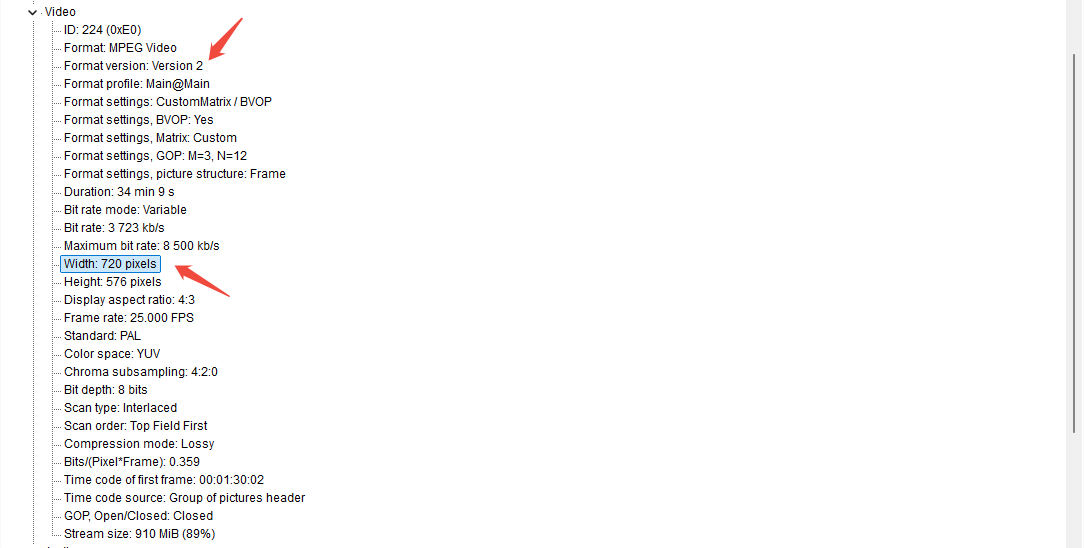
These two sources share a common master and were produced at different times, with different output resolutions and encoding standards.
Now, back to the DVD rips you found. I checked the quality of that version. In short: that version was processed and re-encoded from the 2004 DVD version I mentioned above, with an encoding date of 2022-02-17 by the Gentlemen of Hàn.
Output specs: a 720×556 mp4 version (bitrate 2,040 kb/s) and a 1440×1080 mkv version (bitrate 2,622 kb/s).
Moreover, their encoding process used rather poor processing algorithms, making the quality even worse. As a consequence, this version is of lower quality than the original 2004 DVD version.
My view: the version encoded by the Gentlemen of Hàn can be ignored.
In summary, if you wish to work from the original DVD medium, you can download the 2004 DVD version from
Both the 2004 DVD version and the 2025 1080p version can serve as your input source.
By the way:
-
The link to your “first simple SLP try” is not accessible. Please check it.
-
Processing time is not an issue. I have many GPU cards, so processing can be done in parallel.
sorry, this should work
aha you have orig vob…and many gpus, then why not makeing the test, do 4k SLP upscale
of “sanguo_2004DVD_EP1_01_1.VOB”, set “square pixels”
and do the same with the badly 1080p upscaled SLP 2x to 4k, then compare both..it is that easy
The SLP updating every 25 frames is very visible…
The series originally is 50i, as in the DVD VOB. The 1440x1080 upscale is throwing away half of the fields… Using the DVD rip the video can be converted to 50p using QTGMC, instead of just 25p.
Yes, that comparison is easy to do, and I’ve already done it. Neither restoration result is satisfactory. As I mentioned before, using only Topaz Startlight models will most likely not achieve better results than the baseline.
If you are interested in this project, please first check the results of my baseline restoration solution.
Whether it’s 25fps or 50fps is not the main issue at this moment. What matters is better restoration of the image details.
This is not the 1994 version I’m restoring.
Yes, exactly, good QTGMC deinterlacing provides another boost. It carries over every artifact from the poor upscale, even though those artifacts aren’t present on the DVD itself.
You talked about 1994. ChatGPT says there are only two film adaptations So, what would you like?
- Romance of the Three Kingdoms (1994–1995)
84 episodes
or
- Three Kingdoms (2010)
95 episodes
ChatGPT is right. I’m working on the first one: Romance of the Three Kingdoms (1994–1995), 84 episodes
Your demo is the 2010 version.
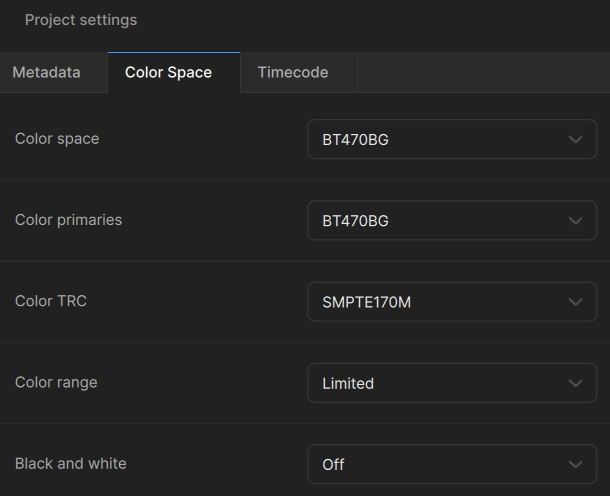
It’s not i just shortened the name, I have it from here Episode 12. It seems to me that you haven’t looked at it, same actor and the one from 2010 is in 16:9 not 4:3. Well, anyway, I can only tell you what I would recommend doing. You asked for advice, but it seems to me that you’re not very receptive to it. Last thing i wrote about this theme here maybe it helps you. Use following Input settings into Topaz
First of all, I apologize for not having carefully checked your demo. You are right — the demo you provided is indeed from the 1994 version. At first glance, I noticed the overall color tone didn’t match my results, so I mistakenly thought it wasn’t the 1994 version. That was my mistake.
Now, back to the results of your demo. First, the color space you used is incorrect. The BT470BG setting you mentioned earlier is wrong.
Second, the texture accuracy generated by your workflow is problematic. For example, in this scene, the pattern on the right man’s clothing.
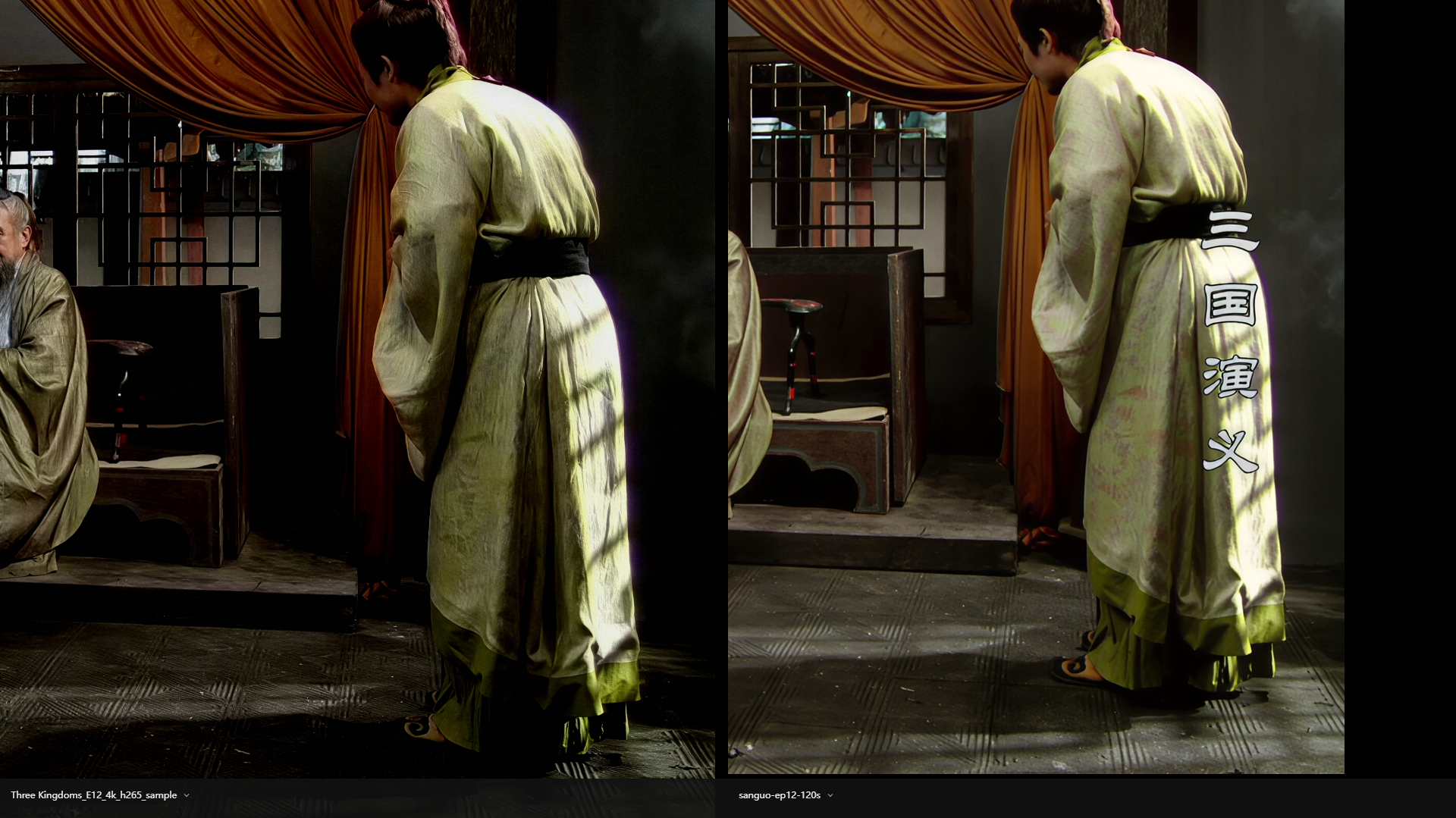
Left side is your demo, right side is my baseline restoration result.
This is the low-resolution source video frame.
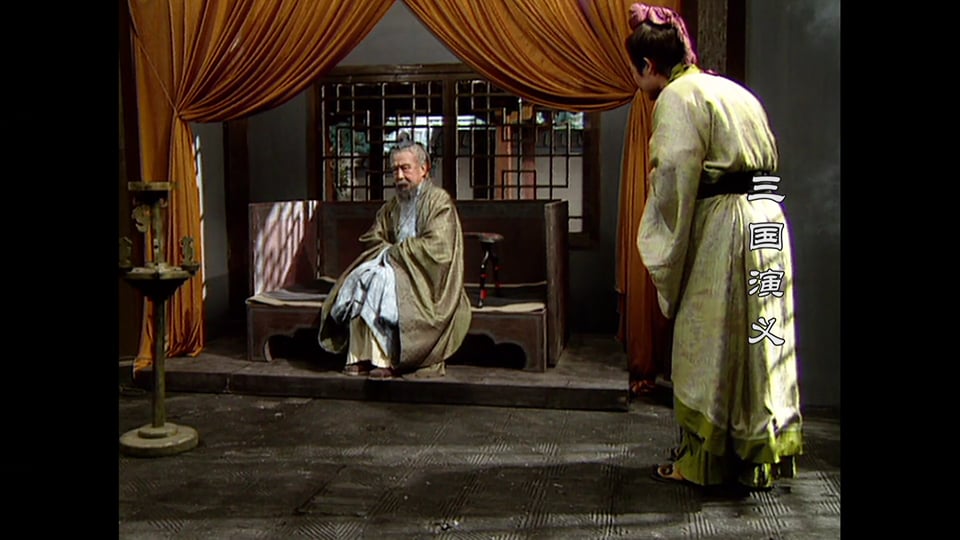
Obviously, your restoration result shows a pattern inconsistent with the source.
Here is the download URL for the full video of this segment from my baseline restoration. You can compare it yourself.
Additionally, the test clip you chose is relatively simple, and the shortcomings of your workflow have not been fully exposed. If you still wish to continue testing, here are two suggestions:
-
Correct the color space issue.
-
Test the clip I selected from episode 01. You may use any source as your input.
Finally, let me restate: Talk is cheap, show me the demo.
What I’m looking for is NOT free advice, but a paid workflow.
Any new idea is welcome!
As a Chinese person, I think you should respect copyright!
You have no idea what you are talking about.
