I have some .mp4 video files at odd framerates (eg 29.92fps), when I try to increase this to a standard 29.97, 30, 60, etc; Topaz Video (7.0.2) will take the usual amount of time processing the video, however, the resulting video is always something odd like 12.45fps, 14.91fps. I’ve tried using different AI models, changing the output file format (mp4, prores, av1, etc), codec and resolution but the result is the same. The source and output is 4K. Has anyone else experienced this issue? Thank you
Hi, looks like source is bad variable frame rate or somehow worse. Here is a GUI way without script use, but needs re-encode (FFV1 codec is no loss) This does not change video lenght, so audio still fits. Download/install Avidemux and follow my screenshots
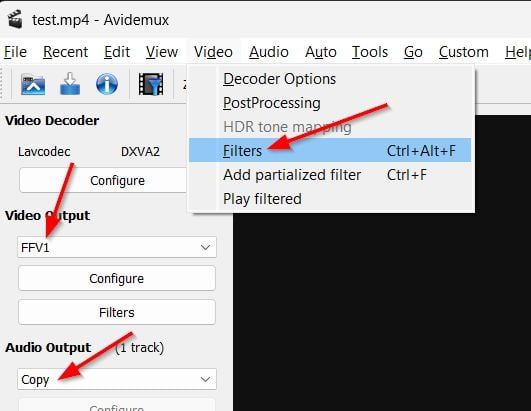
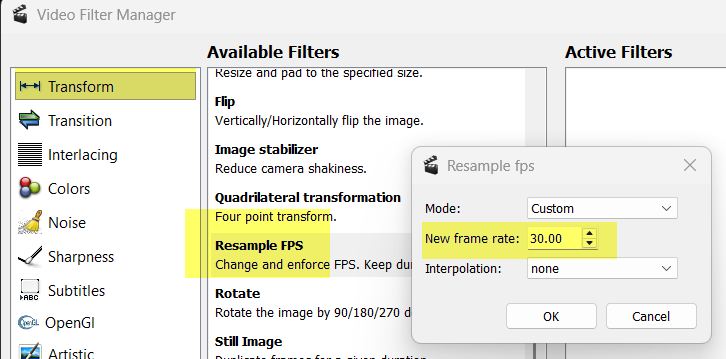
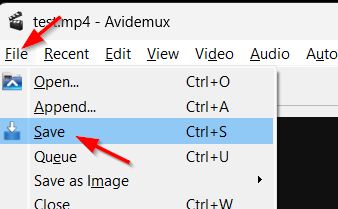
This generates a Constant Frame Rate video by fill up missing frames with 1:1 copies of existing. You can still do frame interpolation later if you like (for example going from 30fps to 60fps) but do this into Topaz not into Avidemux.
1 Like
Thanks Mayday. I ended up reencoding through DaVinchi Resolve and now the files can be processed by TVAI normally. I didn’t know about Avidemux, looks a lot easier to use for reencoding than DVR. Thank you
1 Like
The app does have a difficult time reading odd frame rates and they will need to be converted as you found out and what Mayday mentioned is an easy option to do this and keep the audio tracks synced.
1 Like
This topic was automatically closed 60 days after the last reply. New replies are no longer allowed.
