I recently installed Topaz Video and overall I have to say this the best version since Video Enhance AI 2.6.4. I never liked many of the interface changes, sliders and overall source management of v3+ so this is a nice change and refined a lot of what I disliked about v3+.
I still find 2.6.4 useful for the sheer speed and the quality of the interface for quickly going thru models and settings before ultimately processing with the new version.
There are however 2 gripes I have with Topaz Video and recent versions of the fmr. Video AI Pro.
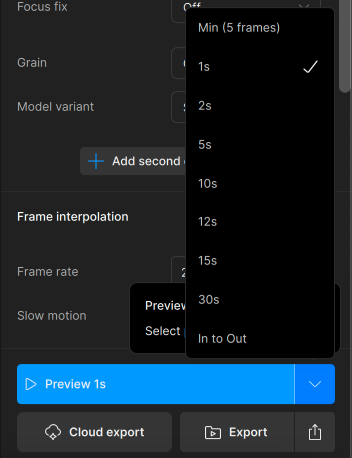
The first being no longer having the option to select an exact amount of frames to generate for the preview, in the case of trusty 2.6.4, this was by default 30 frames which worked well for quickly previewing up and down a timeline and adjusting. The closest setting to that now is the 1s or 2s option.
The second issue being in single view mode, there is not an option or setting, and I have looked all over through preferences and the preview dropdown of allowing the rendered preview video to loop its playback. Be it, 1s, 2s, 30frames or whatever the length of the preview is. The looping function is very useful for combing over the video, zooming in/out while it loops and checking for artifacts and overall pixel structure while toggling via click on/off to compare with the original in real time. This greatly speeds up my workflow and improves quality control.
I have found no such loop function in Topaz Video and if there is one would someone kindly point me to where that is?
Lastly, there is a glitch in Topaz Video, the latest version where all preferences and config settings are saved with the exception of the Multi-GPU AI Processor setting being checked resets to single. Each time I re-open Topaz Video, this setting gets overridden to default (single) and I have to re-enable Multi-GPU each time.
Thanks in advance!