Newbie testing Video AI and a lot of questions

Hello,
I have been using the demo credits for testing Video AI and have a number of observations/questions. I sent them to the support team last week but have not heard back so I thought I would try the experts here.

First, I should explain that I have an older video production suite that I use to add titles to videos & perform edits after enhancing videos. I discovered that some of the 4K videos I made in Topaz Video AI would result in memory issues when I try to re-render the edited 4K videos in that old software. I discovered changing the enhancement setting to 1080p instead of 4K resolved that issue without compromising the output very much.

During the various tests I performed, I encountered some puzzling situations that I hope someone can address. I really want this product to work so I can purchase the offline version. So here goes:

The “Preset” settings offer 4 possibilities: Standard, Art & CG, Interview, Old Videos
Can you explain how choosing any one of these may result in a different outcome?

Can you explain the difference between the FPS setting and the Restore Strength settings and why someone would not always use the highest option for both?

In an earlier email I asked if the software addresses videos jumps and vibrations. Is that something automatic in the software?

Are the video settings displayed in your web demo the extent of every option available?

Are there any setting differences between the web version and the Home PC download? In other words, will the screen and the setting options in the creation screen look the same?

When I changed the FPS setting from 48 to 60 the required credits went from 2 credits to 6 credits. Sometimes it jumps from 2 credits to 4 credits on some videos. But I don’t understand why because the videos are the same length. If I am purchasing the Home PC download, will any of that make a difference? In other words, will I have the ability to make unlimited videos with any setting I want without ever needing to worry about exhausting some limitation of software usage?

I discovered that mpg files are not allowed through the web version even if they are very short. The following message appeared:

“## Sorry, we don’t support that file type in the web application.
Try uploading a MP4 or switch to our Video AI Desktop application.”

Can you say with certainty that mpg files are allowed in the desktop application?

I tried some mp4 files and they loaded, but the setting to use a 1080p enhancement disappeared from the upscale options and I was required to use 4K. So I need to understand why 1080p is being removed as an upscale option for some videos as that could be a major issue for me when using 4K files in video production software.

I then tried the 4K option since it would not give me the 1080p option and studied the before and after files. The 4K file is substantially larger than the original file, but there was no enhancement to the video when I played the 4K file when comparing it to the original file. Can you tell me why no enhancement was performed on the 4K output file from Topaz yet the file is enormous? I know the video is a bit blurry, but it looks like it did not even attempt to unblur it.

Download the TVAI desktop application. Use the trial mode. It watermarks the output, but all speeds and functionality are available.
There is no limit to how many videos you can process with it. Once you buy it, you only have to pay for newer versions if you want them. If not, you are free to keep using the old version that works for you.

Thanks for the response. I have begun the process of downloading and running it on my laptop. I started with PhotoAI since I thought that might be a more logical step since I would think VideoAI could be a lengthier process to enhance a video versus testing just one photo enhancement. Well, hours later and I am still waiting for my first photo to complete. It has been stuck on the “detecting image” step while running the Autopilot process. Since I am in the VideoAI forum it may be best for me to present this issue to the PhotoAI community to get some feedback. But I wanted to follow-up on what happened in my quest to use the Topaz products.
I just purchased a new laptop to be used exclusively for photo and video enhancement. Below are the specs in case someone may believe I need to buy a more robust system.
**[HP OMEN - Transcend 14" 120Hz 3K OLED Gaming Laptop - Intel Core Ultra 9-285H - 32GB Memory - NVIDIA GeForce RTX 5070 - 1TB SSD - Shadow Black]

What do you hope to do to your videos with TVAI? Most laptops are not made with cooling that is able to handle the demand TVAI puts on the system. Depending on what you intend to do to your videos, it could be fine though.

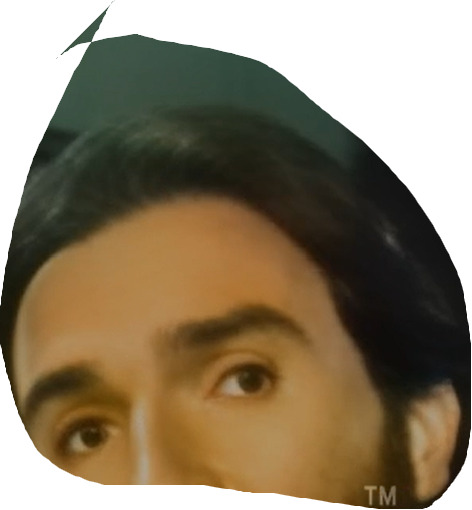
I basically want to improve the quality of old videos I have from various sources. Like old VHS tapes. I’m not expecting 4K type results. In fact, any improvement would be nice. I have started working with the TVAI module and so far the output is worse than the input. The number of settings and models to choose from are overwhelming. If someone could give me all of the settings they have found to be beneficial for most of their videos needs, it would give me a start. Crazy eyeballs seem to be the most common issue I have with all output.

If there is a way I can send you the video I am using (it’s a small video), perhaps you can see if it is a video that cannot be enhanced or maybe you know the settings to be use with it.

If you zip the video and it’s small enough, you can directly upload it here. (You might need to have posted a bunch to get the trust level for it.)

Your laptop should be fine so long as your output is not bigger than FHD.
Enhancing VHS is something I have tried a lot with TVAI. So far nothing does what I want.

The nature of VHS means it’s probably interlaced once it has been digitized. If it’s pure NTSC VHS, it will display half-frames at ~30fps, so to deinterlace it properly and not lose any of the motion, you will need to deinterlace it to ~60fps. I use another program to deinterlace before TVAI, but you can do it with TVAI.

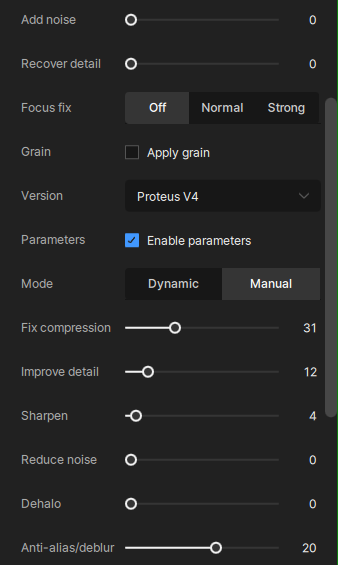
I settled on Proteus 4 Manual settings:

It does some clean up without distorting faces. The differences are not big, but it’s something. I usually compress the final output heavily since it’s not creating any little details that matter.

Thanks for the valuable info. In the meantime I did find a setting that improved the output finally. It was with an Output Resolution of 1920x1920 (4x upscale). The output file was the largest of all of the other settings I have tried so far, which surprised me. I made a print screen of the rest of the settings so I can perhaps use that as a base as I continue testing. The video I am upgrading is one I downloaded from YouTube because I noticed it had a wide range of various qualities edited together in one video. A perfect video for testing various quality levels in one place. If you have YT download software or just want to see what the original looks like, the link is: Test Video

My second test video is one that originated from a VHS tape and was converted to a mpg file many years ago using Sony Vegas software. The original video would flutter in a number of places (usually when there were scenes that had white in them). Back then I tried using many VCRs to see if the machine was causing this but even the best machines had this issue. So I’m guessing it was copied to my tape in that manner. Many years ago I used a product to “de-flutter” and it did the trick in a number of places. But still a number of bad segments remain. Now I am taking that mpg file and processing it through TVAI to see what it can do. I’ve tried many different stabilization options and the best way to summarize all of them is to say it stabilizes, but results in “crazy eyes” where the eyes are big marshmallows with a dot in the middle. I cannot find a way around it. Otherwise, I am seeing enhancements to the original video. So I may have to use the TVAI output and then edit back in the video flutter to replace the segments producing the scary eyes because an audience will probably forgive flutter more than scary eyes.

So you don’t have to set any parameter, I would say this is footage for “Starlight mini” this should work with a RTX 5070 Laptop gpu (sure very slow, but you can do just 2x upscale)…then leave the result as it is, or upscale it afterwards with Proteus V3 in automode from the 720p/960p to 1080p (activate older models usage in the TVAI settings)

For advanced use: There is another method you could speed it up in massive way because there are big black bars. Use a video editor cuts black bars away and place several vids side by side into one and export, you could do 16:9 with it (for example 852x480), give TVAI this, upscale this with “Starlight mini” and after that you can separate the videos again

I tried using Starlight mini yesterday. The 4 hours it took to process 40 seconds of video wouldn’t have bothered me had I received good results. But unfortunately, the scary eye syndrome remained when using this tool.

Here’s what the man should look like:

seems like it’s not the same frame, and adjusting brightness/gamma/contrast/colors of the source before can bring a lot the model works better, you can rid of the white/grey veil here and correct skin tone