Multi-GPU - Why is the performance worse than the older version?

```

Topaz Video v1.1.0

System Information

OS: Windows v11.25

CPU: AMD Ryzen Threadripper PRO 7995WX 96-Cores 511.5 GB

GPU: NVIDIA RTX PRO 6000 Blackwell Workstation Edition 94.336 GB

GPU: NVIDIA RTX PRO 6000 Blackwell Workstation Edition 94.336 GB

Processing Settings

device: 0.1 vram: 1 instances: 1

Input Resolution: 1920x1080

Benchmark Results

Artemis 1X: 51.01 fps 2X: 18.78 fps 4X: 05.22 fps

Iris 1X: 55.82 fps 2X: 20.82 fps 4X: 05.86 fps

Proteus 1X: 52.53 fps 2X: 20.97 fps 4X: 05.57 fps

Gaia 1X: 36.60 fps 2X: 20.41 fps 4X: 05.21 fps

Nyx 1X: 35.80 fps 2X: 27.13 fps

Nyx Fast 1X: 51.13 fps

Nyx XL 1X: 31.48 fps

Rhea 4X: 05.29 fps

RXL 4X: 06.15 fps

Hyperion HDR 1X: 10.71 fps

4X Slowmo Apollo: 39.90 fps APFast: 74.41 fps Chronos: 47.65 fps CHFast: 38.68 fps

16X Slowmo Aion: 50.22 fps

```
Dual RTX 6000 BlackWell GPUS (Multi GPU BenchMark)

```

Topaz Video v1.1.0

System Information

OS: Windows v11.25

CPU: AMD Ryzen Threadripper PRO 7995WX 96-Cores 511.5 GB

GPU: NVIDIA RTX PRO 6000 Blackwell Workstation Edition 94.336 GB

GPU: NVIDIA RTX PRO 6000 Blackwell Workstation Edition 94.336 GB

Processing Settings

device: -2 vram: 1 instances: 1

Input Resolution: 1920x1080

Benchmark Results

Artemis 1X: 48.68 fps 2X: 19.99 fps 4X: 05.02 fps

Iris 1X: 53.07 fps 2X: 21.28 fps 4X: 05.49 fps

Proteus 1X: 55.72 fps 2X: 20.92 fps 4X: 05.45 fps

Gaia 1X: 20.02 fps 2X: 14.25 fps 4X: 05.24 fps

Nyx 1X: 31.03 fps 2X: 22.40 fps

Nyx Fast 1X: 50.51 fps

Nyx XL 1X: 29.85 fps

Rhea 4X: 05.22 fps

RXL 4X: 05.22 fps

Hyperion HDR 1X: 15.32 fps

4X Slowmo Apollo: 37.09 fps APFast: 65.73 fps Chronos: 41.47 fps CHFast: 41.36 fps

16X Slowmo Aion: 38.45 fps

```
(Single GPU Test)

I have a genuine question. In earlier versions (before the PRO version was released), using multiple GPUs resulted in almost a 2Ă— performance improvement. However, in recent versions, as shown in the benchmarking above, there seems to be little to no performance difference at all.

This may vary depending on the model, but for existing models, shouldn’t the performance remain the same?

Of course, if you run multiple scenes on separate GPUs, you can physically achieve nearly double the throughput when handling many scenes. But when it comes to running inference on a single scene using multiple GPUs, it no longer seems to provide any meaningful benefit.
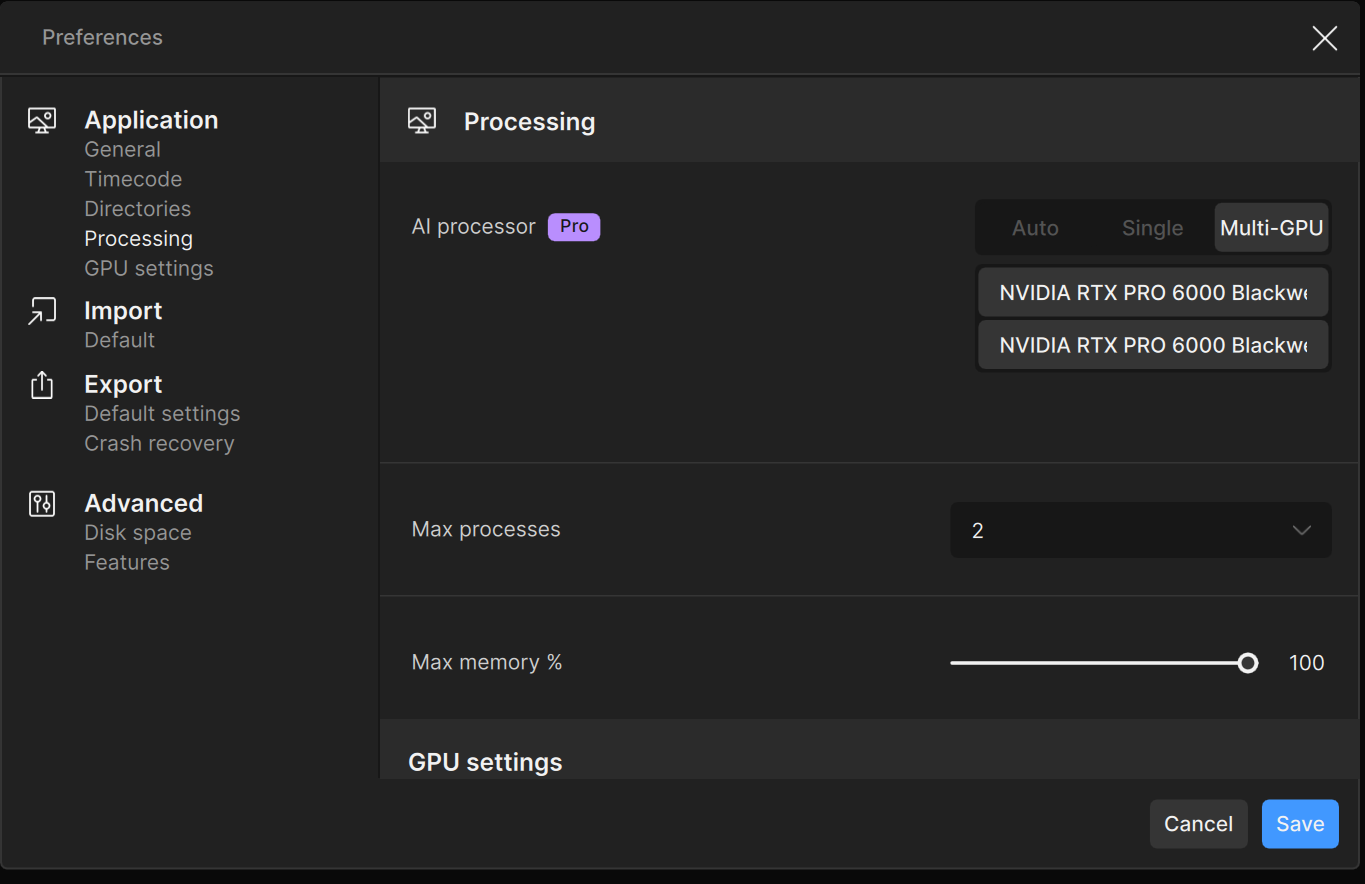
FYI, I don’t see any mention where the Pro version includes multi-GPU support? I think, that comes with the “Enterprise” option only (hard to tell given how vague Topaz marketing material is … i assume on purpose).

To answer your question after I did some decompiling (IDA Pro) work and profiling, there appears to be a loop that does nothing for a few seconds before it continues (this is assembler code).

My hunch is Topaz have introduced a delay to slow down local processing in order to sell cloud processing … just my “guess” based on what my code profiling results show … either that or a significant bug.

4 Likes

I can no longer find it mentioned on the website either. However, the app’s UI does contain the following under GPU settings:

Processing optimization

  •    Multi-GPU rendering is available in Video Pro
    

(the switch is greyed out as I don’t have the Pro licence)

Andy

1 Like

Sorry, this may be unrelated to your question, but could you perhaps post your results on that multi-GPU system for Starlight Mini (local rendering) in terms of FPS and at both 720p and 1080p resolutions?

I’m just curious to compare it to my RTX 5090 setup (currently get 1.6-1.7FPS at 720p and 0.7-1FPS at 1080p in Starlight Mini).


using the pro version enables multi GPU support.

Can you confirm more than ONE GPU is being used? Would really appreciate a video or image or log files with some metrics showing the GPUs load during processing of the local models (desktop).

If you don’t have tools to measure GPU metrics here are a few freeware:

HWINFO64 (free version provided GPU power consumption and load and temps) very good tool and will log to file and supports multiple GPUs.

RTSS + Afterburner will provide logging and overlays during processing.

There are other tools including Windows Task Manager, but the above can log and provide overlay in realtime.

Much appreciated if you get some time. Trying to decide if I want to buy the Pro version as there have been some inconsistencies reported in performance.

Cheers, Rob.

Oops, sorry @Chamberhouse … replied to you instead of @vmsystem

it’s same (around 1.6~1.7 FPS at 720p, 1 FPS at 1080) , and it appears that multi-GPU is not supported.

1 Like

Side question:
Can you confirm that if I use 2 GPUs with pro I can render 2 clips parallel making the process 2x the speed? Or will the speed decrease? I mean both process slows down a bit maybe? I hope not :slight_smile:

unfortunately, significant performance improvements are hard to achieve when attempting to parallelize inference on a single video.
That said, when processing multiple video clips concurrently, with each GPU handling a separate clip, an effective speedup of 1.8Ă— or higher is expected.

1 Like

Although both GPUs are confirmed to be working, overall utilization remains below 20% on both the GPUs and the CPU, and performance is occasionally worse than single GPU execution.
In contrast, assigning different video clips to each GPU results in much higher utilization, indicating a likely architectural bottleneck in single video parallel processing.

Perhaps this is yet another feature that Topaz have removed without telling anyone.

Anyway, there is a potential work-around: use the CLI (while we still can). It is possible to construct a rather convoluted ffmpeg command to split the video into two streams, one for odd and and one for even frames, process both streams in parallel using a separate GPU for each stream, then recombine afterwards.

Only as an example, here’s a post I made some time ago (in TVAI) using a similar principle but across two machines*, rather than two GPUs.

* Note that TVAI allowed use on two machines at once, but TV doesn’t.

Andy

2 Likes

I was looking into multi-gpu processing with TVAI Pro lately as well. When I checked the logs, the commands that were used to invoke starlight-mini and other models will only use 1 gpu per enhancement, regardless of whether the app’s set to use multiple gpus. Specifically for non-starlight models used via ffmpeg.exe, their corresponding filter will have device=, and for starlight used via runner.exe there’s no option to specify the device and it always uses 1 gpu only. I’m disappointed that despite advertising multi-gpu processing on TVAI Pro it doesn’t actually exist..

hmm, considering that the pro version is not cheap, wouldn’t advertising multi-gpu support when it doesn’t actually work be misleading? I also made my purchase based on that advertisement.

The Starlight Mini model is not compatible with multi-GPU processing workflow at this time, Starlight Sharp can utilize it though as well as the GAN based models.