I had standard settings for my 5090, …but actually I asked the NVIDIA app to ‘optimize’ the GPU, which is a slight overclocking as I understand it. However, this made my system a little unstable and once or twice the computer unwantedly halted the render (by rebooting), so I reverted to standard factory settings.
When you underclock, are you still getting .4fps (on a 3x render)? I’m getting 0.4fps on 480p to 1440p. topaz video version 1.1.0
ps: how were you measuring the 650W - from a wall meter, or software estimation?
Hi Ian, I have a simple Wattmeter connected to the power outlet where my PC is plugged in.
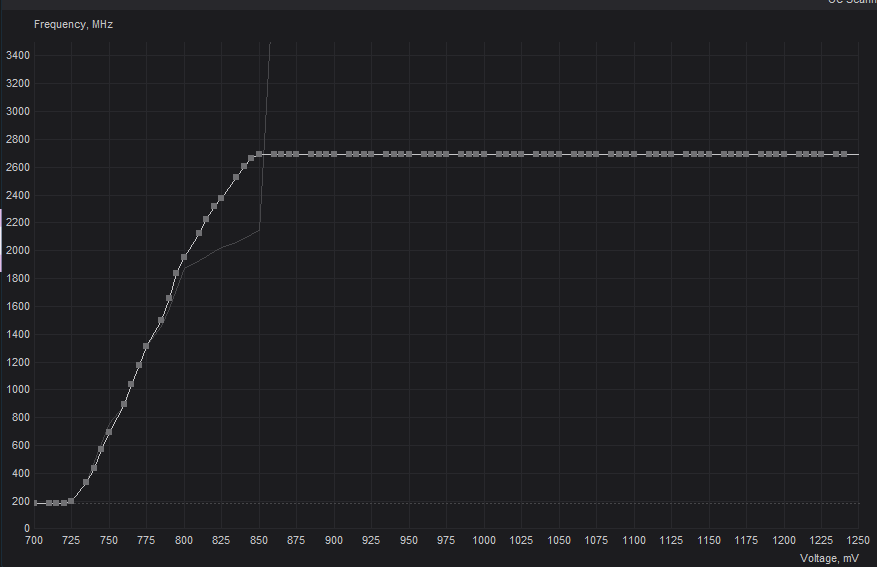
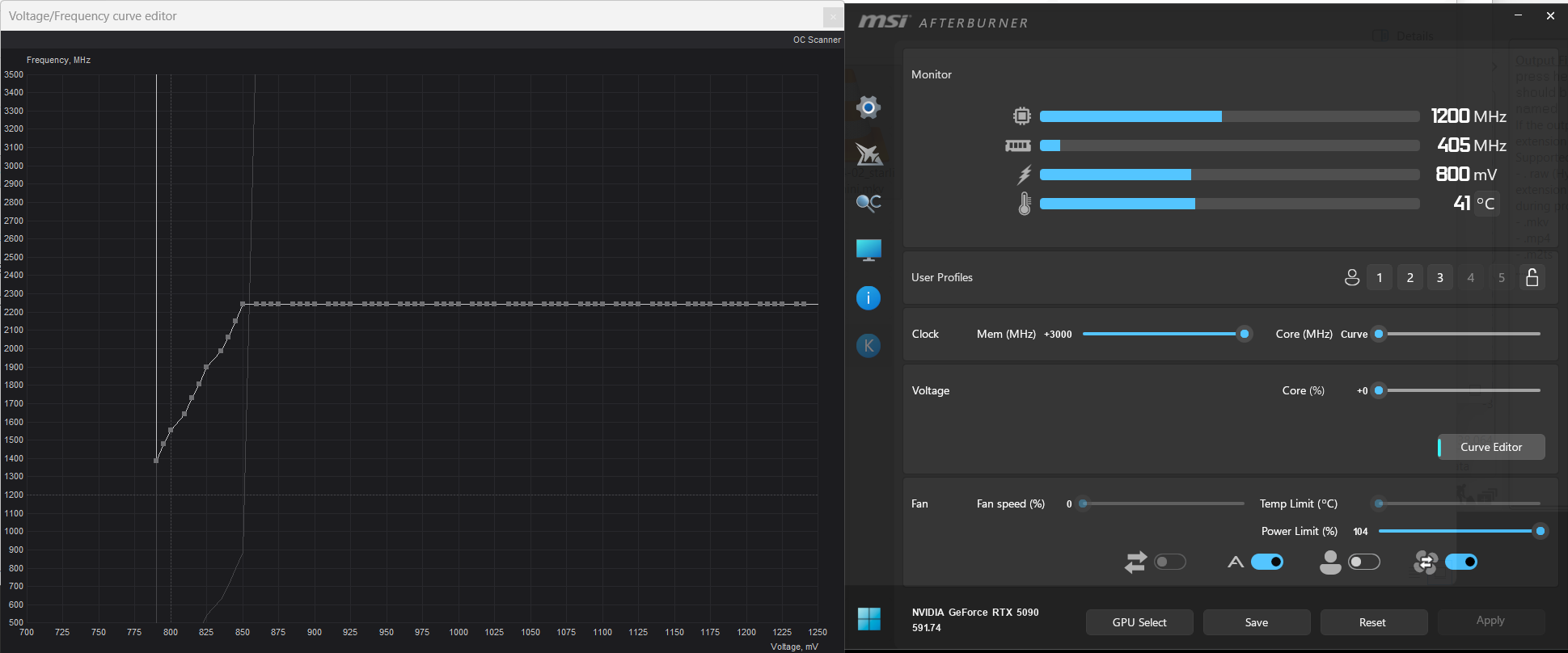
To check what my CPU is actually drawing, I use GPU-Z and see that my 5090 doesn’t draw more than 400W, averaging around 350W. If I don’t use Afterburner, the card’s power draw goes up to 575W with the original settings. I have a Ryzen 7700X with a TDP of 105W. Into Afterburner gpu limitetd to 850mV (Ram maxed out +3000) then the speed loss is about 7% compared to factory default 5090. Gpu clock drops down around 2200Mhz
The 650W sounds plausible to me; short power spikes can be higher, but on average my power consumption is max 650W. Yes I get the same SLM around 0.4fps 480->1440
I’m going to try the undervolting with the settings you mentioned.
I know my system spec is a little different (I have an i9) so I might need to tweak if things get unstable.
That can be, the 5090 850mV is nearer by 0.5fps than 0.4. I can see how it’s swapping between 0.4/05. Your 5080 has base clock of 2295 MHz and a boost of 2617 MHz. So thats cool when your 5080 reaches boost frequency at lower voltage, but check it live while rendering with gpu-z what you really get.
I wrote the 850mV undervolted 5090 uses 400W, but this is peak it does not override 400W, overall the card is about 350W. I think the 5090 at 850mV is the most efficient card in terms of power consumption/FPS.
I just finished another 2 day render, and with those undervolt settings it gave me 46.66kwH, which is an impressive saving on the standard GPU settings. I even noticed that the ambient temperature in the room wasn’t as warm.
I estimate this is saving me about $2 per render, which mounts up if we’re talking about doing this 20-30 times, which I will be doing.
I am still on v 1.1.0 and getting 0.4fps 480p > 1440p.
I’m now getting 0.7 fps at 640×480 → 1920×1440
How are you getting 0.7fps on SLM? We have similar hardware, I’m getting 0.4fps. Starlight Sharp is 1.0fps, but thats poor on medium/long distant faces.
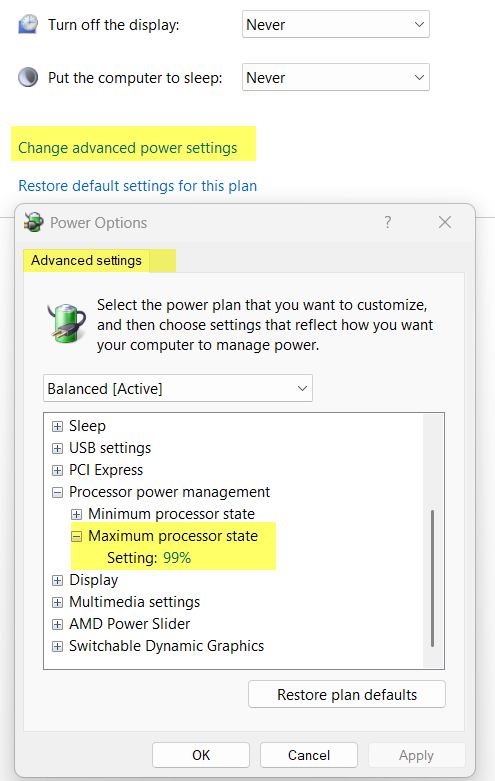
Sounds good what you also can try is limit cpu, simple but effective way: Windows Search for “Edit Power Plan” and limit CPU to 99% what happens here is the cpu never goes into Turbo mode.
Sure, you lose maximum cpu performance that way, but for a machine that runs 24 hours a day and is supposed to save electricity, it’s actually the turbo mode that reduces cpu efficiency and drives up your electricity bill.
Sounds good what you also can try is limit cpu, simple but effective way: Windows Search for “Edit Power Plan” and limit CPU to 99% what happens here is the cpu never goes into Turbo mode.
Sure, you lose maximum cpu performance that way, but the computer runs cooler and the fans are quieter for a machine that runs 24 hours a day and is supposed to save electricity. The turbo mode reduces cpu efficiency, drives up your electricity bill.
Further potential savings
A titanium-graded power supply. Worth considering if your PC is running constantly over years Seasonsic is expensive, but their Prime series are among the best power supplies on market.
PSU have highet efficiency around 50% load. “Seasonic Prime TX-1300 Titanium” that’s around 650W, which is where your undervolted 5090 PC runs. At this point the PSU works at ~94 %
Sorry I was wrong, I did 3x but my source was 360p and not 480p, Unfortunately, I didn’t realize that at the time I wrote the text. So it’s just as slow as it’s always been
I made the CPU power adjustment.
I just did a new render, 59.59 hours.
Electricity meter read 48.58 kwH
So its about a 20% saving, compared to my standard volted 5090. I’m not sure how much the CPU power limiting helped, but its worth doing probably.
One thing I would say is that the +3000 memory setting caused me problems. My render broke halfway through the previous render citing a GPU memory error, and at one place about 30 frames in my TIFF export were corrupted or completely black.
I backed off the memory setting to +2500 and this render did not quit, and so far it looks like it didn’t output any corrupted frames.
I discovered the same thing. If you use GPU-Z to monitor your GPU, you want a memory clock of between 2000 and 2250 MHz (no two graphic card models are the same). That will translate to an Afterburner reading of ~17000. Other over clocking utilities may use a different value since some use the core clock, others after parallelization, others after command rate doubling.
I have been unsuccesful with pushing the VRAM any higher than that (blackouts of entire sequences and other rendering artifacts occur). Interestingly, every stabilty test and benchmark ran cleanly at MUCH higher clocks than Topaz will tolerate. So gamers will need a special Topaz overclocking profile.
Yeah, “~17,000” are like “poser” values simillar DDR6000 does not run at 6000Mhz, coming from theoretical figures. I think here you have to divide 17’000 by 8, which gives 2’125 MHz.


 what you also can try is limit cpu, simple but effective way: Windows Search for “Edit Power Plan” and limit CPU to 99% what happens here is the cpu never goes into Turbo mode.