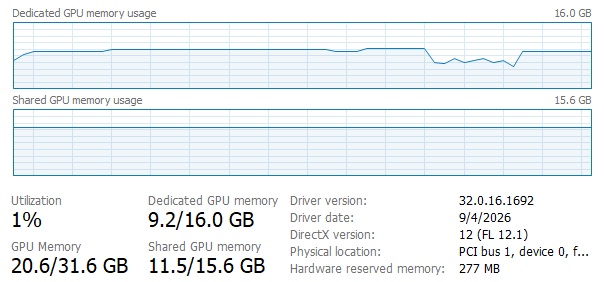
I have been working with Precise 2.6 for the past 2 weeks, and Topaz is only
taking advantage of about 60% of the fast GPU memory, and in fact using more
shared system memory than GPU memory.
Here is a a picture showing pretty typical utilization fo the GPU memory.
There are not further parameters within the app that can be adjusted to use more or less of the GPU at this time. The model will run as it was designed and use the GPU card as it can for processing. The team is actively working on improving its efficiency and how it uses resources across all types of cards.
A launcher tool introduced in another thread is available; using it allows for the effective utilization of remaining memory. However, when aiming for 4K output with “Starlight Precise,” a speed boost is observed only when using a 5090 GPU. If using a 4090 or lower-end GPU, a slight speed improvement might be seen only if the output resolution is Half-HD or lower. In short, even if Topaz were to update the software to make better use of remaining memory, the performance limitations of current local GPUs mean it would have little actual effect. That is why Topaz is not actively pursuing program updates focused on utilizing remaining memory.
I downloaded both launchers. The one from skn89 is overwhelming with my knowledge, and the autotune failed after a couple passes, so I moved onto naxci1’s launcher. With just patching the cuDNN and out of the box it increased the VRAM usage by 20%, and interestingly enough the fps rate also increased my 20%. I need to spend more time looking into these, but the 20% increase is encouraging. thanks for you and netlearner for suggesting the launcher.
Try the latest version of the application; the “auto-optimize” button will suggest settings for you, though you can also adjust them manually. However, after changing the settings (and ensuring Topaz is closed), you must launch Topaz using the “Start Topaz” button; otherwise, the changes won’t take effect. Afterward, add your video to Topaz and perform an SLP export. You can also view detailed information using SLP Lite; the initial data will appear once the first chunk is complete. To utilize more VRAM, you should set a higher Chunk value, which will result in faster performance. If you have any questions regarding this,