Well, that’s disappointing. Zero improvements as regards processing speed and output quality, but a whole bunch of UI changes (again!) that will make simple tasks more time-consuming. The only welcome change is the live preview, and even that is just a return of functionality that was inexplicably taken away a few versions back.
1 Like
Respectfully disagree. Yes, there’s always room for model improvement, but I’m 100% behind them fixing the brokenness first – most markedly the severe deterioration of Preview since v2.6.4. As said before, fire the guy who currently does the Previews, and bring back the v2.6.4 guy who, obviously, knew what he was doing.
So, for me, if 6 Beta truly delivers on its promises, this upcoming test version will be a step in the right direction.
I see where you’re coming from. Personally, I tend to stick to older versions from before they broke everything so this constant cycle of bug creation/patching is something I view from a distance and just tut to myself about. I won’t be motivated to invest in a new version until it’s possible to get better results.
I’m a very simple (some would say stupid!) user: I import a video, select my preferred model (typically Iris), and export it. That’s it, just a few quick, simple steps. None of the UI changes announced here will do anything but add extra clicks to my workflow. Different strokes for different folks though - I totally get that other users take a more hands-on approach and might enjoy the new stuff.
3 Likes
I see where you’re coming from. And I would likely have stuck with v2.6.4 even, if it didn’t use available resources so poorly. 
And I revisited an old Faces look unnatural thread, the other day, And this, at least, no longer occurs:
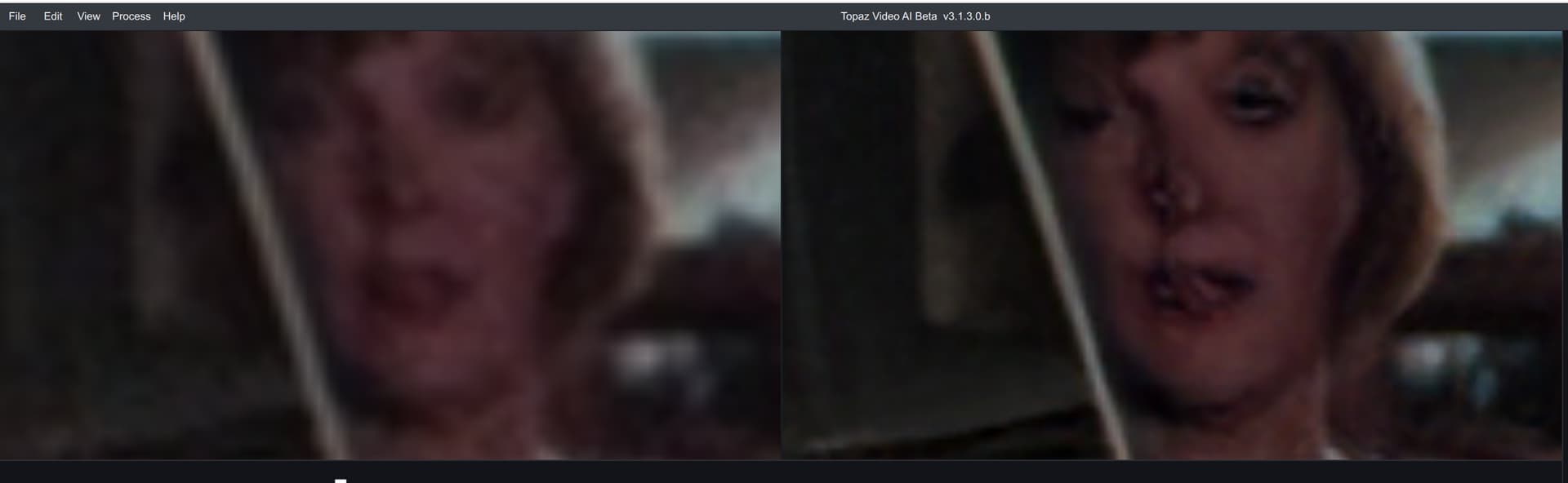
Slowly, but steadily, models are improving, even though it may not be immediately clear to us. 
2 Likes
A working UI is extremely important to me, as I too make clicks, only a lot of them. I pick various segments throughout the movie, test various models and settings, keep running Preview, until Preview breaks again; for me, for intance, timeline stays stuck in the few test seconds, even when timeline is scaled back, so I have to restart TVAI, lose all my model settings (which it was supposed to retain), etc. These are things that greatly frustrate me, So, yeah, by all means, let them finally fix the brokenless!
Ah, good old 2.6.4! Still the best version of the UI in my opinion - pity you can’t use the newer models with it. The faces generated back then were often nightmare fuel.
3 Likes
I stopped renewing the program months ago due to the ‘brokenness’. I will reconsider if and when it is truly ‘fixed’. In the meantime my v2 works great for basic upscaling of relatively good quality source videos, and is faster on my Intel Mac system. V3 is when they began to break things, in my humble opinion, but I persevered for a long time after that.
1 Like
There are only so many ways to slap lipstick on a pig. Can we get back to improving the models? I would like to see a better version of Proteus.
3 Likes
This is so true we forget that every time you install updated model versions iris lqv2 or proteus or even artemis lq v13 they do improve eventhough it is never ever seen as a improvement not even by topaz marketing but if I compare to similar Exports from half year ago or one year ago the difference with the same model but newer versions is stunning the only problem is Topaz marketing sees plugin cloud multiple cpus and Topaz HDR as an Gamechanger which cannot be Your LG TV AI does a much better HDR expirience of not HDR source s Having said this the improvement of existing models under the hood justify a renewal Amen. Forgive topaz for the Marketing fluf with the mediocracy changes.
1 Like
When will all models be supported in Cloud.
You want to pay more tokens ? Proteus v4 is by far still the fastest … 4 X as fast as Rheia Maybe there is not even Businesscase for other models unless you purchase 10000 tokens on black friday and wait till the model becomes available
“Lipstick on a pig” is an accurate description. Well said.
2 Likes
Don’t kid yourself. The upscaling model improvements are minimal comparing this version 6 to as far back as version 2 or 3. I know because I still mostly use the older versions.
1 Like
I’m still trying to find the best formula for turning my old DV cam footage into 4K without the people in the videos looking like animated freaks. Anyone else feel my pain? Am I doing something wrong?
1 Like
4k might be too big of a leap for some DV footage (the model is trying too hard). Try 1080p or even 720p for an improvement. If you haven’t tried Iris or Proteus, those might likely be your best bet.
Sounds hilarious; except that it isn’t about cosmetic changes, but about functionalty. Aka, a working program. Fancy models mean shit with a broken UI that can’t fine-tune/preview them properly and/or easily.
Don’t kid yourself. Annemartensa is absolutely right (of course I would say that: they were agreeing with me  ) But, seriously, training on models certainly has improved over time, especially like in the example I had posted earlier, of a face getting turned into a monstrosity (like a freak transporter accident). Doesn’t mean the overall upscaling look will be better, but these models are continually being trained to avoid the most egregious A.i errors.
When will be new version of models? Next proteus?
1 Like
Okay, sure .
So with this big launch for Video AI 6 we can expect … more user interface.
That’s just great. What everybody has been waiting for. I’m trembling with anticipation.
Seriously is this the USP you’re using to market it with? After everything people have been saying about how they want substantive updates when they arrive, and that they want less development focus on the UI, this marketing strategy is going to make people think you’re mocking them.
The UI has been fine at various points. But then they change it for the worse. So when you see an improvement with the UI it’s usually because they fixed what they’d broken with a previous UI change.
However what also tends to happen is that when they make changes such as to the interface, they end up breaking something else in the process which is usually crucial to the functionality of the program…
1 Like
