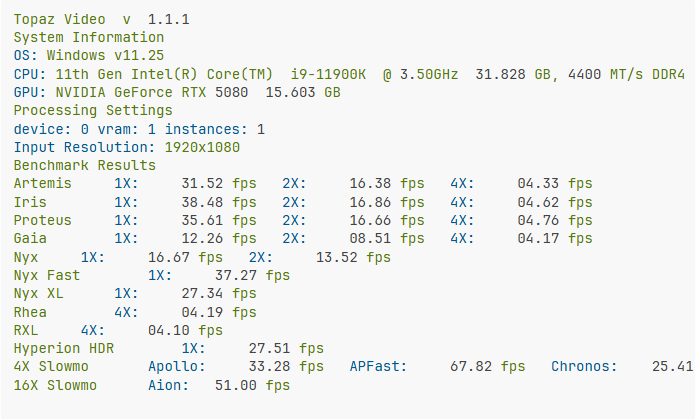
I use to be able to export, and render previews in proteus at 34+FPS on my RTX5080 then all of a sudden TOPAZ Crashed, Now I’m only rendering at 1-7FPS… What the heck happened?
Going to need more info here to understand the situation. What driver version are you running, have you changed video specs or moved files to a different drive?
Running anything else in the background on the system while processing? Windows updates?
A lot of variables at play when the app is running and processing your footage.
If you want to send the logs to the support team we can take a look to try and understand more.
How To Obtain Your System Profile (Windows)
To gather logs, please select Help > Logging > Get Logs for Support and attach the zip file to your reply.
Here is a video to help with the steps of how to collect the logs.
Ok… I am working directly with support on this issue now. I think part of this is I was working with a lot of 720p video upscaling to 1080. Then I switch to some 4K video that needs denoise, that is more intense but, the locking up and crashing isn’t something that should be happening. Typically what would one expect on FPS for processing NYX denoise on fairly noisy 4K video on a RTX5080 GPU?
Take a look at the benchmark section and you can see what other users are getting with their setups and can compare different system builds.
Here is a snapshot of a users benchmark test with a 5080 with 1080p footage, the numbers are rough estimates.