Video AI, Photo AI, Gigapixel AI are now legacy products. I own these apps’ licenses and I can reinstall them in the future on a new PC. Unfortunately, the installers don’t include the AI models that are meant to be downloaded after the apps’ installation. But what if - in the future - Topaz will decide to delete the legacy AI models from their servers? In that scenario you will not be able to download GPU models anymore. So, is there a way to keep/save offline your downloaded GPU models to reuse them for a future offline installation? Thanks in advance.
Hi.
Hope, this is what you’re looking for
Thanks AND-E for your reply, but it doesn’t help: installers does not include the AI models (installers are <1GB, models are >10GB). Topaz should make available both installers AND models for the download and for the personal storage, otherwise they could stop keeping legacy models (for legacy apps) in their servers at any moment. The risk is that the apps you buy are not yours forever, but only as long as the apps are actively maintained and the company still exists.
Might be worth contacting Topaz Support here’s the link to contact them directly
Topaz Support
support@topazlabs.com
Done, but the reply was funny: they insist that the installers include also the models… A bit unreal…
You are correct, the installer does not include the models.
Support tends to get confused when it comes to TVAI, thinking it’s photo ai or some other product.
The answer to your original question is that you can simply copy the models from the old machine to the new one, start the installer and it will ask you where you want to store the models. That’s where you point it to whatever folder you placed them in on your new machine.
You can also change this after you have installed the program, if you forgot to change the model location during installation. Just start the TVAI app, go to preferences and change where your model directory is.
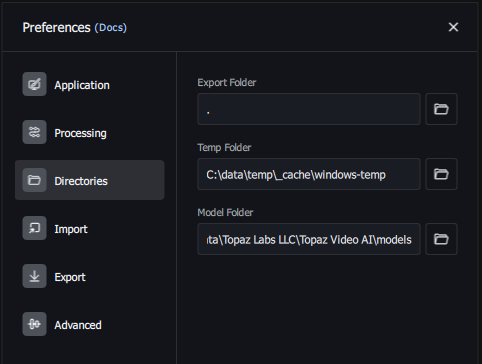
(screenshot from TVAI v4.2.2)
So where are the models?
The default location for the models (on windows) is: %PROGRAMDATA%\Topaz Labs LLC\Topaz Video AI\models
Do note, when you move the models to a different folder, you have to leave all the .json files, plus tvai.tz and auth.tz in the original directory, but the rest, the very large .tz model files you can move to your other folder.
For simplicity, I just tend to copy the entire models folder, models data and json files alike, and then delete only the large tz files in the original model folder. That way I also have a backup of all the metadata files :), even if TVAI isn’t really using those copies.
In fact, I just went through this exercise myself last week. A microsoft update wiped most of my system drive, but since I had already moved the models to a different drive, I just pointed TVAI at that folder during re-installation and I was then able to use those models without re-downloading.
For posterity, here is the relevant information about where TVAI and their ffmpeg runner look for various data:
Environment variables:
TVAI_MODEL_DIR: this is where it will look for metadata about the models. The metadata are the.jsonfiles. IIRC it also looks for the watermark file (tvai.tz) and license file (auth.tz) in this location. Default:%PROGRAMDATA%\Topaz Labs LLC\Topaz Video AI\modelson windows and/opt/TopazVideoAIBETA/modelson linux.TVAI_MODEL_DATA_DIR: the directory where it will look for the large model files (.tz), such as Iris or Proteus. Default: same asTVAI_MODEL_DIR.
if you set those in a terminal, then you can run their ffmpeg CLI entirely without the GUI.
This used to be documented on the topaz website, for the CLI interface, but seems to have been removed for some reason.
Dear jo2, thanks for your so-informative reply. Unfortunately there is a little problem here: I can’t copy ALL the models of TVAI simply because some of them can’t be downloaded! The “stabilization” models give me an error when I try to download them. Did you find any solution to that?
Many thanks in advance.
I assume you mean Chronos fast, as mentioned in the documentation?
I don’t know why there is a download error for that one. When I grabbed it back at v4.2.2 of the software it existed and downloaded correctly.
What I expect you can do if the version you’re using doesn’t find the model you want, is to install an older version of the program temporarily. Just to download the model you want. Then once you have the model files, you can re-install whatever version you prefer to work with, and just point that version to the model folder as previously described.
You can find past versions of TVAI on the respective release pages.
EDIT. I just tested downloading that model myself via the TVAI model manager in v4.2.2 and it worked fine. So test that version if your current one doesn’t work.
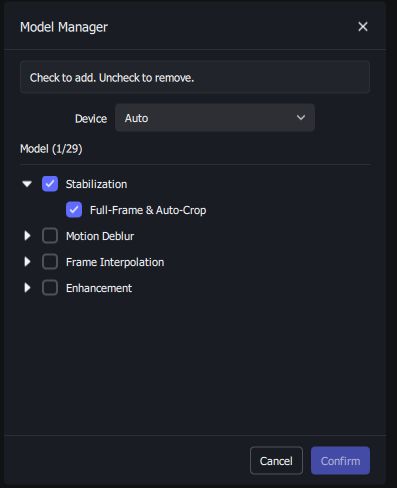
Apparently the “Stabilization” model comprises the actual models:
cpe-v1,cpe-v2,ifi-v1,ref-v2, plus the chronos fast modelchf-3. So these are the ones you want to archive from your models directory if you want to use them later on or on a different machine.
Thanks SO much jo2. It’s unbelievable that since v4.2.2 they never fixed the download of the “Stabilization” models. So, the old models work even on last version of TVAI!?! Fantastic. Very last question: I have to archive cpe-v1, cpe-v2, ifi-v1, ref-v2 and chf-3, so I should keep all the files with those names (and all the extensions) or some other file more?
Many thanks in advance.
To make it easy for you, just archive the entire “%ProgramData%\Topaz Labs LLC\Topaz Video AI” directory. That will save all the information that’s downloaded from the “cloud” except the license key, If you ever need to install from scratch you can then just replace that directory with your own backup.
I think I might have presented a bit too much detail about how the program works, so the above is what I’d recommend any “normal” user to do, as it’s just one simple operation; Copy-paste directory. Then in the future, Copy-paste it back in windows/mac file explorer 
Depending on what GPUs your 2 systems have, you may not be able to copy/paste the model files because they might be different files and could potentially not be compatible.
While Photo AI and Gigapixel’s installations do include the model files, Video AI does not, and this was an accidental oversight from support as it was handled by our account team and not the Video AI team since the initial email was regarding the general studio transition.
The stabilization model not download is a know issue, unfortunately, there is no workaround at this time and the team is working on resolving this. This is a pinned post in our bugs and issues section: [KNOWN ISSUE] Model for stabilization not downloading using model manager in 6.2.0
You can roll back to v6.1.3 if you’d like to download it.
Thanks for the version and the link!
Hi jo2, ok I followed your instructions. I installed TVAI 6.1.3 and downloaded its Stabilization model only, then I archived the models folder. Then I uninstalled 6.1.3 and installed 7.1.5, and I downloaded all its models BUT Stabilization (that can’t be downloaded). Now what? I suppose I have to paste all the 6.1.3 models-files onto the 7.1.5 models-folder, but without any overwriting (so that I’ll paste only the Stabilization-models), and as final thing I suppose I should set “Enable previous model versions“ in TVAI 7.1.5 Preferences (in order to use the old pasted 6.1.3 Stabilization models). Is that all right?
