The v2 version of Recover Faces in Photo v1.0.1 pretty much kills all colour from the iris of eyes leaving the subject with what looks like dilated pupils. I note v1 retains the colour of the iris. Also for my tastes, the v2 model also seems to overdo wrinkle smoothing and often gives a plastic skin type effect, so much so that I usually find myself selecting the v1 recover face option as v2 seems to consistently overdo things.
Thanks for the detailed feedback — that’s very helpful.
To better understand what you’re seeing, would you be able to share some before-and-after screenshots showing the differences between Face Recovery v1 and v2? This will help our team evaluate the behavior more closely, especially around iris color and skin smoothing.
Feel free to upload them here whenever you get a chance!
1 Like
Here’s an example when using Recover Faces v2 (zoomed in for clarity) that shows the left (unprocessed side) has the iris visible whereas the previewed (right) side has almost all of the iris darkened down to clse to black making almost the entire centre of the eye appear to only be the pupil. I have seen this in many images and it doesn’t seem to matter what the colour of width of the iris is. Interestingly now and then it leaves the iris in tact. I’ll dig out another example of the skin smoothing in another reply. Thanks.
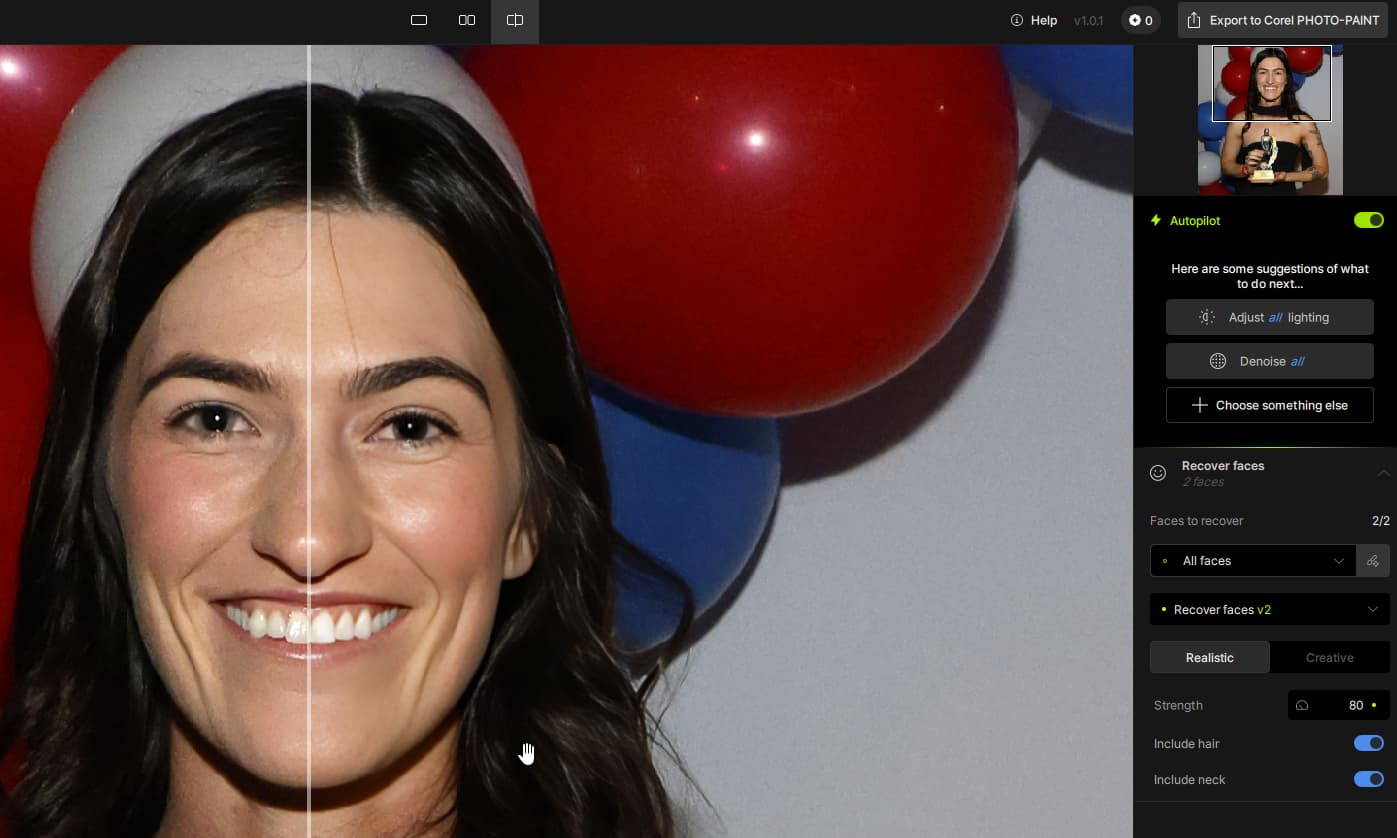
Thanks for sharing that example, it really helps illustrate what you’re seeing with Face Recovery v2.
Face Recovery is primarily designed for low-resolution or very small faces where facial details are lost or unclear. In cases like the one you’ve shown, where the face is already fairly detailed, applying Face Recovery can sometimes produce unintended results, especially in areas like the eyes or skin texture.
We’re currently working on a new enhancement model specifically for high-quality portraits like this, which will focus on refining and enhancing facial details more naturally, without the over-smoothing or loss of iris color you’ve noticed.
For now, we recommend leaving Face Recovery off for detailed portrait images like this one. Really appreciate you taking the time to share your results, it’s feedback like this that helps guide future improvements.
3 Likes
That’s great news! Looking forward to the new face feature.
Could the app automatically switch between a model for small faces and a model for large faces? Say, if the face has more than X pixels in one direction, then use the large face model, otherwise, the small face model. That wouldn’t be perfect, but I think it’s more convenient than manually checking several faces for batch processing.
Thanks so much for the feedback — we really appreciate your suggestion!
That’s a great idea about automatically switching between small and large face models based on detected face size. We’ve heard similar thoughts from other users, especially for improving batch workflows.
If you haven’t already, feel free to add your suggestion to our dedicated Topaz Photo Ideas section!
This is where we track and review feature requests with the development team. Your input helps guide future improvements!
2 Likes
I’ve also found the Recover Faces V2 unusable.
Just downloaded Topaz Photo, the replacement for Photo AI where v2 is still unusable. So far I don’t see a reason to renew my subscription with new releases are a step backwards. This v2 should have never been released.
