It would be awesome if you could please add keyboard short cuts to add and augment “filters”/enhancements when processing images. The reason is that the UI for Photo AI and Topaz Photo is VERY click heavy and, quite frankly, not very intuitive.
Thanks!
Examples:
D = Add Denoise
Ctrl/Opt + D = Configure Denoise
R = Recover Faces
Ctrl/Opt + R = Configure Recover Faces
I’d love to request some additional keyboard shortcuts for adjustments in Topaz PhotoAI. Shortcuts similar to those in Lightroom Classic/Photoshop would speed things up for everyone.
It’d be super handy for making quick edits without constantly reaching for the mouse, making the process way more efficient. Plus, it would help us feel right at home if we’re used to Lightroom Classic/Photoshop.
Could program developers add same kind of command as photoshop has for going back and forward with command+x keys. It would be easier on Photo AI to compare the changes done and seeing tweaked results.
Thank you for your suggestion! The ability to quickly compare changes using hotkeys, like the command + X functionality in Photoshop, is a great idea and would certainly enhance the workflow in Photo AI. While this feature isn’t currently available, we will bring it up to the development team for consideration in future updates.
Be sure to check out the current hotkey shortcuts by opening Photo AI and then going to Preferences > Shortcuts
Bush size can bei modified with the left and right bracket-keys. They are not available (or hard to use) e.g. on a German keyboard. Therefore it would be useful, if you could also use different keys (as ist possible with Photoshop).
There needs to be a way in “Edit Preferences”, or elsewhere, to change the shortcut keys, so that actions like changing the zoom level can be aligned with other editing programs.
Ideally “Edit Preferences” should do what it says on the tin, and allow the shortcuts to be edited directly, as is provided in most other image editing tools. If that’s too difficult an intermediate provision via editing an INI file or the registry would be OK.
I think Topaz Photo is an excellent application with a particularly bad but rectifiable flaw in its interface. For some reason, and I don’t know why, Topaz Photo refuses to include the basic operations of Command-C, Command-A, and Command-V.
When you drag a bunch of images in and I want to batch process them, the natural instinct for most if not all users is to apply an effect, Command-C copy the settings of the effect, Command-A select all, and then Command-V paste those settings. But not in Topaz. If the Command C, A & V functions were being used for some other operation in Topaz, I might understand it - but they are not. Command C, A & V simply do not exist here. Why?
Copy & paste are in the pull-down menus as awkwardly written descriptions of the actions but there are no keyboard shortcuts. This is simply not intuitive as almost every program harnesses Command C, A & V for those operations and has done so for decades. (Yes, it s true that Lightroom does not exactly do this - and that too is very frustrating and believe me I’ve had the same feedback for Adobe.)
Even if you’re not batch processing, copying your settings and then applying to a different image and then customize those settings should be a speedy and simple operation.
And most applications choose to highlight selects in blue so you can see what is selected. Select-All is a checkbox in the window(?) With the select-all checkbox you would think that would mean it would apply the same effect to all the images. But if you use “Apply preset” with a contextual menu, it does not in fact apply the effect to all of them - further adding to confusion. The checkbox only allows an otherwise greyed out action in the pulldown menu to appear. Again, not intuitive based on other applications.
So please consider adding in this basic functionality to make things so much more intuitive for the Topaz Photo’s workflow. There are, as far as I can tell, absolutely no reasons not to do this. And I think it would be largely welcomed by the Topaz community.
Forgive me if this already exists (if it does, I missed how to do it)
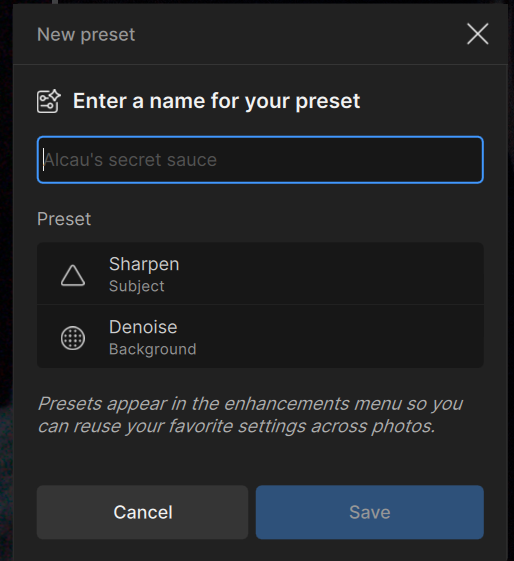
IMHO, it would be helpful to have the option of adding a keyboard shortcut when you define a preset set of filters… presumably it would be added to the New Preset dialog - i.e., a new input field for the keystroke to activate the filter… you’d have to add logic as to whether the selected keystroke is available and update the rename preset functionality to include the ability to remap the keyboard shortcut
Quick bump. Did anyone from Topaz acknowledge or reply to the request to make keyboard shortcuts customisable? This should be a relatively straightforward change of significant use to those of us who work across several software programs.
This was acknowledged by John above. This idea is also shared with the development team, but we have to prioritize among a lot of issues so there is no answer or timeline on this yet