Gigapixel blurrs (ie. softer than the original) a DNG photo (made by DxO PureRaw 5) trying to upscale x2.
File process path: RAW.CR3>DNG>LrC>Gigapixel>LrC
Never had this problem in the past
Any one else had issues with upscaling DNG photos?
Gigapixel blurrs (ie. softer than the original) a DNG photo (made by DxO PureRaw 5) trying to upscale x2.
File process path: RAW.CR3>DNG>LrC>Gigapixel>LrC
Never had this problem in the past
Any one else had issues with upscaling DNG photos?
Without some proper context (before and after) it’s hard to draw any conclusions, but there is one thing that has come up in the past.
If you view an image at 100%, and it looks very soft (even blurry), then upscaling will probably not decrease the blur (you’ll just have 2x the blurry pixels). But as I said, without context, it’s difficult to say what might be happening.
using Windows 11,
It seems to happen with any tack sharp DNG from DXO PR5 edited in LrC
I tested a tack sharp Canon RAW.CR3 photo from LrC to Gigapixel x2 back to LrC with no blur
thanks for your response
I notice the blur problem in Gigapixel x 2 upscale is only when using as a plug-in in LrC and upscaling DNG.
If I export the edited DNG as a JPG (outside LrC) then use Gigapixel x2 with super results.
In the past I’ve always upscaled a JPEG for printing using Gigapixel as stand alone, it’s the first time I got lazy and used Gigapixel as a plug-in in LrC to upscale an edited DNG before exporting the upscaled image as a JPEG from LrC
Do you get the same blurry result if you upscale the DNG directly with standalone Gigapixel, rather than use the plugin?
No, Gigapixel upscales the un-edited DNG as ‘stand alone’ ok, I guess it’s an Adobe LrC or DXO issue, but Gigapixel used as plug-in produces a blurry / soft upscaled edited DNG sent from LrC (imported from PR5). Maybe just happens on Windows 11 as in my case. regards Lee
I’ve seen issues where the gpu doesn’t have enough vram to run LrC and Gigapixel simultaneously.
LrC grabs some vram for it’s own use, and doesn’t leave enough for Gigapixel to run correctly. That’s more likely to occur on systems with 6GB of vram or less (it’s happened to me).
Yes I only have 8GB of vram - I realise now I did a storage/memory wasteful process using Gigapixel as a plug-in in LrC to upscale the already very large DNG ‘digital negative’. I’ll stick to upscaling JPEG exports from LrC using only Gigapixel. Thanks for your reply.
Hello!
To retain the most quality and preserve your processing, we recommend sending a TIFF to Gigapixel for upscaling.
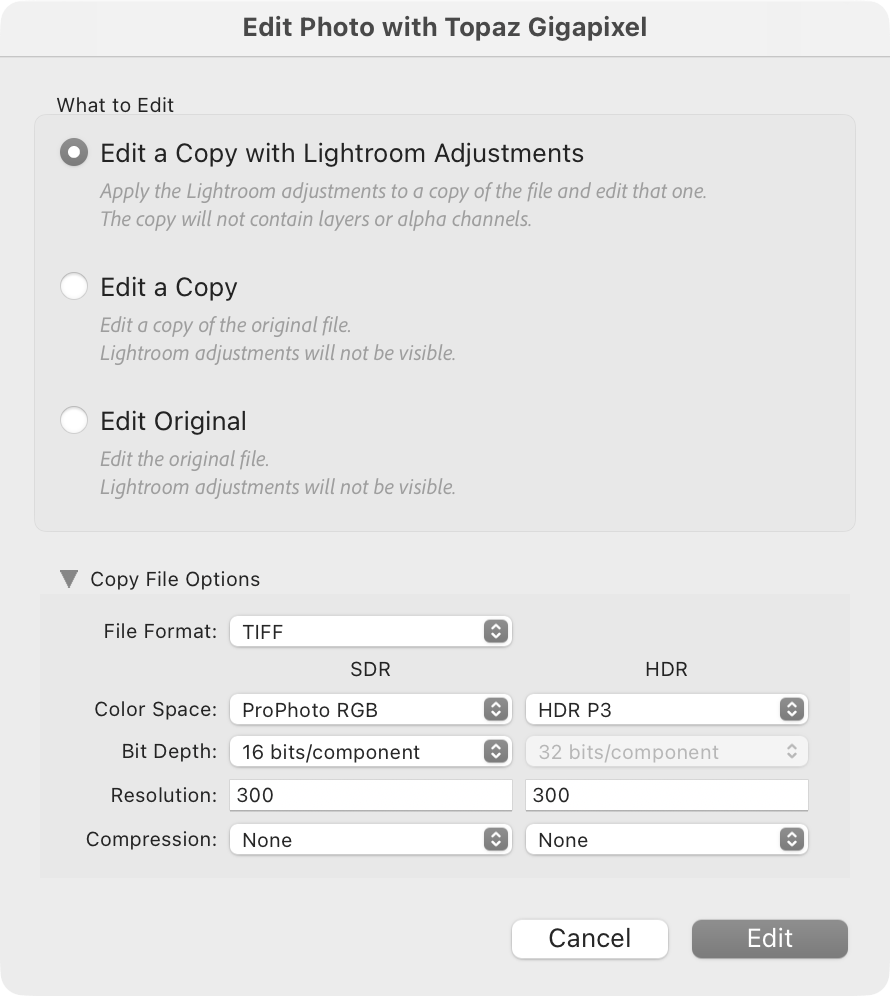
When prompted to initiate the plugin, you should get this popup:
Under “Copy File Options” use TIFF and a bit depth of 16 to retain quality across your workflow.
If your images are large and your system RAM is below 24GB, then you might encounter processing errors.

Thanks for the advice to use tiff instead of dng