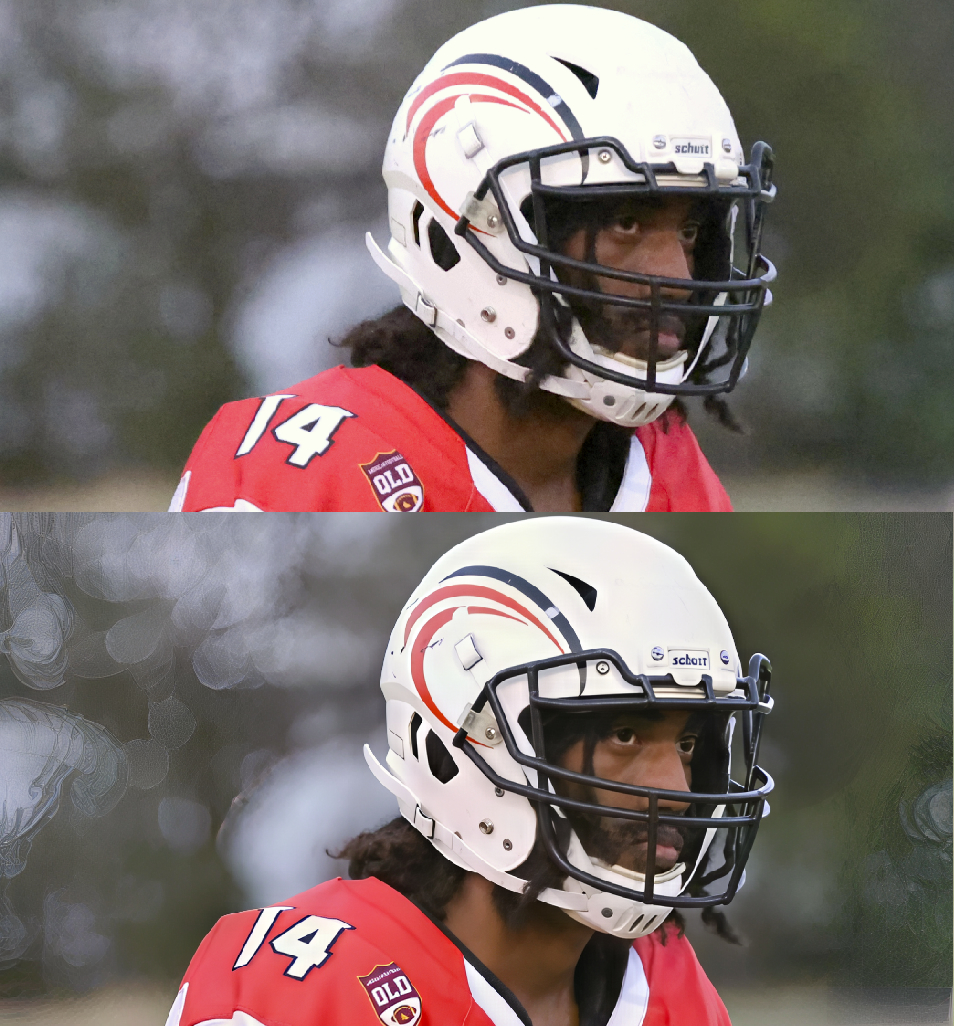
Superfocus V2 in Photo v1.0.2 needs subject selection/isolation mode to prevent the background getting screwed up when the subject is sharpened/refocused. In the attached image, you can see it did an excellent job in the subject but created a horrible broken glass effect on out of focus background highlights. This would not have occurred if I had been able to select a subject area to restrict what Superfocus does its magic on.
Hi.
Forgive me if I’m stating the obvious, but aren’t you using one of the Selection options the Select Subject for instance, for isolating your subject from the background.
Simply, render your image and once the preview appears then, Click on the Super Focus Tab once again and choose Select Subject from the Selection Panel
Here’s some more information about Selections and using Super Focus
Hope this helps
After Super Focus is done rendering, you’ll have the selection tools available so it affects only the subject. This is not a bug, it’s the way the enhancement is built.
1 Like
That would be nice if that worked, but I have found in v1.01 is I can select Subject but the filter still gets applied to the entire area creating weird artifacts in the background. It’s as though it ignores the selection area.
Super Focus has to Render the whole Image first before any Selection can be applied this behaviour is true of all Genaitive AI Models including those found in Photoshop the only difference is Photoshop created a Layer Mask to mask out the unwanted areas which, Super Focus can’t do hence, masking is applied afterwards.
I’ve just tried all the different Selections Options and they are all working as expected the only caveat to that is for me because, I’m using the latest version 1.1.0 the Selections aren’t showing the Masking areas.
To overcome this behaviour is once you’re Rendered your image and have chosen your Selection by reselecting the Super Focus Tab and choosing for example; Subject you can view the Selected area by Clicking on the Grey Box under the words Super Focus and to the right of the Selection Drop-down list.
I don’t know if your issue is with version 1.0.1 or something else so, please update to the latest version 1.1.0 and hopefully that will resolve the issue.
Hope this helps
One major flaw here is you’re assuming everyone is lame enough to be an adobe subscriber. I use Topaz plugins with Corel PhotoPaint for which I have a perpetual license. I stopped using Photoshop years ago when they dropped perpetual licenses and went to subscriptions only, and have happily used Corel PhotoPaint as part of the CorelDRAW! suite ever since.
I didn’t assume anything of the sort and this has nothing to do with Photoshop I was merely pointing out that Adobe use a similar process with Photoshop’s AI where the whole Image has to be Rendered first before Masking is applied
Let’s examine that for a moment and use myself as a real world case study:
In 2012 I paid £376.93p for the Photoshop CS6 Extended Upgrade and £50.00 for the Lightroom 4 version Upgrade a total of £426.93p and like most people I would only Upgrade every other version.
Let’s assume for one minute every other version was every two years/a twenty four month period and using simple math let’s divide the the Upgrade prices by twenty four months
£426.93p ÷ 24 months = £17.78p a month over twenty four month period.
£426.93p divided by two years equals £213.46p a year
In comparison the Adobe Photography Plan which includes Photoshop Extended Lightroom and a whole host of other applications cost £10.00 a month for twelve months which equals £120.00p or over two years equals £240.00p
So, for argument sake over a two year period I have saved £186.92p or £93.46p a year or £7.78p a month on the Subscription Plan compared to the Perpetual License.
Therefore, with my Adobe Photography Plan Subscription since 2012 I have saved a total of £1,214.98p in comparison if I was able to continue with the Adobe Perpetual License for Photoshop and Lightroom combined.
By the way, that Upgrade price for Photoshop and Lightroom would have increased substantially over that thirteen year time span.
In conclusion, the Subscription Model is better value for money for myself then the Perpetual License would have been if I continue down that path and it’s a similar story with Topaz as I will save a lot of money in the long run with the Topaz Subscription.
As far as, Corel PhotoPaint is concerned I don’t know, what the equivalent would have been just for PhotoPaint alone £69.99p or £99.99p a year.
Yes, it can be argued that some people would only Upgrade when they needed to and that would be their choice not yours, not mine or anyone elses we, all make our own choices in this life.
My choice is My Photography is My Art and for myself I demand the latest and greatest applications from both Adobe and Topaz to achieve my goals and I’m not about cut off my ear  (sorry wrong Artist)
I’m not about to cut off nose  to spite my face.
Meaning, I’m not going to make a decision out of anger and cancel the applications I love because off a mere Subscription or Plan that would ultimately lead to self-sabotage and essentially put me at a disadvantage.
In conclusion of the conclusion, essentially Subscription aren’t a bad thing and in most cases can lead to substantial savings and I can’t see the point of cancelling a Subscription because, from my point of view all it does is highlight the futility of seeking revenge in a way that backfires on the person taking the action and harming oneself more than, the intended target or targets.
So, please don’t assume anything when all I’m trying to do is help you
3 Likes
This topic was automatically closed after 60 days. New replies are no longer allowed.
