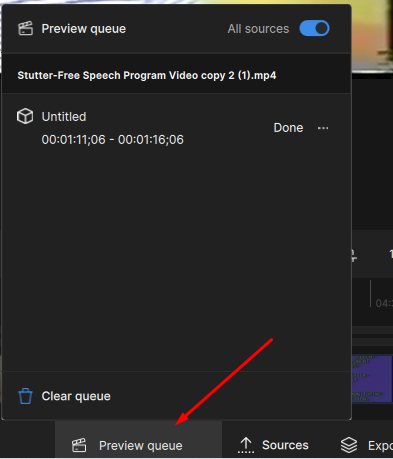
Why can i only have one preview in queue per tab? Last preview always gets overwritten so you can never have multiple previews per tab.
Instead of previous Topaz AI versions where i could have as many previews in my preview queue, as i wanted?
My last preview in the preview queue always gets overwritten, so you can never have multiple preview versions per tab, in your preview queue.. to quickly test various settings out.
Any help with this?
Windows 11 (24H2)
Intel i9 13900K
96 GB RAM
Nvidia ASUS ProArt RTX 4080 Super (16gb vram)
I have found the same thing using a base M4 Mac mini. I have been using Video AI 5, (which was my first version) but I decided to try this new version. The user interface and experience is vastly inferior to VAI 5. I haven’t done any quality comparisons of actual output yet as I am completely flummoxed by this terrible interface and performance. I can’t find any way to loop the previews either. And when I tried clicking in another tab they just vanish. I think I will stick with VAI5.
yeah I hear you I like the older version I currently primarily use Video AI v5.3.6 .. Since it allows me to do multiple previews when testing out various settings and the interface I think is the best it ever was.
I use the newer versions for some of the newer models but the workflow really slows you down since you have to do a lot of clicks.
I really hope they get the preview bug figured out so you can make multiple previews which is the whole point of previews testing out various settings without having each previous preview overwritten, thus wasting any time you spent rendering previews for nothing.
To run a new preview with different settings you will need to create a new tab. This way you can compare against the original or a tab versus another tab.
To loop playback on a preview, use the In/Out markers and select to preview from In to Out this will enable the loop option.
It gets very confusing doing with multiple tabs, which defeats the whole purpose of the preview queue panel?
Whereas the previous versions, I could see multiple video previews encodes as different line items within the preview panel.
Not sure why you can’t just have the preview cues for particular video within the same preview panel instead of multiple tabs which gets confusing when you have multiple videos.
Especially when previews just randomly stop or disappear, because you start a new preview. Since there’s really no preview queue system, like previous versions.
There is a preview queue at the bottom of the interface, and you can rename the tabs if desired to help keep track of settings when running previews before exporting a video.
well that’s what I said, creating a tab for different in code settings, makes the preview queue pointless. Because you have to create another tab with different settings. Because the different settings don’t show up in the same preview panel, because I have to create a new tab.
and any new settings, when hitting the preview button.. just stops and overrides the existing preview, so there’s never a preview queue for the same tab.