I am uprezing 720x480 dv footage (.9 pixels) In both Dione and Proteus the output file is slightly wider than the original . probably the 704 720 problem. If I transcode the DV footage to Prores square pixels (640x480_ then then uprez is the correct size. Let me know if I can do this uprez in Topaz without having to go thru a transcode to square pixels.
Deleted
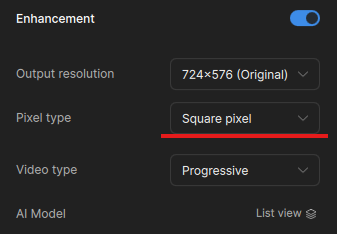
My source footage is DV standard definition very standard (720x480, non square pixels)
When I change to original pixels the output errors out immediately.Output won’t even start. I have tried it with all the Dione and Proteus models.
Video type has to be interlaced because it is DV but even if i change that to progressive it still errors.
Any time I select original pixels it errors out. would you like to see the export error logs?
Can you send the logs to the support team to review? help@topazlabs.com
To gather logs, please select Help > Logging > Get Logs for Support and attach the zip file to your reply.
Here is a video to help with the steps of how to collect the logs.
