You then process a 8bit depth inside a 16 bit depth.
You compute with higher precision (16bit) but the input will remain low precision (8bit).
Even if you put it out as 16bit.
As long as the model does not “generate” a higher bit depth, low bit depth will remain low bit depth.
And noise is a dither, you don’t add information.
If you want to do it right with 8bit input:
8bit input → conversion to 16bit → compute (16bit) (editing) → conversion to 8bit-> 8bit output
Conversion to 16bit will not add any information but it will lower quantisation error while editing because you compute in higher precision.
Highend would be: 8bit input → conversion to 16 bit → generate 16 bit material from input (diffusion) → compute in 16bit (editing) → conversion to 8 bit or remain 16bit → output (depends on what the user want to do)
Topaz Video functions similarly to Topaz Photo and Gigapixel in this regard. It doesn’t just Wrap the old data in a Larger Container; it uses its AI Models to intelligently estimate and fill in the missing colour information.
Here is a breakdown of how that process works and what you can expect:
How Topaz Handles Bit Depth:
When you upscale a video in Topaz Video and choose a 16-bit output format the software isn’t just adding empty zeros to the end of your data strings.
During the enhancement process, the AI Models analyze Gradients like a Sunset or a Clear Blue Sky. In 8-bit, these often suffer from “Banding.”
The AI Predicts what the smooth transition should look like and Generates new Pixel Values that occupy that Higher bit-depth space.
As a result you get a file with significantly reduced “Posterization” (Banding) and more “Headroom” for Colour Grading in Post-Production.
All of the models generate new pixels when running as needed, but the true “generative-AI” models that will add new details and create them are within Astra under the creative settings right now.
The GAN-based models (Proteus, Rhea, Iris, etc.) and the diffusion-based Starlight family within Topaz Video desktop app will not creatively generate new pixels, they are working with what is already there and generating new pixels as needed to fill in when upscaling or enhancing/altering details based on the source video.
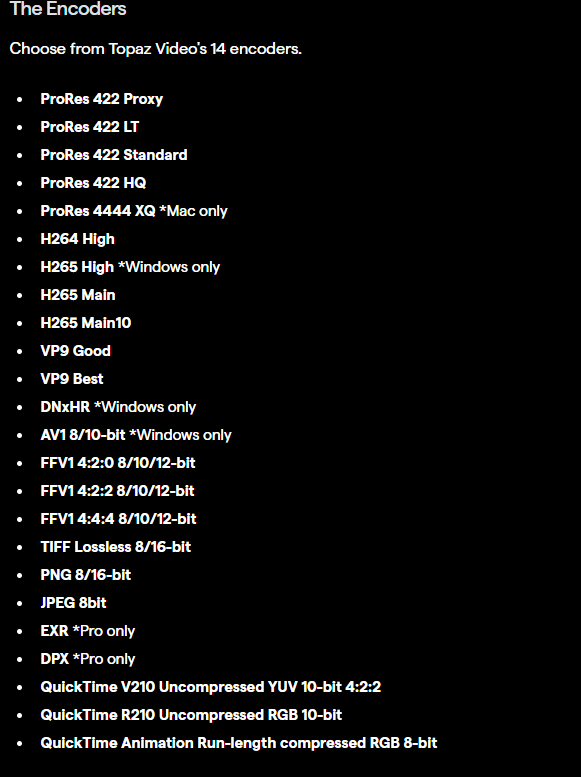
For 16-bit, you would need to swap to image sequence outputs and use EXR, TIFF or PNG formats.