Chromaster v2.x : The ultimate companion Topaz Video / Video AI deserves

Thanks for the feedback and the screenshots!

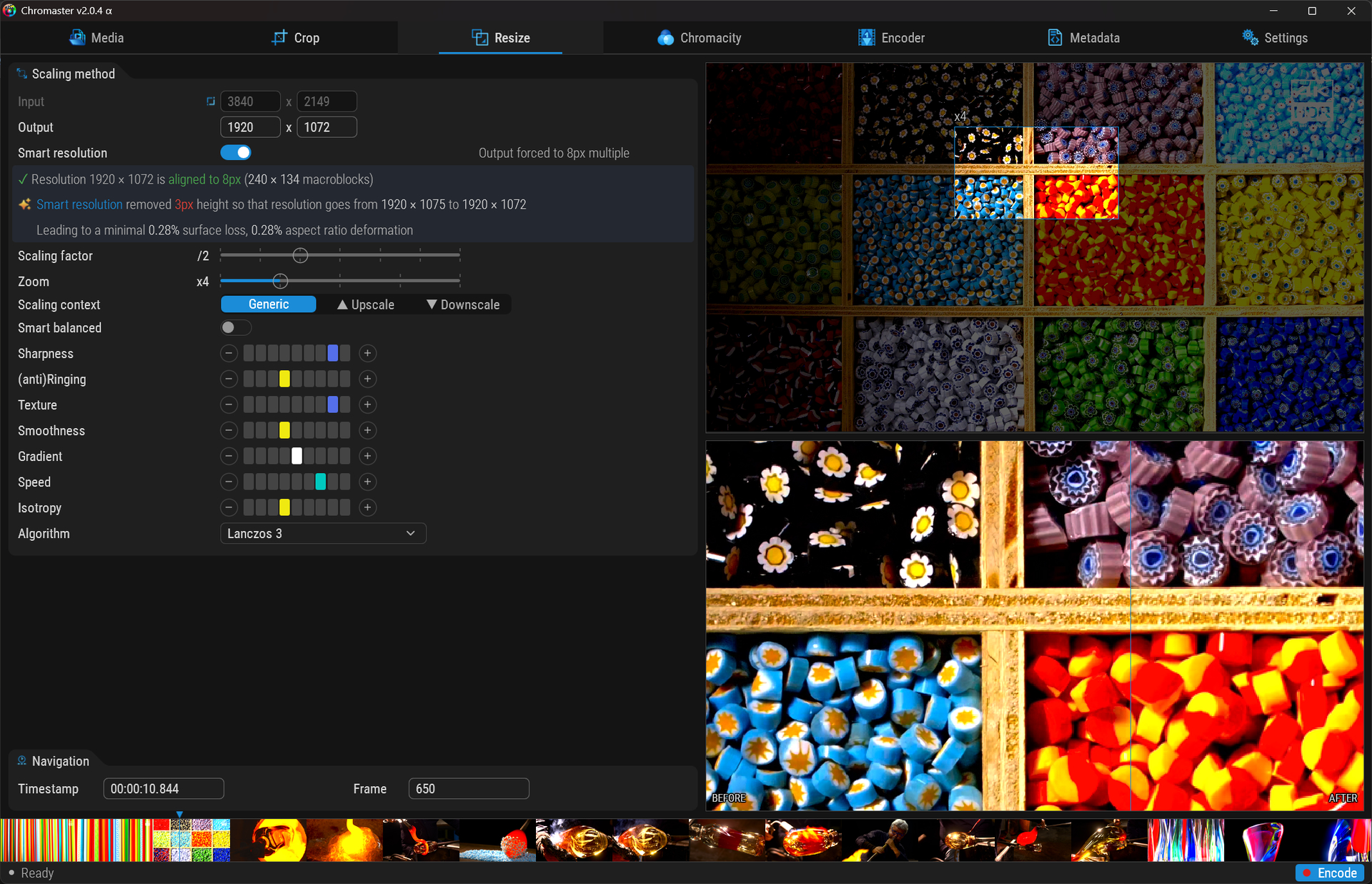
About the preview quality — the Before/After view in Chromaster shows only the resize result (how FFmpeg scales your video to the target resolution). It does not apply any encoding parameters. So switching between Archive, Extreme, or any other template won’t change what you see in the preview — that’s expected.

The actual encoding quality (CRF, grain synthesis, variance boost, etc.) only applies during the real encode. The preview can’t show these effects because SVT-AV1 needs multiple consecutive frames to work properly — temporal filtering compares neighboring frames to reduce noise, film grain is synthesized at decode time, and the rate control adapts across the entire video duration. A single-frame preview would be misleading since it wouldn’t represent the actual quality you’ll get in the final file. Think of it like judging a movie from a screenshot — you’d miss everything that makes the encoder smart.

If the preview looks different from what you remember in the previous version, it’s likely the resize algorithm that changed — check which one is selected in the Scaling method group. Lanczos 3 is usually the sharpest for downscaling.

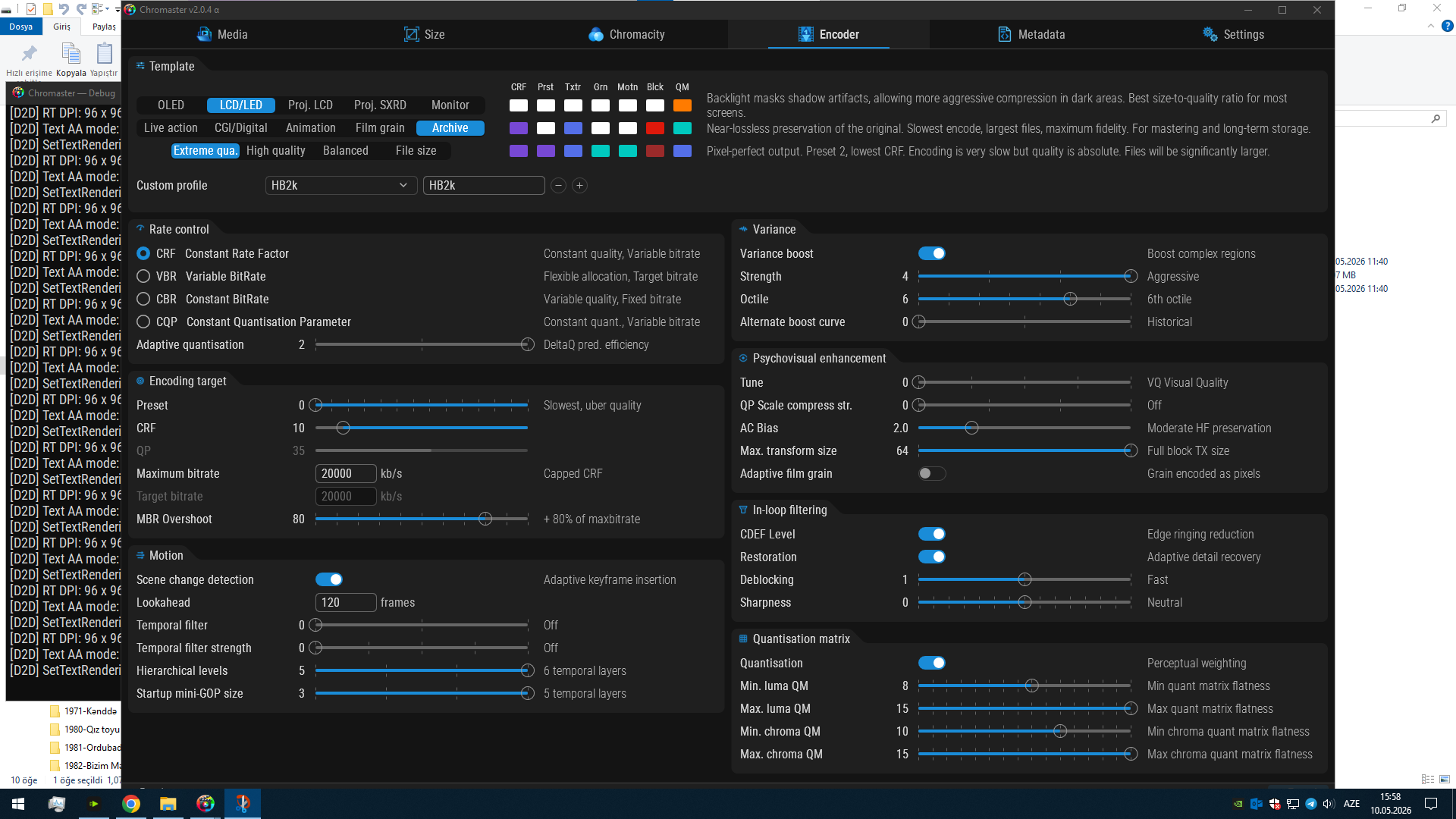
About Archive + 50% reduction — a small heads up: Archive mode is designed for preserving your source at its original resolution, pixel for pixel. Downscaling inherently removes pixel information, so combining it with Archive is a bit contradictory. If you want the best possible quality at a reduced resolution, “Extreme” priority with your display and content type selected would be the right choice — it gives you the lowest CRF and slowest preset optimized for your specific use case.

About the GUI size at 1080p — the current window size (1600×1032) is the minimum design baseline. It fits 1080p with the Windows taskbar, but just barely. This is intentional to ensure all controls remain readable and usable. F11 or the maximize button lets you toggle to expanded mode on larger screens.

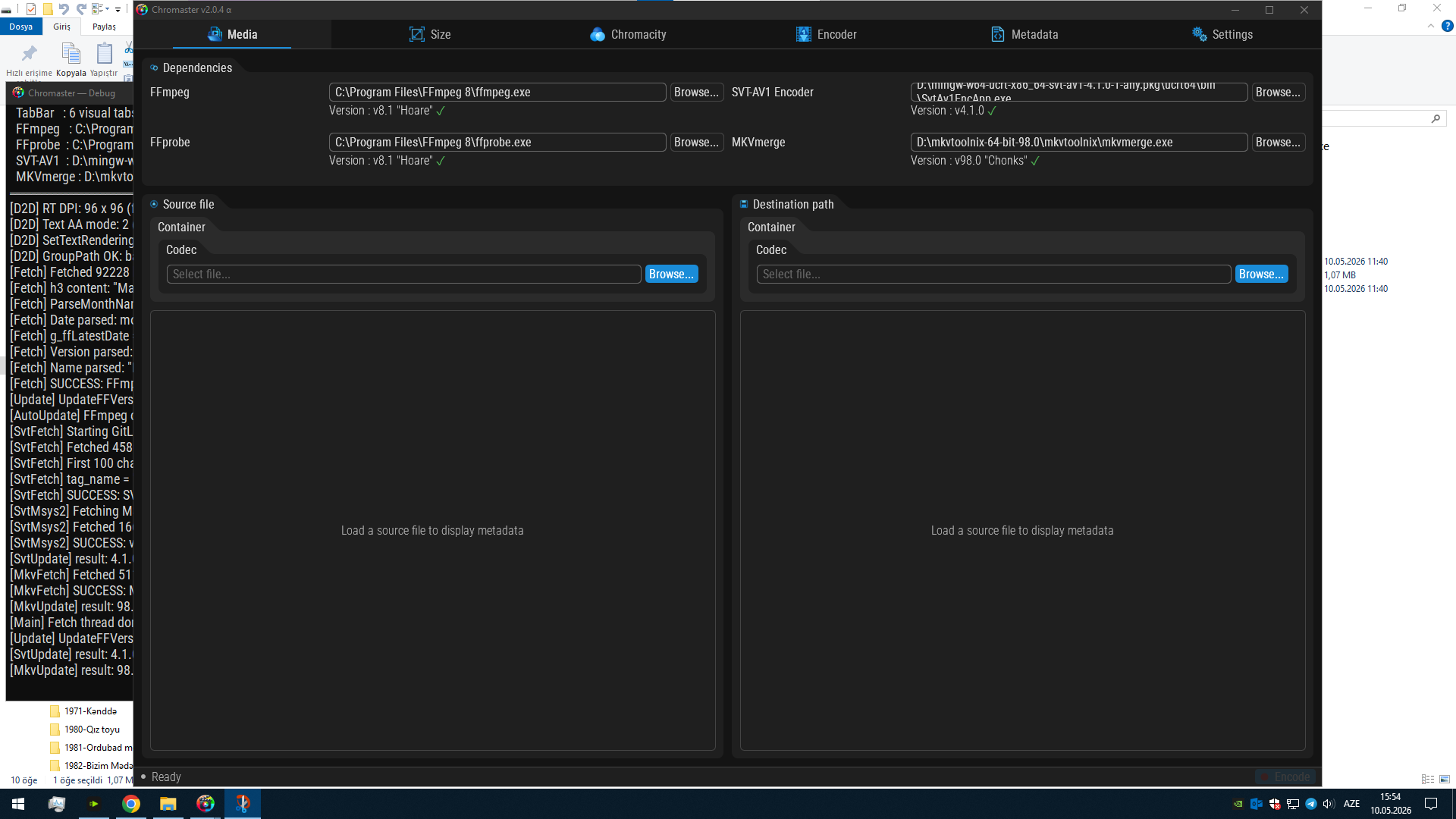
Could you share a full desktop screenshot showing the Chromaster window on your screen? That way I can see exactly how the GUI fits at 1080p. And if possible, point out what specifically looks different to you in the preview compared to the old version — a side-by-side with a red circle or arrow on the area that bothers you would help a lot.

The full-screen output looks like this, meaning it covers the entire screen. The encode key is still below the start bar; it only becomes visible when you press F11 to make it full screen. I think it would be more useful if it were a bit smaller and had scroll bars to move it down. I’ll test it by reducing it to 50%. Thank you for your suggestions. I had chosen the automatic option; do I need a separate setting for black and white videos?

after F11:

The modes include Archive, but not Extreme; however, Extreme quality is also available.

My bad concerning fiting in 1080p screen, bug is found
Focusing the problem and coding a fix

If absolute necessity use a slightly lower DPI


Archiving means that no pixels are modified. If you reduce the resolution, some pixels will inevitably be altered. Therefore, to maintain maximum fidelity, select “Extreme qua.” for “Extreme quality” on the line below.

Chromaster v2.0.5 α — Security & Polish Update


1080p Display Fix

  • Window now fits perfectly on 1080p screens (1920×1080)
  • Title bar height properly accounted for — no more overflow below the taskbar
  • Client area set to 1600×1006, aspect ratio preserved

Security Hardening — 5 automated audits, vulnerabilities found and patched

Chromaster went through a full security sweep using purpose-built audit agents.

  • Input Sanitization
  • DLL Hijacking
  • Memory Safety
  • Resource Leaks
  • Privilege Escalation

The full audit covered command injection, path traversal, buffer overflows, DLL search order, handle inheritance, format strings, integer overflow, and privilege escalation chains. Chromaster is now significantly more hardened than most encoding frontends.

This enormous increase in precaution is due to the manipulation of UAC for certain functionalities.


CPU Monitoring — HWiNFO Frequency

  • Per-core frequency now reads from HWiNFO shared memory when available
  • Precision: ~1-5 MHz (hardware-dependent) instead of 100 MHz steps from the Windows API
  • Monitoring group in Settings now shows 4 status lines: AMD driver, HWiNFO shared memory, CPU temperature source, CPU frequency source
  • “Restart as admin” button moved to its own line with a warning explaining the tradeoffs of running elevated

Smart Resolution — Verbose Feedback

  • Alignment indicator now shows macroblocks count when aligned: “✓ 960 × 544 — aligned to 8px (120 × 68 macroblocks)”
  • When not aligned, suggests the fix: “:warning: 960 × 540 is not 8px aligned. Enable Smart Resolution or adjust resolution to 960 × 544”
  • Smart Resolution explains what it did: “Added 4px height so that resolution goes from 960 × 540 to 960 × 544, leading to a minimal 0.74% surface gain, 0.12% aspect ratio deformation”
  • Proper messages when no source is loaded
  • Disabling Smart Resolution now restores the original values before adjustment

UI Polish

  • New tip boxes (subtle blue-gray panels) behind explanatory text throughout the app — Auto-save, Auto-search, Auto-update, Smart Resolution, Parse HDR, Restart admin, Luma footnote
  • All tip box comments are now dynamic: they change based on toggle state to explain consequences of both ON and OFF
  • D2D_DrawColorText fade alpha now properly applied to color tags — no more abrupt disappearance when crossfading
  • Unicode escapes replaced by actual characters in source for readability
  • Template group: “Extreme quality” and “High quality” tiers, “SXRD” projector type, “Digital” content type added
  • Score matrix headers shortened to 4 chars max with hover descriptions
  • Custom profile save/load with combo + input + add/delete buttons
  • Smart icon (lightbulb) for Smart Resolution features — 16×16 and 32×32

Alpha Expiration

This build expires June 19, 2026.

Download Chromaster v2.0.5 α

Chromaster v2.1 α — Quality Analysis Update

Are your encoding settings actually good?

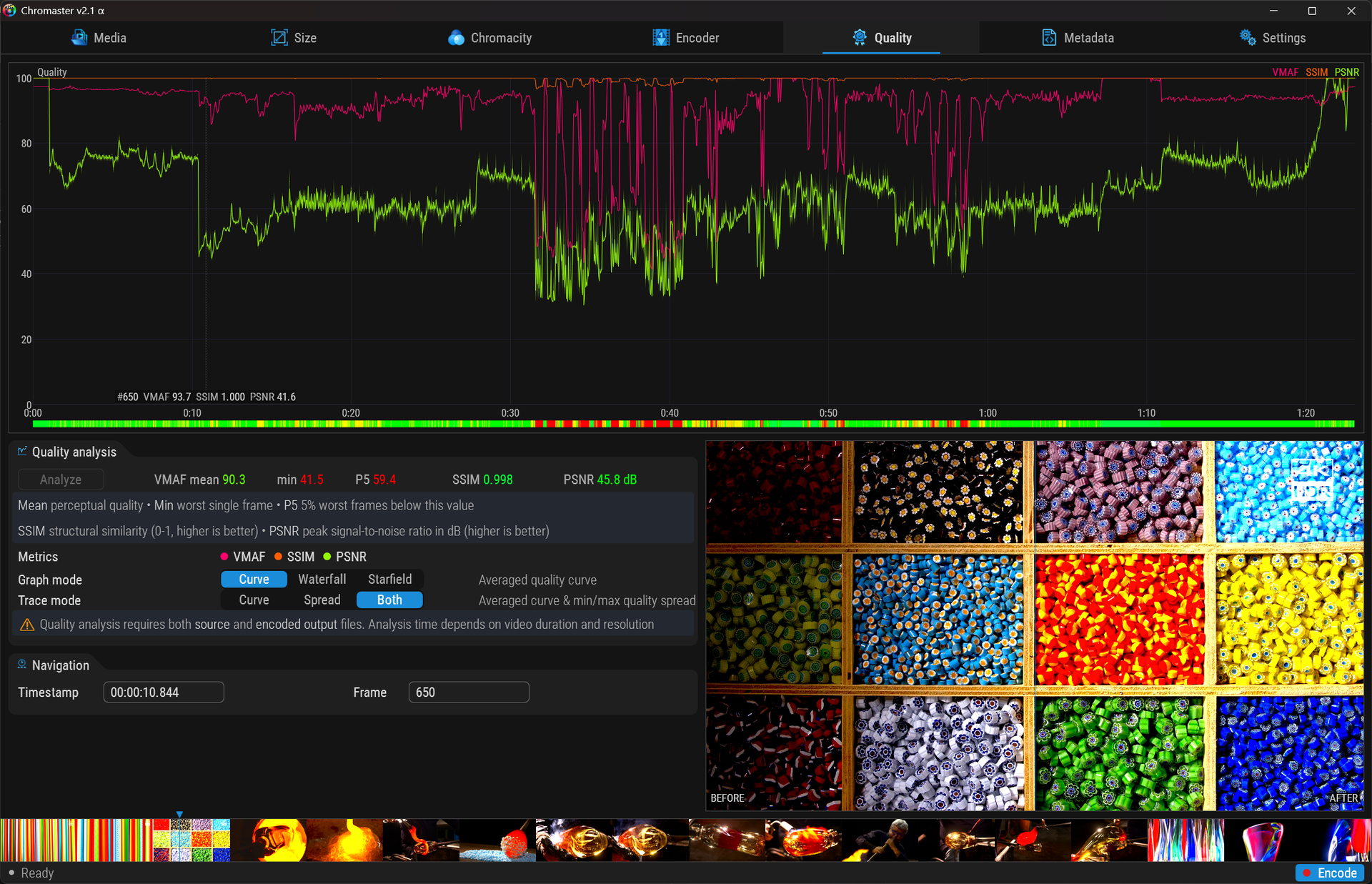
The new Quality tab runs VMAF, SSIM and PSNR against your source in a single pass !

Click any dip on the graph — source vs encoded frame pops up side by side.

No guessing, no eyeballing. Three metrics, one truth. Unique feature :star_struck:


New tab: Quality

Post-encode quality analysis — FFmpeg libvmaf + native PSNR in a single pass.

  • VMAF, SSIM, PSNR computed simultaneously via split filtergraph
  • Curve mode: averaged quality per segment, optional min/max spread with cosine falloff
  • Waterfall mode: intensity cascade from adjustable threshold (slider 80-100), logarithmic gradient
  • Starfield mode: Coming soon, UNIQUE graph (hard maths inside :sweat_smile:)
  • Heatmap strip: instant quality overview, 5-stop gradient green → red
  • Dot toggles: DaVinci-style colored circles, compact per-metric on/off
  • Gradient-colored stats: VMAF mean/min/P5, SSIM, PSNR — color reflects score quality
  • BEFORE/AFTER preview: click graph → source vs encoded side by side, migrating spinner
  • Unified frame cursor: dashed line on all graphs (Luma, Saturation, Scene, Quality), contextual info
  • Auto-detection: existing _chroma_qa.log loaded automatically on source open
  • PTS realignment: setpts=N eliminates timestamp drift at (eg 59.94fps) between containers, special feature usefull if any treatment with MKVmerge
  • Pink progress bar with frame-based ETA

FFmpeg

  • Build type displayed: v8.1.1 "Hoare" (Essentials build) ✓ full is at the moment useless
  • Auto-update mutual lock with encoding and VMAF analysis
  • Point-release names properly shown

Settings

  • Click to seek — global toggle, shared across all graphs
  • Restore last session — reopens last source with all settings
  • Dynamic tip boxes — Auto-search/Auto-update tips change with toggle state

Smart Resolution

  • Verbose: “Added 4px height, 960×540 → 960×544, 0.74% surface gain, 0.12% deformation”
  • Macroblock count, contextual messages when no source loaded

Download Chromaster v2.1 α

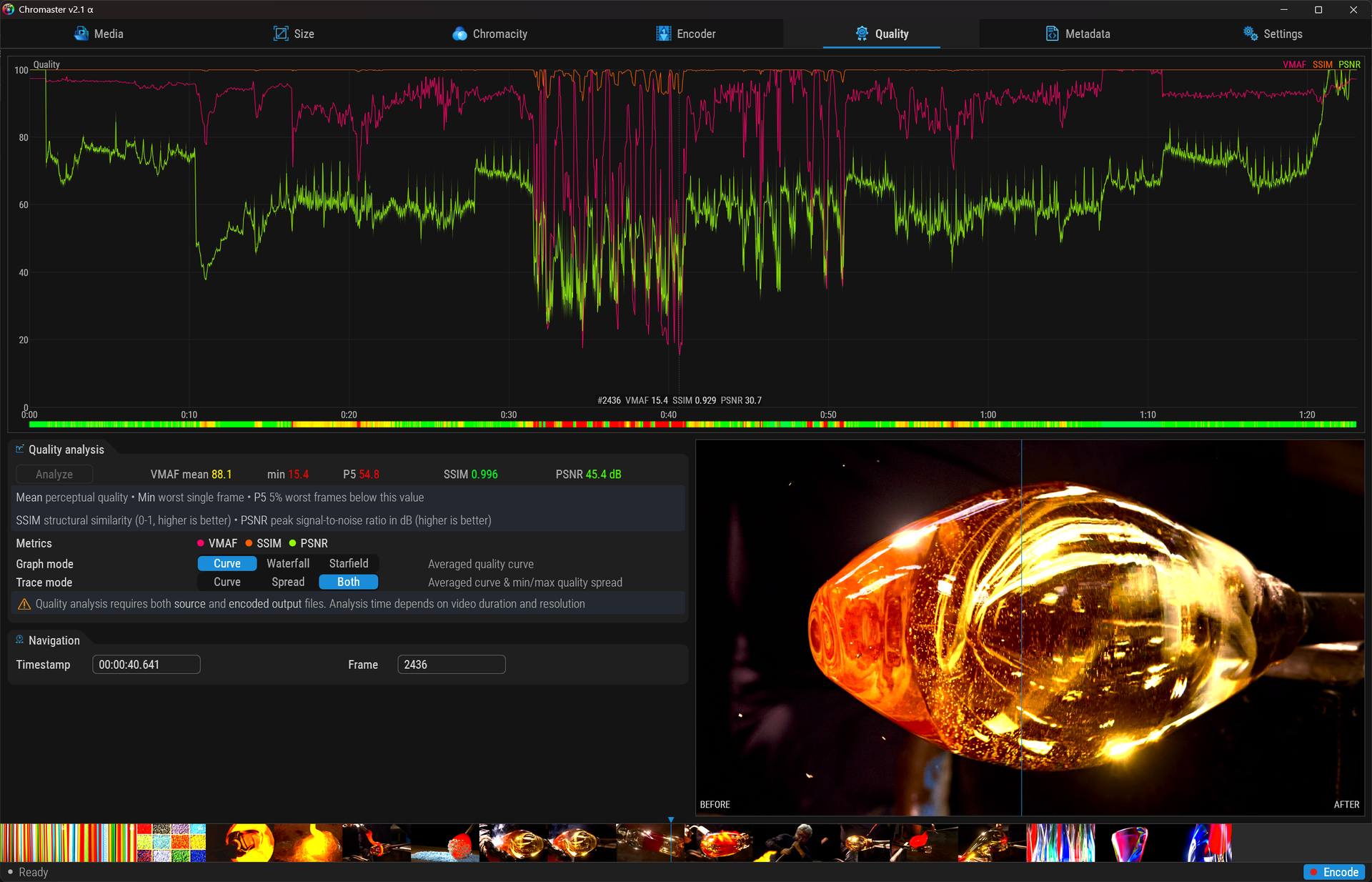
While testing the “File size” option, I wanted to check the VMAF, PSNR and SSIM values, which are extremely low.

The result is undeniable. The resulting image is severely degraded; the codec has discarded information and started creating macroblocks.

The Before/After slider highlights this immediately. The air bubbles in the molten glass have almost disappeared in a few frames.

PSNR barely detects anything, SSIM much more, but VMAF is unforgiving.

Chromaster v2.1.1 α — Daily Build Notes


Quality tab refinements

  • ETA format: ⏱ 2h 15m 33s replaces ETA : 2:15:33

New proprietary binary formats

  • .chrh — HDR stats (signalstats data), delta-encoded + compressed
  • .chrq — Quality metrics (VMAF/SSIM/PSNR), same pipeline
  • .chrs — Strip thumbnail cache for instant reload on startup
  • All three: zero temp files, full in-memory pipeline, single write to disk
  • ~42 KB instead of 10 MB for HDR data. ~11 KB instead of 2 MB QA data. Metrics travel with the file
  • Format is signed with HMAC-SHA512 (faster than 256 on modern CPUs) to prevent tampering. Implementation details are intentionally undisclosed

HDR stats pipeline rewrite

  • Complete rewrite: stderr pipe replaces file redirect, real-time parsing, 8 fields extracted from 28 per frame
  • Fixed the -loglevel warning bug that silently suppressed all signalstats data (metadata=mode=print writes at info level)
  • Auto-detection now searches multiple filename patterns with retrocompatibility for legacy formats

Strip cache

  • Windowed and expanded thumbnails cached separately in .chrs
  • Toggle between modes is now instant (memory cache hit), no re-extraction
  • Cache invalidated automatically when source file changes

Bug fixes

  • Destination filename now respected by the full encode pipeline (IVF + merge)
  • Click to seek migrated to global Settings toggle
  • Restore last session on startup
  • Frame offset -1 bug traced and fixed (norm→sec→frame conversion mismatch)

Download Chromaster v2.1.1 α

World premiere ! No encoder has this ! Anywhere :star_struck:

* High Dynmic Range - Visual Difference Predictor
VDP-2 Detection VDP-3 Quality
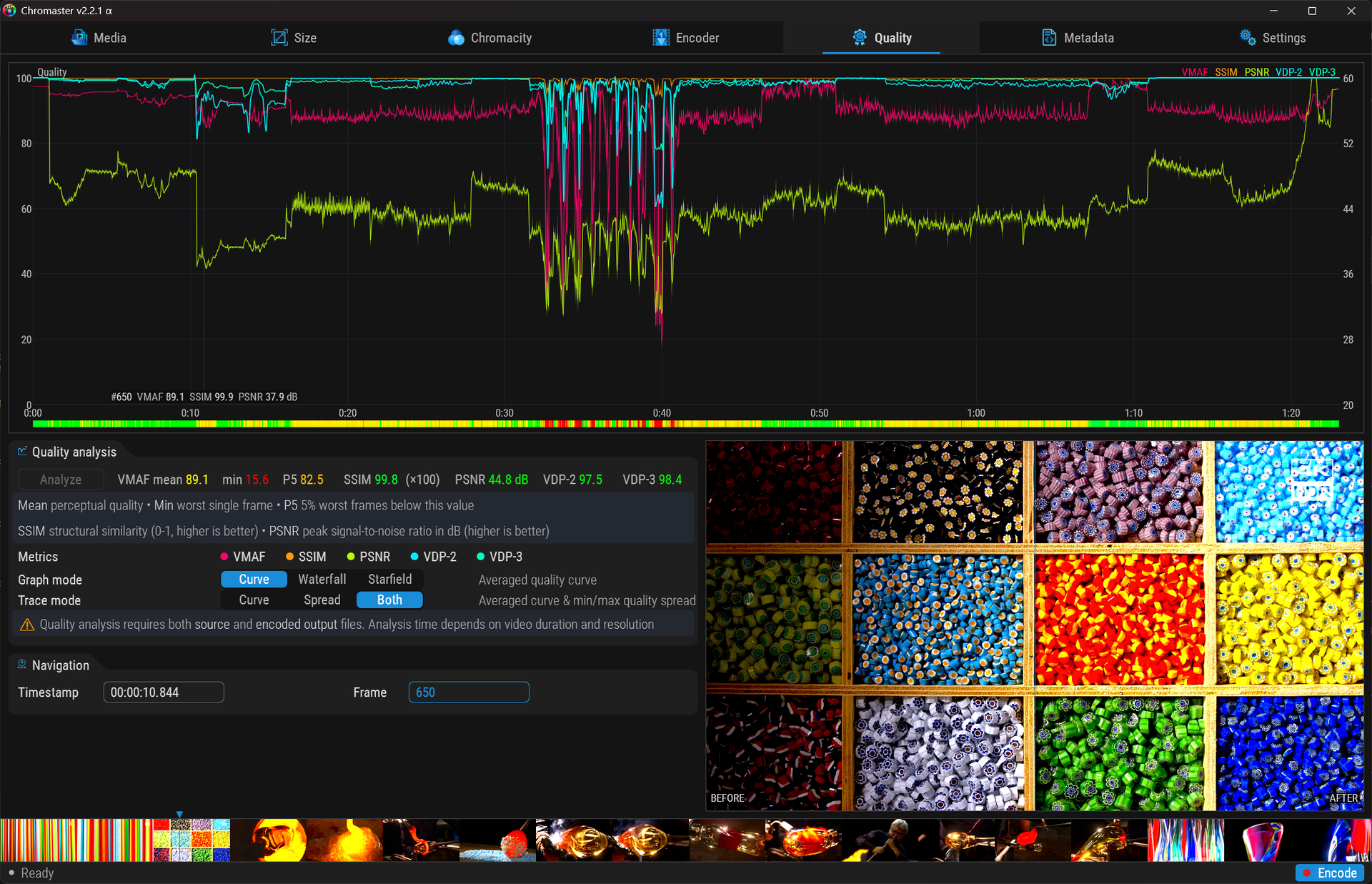
Do you see the difference ? What score would a viewer give ?
:face_with_monocle: The model heavily penalizes differences seen in a forced detection test (where the observer actively searches for the difference). :nerd_face: The model simulates a casual quality judgment: the observer doesn’t search, they simply make an overall assessment.

Chromaster now ships HDR-VDP-3 ! and HDR-VDP-2 (cabling in progress)

A full pure C implementation of the Mantiuk et alii 2023 perceptual visual model.
Not a wrapper. Not a library : Built from the paper, from scratch.

What HDR-VDP does ?

A computational model of the human visual system. Simulates your eye — optics, photoreceptors, cortex, neural noise — to predict what you’d actually SEE on your HDR display.

  • PSNR → “signal differs by X dB” (pixel math) :star::star:
  • SSIM → “structural similarity is X” (pixel math) :star::star::star:
  • VMAF → “quality degraded by X” (pixel math) :star::star::star::star:
  • HDR-VDP → “would a human notice?” (vision science) :star::star::star::star::star:

NONE of the classic metrics understand HDR. HDR-VDP does.


Two metrics, two questions

VDP-2 — Detection

“Can you spot the difference?”

VDP-3 — Quality

“What score would a casual viewer give?”

  • 2x to 5x slower than HDR-VDP-2
  • Calibrated on 4000+ real human judgments (UPIQ)
  • Local luminance adaptation, 2013 CSF refit
  • Stays smooth where VDP-2 panics
  • When VDP-3 dips, you have a REAL problem
    2022 HDR Video Quality Measurement Grand Challenge winner !

Under the hood

Per-frame pipeline:

  • Optical MTF (Vos & van den Berg)
  • Photoreceptor transduction (L/M cones + rods)
  • Steerable pyramid (6+ bands, 4 orientations)
  • Neural CSF interpolated across 7 luminance levels
  • Local per-pixel luminance adaptation
  • Self + cross-orient + cross-freq contrast masking
  • Psychometric function + probabilistic summation
  • Quality scoring in JOD, mapped 0-100

VDP-3 additions:

  • CSF re-fitted on Kim et alii 2013 measurements
  • Per-pixel adaptation (not global average)
  • Age-adaptive model (lens aging, senile miosis)

Hardware acceleration:

  • NVDEC / D3D11VA hardware decode (auto-detected)
    :left_speech_bubble: Ensure your hardware is capable in Media tab

  • CUDA cuFFT double-precision FFT (optional)
    :left_speech_bubble: cuFFT is brought together with Chromaster in Github. You can download it separately from Nvidia CUDA Compute repo.

  • Multithreaded workers on dedicated CPU cores

  • Sampling from full-frame to 1-min intervals

  • Catmull-Rom curve smoothing

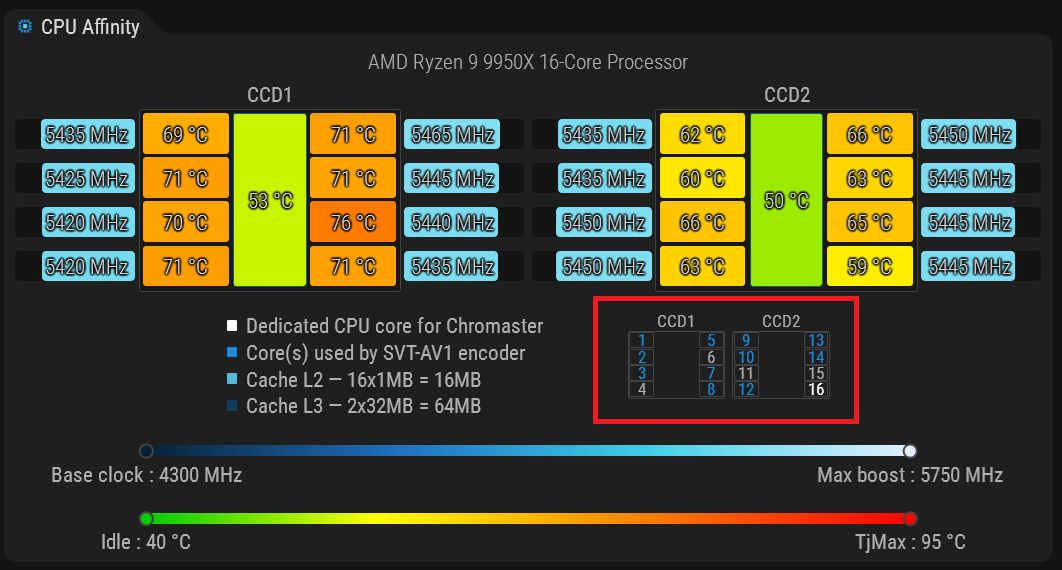
:left_speech_bubble: Suggested settings on high end hardware (16 physical cores / RTX 4090 or 5090), not much than 75% of available cores

:left_speech_bubble: Suggested core assigment, remove worst to keep a balanced clock/temp

:left_speech_bubble: Using a brute-force approach, I am of course optimizing the processing pipeline.


Why it matters for Topaz Video / Video AI users ?

:trophy: Upgrade with Topaz’ Hyperion → encode with SVT-AV1
→ But are your encoding parameters right?
→ Am I keeping the full quality of AI enhancement?
→ Does my Hyperion model perform as expected on this file?

HDR-VDP answers all three. Frame by frame.

VMAF doesn’t understand HDR. It penalizes invisible artifacts and misses visible ones in highlights.
HDR-VDP answers the only question that matters : “Is this encode transparent on my display?”
Frame-level precision. Scene-by-scene verdict. No guessing.

Credits go to
:clap: Rafał Mantiuk, Kil Joong Kim Seoul, Allan G. Rempel, Wolfgang Heidrich
For their original paper

:floppy_disk: Download Chromaster v2.2.0 α

Chromaster v2.2.1 α

:tada: VDP-2 integration
:heart_eyes: New ICtCp Metric (color metric)
:star_struck: Rewrote Streaming Pipeline
6.5× faster ! ! !

VDP-2 back alongside VDP-3

  • Both metrics on every frame, one extraction, zero extra I/O
  • VDP-2: “Can you spot it?” : harshest judge, active detection
  • Two curves, two toggles, same graph

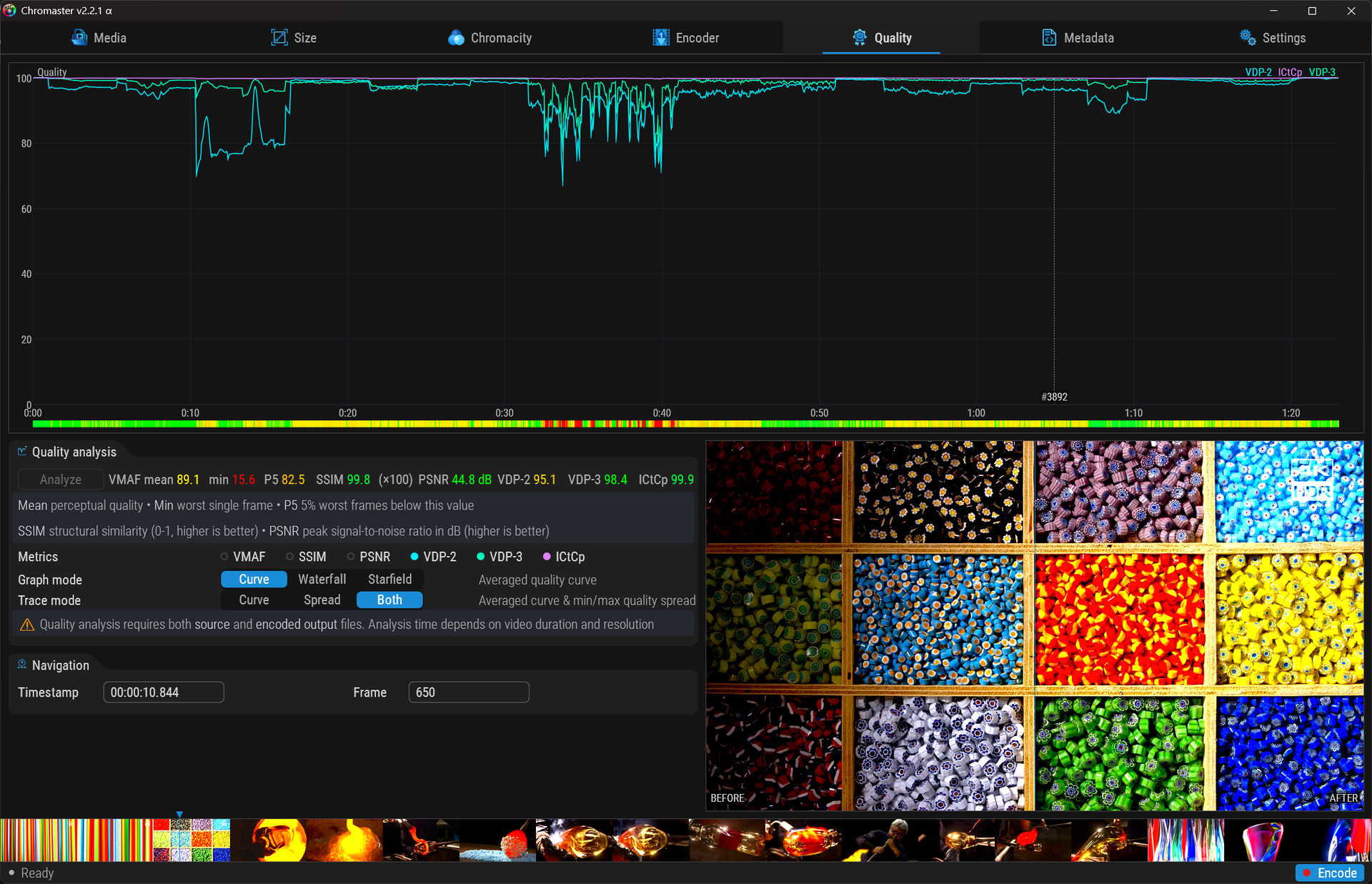
ICtCp delta-E : HDR color fidelity (new)

  • Per-pixel colorimetric distance in BT.2100 perceptual space
  • Fills the gap: no existing metric (VMAF, PSNR, SSIM, VDP) measures color
  • dE < 1 = imperceptible, 1-3 = visible, > 3 = problematic

Luminance fix

  • Proper BT.2020 limited range handling (Y: 64-940)
  • More accurate VDP scores on difficult HDR scenes

New Streaming pipeline

  • 2 FFmpeg via pipes (zero seeks) → 1 reader → bounded FIFO → 11 workers
  • VDP-2 sub-threaded behind VDP-3 (free)
  • nCSF lookup table (256 entries/band)
  • 9m43s → ~2m58s on 4K HDR 166 frames

:left_speech_bubble: Perform best with 75% cores activated

6 metrics total, no encoder has this

Metric Measures HDR
PSNR Signal difference No
SSIM Structural similarity No
VMAF Perceptual quality No
VDP-2 Difference visibility :+1: Yes
VDP-3 Viewer quality rating :+1: Yes
ICtCp Color fidelity :+1: Yes

:floppy_disk: Download Chromaster v2.2.1 α

Bugfix release


  • QA data now properly cleared between encodes — no more stale scores lingering

  • Debug console — last line no longer hidden below the window edge

  • Frame compare in Quality tab — clicking the strip or graph now correctly loads the before/after preview, including VDP-only analysis

  • Save icon added next to profile name in Encoder tab with hover feedback

  • Custom profiles — full encoder state saved/restored (all sliders, toggles, rate mode, text fields), persisted across sessions

  • Save icon dirty indicator — turns blue when current settings differ from saved profile, grey when in sync

  • Quality graph legend — metrics now displayed in correct order

  • Processing settings (Parallelism, Pass, Recode loop) now properly saved and restored on startup

  • QA/VDP progress bar — smooth animation instead of jerky jumps during analysis

  • Quality graph Y-axis labels — better alignment, no more overlap at the bottom

:floppy_disk: Download Chromaster v2.2.2 α

Chromaster v2.3.0 important update : API scripting, security hardening, and perceptual HDR scoring

Big update on Chromaster ! This one is less about UI polish and more about what’s under the hood, and it opens some WILD doors.


:wrench: .chr Script Files : One-click encode recipes, batch processing, aso … :wrench:

Chromaster now supports .chr script files.
Plain text, UTF-8, one command per line.
:backhand_index_pointing_right: From any CLI : chromaster.exe my_script.chr

Encode all the vacation videos in their original directory.

# Encode all MKV files in a folder
ForEach "Z:\My_Vacation_Videos\*.mkv"
  Set Encoding_Target.CRF 18
  Set Encoding_Target.Preset 4
  Set Quantisation_Matrix.Min 8
  Set Quantisation_Matrix.Max 15
  Set Variance_Boost.Strength 3
  Encode.Start
  Encode.Wait_Completed
  Quality.Analyze
  Quality.Wait_Completed
EndForEach

Encode all vacation videos in the local video directory.

# Encode all MKV files in a folder
Set Destination.Path C:\Users\Nicolas\Videos\
ForEach "Z:\My_Vacation_Videos\*.mkv"
  Set Encoding_Target.CRF 18
  Set Encoding_Target.Preset 4
  Set Quantisation_Matrix.Min 8
  Set Quantisation_Matrix.Max 15
  Set Variance_Boost.Strength 3
  Encode.Start
  Encode.Wait_Completed
EndForEach
  • Every command mirrors the GUI
    :backhand_index_pointing_right: Set Encoding_Target.CRF 18 → same as dragging the slider
    :backhand_index_pointing_right: Quality.Analyze → same as clicking the button
  • No new language to learn: if you can read the interface, you can write a script :rocket:

Results are logged to a .chr.log file next to your script:

Set Encoding_Target.CRF 18 -> OK
Encode.Start -> STARTED
Encode.Wait_Completed -> OK (134.2s)
Quality.Analyze -> STARTED
Quality.Wait_Completed -> OK (718.1s)
Get Quality.VMAF_Mean -> 94.21
Get Quality.VDP3_Mean -> 99.28
Get Quality.ICtCp_Mean -> 99.81

Share your recipes !

:crystal_ball: Found the perfect settings for anime upscales ?
Save your .chr, post it where you want, someone else double-clicks it, done ➜ No guesswork, no screenshots of settings panels.


:robot: Self-documenting API :robot:

Type Help in a script and Chromaster dumps every available command:

Help
--- Groups ---
  Encoding_Target    (6 properties)
  Quantisation_Matrix (5 properties)
  Variance_Boost     (4 properties)
  Motion             (6 properties)
  Quality            (19 properties)
  ...
--- Actions ---
  Encode.Start
  Quality.Analyze
  Wait.Encode
  Help [group]

Drill into a group:

Help Encoding_Target
  Preset        int   RW  0..13
  CRF           int   RW  1..70
  QP            int   RW  1..63
  Max_Bitrate   text  RW  [1-100000]

:robot: Any AI — local LLM, ChatGPT, Claude : can read the Help output and generate valid .chr scripts. No documentation needed. :star_struck:

:mechanical_arm: The API is the documentation, designed to be dead simple.

:sparkles: You don’t even need to learn it : any LLM understands it instantly. Just describe what you want at your skill level, the AI translates it.


:locked_with_key: Security : Process isolation & hardening :locked_with_key:

Hardware monitoring extracted into a dedicated ChrMonitor.exe process:

  • AMD Ryzen Master SDK (Platform.dll, Device.dll) and HWiNFO shared memory
    :brick: Loaded exclusively in ChrMonitor.exe, NEVER in the main process
  • Main Chromaster reads a local shared memory buffer only :
    :shield: Zero third-party DLLs in its address space
  • ChrMonitor embedded as resource inside chromaster.exe, auto-extracted on first launch
    :locked_with_pen: One file to distribute

Additional hardening this cycle:

  • Command injection audit on all subprocess launches
  • Input sanitization and path validation
  • Buffer safety and proper UTF-8 pipeline
    Deliberately kept vague for security reasons.

:bar_chart: 6 quality metrics, all in one pass !

Quality analysis now runs VMAF, SSIM, PSNR, HDR-VDP-2, HDR-VDP-3, and ICtCp delta-E in parallel. All six scores appear in the Quality tab and are accessible via the API:

Get Quality.VMAF_Mean -> 94.21
Get Quality.SSIM_Mean -> 0.9989
Get Quality.PSNR_Mean -> 47.47
Get Quality.VDP2_Mean -> 97.62
Get Quality.VDP3_Mean -> 99.28
Get Quality.ICtCp_Mean -> 99.81

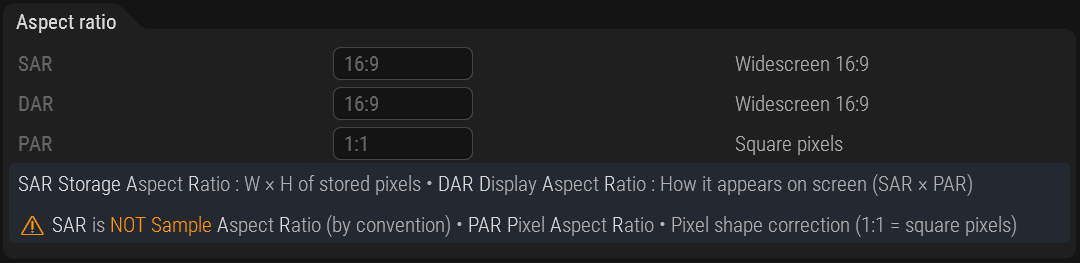
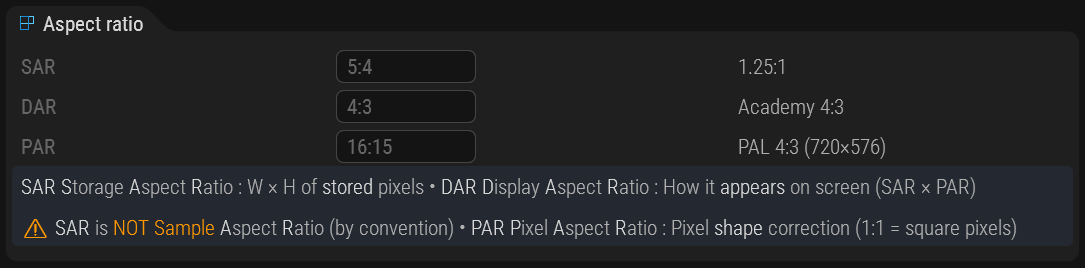
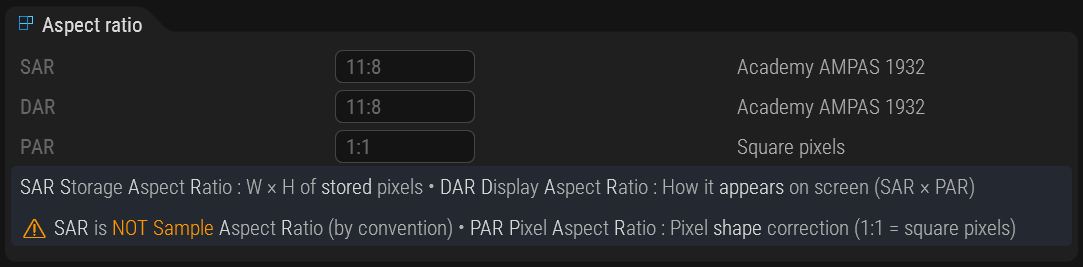
:triangular_ruler: Aspect ratio intelligence

NEW ! Aspect Ratio group (Crop and Resize tabs) now shows dynamic labels instead of static definitions:


Even 1932 AMPAS black-and-white silent movie :innocent:

:brain: Smart matching algorithm identifies standard cinema and broadcast ratios automatically, or suggests the closest known format when no exact match exists.
Works in both landscape and portrait.

  • SAR 16:9Widescreen 16:9
  • DAR 2.39:1Scope (2.39:1)
  • PAR 16:15PAL 4:3 (720x576)
  • DAR 2.37:1Close to Scope (2.39:1)

:counterclockwise_arrows_button: What’s next

  • :brain:Smart profiles (Cap 1) : Automatic source analysis (spatial/temporal complexity, grain, HDR level) mapped to optimal encoder presets, allready running
  • :gear: Batch calibration — the .chr + ForEach combo is already being used to grind through parameter combinations and build training datasets,
  • :robot: Local AI pilot : an AI reads Help, understands the API, and drives Chromaster autonomously to converge on optimal settings for each source (local AI training).

Feedback welcome as always !

:floppy_disk: Download Chromaster v2.3.0 α

:speech_balloon: Edit : Sorry if I’m cluttering your folder with CSV or statistics files, it’s for future AI training. You can delete them without any problem or send them to my inbox :smiley: