Chromaster — Bare-metal SVT-AV1 encoder built for Topaz Video AI users
Tired of losing HDR metadata. Tired of guessing scaling algorithms. Tired of bloated GUIs hiding what matters.
So I built my own. This also should be your BEST companion for Video AI or Topaz Video, because, I mainly first coded it to polish and fine tune the final video file to get a full ITU-R compatible file.
Chromaster — a native Windows SVT-AV1 frontend. Written from scratch in C + Direct3D 11 + Direct2D.
- No Electron, no QT : No hungry framework
- No runtime dependency beyond Windows SDK
- Raw Win32, GPU-accelerated pipeline, screen vsync fps, zero per-frame allocation
Designed specifically to re-encode Topaz Video AI output with surgical precision.
1. Media — Full transparency on your streams
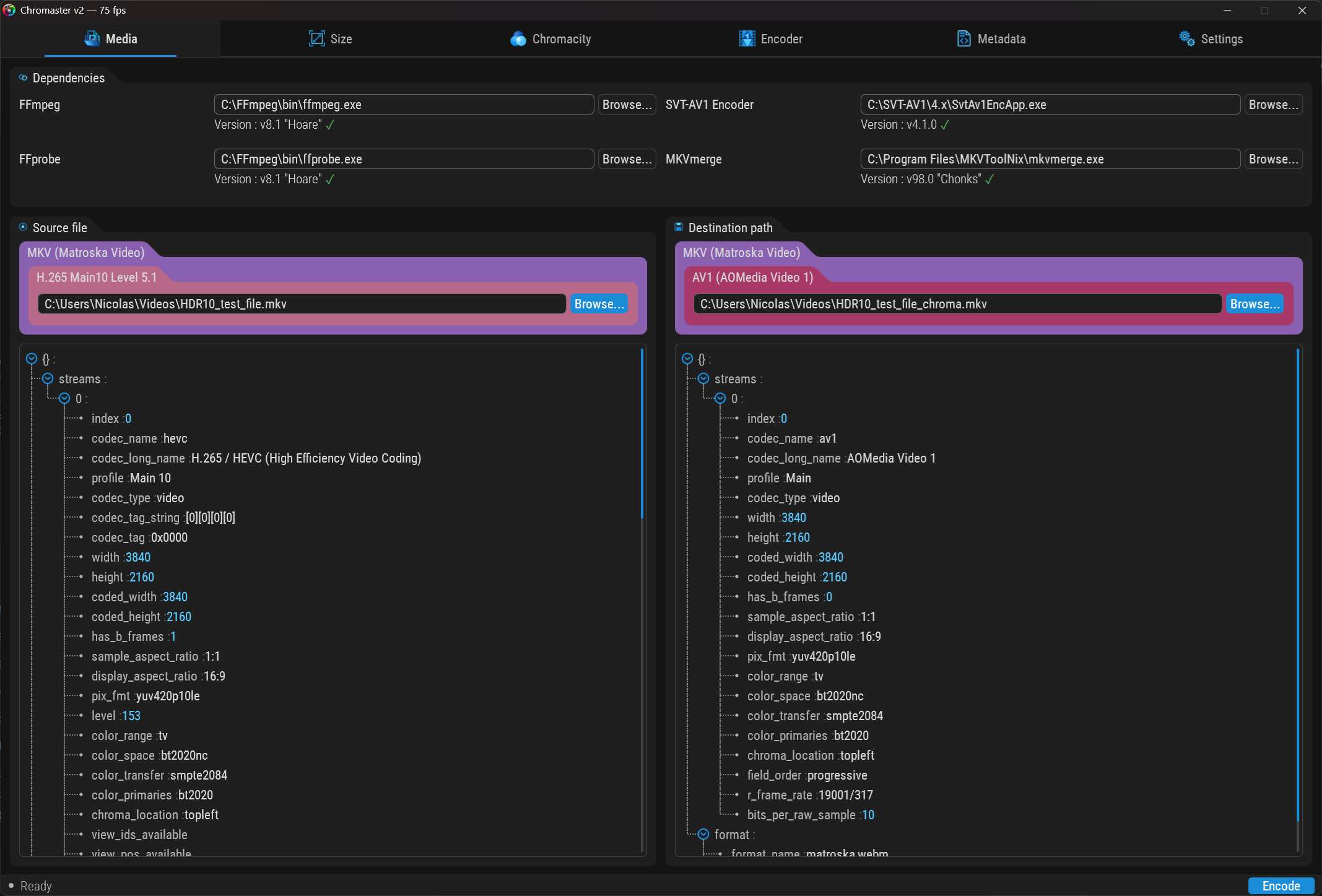
- This tab is the equivalent of MediaInfo on steroids : Full JSON tree view of source & destination streams — every field, every flag, nothing hidden
- Source codec, profile, resolution, pixel format, color space, transfer, primaries, frame rate, field order — all visible at a glance
- Destination shows the actual AV1 output with all encoding parameters
- Dependencies version-checked at startup: FFmpeg, SVT-AV1, FFprobe, MKVmerge
- Update notifications when a newer version is available
- Color-coded container & codec badges : MKV, MP4, WebM, IVF, and so ono each have their own color. Same for codecs (H.265, AV1, HEVC…). Spot your format instantly without reading a single label.
2. Crop — Detect, trim, visualize

Not just a rectangle overlay. A perspective trapezoid showing each edge being trimmed, with directional controls and x2–x32 zoom.
Black bar detection
- Automatic detection — pixel-level scan on source thumbnails
- Configurable black threshold slider (how dark is “black”)
- Aspect ratio presets — Native, 16:9, 21:9, 2.39:1, 4:3, 1:1
- Symmetric crop toggle — lock left/right and top/bottom margins together
- Input vs Output resolution displayed — see the exact dimensions before and after cropping
- Status bar reports detection result in real-time
Three visualization methods
- Chunk — zoomed source image, pixel by pixel. See the actual content being removed.
- Average — average color per row/column. Instantly reveals banding or color shifts at edges.
- Peak — brightest pixel per row/column. Catches hot pixels and encoding artifacts at frame borders.
3. Smart Algorithm Selection — Tell it what you want, not what to use
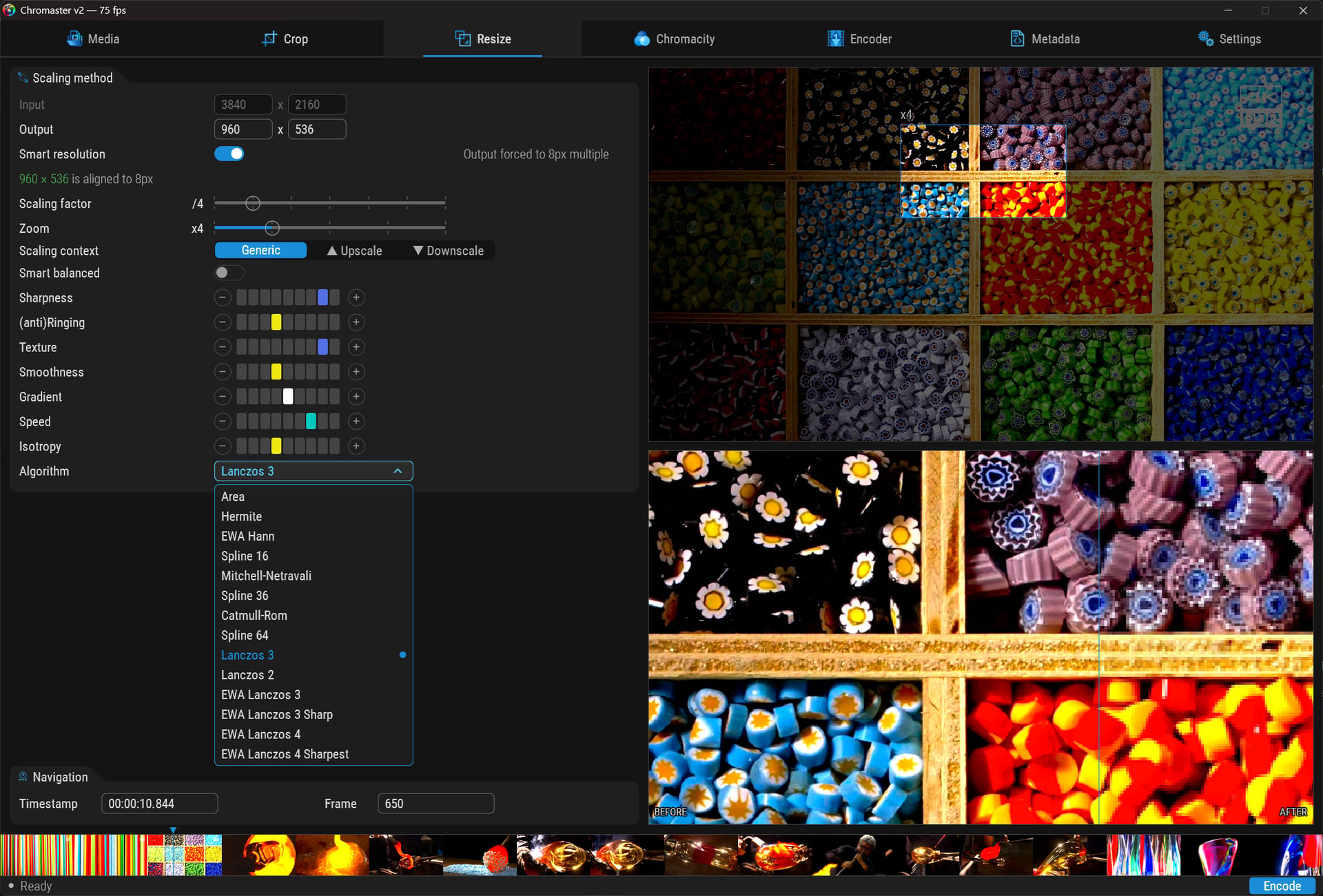
This one doesn’t exist anywhere else.
The idea: stop reading academic papers to figure out Lanczos vs Spline36 vs EWA. Instead, describe what you care about using 7 visual score bars:
- Sharpness
- Anti-ringing
- Texture preservation
- Smoothness
- Gradient handling
- Speed
- Isotropy
Chromaster cross-references your priorities against 14 scaling algorithms — from Area and Hermite all the way to EWA Lanczos 4 Sharpest — across 3 context modes:
- Generic — general purpose
- Upscale — optimized for enlargement
- Downscale — optimized for reduction
Result: automatic best-match recommendation. No guesswork.
Smart Resolution
- 8px alignment enforcement — output dimensions automatically adjusted to codec-compatible multiples
- Visual validation: “960 x 536 is aligned to 8px”
- Prevents encoding failures from misaligned resolutions
Zoom Preview + Before/After
- Draggable selection rectangle on source frame
- x2 to x32 magnification
- Live BEFORE/AFTER split — left = source (nearest-neighbor), right = processed (linear interpolation)
- Pixel-level comparison in real-time
Thumbnail Strip
- Dynamic thumbnail generation across the full timeline
- Click any thumbnail to jump to that frame instantly
- Timestamp + frame number navigation bar
- All of this in a 750 KB application. No preloaded cache, no bloated asset pipeline.
4. HDR Chromaticity — CIE 1931, live, interactive

CIE 1931 Gamut Diagram
- Real spectral locus, drawn pixel-perfect on CPU framebuffer
- Source & destination gamut triangles (BT.709 / BT.2020) with labeled primaries
- Multi-pass diffuse glow on labels
- Not a static image — rendered in real-time every frame
Saturation Graph
- Full-timeline saturation analysis
- Spot chroma clipping or gamut excursions before encoding
Colorimetry Panel
Every HDR parameter exposed and editable:
- Primaries, transfer function (with human-readable description: “SMPTE ST 2084 (PQ/HDR10)”), matrix coefficients
- Color format, color range (“Limited 16-235” / “Full 0-255”), bit depth, chroma position
- Mastering display metadata — R, G, B, White Point, Luminance with parsed color-coded coordinates (x=0.64 y=0.33 etc.)
- Mismatch warnings — source says BT.2020 but transfer is BT.709? Flagged immediately.
5. Luminance & Scene Intelligence
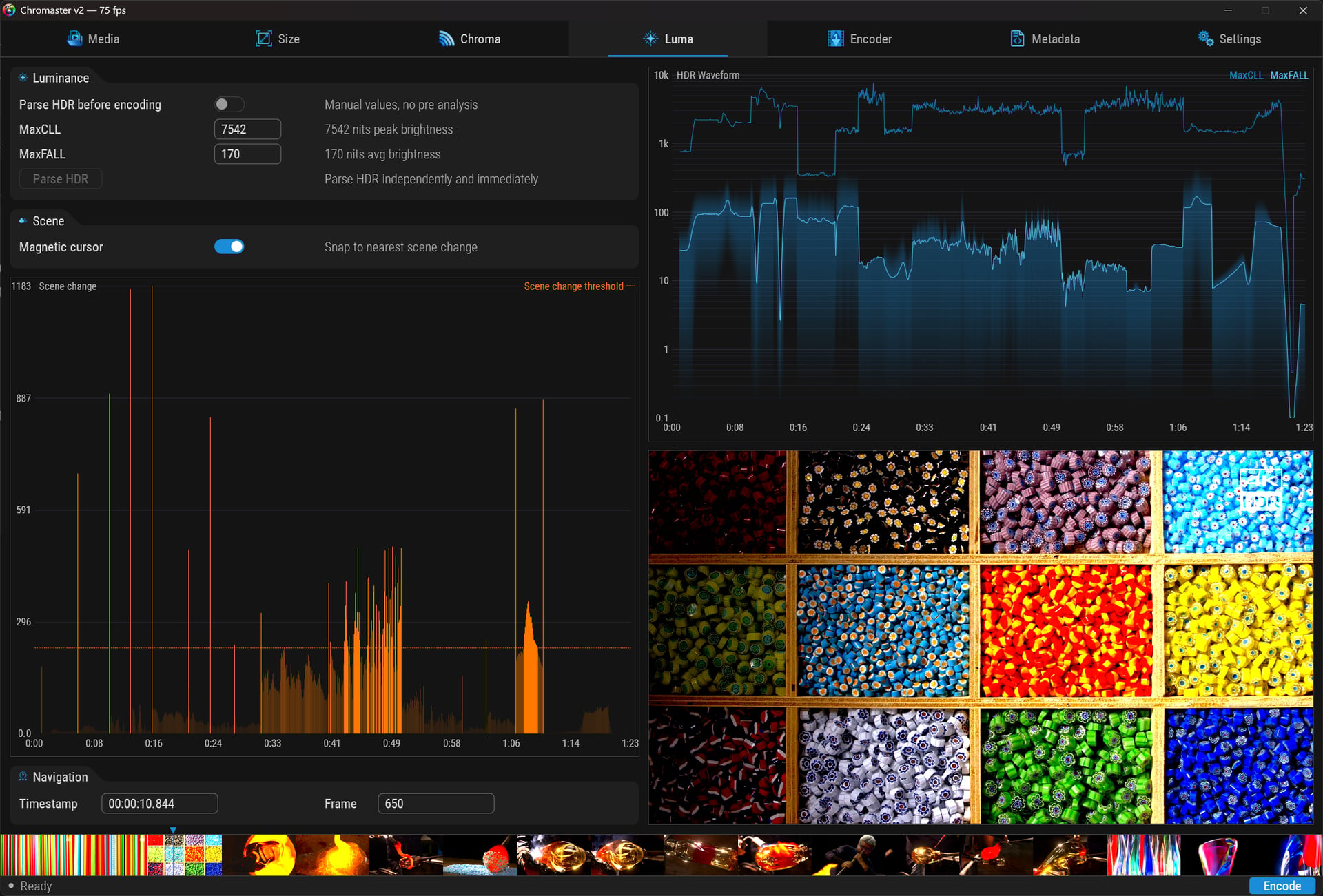
HDR Waveform
- Logarithmic scale, 0.1 to 10,000 nits
- Per-frame luminance map across full timeline
- MaxCLL and MaxFALL reference lines
- Rasterized scanline-by-scanline on CPU framebuffer — not a simple histogram
HDR Parsing
- Parse HDR before encoding toggle — automatic pre-analysis or manual values
- Parse HDR button — trigger analysis independently and immediately, no need to start an encode
- Human-readable descriptions: “7542 nits peak brightness”, “170 nits avg brightness”
Scene Change Detection
- Frame-level granularity across full timeline
- Scene change threshold reference line
- Magnetic cursor — snaps to nearest detected scene boundary
- Essential for tuning lookahead, temporal filtering, keyframe placement
6. Full SVT-AV1 Encoder Control

Every SVT-AV1 parameter, organized into logical groups with human-readable annotations:
- Rate control — CRF / VBR / CBR / CQP with adaptive quantization
- Encoding target — preset (14 levels from “Slowest, uber quality” to “Fastest”), CRF, QP, max bitrate, target bitrate, MBR overshoot
- Motion — scene change detection (“Adaptive keyframe insertion”), lookahead, temporal filter, hierarchical levels, startup MG size
- Variance — variance boost (“Boost complex regions”), strength, octile, alternate boost curve
- Psychovisual enhancement — tune (VQ/PSNR/SSIM/IQ/MS-SSIM), QP scale compression, AC bias (“Moderate HF preservation”), max TX size, adaptive film grain
- In-loop filtering — CDEF (“Edge ringing reduction”), restoration (“Adaptive detail recovery”), deblocking, sharpness
- Quantisation matrix — perceptual weighting with min/max luma & chroma controls
Every slider: current value + description. “Temporal filter strength: 3 — Strong.” No documentation lookup needed.
7. Metadata — Total traceability
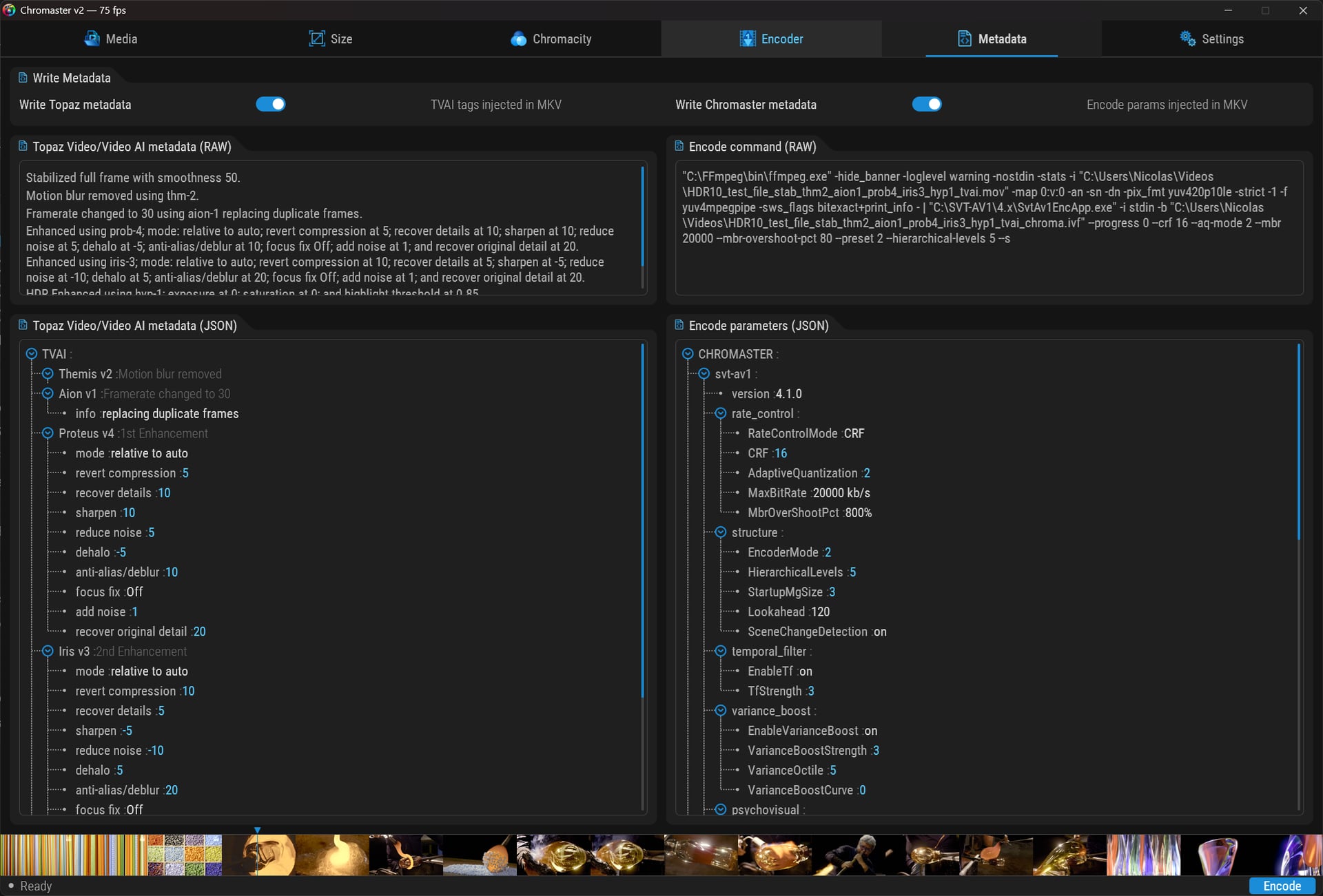
This is where Chromaster becomes a forensic tool.
Write Metadata
- Write Topaz metadata toggle — TVAI processing tags injected directly into MKV
- Write Chromaster metadata toggle — all encoding parameters injected into MKV
Four panels of truth
- TVAI metadata (RAW) — the exact processing pipeline in plain text: models used, every parameter, every enhancement pass
- TVAI metadata (JSON) — structured tree view: Themis v2, Aion v1, Proteus v4, Iris v3… each with full parameter breakdown (mode, revert compression, recover details, sharpen, reduce noise, dehalo, anti-alias, focus fix, add noise, recover original detail)
- Encode command (RAW) — the full FFmpeg command line that will be executed. Nothing hidden.
- Encode parameters (JSON) — structured tree of every Chromaster/SVT-AV1 parameter: version, rate control, structure, temporal filter, variance boost, psychovisual…
Bitrate in stream name — the output video stream is titled “AV1 20000”, so you can identify encodes at a glance in any media player.
8. Settings — CPU topology & application control

CPU Affinity
- Visual AMD Ryzen topology — CCD1/CCD2 layout with individual core numbering and L3 cache sizes
- Per-core assignment: click a core to assign Chromaster, remaining cores become workers
- Workers mode: Single / Multi
- Automatic CPU detection (AMD Ryzen 9 9950X 16-Core shown)
Processings
- Parallelism — auto or manual thread control
- Pass — single-pass or multi-pass encoding
- Recode loop — from off to all frames
Application
- Debug window — remote debug via user feedback
- Auto-update — update dependencies automatically
- Auto-search — search for dependencies nearby
- Track language selector — set output track language (French, English, etc.)
9. Expandable Tab Bar
One more thing. The tab bar uses expandable parent tabs — “Size” expands into Crop + Resize, “Chromacity” expands into Chroma + Luma. Animated transitions, dynamic width reallocation, zero layout jank. Clean navigation across 8 content tabs in 6 visual slots.
10. Under the hood
Render engine
- Plain C — gcc MinGW-w64 x64
- Direct3D 11 — swap chain, texture upload, present
- Direct2D — anti-aliased widgets, rounded corners, native AA
- DirectWrite — subpixel text rendering
- CPU framebuffer BGRA8 — graphs rasterized column by column, pixel-perfect, zero API overhead
- Per-monitor DPI aware — adapts to any display scaling (100%, 125%, 150%…), positions and dimensions scale, stroke widths stay crisp
Zero GDI+. Zero garbage collection. Zero magic numbers in the entire codebase.
Built for TVAI workflows
- Human-readable JSON model files — clean, documented, diffable, version-controllable. No binary blobs.
- ITU-R BT.2100 HDR10 compliant output — correct SMPTE ST 2086 mastering display metadata, MaxCLL/MaxFALL, BT.2020 primaries, PQ transfer. No more broken HDR flags.
- Full metadata injection — both TVAI processing history and Chromaster encoding parameters embedded in the output MKV.
- Bitrate in stream name — identify encodes at a glance in any media player or inspection tool.
Code quality
- Automated review passes on every change
- Sanity checks and security audits
- Optimization passes before release
- Built-in debug window with real-time telemetry
- 22+ custom widgets, each validated individually before integration
11. What’s coming next
- Intel CPU widget — hybrid architecture aware, exploiting P-cores and E-cores separately for optimal worker distribution
- HDR10+ and Dolby Vision output construction — dynamic metadata, not just static HDR10
- Additional codecs:
- H.266 / VVC via VVenC — the successor to HEVC. Half the bitrate, same quality. You read that right.
- AV2 — next-gen AOMedia codec, day-one support planned
- Apple ProRes — intermediate mastering format
- FFV1 — lossless archival codec for intermediate mastering workflows
12. Download & requirements
Platform
- Windows 10/11 x64
Dependencies (bundled separately)
- FFmpeg — video demuxing & piping
- FFprobe — stream analysis
- SVT-AV1 (SvtAv1EncApp.exe) — AV1 encoding
- MKVmerge — container muxing
Chromaster auto-detects installed tools and checks versions at startup. Enable Auto-search in Settings to locate them automatically.
Download
Chromaster v2.0.0 — single portable .exe, ~540 KB. No installer.
Status
Chromaster v2.0 — active development. Render engine, all widgets, full tab layout: functional. Working toward first public release.
One developer. No team.
Built because the tool I needed didn’t exist.
