Hi everyone,
I wanted to share a severe performance bug I’ve isolated regarding the Starlight Precise model and AMD RDNA3 GPUs, just in case anyone else is pulling their hair out over incredibly slow render times.
I am currently working on restoring some S-Video VHS captures, and the Starlight model is causing a complete pipeline collapse on my system, effectively abandoning the GPU.
My System Specs:
GPU: AMD Radeon RX 7900 XTX
CPU: AMD Ryzen 7 3800XT
RAM: 32gb
OS: Windows 11
Topaz Version: 1.6.1
The Issue:
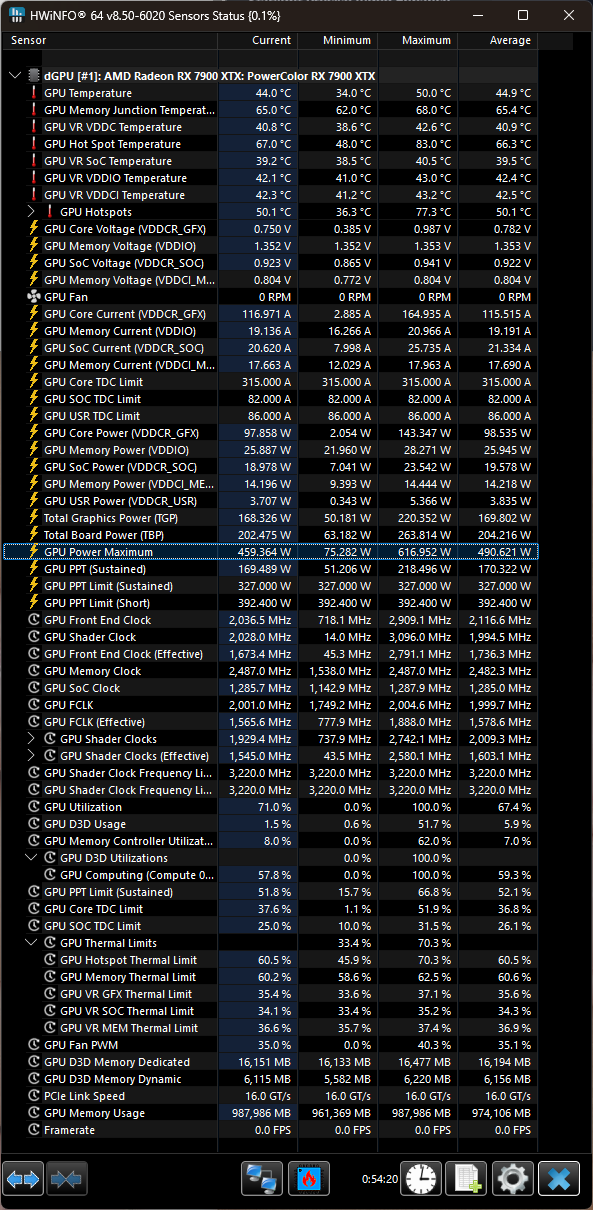
When attempting to render a simple 36-second clip using Starlight Precise (Output: 1920x1080, H.265 AMD AMF), the estimated render time was 4 hours and 34 minutes. Monitoring via HWINFO showed the GPU clock speeds dropping to idle (15 MHz), indicating the GPU was either being starved of data or the software was failing to utilize it.
Chronological Troubleshooting & Isolation:
To figure out what was causing the bottleneck, I went step-by-step:
Thermals & Power: Checked HWINFO. GPU Hot Spot was well under 88°C. No thermal throttling or power limit issues.
Memory/Paging: Dropped Topaz Max Memory Usage to 20% and set Max Processes to 1 to rule out SSD paging or memory leaks. The 4.5-hour timer remained.
Model Isolation (The Fix): I kept all settings identical (Progressive, no frame interpolation) but swapped the enhancement model from Starlight to Proteus. The render time instantly dropped from 4.5 hours down to 1 minute, and the GPU engaged perfectly.
Confirmation: I swapped back to Starlight Precise as the sole enhancement model. The render time instantly jumped back to 4.5 hours.
Conclusion & Workaround:
My hardware, memory allocation, and power delivery are functioning perfectly (as proven by the 1-minute render with Proteus). The issue is strictly isolated to the Starlight model failing to communicate properly with the RX 7900 XTX.
For now, my workaround is strictly using Proteus, Iris, or Dione, which all run flawlessly and utilize the AMD hardware correctly.
I have submitted an official support ticket, but I wanted to post this here to help anyone else who might be experiencing this. Is anyone else with a 7000-series AMD card experiencing this exact bug with Starlight?