I have tested every Starlight Mini version released so far, starting from the very first version included in Topaz Video AI, through all subsequent updates and up to the latest versions available in the new Topaz Video.
Using the exact same source material, the same video format, identical frames, and the same hardware, I performed repeated tests with the goal of restoring a short segment extracted from an interlaced DVD rip.
Unfortunately, I have consistently observed a severe regression in output quality in all versions released after the original Starlight Mini model.
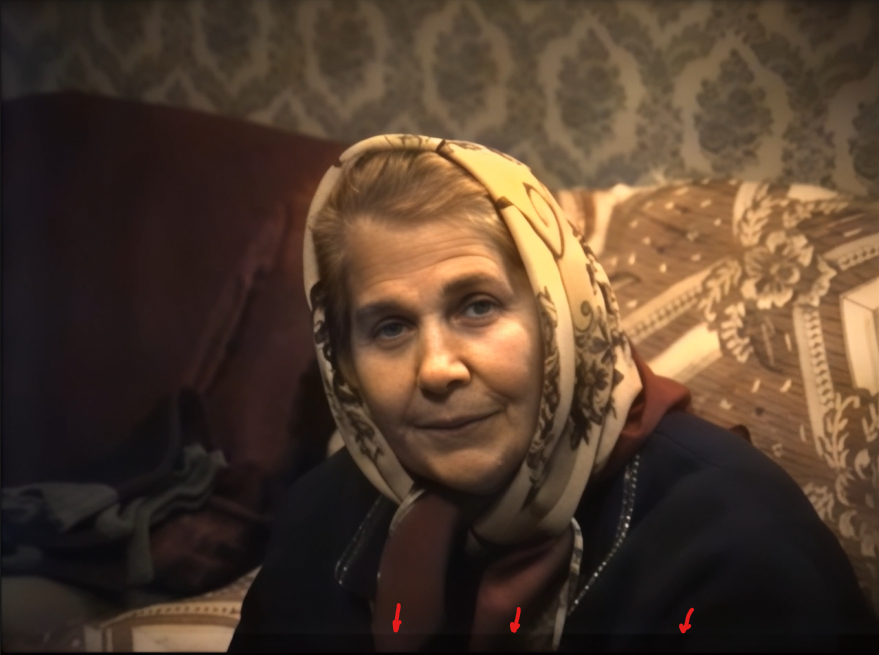
Specifically, every later version introduces a visible dark horizontal band at the bottom of the frame.
This artifact clearly divides the image into two uneven horizontal regions and severely compromises the visual integrity of the processed video, effectively making the restoration unusable.
This issue appears consistently when processing material originating from interlaced DVD sources.
I already reported this problem in previous forum discussions when the first few updated versions of Starlight Mini were released, but the issue has not been resolved so far.
I would therefore like to ask whether the development team is currently aware of this problem and whether any work is being done to address it.
Please note that I am not looking for workarounds. The original Starlight Mini version clearly handled this scenario correctly and did not produce this artifact.
However, continuing to use the first version is unfortunately not a viable solution, because it suffers from another critical problem:
during the restoration process the conversion randomly stops and fails, showing the typical red error message in the processing window. When this happens, all previous processing progress is lost, and restarting the process often results in the same failure again.
Because of this instability, it is effectively impossible to use the original model reliably.
For this reason I would like to ask the development team the following question:
Why were the tiling/patch processing method, frame edge handling, and luminance normalization changed in later versions, if the only version that produced correct visual results was the original Starlight Mini model?
If possible, it would be extremely helpful to restore the original behavior of the first Starlight Mini version while also fixing its stability issues.