Introducing Bloom
We launched something really special this week 
Bloom is our new creative upscaling web application, and it is available now! You’re definitely going to want to check it out if you utilize AI generated images in your daily workflows.
Bloom is fantastic for enhancing:
- AI generated images
- CG renders
- Illustrations, and more!
And Bloom can enhance those images in a new way with creative upscale. But if you’re working on photographs, we’d still recommend using our other tools like Photo AI, Gigapixel, or our other web tools for standard upscaling.
Keep reading to learn more about Bloom!
Powerful Creative Upscaling for AI Generated Images
Bloom is the most powerful creative upscaler on the market, and it is built from the ground-up for enhancing AI generated images, and for creators using AI content in their creative workflows.
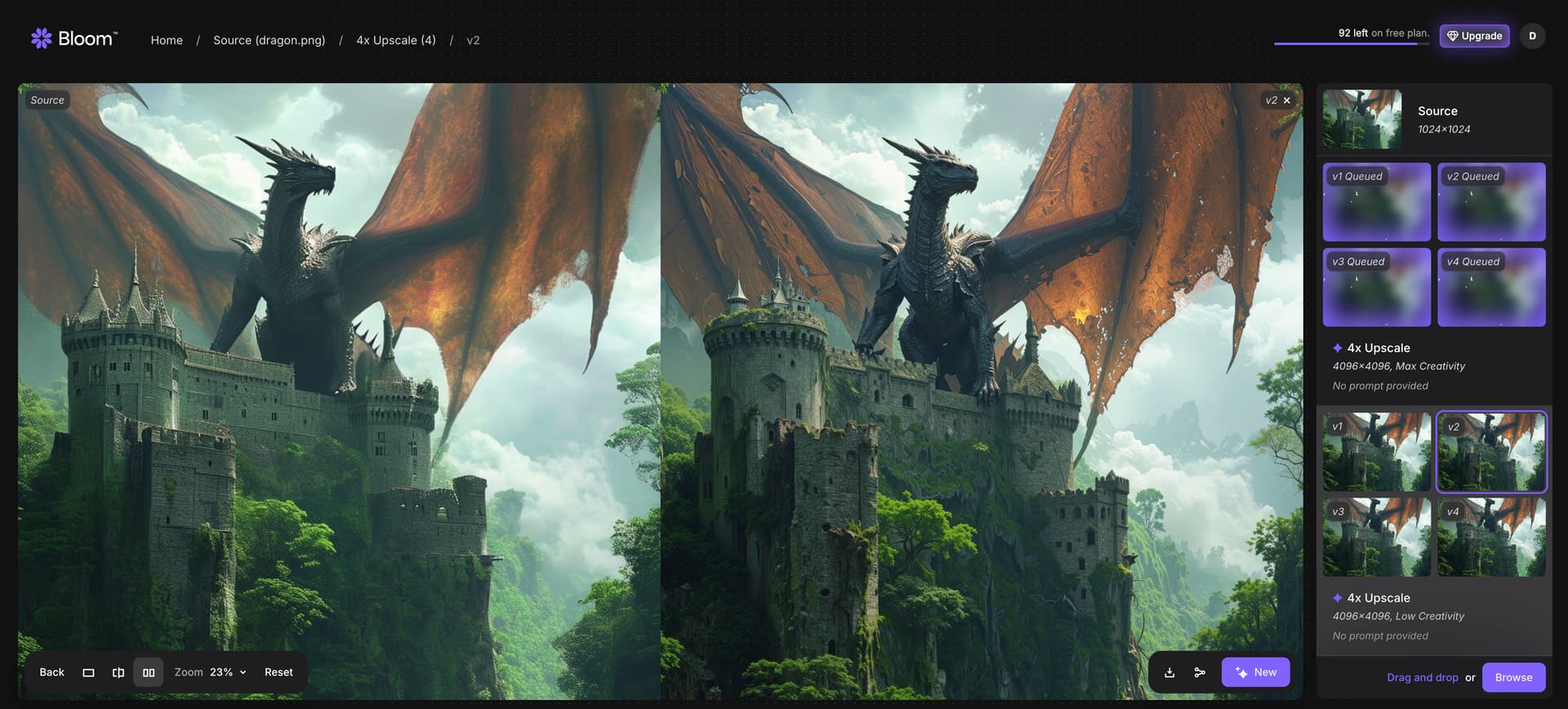
Using cutting-edge AI models developed in-house by our team of PhD researchers, Bloom offers “creative upscaling” that not only upscales images up to 8x but intelligently adds greater detail and texture that is relevant to the prompt.

You don’t need creative upscaling for most photos - but the results are absolutely unbelievable on AI generated images:

Maybe you’re curious about creative upscaling though in general? Let’s talk about it!
What is Creative Upscaling?
Creative upscaling is an advanced AI technique that fundamentally rethinks traditional image resizing using diffusion models under the hood. It not only scales images — but also intelligently enriches them by introducing new levels of detail and enhancing their immersive qualities.
We’ve always prioritized fidelity to the original image, and authenticity. Our AI models are unique in how faithful the outputs are, even when upscaling by 2x, 4x, or even 6x and beyond.
And yet, in our relentless pursuit of fidelity and upscaling and recovering images and videos with quality, we’ve began to build new AI models in this spirit using Generative AI technologies.
In fact, we’ve been working on diffusion models for quite some time. Maybe you’ve seen them?
Starlight: World’s first diffusion-based whole video restoration AI model. Adds missing details for incredible recovery of even the toughest and most degraded videos. Also works well on AI videos! Available on the web, and in Video AI with Starlight Mini running locally.
Recover: Powerful diffusion-based image restoration. Allows you to recover images which otherwise simply would not have been possible with traditional upscaling. Available in Gigapixel, and we use the same technology on Dust & Scratch in Photo AI
Redefine: This is actually our first “creative” upscaler, available in Gigapixel. The Realistic mode still creates incredibly faithful outputs, but the AI model has more creative license to add back in missing details. It’s really not the perfect creative upscaler, and we’ll talk more about that later here, and how Bloom vastly improves on this model.
Bloom is the best-in-class creative upscaler, developed by our same team of talented researchers, and we’re excited to share it with you.
We are going to continue to refine Bloom to make it better every day, just like we do with our other products.
What images work best on Bloom?
Bloom is built for upscaling and adding detail to AI generated images, and you’re going to get the best results using Bloom for this use case.
In a typical creative workflow, Bloom is primarily used as a post-processing and enhancement tool. Its application is most effective after the initial creation or generation of an image.
The types of images that benefit most from Bloom’s creative upscaling include a diverse range of digital art styles:
- Images generated by AI models: Content produced by text-to-image generators and other AI art platforms. Works great on images from ChatGPT, Midjourney, Flux, and more.
- Digital paintings and illustrations: Artwork created using digital painting software.
- Concept art: Visual development pieces for games, films, and other media.
- Character designs: Detailed representations of characters in various artistic styles.
- Abstract digital art: Non-representational digital creations.
Currently, Bloom is compatible with PNG and JPG file formats.
And what about upscaling in Gigapixel?
If you want to upscale or restore photographs, images with faces and identities that you want to preserve, or if you don’t want to alter the original image or subject at all - we’d recommend using Gigapixel, Photo AI, or our other upscaling tools instead. For creative upscaling, Bloom is going to give the best results on AI generated images.
Why did we create Bloom?
Bloom is designed for individuals and professionals engaged with AI art and AI content creation.
We’ve seen an incredible increase in the amount of AI generated images being run through our traditional upscaling models. And while we do offer best-in-class upscaling models - they are trained and fine-tuned for Photographs and other images of that nature, not for AI generated images.
See, you don’t need creative upscaling for most photos taken from a camera. Perhaps you’ve upscaled an AI image before and noticed — even with the world’s best upscaling models in Gigapixel, the results can be too clean, too perfect, and artificial.
Here’s an example - even the best upscale here produces very little improvement because the original image, generated using Flux, is simply lacking detail and texture that would normally be present in a photograph:
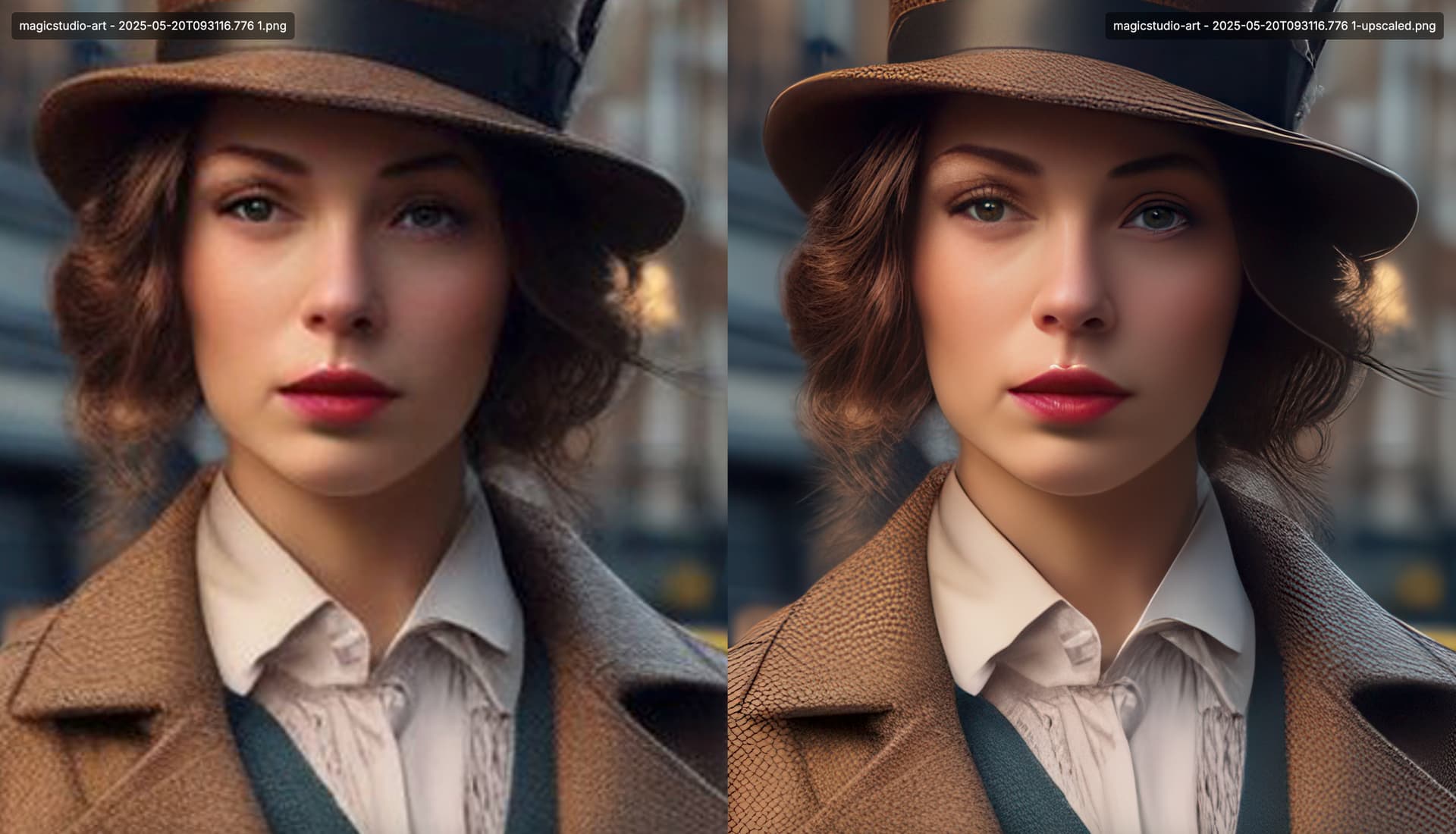
Above: Not the best upscale, done using a traditional upscaling model. Notice the unrealistic textures and lack of detail. See the limitation?
The original image is lacking the true detail density required to get a great result. Creative Upscaling is a technique that gives our AI models creative license to add more detail and texture back into the image, increasing detail density to get a great result – which looks much more realistic:
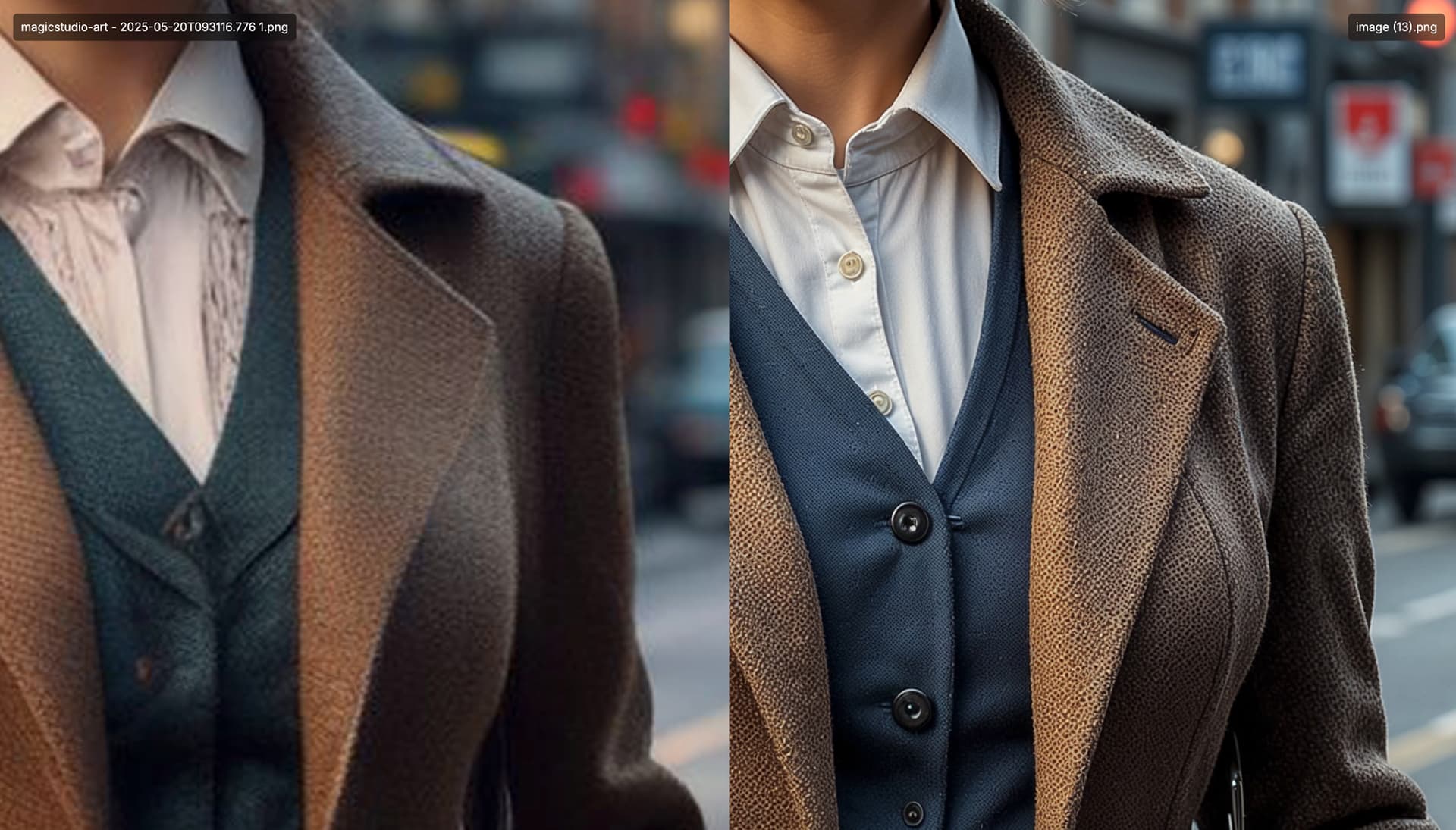
Above: Creative upscale using Bloom. Look at the vastly improved texture and details on the clothes here. A few extra buttons too, which probably should have been there.
This results in phenomenal upscales of AI generated images from Midjourney, ChatGPT and even computer generated renders. We’ve tuned Bloom to be the absolute best in class when handling these images.
You’re going to love adding texture and detail while upscaling AI images with Bloom.
How does Bloom work?
Bloom is a web application, and you can use it by signing up here.
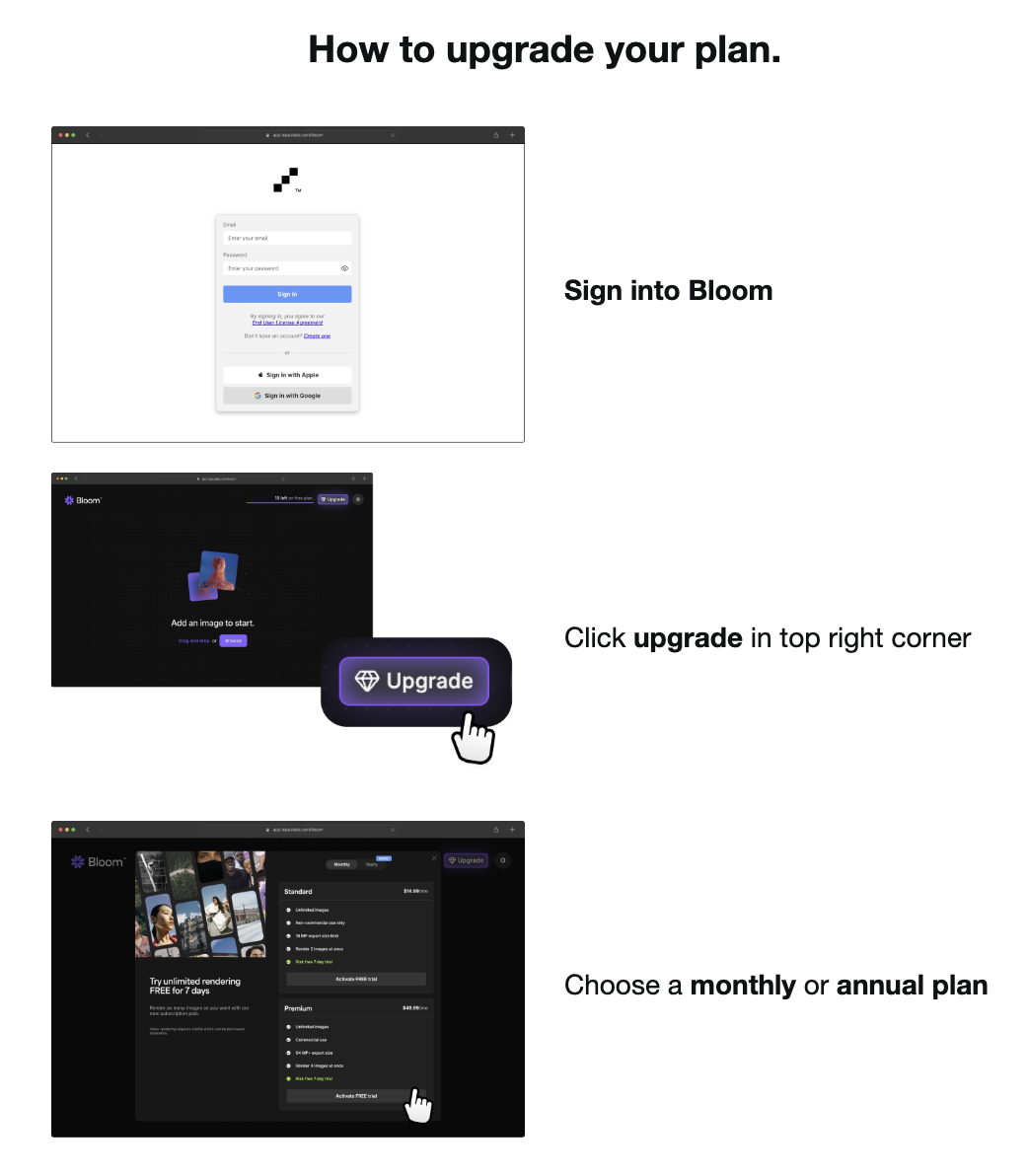
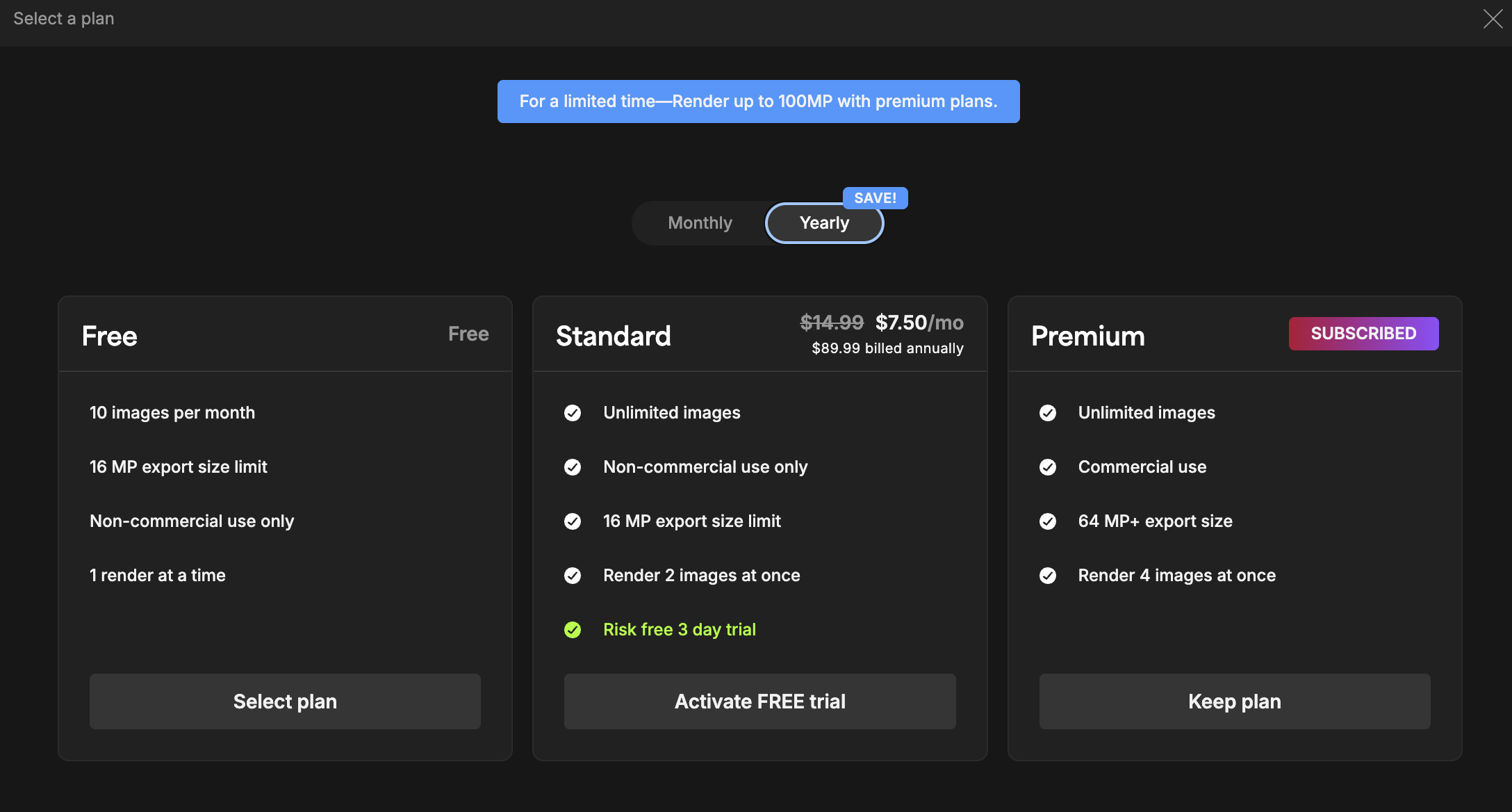
Try out 10 images for free, or sign up for our Standard or Premium plans with a 7-day free trial to get the absolute best experience.
You probably know our desktop applications like Photo AI, Gigapixel, and Video AI - which work great because your images and video are often hardware native, and especially working with RAW or high resolution footage - extremely data intensive.
But AI images are web native, so we had to build a web-first application with Bloom. The advanced creative upscaling AI model behind Bloom is also only available in the cloud, running on extremely powerful GPU clusters to get results to you fast — and up to 4 at a time!
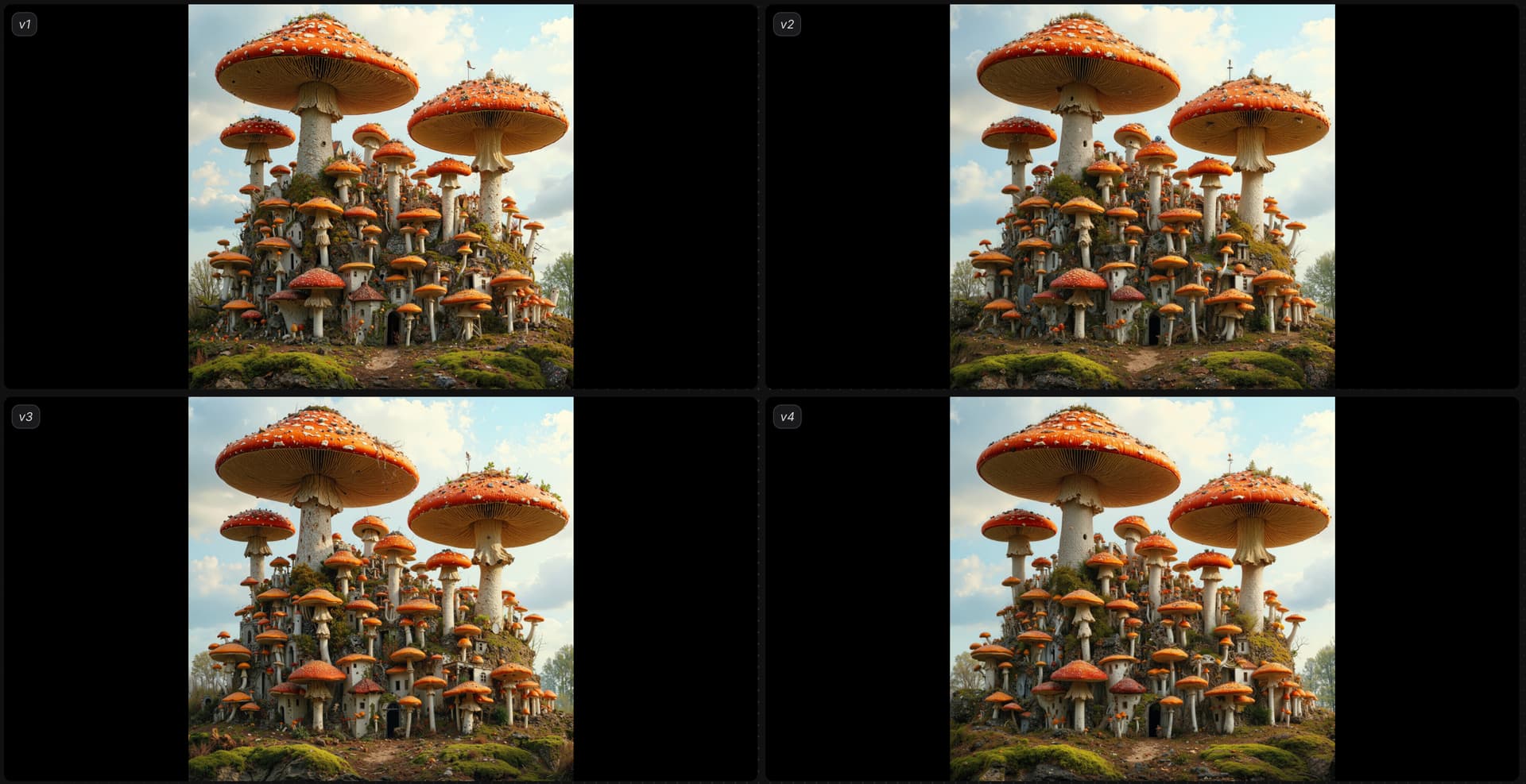
Above: Render 4 different configurations of mushrooms at once!
You can control the creativity level with a single, simple interface. Choose from the following creativity levels, and add a prompt, or don’t use one at all:
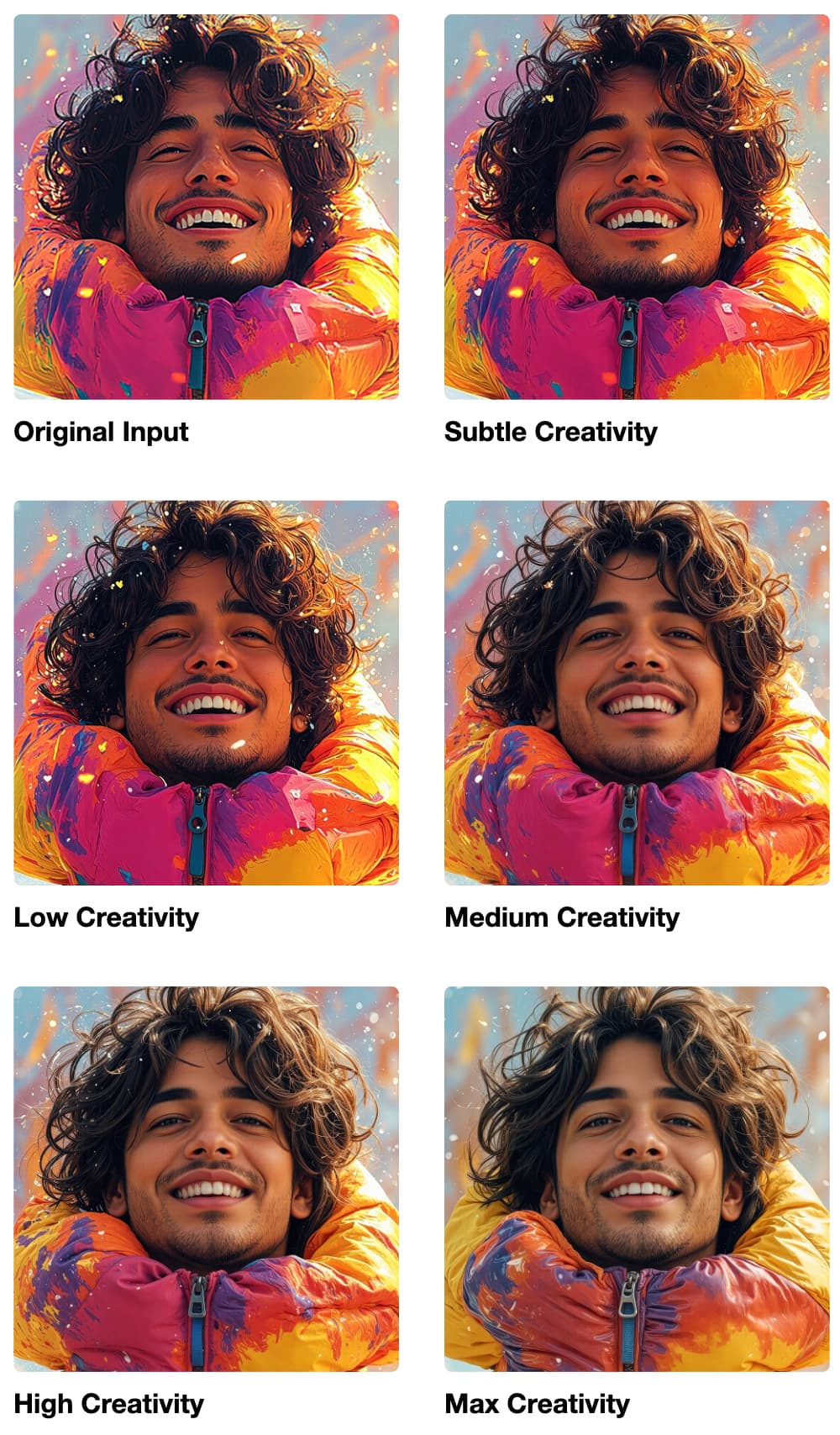
- Subtle: Get the maximum detail while changing as little structure in your original image and preserving the content and character as much as possible.
- Low: Give the AI model a license to add minor details and textures into the image. Maybe it allows you to change textures or colors with the prompt.
- Medium: Allow the prompt to influence results even more. You’re going to notice more variation in texture, changing of subjects, and overall more creative detail.
- High: If you’re looking to transform a scene from day to night, forest to desert, or change the color of the scene - you’re going to want to use a higher creativity to achieve this.
- Max: Unshackle the AI to creatively upscale at maximum capacity. The results are incredible, and at times, a little wild.

The image above needed a little extra punch to achieve my intended prompt. Swapped it to 4x and added a creativity boost on Max Creativity to get what I was looking for.

Need an extra punch to get what you’re looking for? We’ve got an extra toggle here that you can use if upscaling at 4x or greater. It adds another layer of recursive detail to your image, resulting in a much more creative output. You’re probably only going to want to use this at higher levels of creativity in most scenarios.
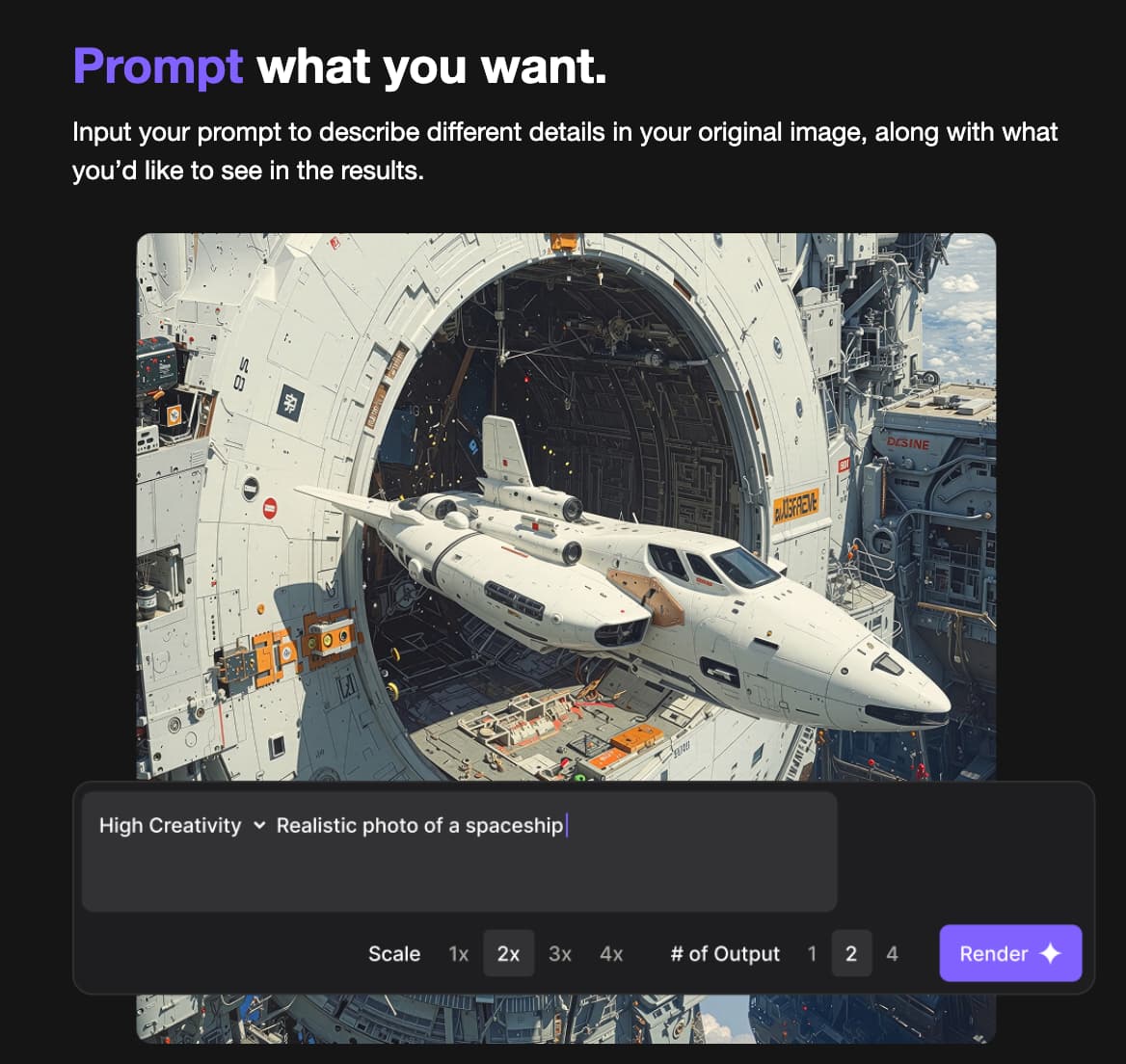
Do you need a prompt? No, it’s totally optional. We do recommend one if you’re using a higher creativity level to guide the outputs, but plenty of our users get excellent results without any prompt at all!
Use a description for the best results. For example, write: “A warrior monk with blonde hair, doing Yoga while standing on a rock in a pond” instead of “turn this person into a warrior monk”.
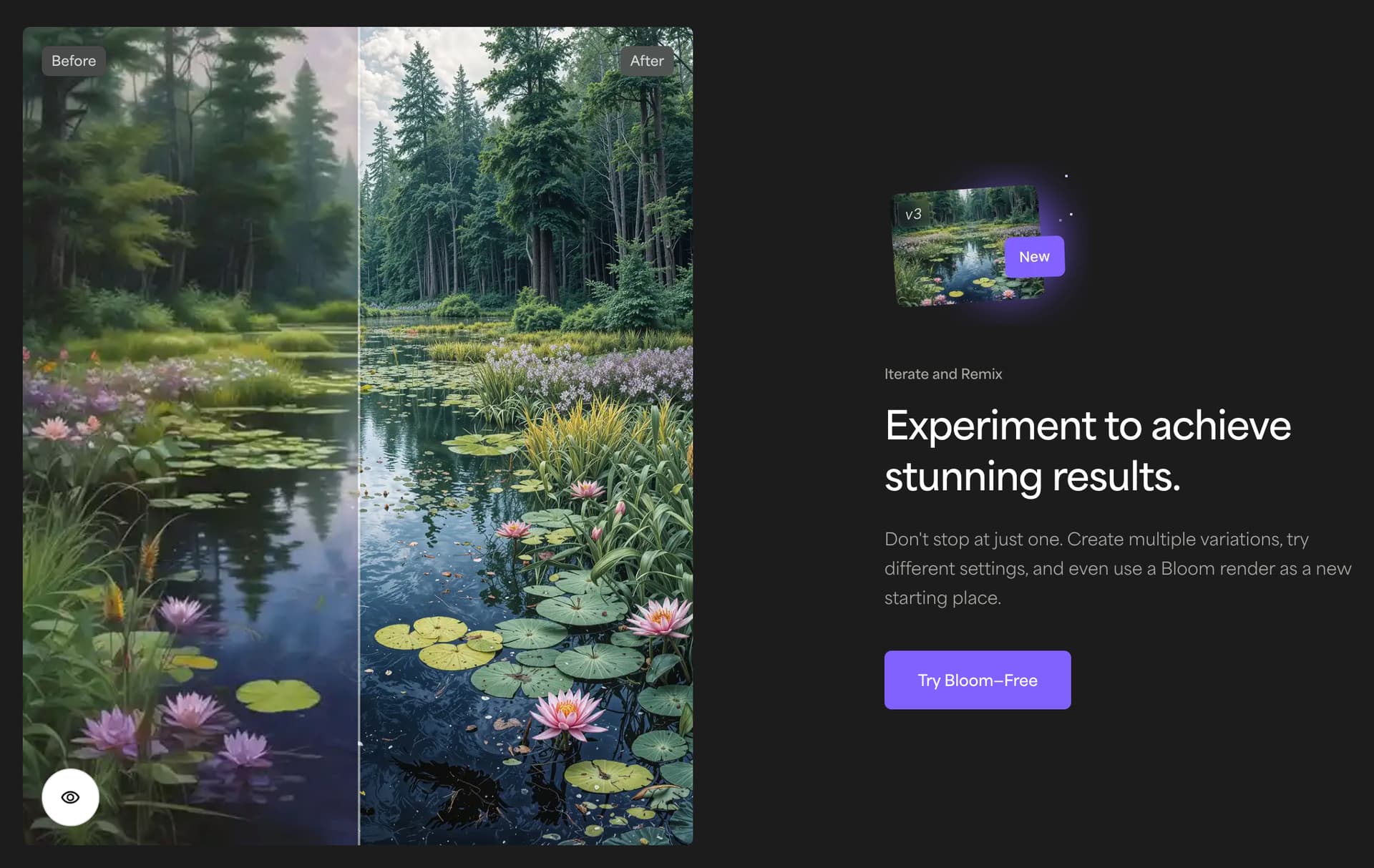
You can even take your Blooms and remix them by upscaling them AGAIN using this button. Some people are getting amazing results by mixing and matching different levels of creativity this way. Try it out!
How is it different than other creative Upscalers?
Bloom isn’t the only creative upscaler in the world, so you may be wondering what makes it different. Even compared to Gigapixel’s Redefine, there are some significant differences.
Compared to other creative upscalers, this is where Bloom stands out
AI Model Outputs
-
QUALITY: Get the highest quality creative upscaling AI model available, with the best details generated for AI images. Unparalleled by any other model we’ve tested, including our own, and competitors.
-
CONSISTENCY: Less artifacts than other creative upscalers, more stable outputs for professional use. Other creative upscalers create significant artifacts and have problems with tile edges, or fractal-like outputs. They also mess up textures on faces and skin, or identities. We’ve minimized this with Bloom, and it’s going to get even better over time.
-
VARIATIONS: You can generate up to 4 output variations at a time with each input. It turns out this is a really big deal for your workflow. If you want to test different levels of creativity or different “seeds”, you can easily find the best results possible with Bloom.
Bloom Rendering Plans
-
UNLIMITED: All paid plans are absolutely unlimited. Never pay for another single render, and absolutely no credits involved. Upscale responsibly - enjoy!

-
COMPETITIVE PRICE: A better price point than other creative upscalers out there in the market, especially if you consider the unlimited upscaling compared to limits in other upscalers.
-
FREE TRIALS: Test out the premium plans for free with full features, unlimited images, and up to 4 concurrent generations with no commitment. Of course, we know you’ll love it.
-
FREE PLAN: We believe you’re going to like the results of Bloom so much, we currently let you upscale 10 images per month at no charge. This is not a drill!
-
TOPAZ IMAGE TOOLS: Includes access to other Topaz Labs web tools like Unblur, Denoise, and more. It doesn’t include access to our desktop apps, but this is an incredible deal.
What’s in the future for Bloom?
We are going to continue to update Bloom and improve the results of our AI models behind Bloom just as we do with our other products.
We have big plans. Huge plans.
There’s so much more to Bloom, and this is just the start. But if you have any questions, or you just want to share some great results - please join us on Discord!
We will be using Discord exclusively instead of the forums to collect feedback, send updates, and talk with our wonderful community for Bloom. We’d love to see you there!
