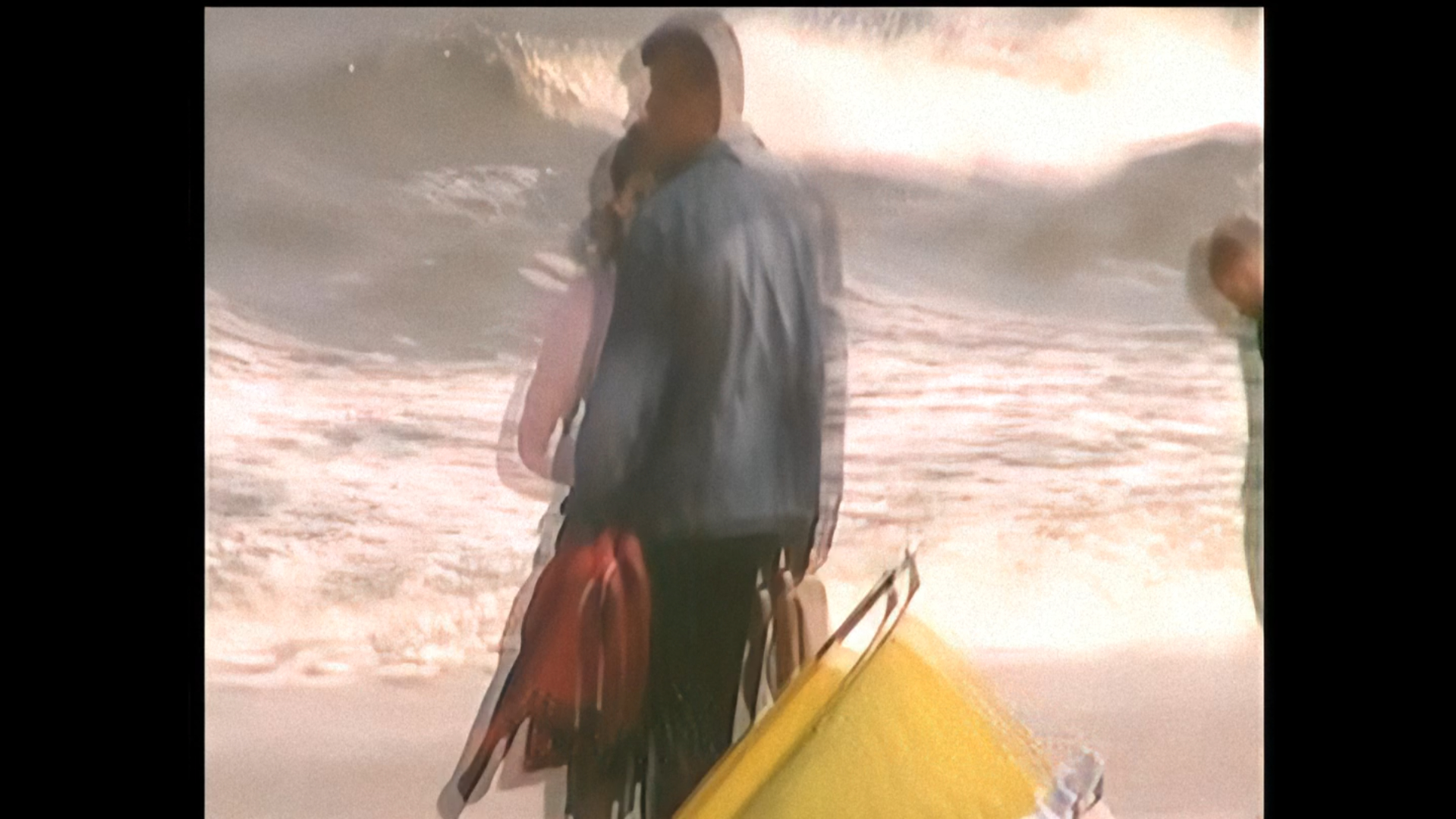
I don’t know how feasible this is, but a model that removes double vision would be useful. An example is shown in the attached photo, caused by a poorly positioned, medium-quality camera recording to MiniDV tapes.
Ouch. I guess that will be quite hard to achieve.
Maybe give the IrisLQ „interlaced progressive“ model a try? And try strong dehaloing
1 Like
Thanks for the tips—I’ll give it a try.
That said, I think a model that does nothing but fix this kind of ghosting would be great, because a while back I couldn’t find a solution to this problem anywhere.
1 Like
I do not know of any model which would fix this specifically.
As of sort of wild idea tho, i would maybe suggest to at least try the Themis 2 (Motion Deblur).
While this was originally designed to “reduces blur from camera/fast movement” i was for year using it extensively for “focusing” the footage, even without any actual movement in it, just unfocused. And very often it did absolutely spectacular job at it. I guess in many cases those “trailing silhouettes” or artifacts of “frame blending” look alike? Dont know. It has many quirks like artifacts it create on hair or static walls for certain qualities of source footage. Maybe if you downscaled it a tiny bit the Themis2 will work with it as if it was motion. 
Looks like fast horizontal movement that has been “blend” deinterlaced (or could be a telecined frame made up of two frames). Maybe go back to your MiniDV tapes and perform full-field deinterlace first - try a few different deinterlacers in field mode - or try inverse telecine. If you have the original MiniDV, it likely needs further investigation around the frame/field construction, rather that praying for a “magic model”.
1 Like
Unfortunately, Themis2 only made the problem worse. IrisLQ didn’t help either.
These are old home movies that I’d like to restore while I’m at it.
Did you explicitly specify the interlaced progressive option (as that would be the important part)?
See if either ones of these helps:
$ ffmpeg -i INPUT -filter:v "yadif=mode='send_field'" -codec:v 'ffv1' -codec:a 'copy' "deinterlaced.mkv"
or
$ ffmpeg -i INPUT -filter:v "pullup" -codec:v 'ffv1' -codec:a 'copy' "inversetelecine.mkv"
And then try playing back in MKV or VLC, step through frame by frame and see if you still get merged frames. There are plenty of other deinterlacers out there, like QTGMC. VapourBox is one of the easiest wrappers for QTGMC.
I recorded this a long time ago, but I get the impression that there was no interlacing—it was just recorded that way by the camera.
Either way, I’ll have to look for those tapes—if my parents kept them after I recorded them—and check whether there actually is interlacing or not.
The random internet sources I just looked at say MiniDV is always recorded as interlaced video.
1 Like
I understand that proper deinterlacing is the preferred workflow. However, Topaz Video AI already solves many problems that ideally should have been fixed at the source (noise, blur, compression artifacts, low resolution). A model that could reduce residual ghosting or double images in legacy footage would fit the same philosophy—helping users recover imperfect material rather than requiring perfect sources.
Users might as well record video in 4K right away instead of using Starlight models for repairs…
cli user is absolutely right. i recognise this problem with poorly copied cine films as well as mini DV tapes. Go back to your source if possible and try Shutter Encoder (it’s free) to de-interlace to double the frame rate, so 25fps (50 fields per second) becomes 50 progressive frames per second (in most of the world anyway).
I completely agree that proper deinterlacing from the original source is the best solution. My suggestion is aimed at the many users who no longer have access to the original tapes. For family archives, downloaded footage, or legacy files where only the final encoded video remains, an AI model capable of reducing residual ghosting would still provide value.
Is there any plan to address this issue, or has it effectively been deprioritized because it doesn’t have an obvious solution?
The option had no effect for me. I tried to fix a few messed up videos with baked in blur (around the interlaced-progressive motion).
