Video Enhance v2.6.4

@Chase The way I’ve seen the VEAI installer work, is that it deletes the (for macOS) the ~/Library/Applications Support/Topaz Labs LLC/Video Enhance AI Beta/ folder sometimes when it updates. This deletes the models, and I’ve had to redownload them over and over throughout beta testing.

When 2.6.2.0b was released I did a full model download of any models I normally used so that I could use them offline, that amounted to 22 GB of /models/ data. I copied this data to an external SSD. Making the symlink to the corresponding location in the ~/Library/…/models/ directory. When I upgraded to VEAI 2.6.2 full release, there was a new folder created of course called ~/Library/Applications Support/Topaz Labs LLC/Video Enhance AI/ and before I launched for the first time, I simply made the new symlink to this new install where the /models/ would need to be downloaded.

When I launched 2.6.2, it of course asked me to register/login, and then I added the first video, to test, when I hit preview the model activated immediately because it was symlinked already. This lends me to believe that VEAI checks its own /models/ directory to see what models are present, thus “enabling” them in Preferences Models Manager. I can verify that all the models downloaded, and moved from a beta to the full release, worked flawlessly.

I would also expect that VEAI to check the internal version of the model that now is “already present” and if there is a newer version, even of that exact “v” number, it would indicate an update. I’m looking to reduce the 22GB+ download for my models each time we update. It would be helpful if these models could be stored in the user defined area, using local storage for such files reduces the SSD space for the system. The “coreMLCache” directory takes fast copies" of the models for app use, so the actual /models/ is just storage.

I do have Artemis and @loxiye is most likely experiencing a connection issue. Hopefully the above descriptions of how the models are stored can give some ideas on finding a solution. Either to clearing or resetting that system storage directory for Topaz VEAI.

I have never tried to add older .json only models to the new 2.6.2 that is correct. did @deedle2 find a solution?

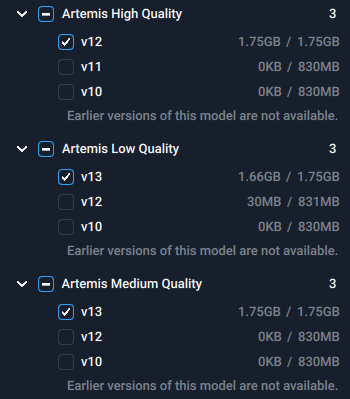
I get updates & downloads for optimized files just fine. I have no issue removing models and re downloading them either but under artemis medium AMQ11 is just gone, i have 10,12,13.

High quality 11 is there but no more medium 11. I know it was there bc i’ve ran 7 seasons of a show thru with it.

Thank you for your clarification. I can confirm, AMQ11, and ALQ11 are both gone for me.
amq11 and alq11 missing

1 Like

Why does Topaz think it’s a good idea to arbitrarily decide which models a user is and is not allowed to use? What sense does that make? That is not user friendly.

Before attacking or judging, maybe a better way would be to ask or wait an official answer. Maybe it’s related to an issue with the Amazon web service that’s happened the other day, or something like that.
the v11 is still there for AHQ. Maybe it’s a bug. I noticed this on the actual beta too.

The app still crashes when trying to add certain videos (Mac,M1 Max)

Or maybe Topaz got enough data to see there was problems for some users with that model or the statistical data showed not enough of a difference to keep it in the pipe line. Marty your right and I hope Topaz will let everyone know. So many possibilities before just going to not user friendly.

I hope everyone is keeping old install downloads so when issues arise they can just install a previous version that worked for them. I also wish there was a Wiki official or not just so we could keep up with the changes and model versions for each full release and beta.

yes, let’s not forget that this app crash a lot, but maybe some crashes are related to the models… who know. we’ll see when we’ll have an official answer.

How can removing the audio for Dione be an IMPROVEMENT???
Working with interlaced DV footage has worked perfectly with audio for me up till now, I purchased VE for working wth these files. The issue in 2.6.1 was the inability to remember to double the frame rate, NOT the sound. If you feel you have to remove tis option, it is because you have broken something that used to work.

PLEASE fix it.

Officially Artemis Dehalo and strong Dehalo are the Artemis v11 MQ & LQ replacements even though the results are not the same.

It’s a shame we have to keep repeating this, but you DO NOT want VEAI audio, from any model, for any reason, until they fix the audio engine. Your audio quality gets reduced to a ridiculously low bitrate, and cut to 2 channel stereo. You ALWAYS want to remux your audio from the original until Topaz fixes this, and they have promised to in a future version.

3 Likes

It’s a good thing your not working with my videos. Many are mono audio and a lot have audio bitrates lower than the 96Kbps AAC output from VEAI. Along with my hearing not being as good as it was ages ago I can save a little on file size because I can’t hear the difference between good audio and bad any more. The one thing I can hear is good 5.1 or 7.1 surround but I don’t use VEAI on any videos that have that.

I will say though the audio is very easy to deal with from many different software packages. I use Avidemux because I can save the audio stream from the original or process the audio only and save just that processed audio. Than you can mux that saved audio with your VEAI file or use another program to mux the audio with the video.

2 Likes

Artemis Dehalo v1 is too strong. Is there any way to reduce the strength of the upscale? It’s oversharpening a bit but mainly it’s making features too thick. This is a poorly lit overcompressed standard def movie and yet this model is somewhat working where all the others failed.

I’m trying to go from 768x576p to 960x720p by way of the 200% model (later downscaled in Avisynth). I tried the 100% model and upscaled that to 720p but it looked about the same (features too thick). You can clearly see the “too thick” effect looking at the movie credits at the end.

Has anyone been able to configure Proteus (v1 or v2) to work similar to Artemis Dehalo?

I’m sorry, shame and all, but - I DO WANT WANT VEAI AUDIO!!!
I bought VE to work through my DV tapes and my earlier Hi8 tapes (recorded via my DV camcorder), and have happily been working through the files, the sound has been FINE for me.

So now in 2.6.2, to fix a bug in 2.6.1, you remove the sound from my files? WTF? How on earth do you think it right to remove a feature like that? I’m working on over 5000 input files (~1.5 TB), and now you’ve added extra, unknown steps to my workflow? What a present, luuuucky mee! … No.
What I don’t need is someone else telling me what I want.

What I REALLY want is to have VEAI working for me as I had it before, as I paid for, doing what I need.
Gary

2 Likes

Yes, Proteus works great, but you’ll need to experiment with the sliders, mostly with dehalo and deblur.

I’ve quit using Proteus v1 and v2 for v3. A little trick I use for a starting point with the settings is find a place in the video that is all black if possible. Click on Auto-Detect lightning bolt and save that as a preset. That should give you the every settings very close, especially the Compression. Now go to the credits and see how they look. If good make note of the starting frame of the credits and process only the credits. Once you have your credits go back and find a scene with high contrast items. Generally I look for teeth, eyes and jewelry. Adjust your Deblur up and your Dehalo down small amounts until your satisfied. You might also need to reduce the sharpening as that brightens edges or darkens edges to increase contrast. You don’t need large adjustments with v3 like you did with 1 and 2.

Once you have those settings process the rest of the video. When done append the 2 or 3 sections. Don’t forget when splitting the processing make sure you are at the correct frames.

When processing black-and-white films in VEAI 2.6.2, Proteus v.3 imposes a grid of small diamond-shaped cells on the image, and the human skin is covered with fine-grained (film) noise, as if the “grain” mode is turned on.
At the same time, pure white surfaces remain clean, as in the source.
Changing the value of the noise removal parameter from 3 to 30 partially solves the problem, but leads to an overall decrease in clarity.
Proteus V.2 performs the same b/w film processing better and cleaner, although the grid appears in some places.
My source is a b/w progressive movie 960x720 25fps.
More than half of my material for processing is black and white films. I bought VEAI to process them.

If someone else sees similar processing artifacts, then write about it. Then I won’t be alone when contacting tech support.

Gary I’m torn on responding but can’t you just reinstall the last version that worked for you and continue processing. At work once a project was moving forward and software was debugged we never updated any software until the project was completed. That was years sometimes. Many don’t update Windows for a year or more because of the same thing your expressing, bugs or removed features. I’m really glad I don’t pay for Google software the way they remove things. I understand that we paid good money for the software but things happen I guess.

I do hope you find a resolution for your situation as 5000 files sounds like a whole lot of work. And like you most of my videos the audio that VEAI supplies is just fine. I don’t do anything that involves the Dione models though.

Best of luck

2 Likes

I keep getting multiple crashes when using Proteus Fine Tune

When I close the app, it crashes. I’m not sure where to submit bug reports.

It also drains the battery terribly unless I force the system off battery health/management. I can have the Mac plugged in and it will drain the battery if I leave the brightness up and the laptop connected to a second display (i.e. sidecar). No other app does this.

Translated Report (snipped report - can't upload full crash due to character limitation)
-------------------------------------

Process:               Topaz Video Enhance AI [27869]
Path:                  /Applications/Topaz Video Enhance AI.app/Contents/MacOS/Topaz Video Enhance AI
Identifier:            com.topazlabs.Topaz-Video-Enhance-AI
Version:               2.6.2 (2.6.2)
Code Type:             X86-64 (Native)
Parent Process:        launchd [1]
User ID:               501

Date/Time:             2021-12-21 18:11:34.8238 -0800
OS Version:            macOS 12.2 (21D5025f)
Report Version:        12
Bridge OS Version:     6.2 (19P50725a)
Anonymous UUID:        BB4FA898-1E39-BC60-97C3-B5F0E700FF16

Sleep/Wake UUID:       CDCA2E55-CB7D-4D44-8777-E5150BCD3442

Time Awake Since Boot: 230000 seconds
Time Since Wake:       49035 seconds

System Integrity Protection: enabled

Crashed Thread:        0  Dispatch queue: com.apple.main-thread

Exception Type:        EXC_BAD_ACCESS (SIGSEGV)
Exception Codes:       KERN_INVALID_ADDRESS at 0x000016dbf06ee3b0
Exception Codes:       0x0000000000000001, 0x000016dbf06ee3b0
Exception Note:        EXC_CORPSE_NOTIFY

Termination Reason:    Namespace SIGNAL, Code 11 Segmentation fault: 11
Terminating Process:   exc handler [27869]

**VM Region Info: 0x16dbf06ee3b0 is not in any region.**  Bytes after previous region: 25127916942257  Bytes before following region: 80419228818512
      REGION TYPE                    START - END         [ VSIZE] PRT/MAX SHRMOD  REGION DETAIL
      JS JIT generated code       163de9000-163deb000    [    8K] r-x/rwx SM=COW  
--->  GAP OF 0x5ffe9c215000 BYTES
      MALLOC_NANO              600000000000-600008000000 [128.0M] rw-/rwx SM=PRV  

Thread 0 Crashed::  Dispatch queue: com.apple.main-thread
0   QtCore                        	       0x10bc9e40c QMapNodeBase::nextNode() const + 60
1   QtQml                         	       0x10ce87a7c QV4::ExecutionEngine::fromVariant(QVariant const&) + 2252
2   QtQml                         	       0x10cef2fd0 QV4::QObjectWrapper::getProperty(QV4::ExecutionEngine*, QObject*, QQmlPropertyData*) + 2944
3   ???                           	       0x11b5c223e ???
4   QtQml                         	       0x10cf11573 0x10cdeb000 + 1205619
5   QtQml                         	       0x10ceb7985 QV4::Function::call(QV4::Value const*, QV4::Value const*, int, QV4::ExecutionContext const*) + 341
6   QtQml                         	       0x10d03bb9e QQmlJavaScriptExpression::evaluate(QV4::CallData*, bool*) + 622
7   QtQml                         	       0x10cff23f6 QQmlBoundSignalExpression::evaluate(void**) + 1014
8   QtQml                         	       0x10cff2bcb 0x10cdeb000 + 2128843
9   QtQml                         	       0x10d021785 QQmlNotifier::emitNotify(QQmlNotifierEndpoint*, void**) + 581
10  QtCore                        	       0x10be65b88 0x10bc3a000 + 2276232
11  QtQml                         	       0x10d021785 QQmlNotifier::emitNotify(QQmlNotifierEndpoint*, void**) + 581
12  QtCore                        	       0x10be65b88 0x10bc3a000 + 2276232
13  QtQml                         	       0x10d0449ae 0x10cdeb000 + 2464174
14  QtQml                         	       0x10d043c44 0x10cdeb000 + 2460740
15  QtQml                         	       0x10d041cc0 QQmlBinding::update(QFlags<QQmlPropertyData::WriteFlag>) + 304
16  QtQml                         	       0x10d021785 QQmlNotifier::emitNotify(QQmlNotifierEndpoint*, void**) + 581
17  QtCore                        	       0x10be65b88 0x10bc3a000 + 2276232
18  Topaz Video Enhance AI        	       0x10aa3991e TBackend::currentPosChanged(int) + 62
19  Topaz Video Enhance AI        	       0x10aa0ed6e TBackend::setCurrentPos(int) + 174
20  Topaz Video Enhance AI        	       0x10aa1655a TBackend::autoDetectParameters(QString const&, QMap<QString, QVariant> const&) + 266
21  Topaz Video Enhance AI        	       0x10aa3c1b5 0x10a9ef000 + 315829
22  Topaz Video Enhance AI        	       0x10aa3a5fc TBackend::qt_metacall(QMetaObject::Call, int, void**) + 124
23  QtQml                         	       0x10cefc559 0x10cdeb000 + 1119577
24  QtQml                         	       0x10cef8753 0x10cdeb000 + 1103699
25  QtQml                         	       0x10cef7fda QV4::QObjectMethod::callInternal(QV4::Value const*, QV4::Value const*, int) const + 1418
26  QtQml                         	       0x10cf26b9c QV4::Runtime::CallPropertyLookup::call(QV4::ExecutionEngine*, QV4::Value const&, unsigned int, QV4::Value*, int) + 140
27  ???                           	       0x10d9b66c8 ???
28  QtQml                         	       0x10cf11573 0x10cdeb000 + 1205619
29  QtQml                         	       0x10ceba8cf 0x10cdeb000 + 850127
30  QtQml                         	       0x10cf26b9c QV4::Runtime::CallPropertyLookup::call(QV4::ExecutionEngine*, QV4::Value const&, unsigned int, QV4::Value*, int) + 140
31  ???                           	       0x10d9cc9c2 ???
32  QtQml                         	       0x10cf11573 0x10cdeb000 + 1205619
33  QtQml                         	       0x10ceb7985 QV4::Function::call(QV4::Value const*, QV4::Value const*, int, QV4::ExecutionContext const*) + 341
34  QtQml                         	       0x10d03bb9e QQmlJavaScriptExpression::evaluate(QV4::CallData*, bool*) + 622
35  QtQml                         	       0x10cff23f6 QQmlBoundSignalExpression::evaluate(void**) + 1014
36  QtQml                         	       0x10cff2bcb 0x10cdeb000 + 2128843
37  QtQml                         	       0x10d021785 QQmlNotifier::emitNotify(QQmlNotifierEndpoint*, void**) + 581
38  QtCore                        	       0x10be65b88 0x10bc3a000 + 2276232
39  QtQml                         	       0x10d09b99c QQmlTimer::event(QEvent*) + 172
40  QtCore                        	       0x10be32dd8 QCoreApplicationPrivate::notify_helper(QObject*, QEvent*) + 88
41  QtCore                        	       0x10be32a34 QCoreApplication::notifyInternal2(QObject*, QEvent*) + 212
42  QtCore                        	       0x10be33d79 QCoreApplicationPrivate::sendPostedEvents(QObject*, int, QThreadData*) + 809
43  libqcocoa.dylib               	       0x1140d8259 0x11409e000 + 238169
44  libqcocoa.dylib               	       0x1140d7591 0x11409e000 + 234897
45  QtCore                        	       0x10be32f27 QCoreApplication::processEvents(QFlags<QEventLoop::ProcessEventsFlag>) + 39
46  Topaz Video Enhance AI        	       0x10aa2f17a TVideoWriter::runFfmpeg(QStringList const&) + 378
47  Topaz Video Enhance AI        	       0x10aa2ea0a TVideoWriter::mergeAudio(QString, double, double, QString, bool) + 1674
48  Topaz Video Enhance AI        	       0x10aa2d2a9 TVideoWriter::close() + 265
49  Topaz Video Enhance AI        	       0x10aa2f6dd TVideoWriter::~TVideoWriter() + 29
50  Topaz Video Enhance AI        	       0x10aa133d5 TBackend::~TBackend() + 373
51  Topaz Video Enhance AI        	       0x10aa09742 main + 2818
52  dyld                          	       0x1165454fe start + 462

Thread 1:: QQmlThread
0   libsystem_kernel.dylib        	    0x7ff801a5a19e poll + 10
1   QtCore                        	       0x10be95220 qt_safe_poll(pollfd*, unsigned int, timespec const*) + 608
2   QtCore                        	       0x10be96a21 QEventDispatcherUNIX::processEvents(QFlags<QEventLoop::ProcessEventsFlag>) + 849
3   QtCore                        	       0x10be2eacf QEventLoop::exec(QFlags<QEventLoop::ProcessEventsFlag>) + 431
4   QtCore                        	       0x10bc5b603 QThread::exec() + 131
5   QtQml                         	       0x10d07e469 0x10cdeb000 + 2700393
6   QtCore                        	       0x10bc5c619 0x10bc3a000 + 140825
7   libsystem_pthread.dylib       	    0x7ff801a904f4 _pthread_start + 125
8   libsystem_pthread.dylib       	    0x7ff801a8c00f thread_start + 15

<snip>

Model: MacBookPro16,4, BootROM 1715.80.2.0.0 (iBridge: 19.16.10725.5.1,0), 8 processors, 8-Core Intel Core i9, 2.4 GHz, 64 GB, SMC 
Graphics: Intel UHD Graphics 630, Intel UHD Graphics 630, Built-In
Display: Sidecar Display, 2032 x 1620, MirrorOff
Graphics: AMD Radeon Pro 5600M, AMD Radeon Pro 5600M, PCIe, 8 GB
Display: Color LCD, 3072 x 1920 Retina, Main, MirrorOff, Online
Memory Module: BANK 0/ChannelA-DIMM0, 32 GB, DDR4, 2667 MHz, Micron, MT40A4G8BAF-062E:B
Memory Module: BANK 2/ChannelB-DIMM0, 32 GB, DDR4, 2667 MHz, Micron, MT40A4G8BAF-062E:B
AirPort: spairport_wireless_card_type_wifi (0x14E4, 0x7BF), wl0: Jul 12 2021 18:02:56 version 9.30.464.0.32.5.76 FWID 01-c081cfed
Bluetooth: Version (null), 0 services, 0 devices, 0 incoming serial ports
Network Service: iPad, Ethernet, en8
Network Service: Wi-Fi, AirPort, en0
USB Device: USB31Bus
USB Device: iPad
USB Device: T2Bus
USB Device: composite_device
USB Device: Touch Bar Backlight
USB Device: Touch Bar Display
USB Device: Apple Internal Keyboard / Trackpad
USB Device: Headset
USB Device: Ambient Light Sensor
USB Device: FaceTime HD Camera (Built-in)
USB Device: Apple T2 Controller
Thunderbolt Bus: MacBook Pro, Apple Inc., 63.5

I can’t upload the entire crash because of the limit on posts and I’m not allowed to embed media. Provide me with a support email and I’ll forward the crash and proteus settings.
There will be a new audio engine in a future version.