Version 1.7.3b (Artemis LQ v6) cannot create a file larger than 27.8 gb and crashes for no reason. Tried it several times on different HDDs.
Are the any plans to EVER fix the color matrix problem with png output?
With png output:
- The gamma bumps down from around 1.00 to .98
- The color matrix shifts based on a Rec.709 → Rec.601 conversion
The below gifs already bump the gamma up on the VEAI result by a factor of 1.02.

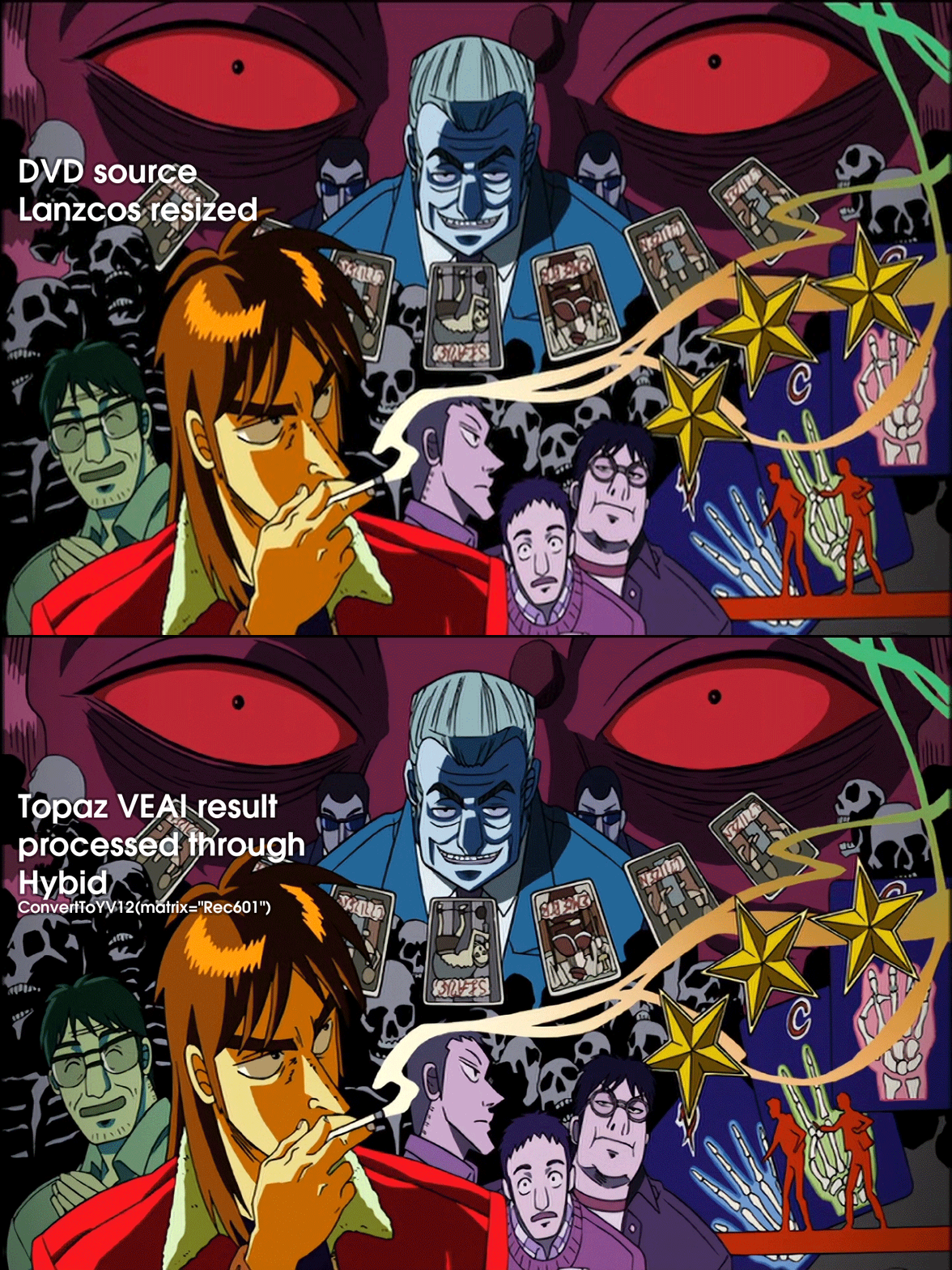
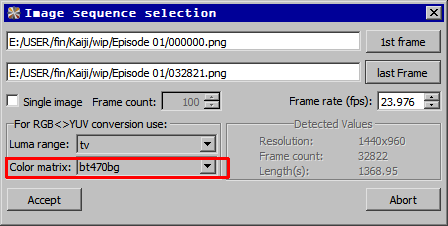
To get the colors to match the source, right now you have to import the image stream into Hybrid using the bt470bg color matrix, which will insert ConvertToYV12(matrix="Rec601") into the Avisynth script, which fixes the problem:
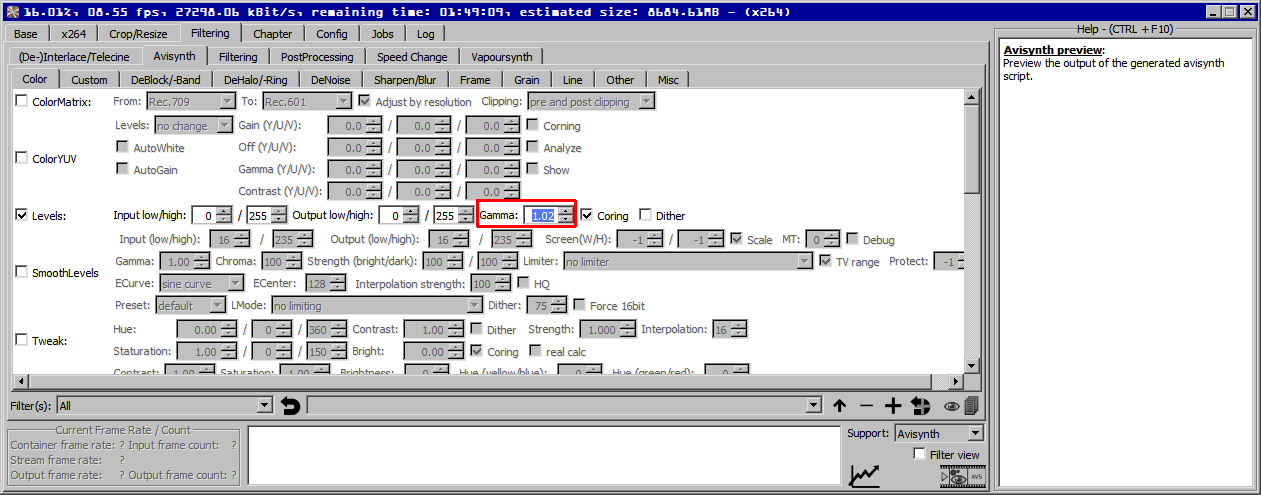
You also have to use the Levels filter to adjust the gamma by 1.02:
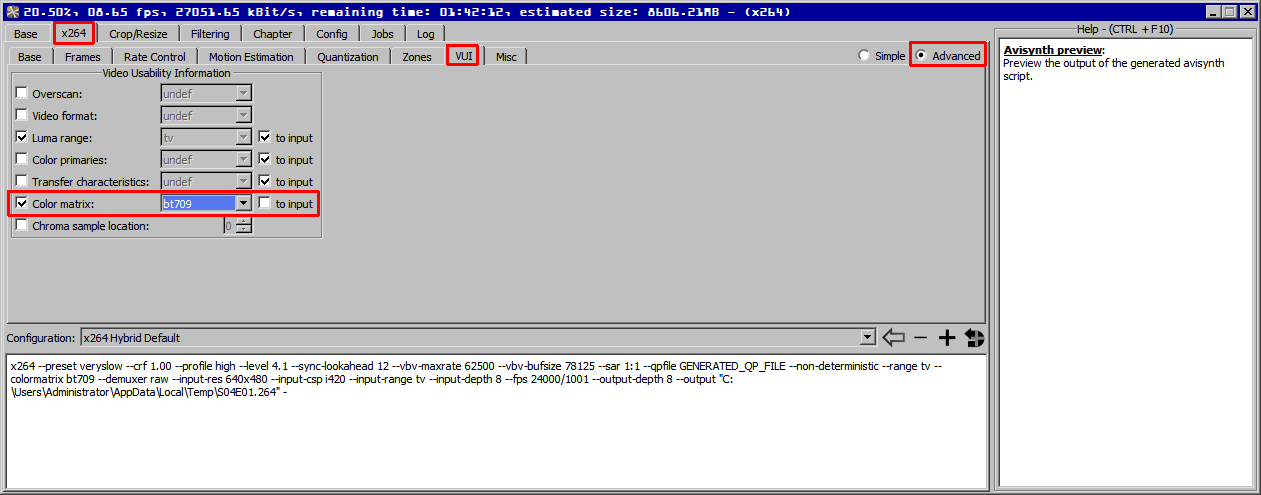
Depending on your playback device, you may need to set the bt709 color matrix flag in your output from Hybrid… it doesn’t change colors, it’s just a flag and may not be necessary:
Ideally, gamma and color matrix in png output from Topaz Video Enhance AI should match the source. Rec.601 is usually used on SD sources, Rec.709 is usually used on HD sources. VEAI seems to be doing a Rec.601->Rec.709 conversion, which will give incorrect colors in the output, unless the user converts them back by some means (as indicated above). The conversion may look better in some cases, but that should be up to the user.
Additionally, if the user does any kind of color manipulation in Hybrid via filters, they may have to set a custom script and insert the appropriate conversion matrix at the correct point in the script if it does not happen automatically (i.e., ConvertToYV24(matrix="Rec601")). This wouldn’t be a concern if the Topaz VEAI output was correct.
2 Likes
Admins, when new version will be released? I want to try beta, pls give me a link on facebook
1 Like
I use Handbrake. Just try playing with the bitrate untill you find a value that’s suitable for yout source and liking. I don’t use the “constant quality” setting, instead use the AVG Bitrate. For 4k videos I usually go for 10mbps - 16mbps depending on the source (but it’s a hit-and-miss anyway)
Just search on Facebook, there is a link in this post where you can apply to be a beta tester …
This error is written to the Windows log when the program stops suddenly:
Имя сбойного приложения: Topaz Video Enhance AI (BETA).exe, версия: 0.0.0.0, метка времени: 0x5f9cc1b8
Имя сбойного модуля: VCRUNTIME140.dll, версия: 14.0.24234.1, метка времени: 0x5a8ba5e6
Код исключения: 0xc0000005
Смещение ошибки: 0x000000000000c387
Идентификатор сбойного процесса: 0x354c
Время запуска сбойного приложения: 0x01d6b26aaec95d05
Путь сбойного приложения: C:\Program Files\Topaz Labs LLC\Topaz Video Enhance AI (BETA)\Topaz Video Enhance AI (BETA).exe
Путь сбойного модуля: C:\Program Files\Topaz Labs LLC\Topaz Video Enhance AI (BETA)\VCRUNTIME140.dll
Идентификатор отчета: ffd6b590-3a0a-472f-8576-354c2e8653e1
The program crashes after 11-12 hours of work. From 1.6 and up. 1.5.3 and below works fine. MSI 1060 graphics card.
Please raise a support request at the main website as the 0xc0000005 error is a general windows one and if you have Logs enabled include those also.
1.7.0 adds support for AMD and RTX 3000.
Also greatly improves speed (around 2x comparing to 1.6.1 with my RTX 2070)
yea it allows me to, the scale percentage is 1200percent from 360p to 8k. The key to making it look good however is i first look for a good quality that is dvd or 1080p, then i downscale it to 360p lossless in handbrake denoised and deblocked. This was even tho its 360p its a high bit rate 360p that looks more like 480p or between 480p and 720p.
Hi i found your discussion very interesting.
I am on VEAI 1.8.1 and my findings are that for x200 upscale works better feed the signal to veia.
i have created 2 avs files (One line both)
DGSource("sample.dgi"deinterlace=2) VS
QTGMC(Preset=“Very Slow”, MatchPreset=“Very Slow”, MatchPreset2=“Very Slow”, NoisePreset=“Slower”, InputType=0, SourceMatch=3,Sharpness=0.0 , Lossless=1, NoiseProcess=1,ChromaNoise=True,Denoiser=“dfttest”,DenoiseMC=True,NoiseTR=2,GrainRestore=0.3,NoiseRestore=0.0, NoiseDeint=“Bob”,StabilizeNoise=False)
QTgmc produces more detail, but also a lot more artifacts on direct Artemis MQ x200
Look at the full album to samples
https://imgur.com/a/FdfEIVU
