For HD upscales this is mostly correct (depending on the HW config 100% can still be the fastest).
But for SD upscales setting RAM to 10% still leads to a massive performance gain.
For HD upscales this is mostly correct (depending on the HW config 100% can still be the fastest).
But for SD upscales setting RAM to 10% still leads to a massive performance gain.
Interesting - I have not seen this gain. I mainly deal with 480p video and see no changes when upscaling to 720p when the RAM settings is changed to 10% or 100%.
Perhaps this is only the case when upscaling to 1080p?
I guess the speed gain by reducing RAM usage heavily depends on how many GPU cores you have (someone told that setting RAM to 10% forces the app to use the GPU while at 100% it uses the Neural Engine instead).
So, of course your mileage will vary on the “bare” M1 compared to the M2 ultra I have here (with 60 GPU cores).
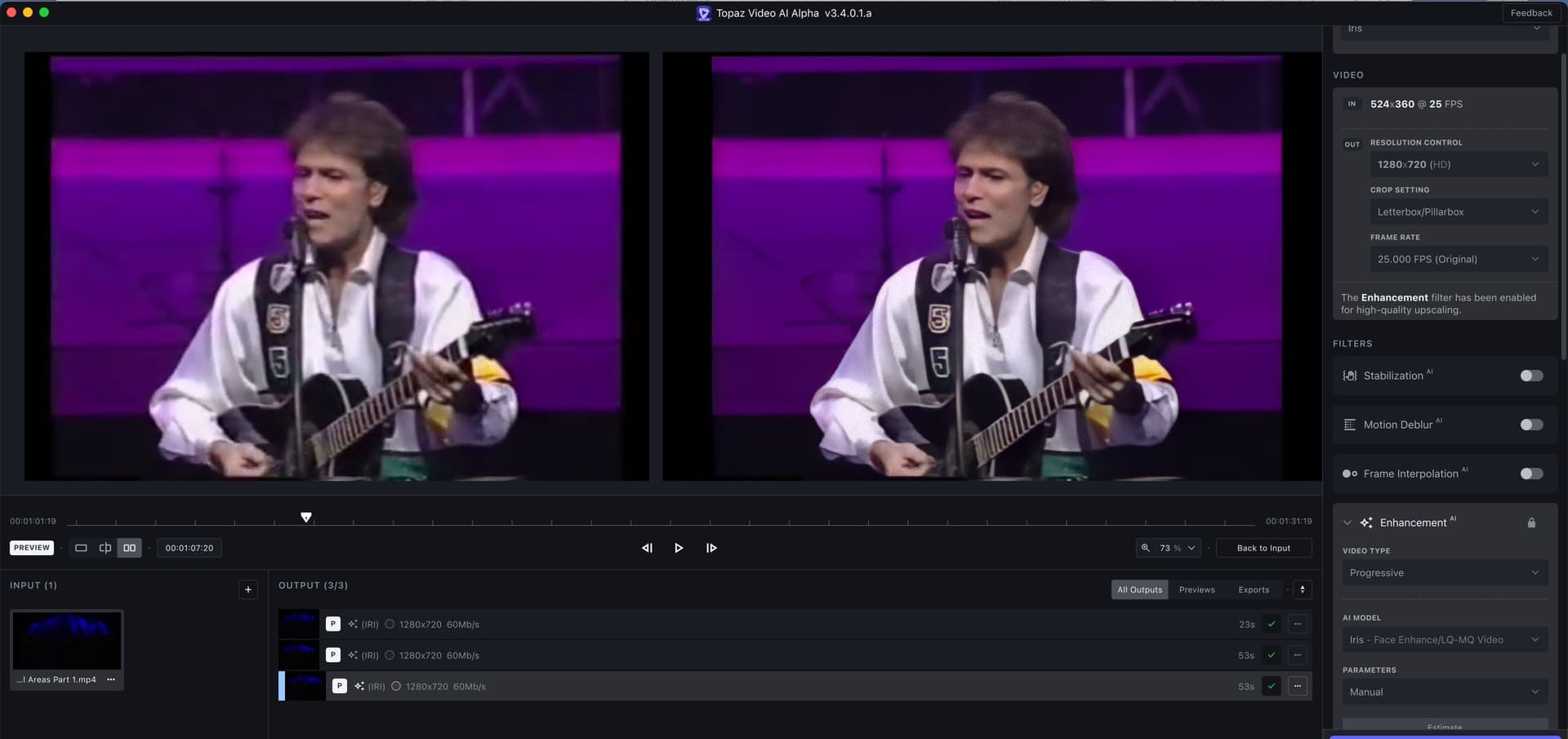
Anyway this is what I’m getting here upscaling a 524x360 video to 1280x720:
The upper preview was done with RAM set to 10% and the middle and lower one with 80% and 100%, respectively.
So, with many GPU cores you get a massive boost by setting RAM to 10% for anything lower than 1080p input resolution and up to 2x upscales.
Topaz Video AI  v3.3.9
System Information
OS: Windows v10.22
CPU: AMD Ryzen Threadripper 3970X 32-Core Processor   127.87 GB
GPU: NVIDIA GeForce RTX 3090  23.77 GB
Processing Settings
device: 0 vram: 1 instances: 0
Input Resolution: 1920x1080
Benchmark Results
Artemis		1X: 	24.37 fps 	2X: 	10.04 fps 	4X: 	02.79 fps
Proteus		1X: 	22.37 fps 	2X: 	09.58 fps 	4X: 	02.74 fps
Gaia		1X: 	08.50 fps 	2X: 	05.76 fps 	4X: 	02.68 fps
4X Slowmo		Apollo: 	30.39 fps 	APFast: 	47.54 fps 	Chronos: 	18.89 fps 	CHFast: 	24.31 fps
So I’m guessing that you’re getting a bit better results from windows 11?
I only have been using 11. Not a fan of 11 but I built the new system with a 4090 and figured it’s optimized better than 10 which I am most likely wrong cause 10 is very stable. I haven’t had any issues with 11 so I don’t have benchmarks from 10. I did debloat 11 so only the basics and maybe that’s why it hasn’t crashed yet. How about you?
Topaz Video AI  v3.3.9
System Information
OS: Windows v11.22
CPU: 13th Gen Intel(R) Core(TM) i9-13900K  127.75 GB
GPU: NVIDIA GeForce RTX 4090  23.59 GB
Processing Settings
device: 0 vram: 1 instances: 1
Input Resolution: 1920x1080
Benchmark Results
Artemis		1X: 	40.23 fps 	2X: 	16.39 fps 	4X: 	04.30 fps
Proteus		1X: 	32.26 fps 	2X: 	15.39 fps 	4X: 	04.30 fps
Gaia		1X: 	15.85 fps 	2X: 	10.92 fps 	4X: 	04.71 fps
4X Slowmo		Apollo: 	41.92 fps 	APFast: 	73.20 fps 	Chronos: 	32.45 fps 	CHFast: 	34.61 fps
Topaz Video AI  v3.3.9
System Information
OS: Windows v11.22
CPU: 13th Gen Intel(R) Core(TM) i9-13900K  127.75 GB
GPU: NVIDIA GeForce RTX 4090  23.59 GB
Processing Settings
device: 0 vram: 1 instances: 1
Input Resolution: 720x480
Benchmark Results
Artemis		1X: 	199.20 fps 	2X: 	79.91 fps 	4X: 	24.50 fps
Proteus		1X: 	151.91 fps 	2X: 	69.15 fps 	4X: 	22.52 fps
Gaia		1X: 	84.64 fps 	2X: 	57.48 fps 	4X: 	30.38 fps
4X Slowmo		Apollo: 	216.67 fps 	APFast: 	450.87 fps 	Chronos: 	171.72 fps 	CHFast: 	207.38 fps
Topaz Video AI  v3.3.9
System Information
OS: Windows v10.22
CPU: 13th Gen Intel(R) Core(TM) i7-13700K  31.776 GB
GPU: NVIDIA GeForce RTX 4090  23.59 GB
GPU: Intel(R) UHD Graphics 770  0.125 GB
Processing Settings
device: 0 vram: 1 instances: 0
Input Resolution: 1920x1080
Benchmark Results
Artemis		1X: 	49.76 fps 	2X: 	19.62 fps 	4X: 	05.93 fps
Proteus		1X: 	40.87 fps 	2X: 	19.16 fps 	4X: 	05.03 fps
Gaia		1X: 	16.16 fps 	2X: 	11.72 fps 	4X: 	05.14 fps
4X Slowmo		Apollo: 	43.25 fps 	APFast: 	92.77 fps 	Chronos: 	34.20 fps 	CHFast: 	26.64 fps
Topaz Video AI  v3.3.9
System Information
OS: Windows v10.22
CPU: 13th Gen Intel(R) Core(TM) i7-13700K  31.776 GB
GPU: NVIDIA GeForce RTX 4090  23.59 GB
GPU: Intel(R) UHD Graphics 770  0.125 GB
Processing Settings
device: 0 vram: 1 instances: 0
Input Resolution: 1280x720
Benchmark Results
Artemis		1X: 	100.56 fps 	2X: 	42.20 fps 	4X: 	11.72 fps
Proteus		1X: 	82.95 fps 	2X: 	39.45 fps 	4X: 	11.95 fps
Gaia		1X: 	36.05 fps 	2X: 	26.35 fps 	4X: 	11.78 fps
4X Slowmo		Apollo: 	108.90 fps 	APFast: 	195.79 fps 	Chronos: 	73.28 fps 	CHFast: 	97.34 fps
Posting beta benchmarks is not a great idea since they are not meant to be directly comparable to official releases. I’m sure that category will be created once it’s released.
Topaz Video AI  v3.3.10
System Information
OS: Windows v10.22
CPU: AMD Ryzen Threadripper 3970X 32-Core Processor   127.87 GB
GPU: NVIDIA GeForce RTX 3090  23.77 GB
Processing Settings
device: 0 vram: 1 instances: 0
Input Resolution: 1920x1080
Benchmark Results
Artemis		1X: 	24.15 fps 	2X: 	09.54 fps 	4X: 	02.70 fps
Proteus		1X: 	23.89 fps 	2X: 	09.19 fps 	4X: 	02.59 fps
Gaia		1X: 	08.41 fps 	2X: 	05.66 fps 	4X: 	02.58 fps
4X Slowmo		Apollo: 	29.62 fps 	APFast: 	46.31 fps 	Chronos: 	18.61 fps 	CHFast: 	25.56 fps
Topaz Video AI  v3.3.10
System Information
OS: Windows v11.22
CPU: 13th Gen Intel(R) Core(TM) i9-13900K  127.75 GB
GPU: NVIDIA GeForce RTX 4090  23.59 GB
Processing Settings
device: 0 vram: 1 instances: 1
Input Resolution: 1920x1080
Benchmark Results
Artemis		1X: 	37.96 fps 	2X: 	15.00 fps 	4X: 	04.26 fps
Proteus		1X: 	28.34 fps 	2X: 	13.16 fps 	4X: 	04.08 fps
Gaia		1X: 	15.79 fps 	2X: 	10.86 fps 	4X: 	04.34 fps
4X Slowmo		Apollo: 	39.93 fps 	APFast: 	70.19 fps 	Chronos: 	33.42 fps 	CHFast: 	33.48 fps
Topaz Video AI  v3.3.10
System Information
OS: Windows v11.22
CPU: 13th Gen Intel(R) Core(TM) i9-13900K  127.75 GB
GPU: NVIDIA GeForce RTX 4090  23.59 GB
Processing Settings
device: 0 vram: 1 instances: 1
Input Resolution: 720x480
Benchmark Results
Artemis		1X: 	192.86 fps 	2X: 	78.84 fps 	4X: 	21.85 fps
Proteus		1X: 	139.01 fps 	2X: 	70.42 fps 	4X: 	22.17 fps
Gaia		1X: 	85.45 fps 	2X: 	61.56 fps 	4X: 	27.65 fps
4X Slowmo		Apollo: 	235.73 fps 	APFast: 	425.31 fps 	Chronos: 	171.98 fps 	CHFast: 	214.44 fps
System Memory: 32GB DDR4 @ 3815 MHz(QuadChannel)
Topaz Video AI  v3.3.10
System Information
OS: Windows v10.22
CPU: Intel(R) Core(TM) i9-7940X CPU @ 3.10GHz  31.689 GB
GPU: NVIDIA GeForce RTX 4070 Ti  11.729 GB
Processing Settings
device: 0 vram: 1 instances: 1
Input Resolution: 1920x1080
Benchmark Results
Artemis		1X: 	26.76 fps 	2X: 	10.83 fps 	4X: 	02.94 fps
Proteus		1X: 	22.35 fps 	2X: 	10.20 fps 	4X: 	02.84 fps
Gaia		1X: 	08.26 fps 	2X: 	05.93 fps 	4X: 	02.86 fps
4X Slowmo		Apollo: 	24.27 fps 	APFast: 	43.57 fps 	Chronos: 	19.00 fps 	CHFast: 	17.98 fps
System Memory: 16GB DDR4 @ 3815 MHz(DualChannel)
Topaz Video AI  v3.3.10
System Information
OS: Windows v10.22
CPU: Intel(R) Core(TM) i9-7940X CPU @ 3.10GHz  15.689 GB
GPU: NVIDIA GeForce RTX 4070 Ti  11.729 GB
Processing Settings
device: 0 vram: 1 instances: 1
Input Resolution: 1920x1080
Benchmark Results
Artemis		1X: 	22.38 fps 	2X: 	08.98 fps 	4X: 	02.53 fps
Proteus		1X: 	18.16 fps 	2X: 	09.03 fps 	4X: 	02.41 fps
Gaia		1X: 	08.22 fps 	2X: 	05.84 fps 	4X: 	02.50 fps
4X Slowmo		Apollo: 	23.42 fps 	APFast: 	39.43 fps 	Chronos: 	18.97 fps 	CHFast: 	18.03 fps
Topaz Video AI  v3.3.10
System Information
OS: Windows v11.22
CPU: AMD Ryzen 9 7950X 16-Core Processor              63.732 GB
GPU: NVIDIA GeForce RTX 4090  23.59 GB
GPU: NVIDIA GeForce RTX 4090  23.59 GB
GPU: NVIDIA GeForce RTX 4090  23.59 GB
Processing Settings
device: 0 vram: 1 instances: 1
Input Resolution: 1920x1080
Benchmark Results
Artemis		1X: 	42.81 fps 	2X: 	15.60 fps 	4X: 	03.92 fps
Proteus		1X: 	33.10 fps 	2X: 	14.57 fps 	4X: 	04.04 fps
Gaia		1X: 	16.35 fps 	2X: 	11.60 fps 	4X: 	04.14 fps
4X Slowmo		Apollo: 	46.10 fps 	APFast: 	65.08 fps 	Chronos: 	33.16 fps 	CHFast: 	37.71 fps
Topaz Video AI  v3.3.10
System Information
OS: Windows v11.22
CPU: 11th Gen Intel(R) Core(TM) i9-11980HK @ 2.60GHz  63.775 GB
GPU: NVIDIA GeForce RTX 3080 Laptop GPU  15.812 GB
Processing Settings
device: 0 vram: 0.9 instances: 1
Input Resolution: 1920x1080
Benchmark Results
Artemis		1X: 	13.71 fps 	2X: 	08.26 fps 	4X: 	02.39 fps
Proteus		1X: 	12.66 fps 	2X: 	07.72 fps 	4X: 	02.40 fps
Gaia		1X: 	04.19 fps 	2X: 	02.96 fps 	4X: 	01.98 fps
4X Slowmo		Apollo: 	16.70 fps 	APFast: 	42.39 fps 	Chronos: 	10.73 fps 	CHFast: 	20.80 fps
Topaz Video AI  v3.3.10
System Information
OS: Windows v11.22
CPU: Intel(R) Core(TM) i7-10700K CPU @ 3.80GHz  127.91 GB
GPU: NVIDIA GeForce RTX 3080 Ti  11.816 GB
GPU: NVIDIA GeForce RTX 3080 Ti  11.816 GB
Processing Settings
device: 2 vram: 1 instances: 1
Input Resolution: 1920x1080
Benchmark Results
Artemis		1X: 	20.20 fps 	2X: 	09.63 fps 	4X: 	02.64 fps
Proteus		1X: 	17.01 fps 	2X: 	07.23 fps 	4X: 	02.45 fps
Gaia		1X: 	16.24 fps 	2X: 	09.42 fps 	4X: 	02.70 fps
4X Slowmo		Apollo: 	17.01 fps 	APFast: 	40.53 fps 	Chronos: 	17.58 fps 	CHFast: 	20.88 fps
My latest using the most recent build:
Topaz Video AI  v3.3.10
System Information
OS: Windows v11.22
CPU: 12th Gen Intel(R) Core(TM) i9-12900KF  63.846 GB
GPU: NVIDIA GeForce RTX 3090  23.77 GB
Processing Settings
device: 0 vram: 0.87 instances: 1
Input Resolution: 1920x1080
Benchmark Results
Artemis		1X: 	24.84 fps 	2X: 	15.60 fps 	4X: 	04.32 fps
Proteus		1X: 	24.21 fps 	2X: 	13.89 fps 	4X: 	04.19 fps
Gaia		1X: 	08.34 fps 	2X: 	05.73 fps 	4X: 	03.83 fps
4X Slowmo		Apollo: 	29.17 fps 	APFast: 	62.39 fps 	Chronos: 	18.93 fps 	CHFast: 	27.19 fps
interestingly I seem to have lost performance speed as compared to my benchmark on April 9 with build 3.2.0
Topaz Video AI v3.2.0
System Information
OS: Windows v11.2009
CPU: 12th Gen Intel(R) Core™ i9-12900KF 63.846 GB
GPU: NVIDIA GeForce RTX 3090 23.77 GB
Processing Settings: device: 0 vram: 0.87 instances: 1
Input Resolution: 1920x1080
Benchmark Results
Artemis 1X: 24.52 fps 2X: 18.21 fps 4X: 5.74 fps
Proteus 1X: 24.59 fps 2X: 16.85 fps 4X: 5.54 fps
Gaia 1X: 8.41 fps 2X: 5.79 fps 4X: 3.97 fps
4X Slowmo Apollo: 32.84 fps Chronos: 18.97 fps Chronos Fast: 27.30 fps
One of the developers mentioned making some change to the benchmark that can effect speed. That was between that version and the current. I’m hoping that’s what’s going on.
As far as i know, RDNA3 is highly optimised for paralell execution.
And Nvidia has more problems with bugs than AMD.
I would like to know which GPU is the most efficient.
The thing is that 4 times slower means 4 times as longer power consumption.
A 4090 can set to only consume 50% of its peak watts and being almost as fast as before still.
Just that an M2 Ultra is more like nearly half the speed of a 4090 in the most common scenario (2x upscale) and the whole system uses ~160W with that - and that is CPU, GPU, HD, Power-supply, fans, everything.
A i9/4090 PC will use at least 600W for the whole system, so the M1/M2 still is power effective. Not to talk about the extreme differences when the system is idling or in desktop use.