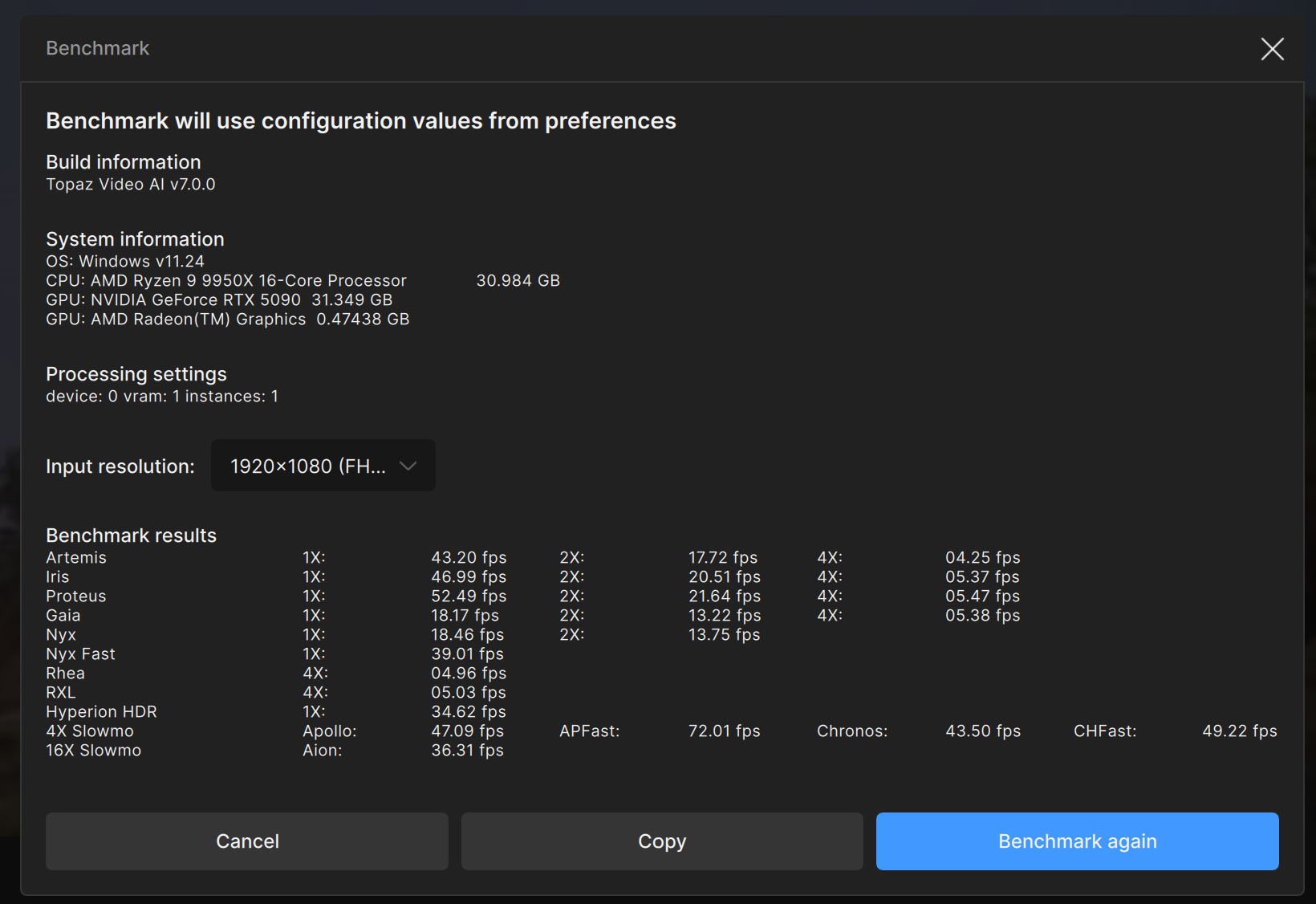
Video AI 7.0.X - User Benchmarking Results

Topaz Video AI  v7.0.0
System Information
OS: Windows v11.24
CPU: 12th Gen Intel(R) Core(TM) i9-12900KF  127.78 GB
GPU: NVIDIA GeForce RTX 4060 Ti  15.731 GB
Processing Settings
device: 0 vram: 0.75 instances: 1
Input Resolution: 1920x1080
Benchmark Results
Artemis		1X: 	12.21 fps 	2X: 	07.97 fps 	4X: 	02.64 fps 	
Iris		1X: 	12.04 fps 	2X: 	06.78 fps 	4X: 	01.87 fps 	
Proteus		1X: 	11.72 fps 	2X: 	07.87 fps 	4X: 	02.44 fps 	
Gaia		1X: 	03.96 fps 	2X: 	02.82 fps 	4X: 	01.90 fps 	
Nyx		1X: 	03.51 fps 	2X: 	02.95 fps 	
Nyx Fast		1X: 	08.40 fps 	
Rhea		4X: 	01.42 fps 	
RXL		4X: 	01.31 fps 	
Hyperion HDR		1X: 	15.69 fps 	
4X Slowmo		Apollo: 	20.47 fps 	APFast: 	48.09 fps 	Chronos: 	09.38 fps 	CHFast: 	16.36 fps 	
16X Slowmo		Aion: 	19.64 fps 	

GPU:90% max power limit.

Hi, u might want to take a performance check of your PC with http://userbenchmark.com/
Your RAM dependent performance is pretty low. Maybe there is some misconfiguration with your RAM slots.

In the RAM dependent tests (e.g. Hyperion HDR, Aion) , my 6850K (8 year old) + 3080 outperforms your system, there as in GPU dependent tests (e.g. Proteus 1X, Chronos) your system is about 3 times faster as it should be.

Here i created a list of all TVAI models with approximate weight of how much GPU- or RAM/CPU dependent their performance is:
GPU or RAM/CPU dependence for each model in a chart generated by Claude AI

Hi Michael.

At first blink I found your idea great, but after some thoughts, some thing upsets me.

You are comparing two different platforms.

System 1 Intel Core i7-6850K and system 2 AMD Ryzen 9 9950X3D.
And RTX 3080 vs 5090.
I guess ram DD4 vs DDR5.

When you change ONE parameter, you can definitely know what changes. But when here you change both GPU but also CPU, what of the two parameters is the culprit to better or slower performance? GPU? CPU? Both?

And with three parameters with Ram change, what is going on exactly?

Do you still have your system 1 available, where you could just swap GPU and going from 3080 to 5090 and see what happens?

Then going on system 2 and putting with your brand new 9950x3d the 3080, then swapping with 5090.

At least with that kind of test, we would know EXACTLY what GPU/CPU changes, in what proportion/percentage. Despite the Ram change that I think must not change a lot the results.

Because I’m sorry, going from System 1 to 2, you can just compare ONLY those 2 systems. But you can’t conclude for sure that others will get similar percentages results. You can’t get a general law I mean.

If you are on Zen 3 with a 2080, what happens when we go to 9950x3D and 5070?

You apply you percentages and that’s it? I don’t think so.

5090 has 21,760 cores.
3080 has 8960 cores for the 12Gb version.

You speak about 5090 3.5 times faster than 3080. Where did you get that? Topaz relies mainly on Cuda cores as far as I know. Not only that but mainly if you want the fastest speed, you need to get the card with the more cuda cores.

21.760 / 8960 = 2,42 times faster.

You started from 5090 is 3.5 times faster than 3080 theoretically. Ok, but where do you get this figure? I’m skeptic.

I remind one thing:

when people do reviews on CG, they use a platform/system and they test:

4050 then 4060 then 4070, then 4070ti, etc.. They ONLY swap CG. They don’t change ANYTHING EXCEPT the GPU.

Same to test CPU, they swap only CPU.

But here, you draw conclusion and percentages, but that only works comparing your 2 systems.

Now maybe we could speak of a tendency using your figures that:

If you want better results, buy a more powerful GPU except if you are mainly using hyperion and aion. But even that would need to be confirm with at least a couple of guys doing like you, testing their old system, then next day they receive their new one, testing on the new one and see if they get similar tendencies as you.

Same with Ram. Is ram affects speed? Do CL32 slower than CL28 and how much? Does ram 6800 allows faster topaz speed than Ram 6000mhz? So you have to test ONLY the ram.

What do you think?

Thanks. :slight_smile:

2 Likes

You are right that the method used is by far not perfect but I think it still gives a good idea of how much impact a faster GPU or faster RAM/CPU is more important for certain TVAI models.

Ofc, percentages will differ from system to system but the general observations, e.g. Hyperion HDR and Aion being pretty dependent on RAM speed (it seems to be mostly RAM speed and CPU second), very much fits what I have been observing for a while when comparing results in these benchmark threads.

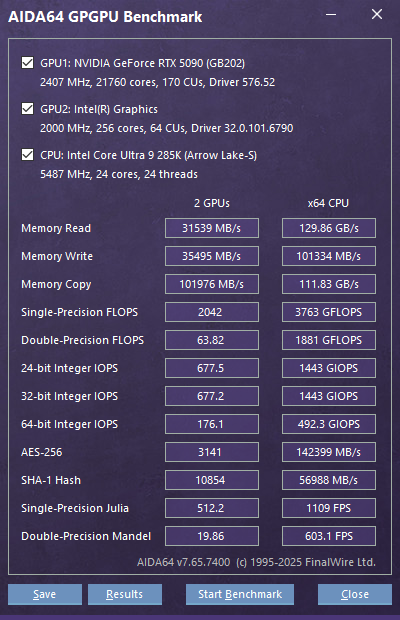
A good example are the results in this thread of my 6850K + 3080 system (quad memory channel) and rfrankaway’s system with a 285K CPU and a 5090. The more GPU dependent results are about 2.5 times faster but the RAM dependent results are actually slower. The only explanation for me is that there is some RAM (less likely CPU) misconfiguration in play.

If I had more time, I would probably test how much influence a 50% reduction in GPU clock, VRAM clock, CPU clock, RAM throughput, RAM latency) has for the benchmark results. But each of these tests will usually also be influenced by the other components speed. Therefore, perfectly comparable tests do not really exist. I hope my results here give some indication what to look for when somebody wants to improve performance for a specific model.

Topaz Video AI  v7.0.0
System Information
OS: Windows v11.23
CPU: AMD Ryzen 9 5900X 12-Core Processor              31.922 GB
GPU: NVIDIA GeForce RTX 3080 Ti  11.816 GB
Processing Settings
device: 0 vram: 1 instances: 1
Input Resolution: 1920x1080
Benchmark Results
Artemis		1X: 	23.36 fps 	2X: 	10.85 fps 	4X: 	02.89 fps 	
Iris		1X: 	21.79 fps 	2X: 	12.03 fps 	4X: 	03.70 fps 	
Proteus		1X: 	22.97 fps 	2X: 	13.70 fps 	4X: 	03.85 fps 	
Gaia		1X: 	08.68 fps 	2X: 	05.98 fps 	4X: 	03.51 fps 	
Nyx		1X: 	09.34 fps 	2X: 	04.95 fps 	
Nyx Fast		1X: 	18.91 fps 	
Rhea		4X: 	03.15 fps 	
RXL		4X: 	03.00 fps 	
Hyperion HDR		1X: 	25.34 fps 	
4X Slowmo		Apollo: 	31.97 fps 	APFast: 	47.17 fps 	Chronos: 	19.41 fps 	CHFast: 	28.55 fps 	
16X Slowmo		Aion: 	41.49 fps 	

It’s interesting to see the different benchmarks with the same GPU, but different CPUs. I noticed that AMD CPUs tend to be slightly higher.

1 Like

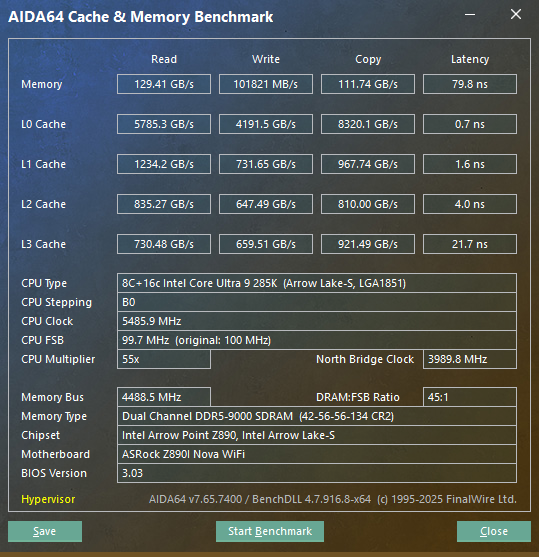
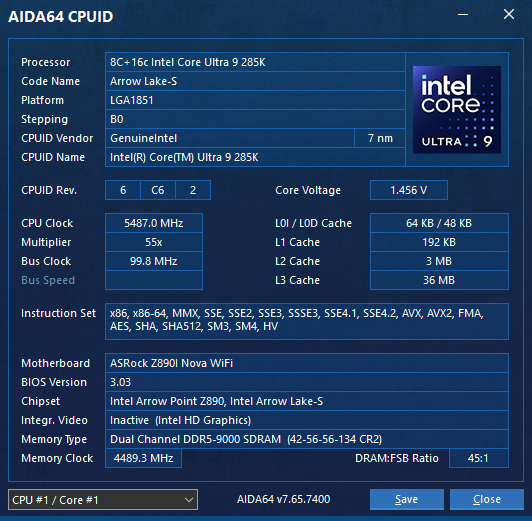
My DDR5 (CUDIMM) is extreme tuned and very fast at DDR5-9000 (Gear2). I can run at DDR5-9200 (Gear4), but slightly slower since Gear4 adds more latency. What you are seeing is a well-known issue with latency in the memory controller in the latest gen Arrow Lake Intel processors. I have a massive amount of DDR bandwidth due to the speed and posted this in an earlier thread since I was one of the first here with a 285k Arrow Lake processor.

We had actually discussed this earlier:


1 Like
Topaz Video AI  v7.0.0
System Information
OS: Windows v11.24
CPU: AMD Ryzen 9 7950X 16-Core Processor ECO Modus.           127.65 GB ECC 3988 Mhz
GPU: NVIDIA GeForce RTX 4090  22.082 GB
Processing Settings
device: 0 vram: 0.9 instances: 0
Input Resolution: 1920x1080
Benchmark Results
Artemis		1X: 	30.47 fps 	2X: 	11.67 fps 	4X: 	02.93 fps 	
Iris		1X: 	28.32 fps 	2X: 	14.28 fps 	4X: 	03.83 fps 	
Proteus		1X: 	30.58 fps 	2X: 	13.98 fps 	4X: 	03.98 fps 	
Gaia		1X: 	11.91 fps 	2X: 	08.39 fps 	4X: 	03.70 fps 	
Nyx		    1X: 	10.84 fps 	2X: 	07.77 fps 	
Nyx Fast	1X: 	21.56 fps 	
Rhea		4X: 	03.47 fps 	
RXL		    4X: 	03.43 fps 	
Hyperion HDR		1X: 	30.46 fps 	
4X Slowmo		Apollo: 	35.95 fps 	APFast: 	52.57 fps 	Chronos: 	23.35 fps 	CHFast: 	35.11 fps 	
16X Slowmo		Aion: 	30.82 fps 	

1 Like

What are your DDR5 RAM speed and timings on your 9950X3D system?

Very similar to Mellow’s settings and benchmarks (just a tad slower), 6400@CL30 with slightly different sub-timings (which are actually quite important especially for latency):

I still don’t understand how the Hyperion/Aion numbers are so low on your (and some other) systems. There might be something to fix on Topaz side, imho.

Topaz Video AI  v7.0.0
System Information
OS: Mac v14.03
CPU: Apple M3 Max  128 GB
GPU: Apple M3 Max  96 GB
Processing Settings
device: 0 vram: 1 instances: 1
Input Resolution: 1920x1080
Benchmark Results
Artemis		1X: 	11.42 fps 	2X: 	07.35 fps 	4X: 	02.45 fps 	
Iris		1X: 	08.07 fps 	2X: 	04.75 fps 	4X: 	01.66 fps 	
Proteus		1X: 	09.34 fps 	2X: 	06.76 fps 	4X: 	02.14 fps 	
Gaia		1X: 	03.17 fps 	2X: 	02.37 fps 	4X: 	01.82 fps 	
Nyx		1X: 	04.36 fps 	2X: 	04.30 fps 	
Nyx Fast		1X: 	10.47 fps 	
Rhea		4X: 	00.95 fps 	
RXL		4X: 	01.03 fps 	
Hyperion HDR		1X: 	74.79 fps 	
4X Slowmo		Apollo: 	12.90 fps 	APFast: 	46.00 fps 	Chronos: 	04.29 fps 	CHFast: 	07.10 fps 	
16X Slowmo		Aion: 	13.25 fps 	

ECO Mode + ECC Enabled + 4 Ram Sticks in Mainboard = Main Memory Bandwidth limited.

The 4090 is ECC enabled too.

Topaz Video AI  v7.0.0
System Information
OS: Windows v11.24
CPU: 13th Gen Intel(R) Core(TM) i5-13600KF  63.857 GB
GPU: NVIDIA GeForce RTX 4070 Ti SUPER  15.687 GB
Processing Settings
device: 0 vram: 1 instances: 1
Input Resolution: 1920x1080
Benchmark Results
Artemis		1X: 	28.03 fps 	2X: 	16.16 fps 	4X: 	04.66 fps 	
Iris		1X: 	25.91 fps 	2X: 	15.45 fps 	4X: 	04.70 fps 	
Proteus		1X: 	27.09 fps 	2X: 	18.58 fps 	4X: 	05.44 fps 	
Gaia		1X: 	09.56 fps 	2X: 	06.80 fps 	4X: 	04.61 fps 	
Nyx		1X: 	08.61 fps 	2X: 	07.07 fps 	
Nyx Fast		1X: 	19.56 fps 	
Rhea		4X: 	03.21 fps 	
RXL		4X: 	03.07 fps 	
Hyperion HDR		1X: 	23.77 fps 	
4X Slowmo		Apollo: 	30.71 fps 	APFast: 	61.75 fps 	Chronos: 	20.18 fps 	CHFast: 	33.49 fps 	
16X Slowmo		Aion: 	46.37 fps 	

Planning to upgrade to a 9950X3D in the near future, but so far I’ve only upgraded my GPU so here’s a benchmark with a somewhat unbalanced and CPU bottle-necked result.

Topaz Video AI Beta  v7.0.0.4.b
System Information
OS: Windows v11.24
CPU: 12th Gen Intel(R) Core(TM) i5-12600K  31.797 GB
GPU: NVIDIA GeForce RTX 5090  31.348 GB
GPU: Intel(R) UHD Graphics 770  0.125 GB
Processing Settings
device: 0 vram: 1 instances: 0
Input Resolution: 1920x1080
Benchmark Results
Artemis		1X: 	35.39 fps 	2X: 	11.37 fps 	4X: 	03.03 fps 	
Iris		1X: 	35.60 fps 	2X: 	13.70 fps 	4X: 	03.34 fps 	
Proteus		1X: 	35.65 fps 	2X: 	13.54 fps 	4X: 	03.81 fps 	
Gaia		1X: 	16.57 fps 	2X: 	11.01 fps 	4X: 	03.40 fps 	
Nyx		1X: 	16.38 fps 	2X: 	09.49 fps 	
Nyx Fast		1X: 	35.14 fps 	
Rhea		4X: 	03.35 fps 	
RXL		4X: 	03.16 fps 	
Hyperion HDR		1X: 	24.14 fps 	
4X Slowmo		Apollo: 	30.55 fps 	APFast: 	50.35 fps 	Chronos: 	34.46 fps 	CHFast: 	30.11 fps 	
16X Slowmo		Aion: 	30.31 fps 	

Why are you thinking of the 9950X3D instead of Intel? I’m thinking about doing the same. haha.

1 Like

Purely because at this point in time AMD seem to have better CPUs for both gaming and productivity based on all the benchmarks I’ve seen. If that changes around the time I’m next looking to upgrade I’d have no qualms about switching because I have no brand loyalty to either.

Which is, btw, the only right thing to do.

1 Like

Got a new GPU so I’m doing some benchmarking with older gpus (using starlight mini) I have and created a test file with some distant shots and fairly close faces. It’s a low bitrate (168kbps data) 12 second cut of Silkwood [1983] 716*348. It’s 30 FPS and 360 frames.

my 9950x 5590 32gb finished the minimum upscale (1482*720) at 6:33 or 393 seconds 360/393 > .91 FPS.
at 300% upscale (2148x1044) it took 12:41 > 761 seconds 360/761/ > .47 FPS