I’ve read all this threat top to bottom and WoW, you’ve made incredible things out of nothing (worst quality but best source available), lot of progress in few months. Some pictures are clearly blu-ray level here, some seems to leak details in background, I guess that’s the limit of the models right now ?
Are you using a pre-processing script to made some clean upload before upscaling ?
Yep, there is what some would call “intense” pre-processing done. Before I feed the source material from the PAL-DVDs into Topaz VEAI, I use a front-end software called “StaxRip” and “Hybrid” to handle what I consider “the worst and most prominent issues” from the original DVDs.
Short summary (StaxRip):
Filters to handle CrossColoring and Banding effects, deinterlacing and additional image improvements via QTGMC, DeBlock, DeHalo, Deringing, Anti Aliasing, Sharpening, Framerate-Adjustments.
Perhaps you could make use of Neat Video. It is a plug-in that works with DaVinci, Adobe and other programs, but you have to pay for it and it’s not cheap. But it’s very versatile and has a dust&scratches removal feature than can be adjusted. They also provide many sample and how-to vids that helped me a lot by customizing it for my purposes.
Perhaps that’s worth a look.
Hello community. I thought I would share some updates on my upscaling work (as you know I have been tinkering with my workflow a lot), now I have teasers to share.
Here are the latest results of Star Trek - Deep Space Nine:
Here are the latest results of Star Trek - Voyager:
Here are the latest results of Babylon 5 (please note that I have combined the live action PAL-DVD scenes with the 1080p CGI from the remastered version, but stretched them to conform to 16:9 - that’s my own little experiment):
I have been upscaling via different methods, including AVSPmod/AVISynth QTGMC, XviDPSP5 (great at cleaning up grain on film prints) and I am intrigued by this post. How would I import the script into VEAI 2.6.2.2b? Thanks in advance,
Albert
Yet another new image set, this time from Babylon 5 - Episode 1, Season 1 “1x01 - Midnight on the Firing Line”
Comparison shots (with slider; 10 images per link):
Please be advised that I have replaced the DVD effect scenes with those from the latest HD-masters and then did a stretch on them to conform to 16:9 aspect ratio of the live action scenes, which explains why the quality differs so much.
Nice topic and amazing UPSCALE. Question anyone knows whats the best settings and best AI Model for DVDRIPS SD but sitcoms like old tv shows with barely any special effect and normal lighting? I guess it should be the same for the shows like this no?
That’s a tricky and rather involved question. Unfortunately, there isn’t “THE” setting for certain materials.
Mostly it’s being determined by trial and error.
But personally, I usually do a check list with factors I want to consider before I begin (which can help you later on):
What is your source material (DVD-untouched, DVDrip, TV-recording etc.)?
Is your source material NTSC, PAL or a mix (f.e. phase shifted interlaced parts on progressive)?
Does your source have a CFR (constant frame rate) or VFR (variable frame rate)?
Is interlacing present?
Are there issues that impact the quality (like artefacts, rainbowing, cross-coloring, compression, aliasing, ringing, halos)?
Do you need to crop?
Do you have mostly live action or more CGI/VFX/effects? Or is it a mix?
Would you prefer a more “realistic” look (keeping more grain, increased sharpening) or do you like it “smooth” (clean, low grain, less sharpening)?
Is quality very important (watching on 4K) or is size also a matter? What would your trade-off be?
What’s the final output format? (can sometimes impact compatibility with players)
I hope that’s helpful. Otherwise I would gladly share my workflow or give further advice.
Hello again. I apologize for the late reply, been busy.
Well, since you were kind enough to give me a lot of info, I’ll try to respond in detail.
A general note: I usually run all my sources through StaxRip, especially if a source has interlacing; QTGMC is a very useful tool right there. Also, additional filters (like Denoise, Dehalo, Derainbow, Sharpening, AntiAliasing and such) can help to give you a good basis to work from. I would recommend to only deinterlace with Topaz VEAI if other methods fail, because the deinterlace here is not without problems (unfortunately).
So you have DVDrips as well as TV-Recordings.
Answer: If at all possible, try to get the highest quality source you possibly can get your hands on. DVDrips have usually already been compressed and therefore might have lost quality (depending on how the ripping was done). A “raw” DVD stream (like vob-files) would be better. DVDs can benefit from Gaia HQ and/or Artemis MQ, I usually do a 100% pass with Gaia HQ and then upscale with Artemis MQ.
TV-recordings usually are compressed more “heavily” or can have artefacts, those could benefit from Artemis LQ, but you would have to be careful because that could lose detail as well.
Your source material is NTSC.
Answer: Good, so you should not have to deal with pulldowns (sometimes present in PAL material), don’t see any problems there.
You have CFR.
Answer: Great. VFR is a nightmare and not many players can handle that correctly (many try to create a midway solution by establishing a “inbetween-framerate”, which leads to motion stutter). You should not face any problems with CFR.
You have both - progressive and interlaced.
Answer (progressive): Usually a “safe bet”, since the image is create line by line.
Answer (interlaced): I would deinterlace with QTGMC via StaxRip. Beware of the field order (top or bottom first), interlaced content can sometimes display distracting visual lines, especially with moving objects or panning shots.
Your source is a sitcom.
Answer: Nice. Should be a relatively stable environment as far as lighting, objects, people are concerned. Also, the shots should be mostly medium range and closeups, since single-camera sitcoms are mostly done that way with few distance shots. Upscalers have issues with objects in the background (peoples eyes especially).
No crop needed.
Answer: Ok, you’ll safe a little time there adjusting for borders and such.
No effects present.
Answer: Good, so you don’t have to worry about CGI/VFX.
You’d like to compare between “clean” and “realistic”.
Answer (clean): Models like Artemis LQ or Gaia CG usually deliver a clean, sometimes even “too clean” look, since artefacts and grain are filtered out. That also can hurt the detail level, so keep an eye on that.
Answer (realistic): Models like Artemis MQ or Gaia HQ keep more grain, detail but also may enhance artefacts, be on the watch for those. Be careful with Artemis HQ, it does tend to “oversharpen”.
You want it in 4K.
Answer: You can upscale to 4K, but I would recommend doing it in two steps. When your source is a DVDrip and/or TV-recording, I assume an SD-resolution (like 720x480, which would be NTSC in 4:3 ratio). So you would go from that about 200% to 1080p, then from that again about 200% to 4K. Doing a 400% to 4K can sometimes create undesirable effects from the upscaler, but it really depends on your source. Also keep in mind the black border issue with 4:3 aspect ratio (with was common for sitcoms): If you want it in the original 4:3 then upscale normally and black borders will be added by Topaz (so your resolution will go like: 720x480 to 1920x1080 to 3840x2160). But if you want to stretch it later to fill your screen, then you would have to upscale with custom function in Topaz (so your resolution will go like: 720x480 to 1440x1080 to 2880x2160, which is 4:3 in 4K without black borders).
You want it in MP4.
Well, basically any software offers that format and compatibility is great, shouldn’t be an issue.
General tip: DaVinci Resolve is a great tool to take you Topaz Upscale one step further. Highly recommended and plug-in capable (I added Neat Video Denoise, another great tool) if you want to go the extra mile - not cheap, but worth it (in my opinion).
Hello community. More upscaling project teasers. This time I tried my hands on BluRay that have difficulties.
In this post, I grabbed my SG-1 BluRay set. Still a work in progress.
Hello community. More upscaling project teasers. This time I tried my hands on BluRay that have difficulties.
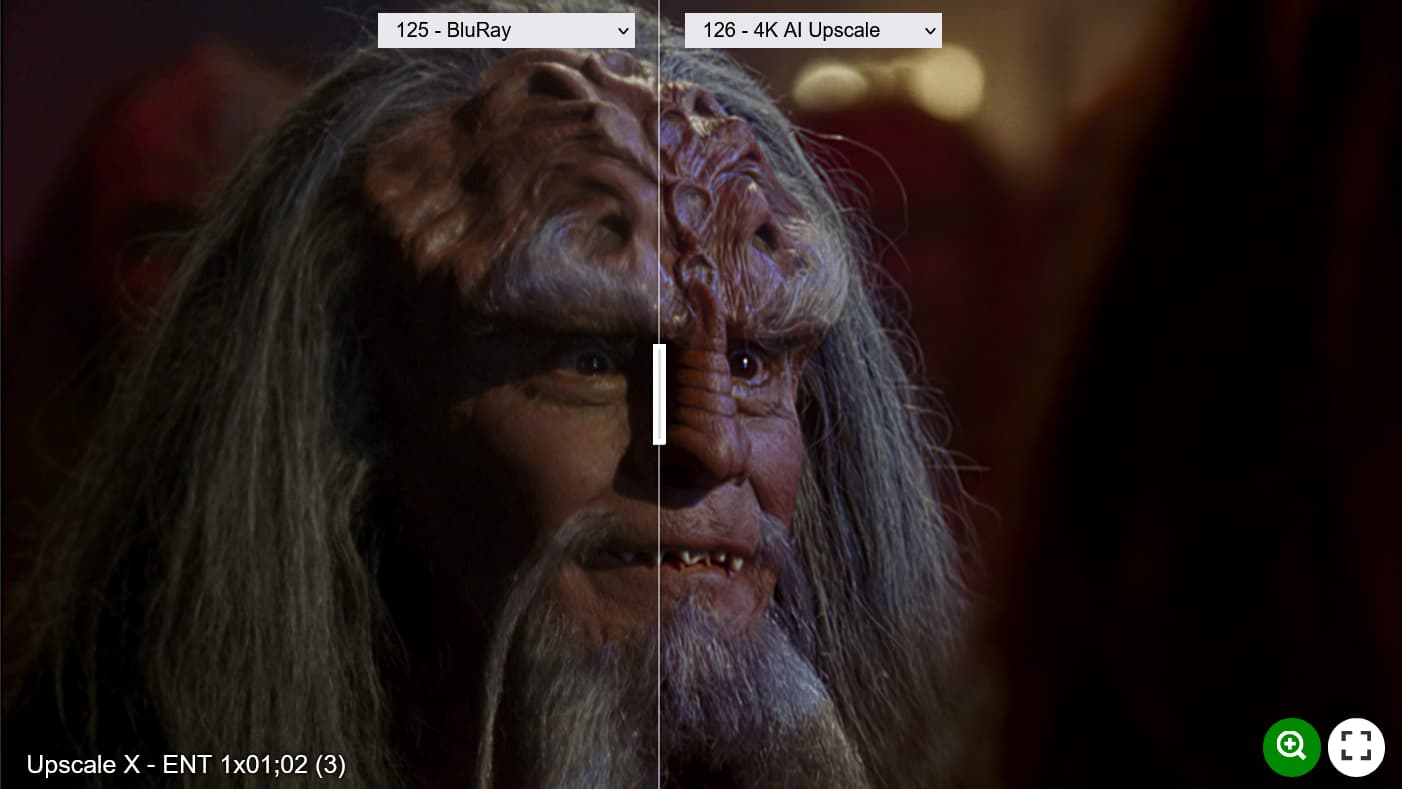
In this post, I grabbed my Star Trek-Enterprise BluRay set. Still a work in progress.
Just thought I would share a little snippet from my upscaling experiments on the B5-Movie “The Lost Tales / Voices in the Dark”. Thankfully a friend of mine provided me with a 720p version, so I could work from that.
Hello again.
Since I realized my previous 2 tests were not exactly what I imagined, I refined the workflow to closer resemble the original and look less “artificial” and avoid oversharpening.
Here are the comparison images:
On the faces and skin tones there is an aggressive and unflattering magenta or violet color cast. Is that added by you or is that a side effect of the up scaling process?