And it doesn’t delete temp files on closure, which annoys me.
3 Likes
My advice!
I’ve owned the program for over a year now, but I still haven’t found any poor quality video enhancement algorithm that satisfies me.
Here’s what I’ve learned: no program can do the perfect job on its own…
TVAI does a great job of handling high-quality videos, making them even better. Therefore, the very first task is to make the video already good before you submit it to the TVAI program.
After checking many of the results, I came to this conclusion! All videos, before the faults reach TVAI, need to be pre-processed in other programs.
That’s what I do! I upload the video to Davinci Resolve. With the help of the Neat Video plugin, I remove noise and adjust the sharpness of the image. Next, in Davinci, I also add sharpness, if necessary. I increase the contrast a little. With the help of an RGB window, I align in color, light, dark and medium tones. I increase the color saturation, etc.
Only then can the video be submitted in the montage codec to TVAI. TVAI can make high-quality upscaling the first pass. And the second pass interpolation of frames up to 60 (120)fps.
I am amazed to follow the forum where you share your experiences of how you try to do what the program is not capable of. TVAI will never improve your video if it is of poor quality. She’ll just finish drawing something, but it won’t be perfect.
TVAI gives the best video when it interferes with it the least. Pay attention to the screenshot. In all the videos that I upload to TVAI after Davinci, the manual setup score in both Proteus and Iris is almost always the same. I’ve tested dozens of options, the settings evaluator shows the same picture for all medium to high quality videos like in the screenshot. Increasing a parameter leads to distortion in some places. On the contrary, I’m lowering the Sharpen option a bit because I’ve used it enough in Davinci…
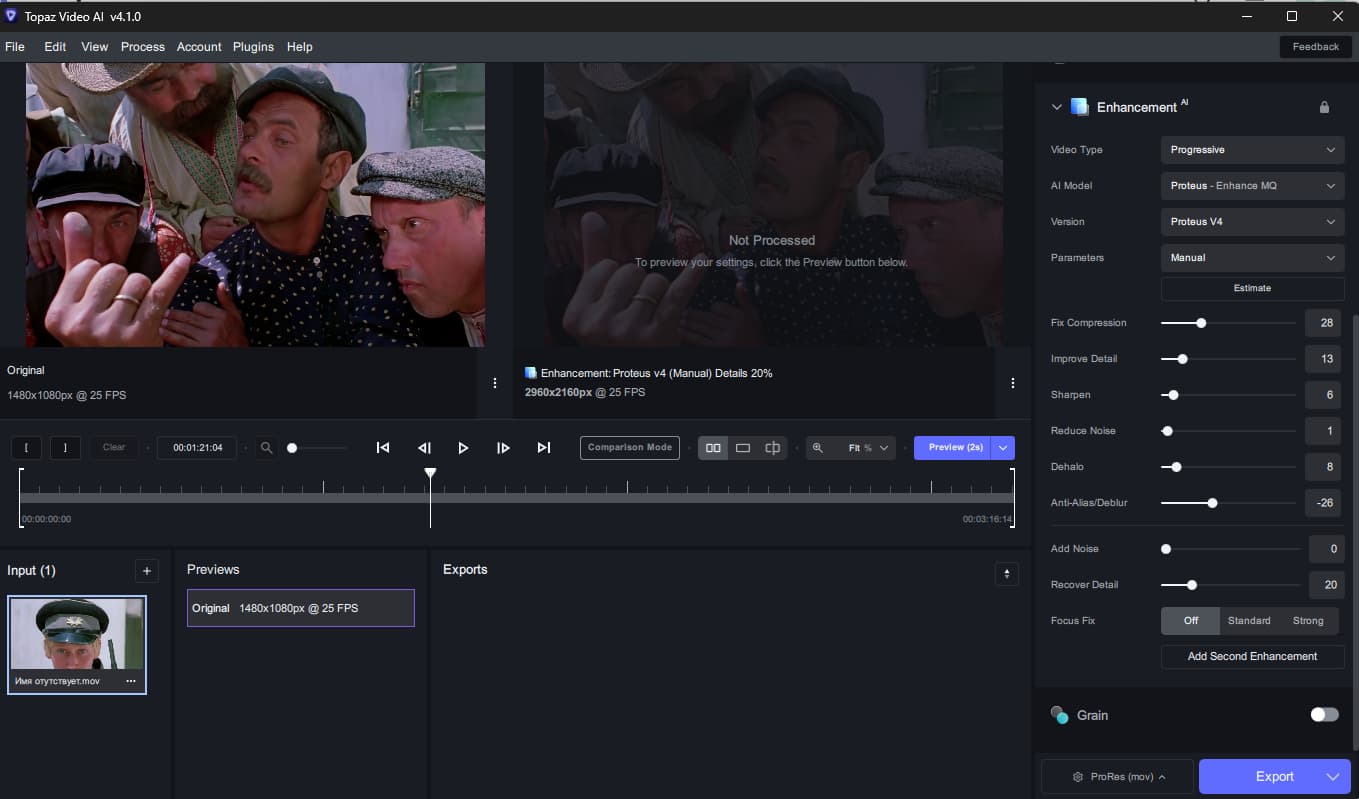
Невозможно сделать второе и любое последующее превью. Даже 2 секундное. Программа стартует, но практически моментально зависает намертво, иногда с перезагрузкой системы. Система начинает очень жестко тормозить, завершение процесса невозможно. Приходится жестко выключать. Тенденция прослеживается на протяжении всей 4 версии. Виндоус 11 pro, ноутбук msi gt77, 12 поколение интел i9 hx, 3080 ti 16gb, ddr5 128gb.
I agree with that. You need to clean the video as much as you can before sending it to TVAI.
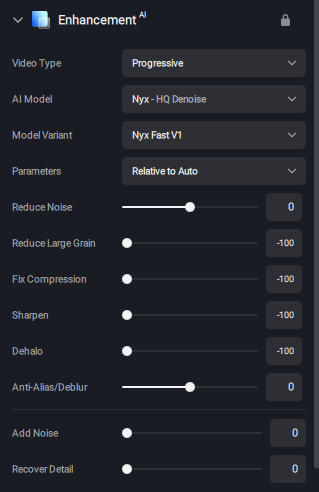
I’m curious how Nyx Fast compares to Neat Video at denoising? I’ve heard some people on here say it cannot adjust for varying levels of noise. My findings so far with Nyx Fast is that it can adjust and does a pretty good job in my eyes. Maybe a little painting-like, but very little. I have it set like this, and adjust the Reduce Noise slider in the most noisy part of the video.
1 Like
I tried Nyx Fast Avto on a good quality video. The entire video was 100% horribly distorted. It looked like crocodile skin, or cracked dry mud.
1 Like
That’s why you have to use relative to auto with those settings. I have not tried it on anything that’s not a DVD, so that might make a difference.
4.1.0 hasn’t fixed this bug for me - hoping fixing this bug is a priority.
Please can you alter the default window size?
Every time I open this app, it completely fills the screen blotting out everything else.
Otherwise, a great update. 
1 Like
I don’t get a default window size here. When I start the app, it opens at whatever size it was the last time I closed it.
Someday I’ll try it on DVD
Everyone can’t see anything! There is no preview in this app. But, once there was.
2 Likes
Proteus v4 is great. Finally no issues with people eyes comparing with Iris.
1 Like
That’s weird. I have to manually resize every time I launch the app.
Are you running in Windows or Mac?
Old models (via modified json files) are recently re-downloaded each time I start processing or previewing… I don’t know exactly with which version this behaviour started. Any chance that this will be fixed?
Hi… I want to understand better the work of fix focus. If i have a dvd file for example 640x480, with fix focus standard, the file first will be downscaled of the 50% and reupscaled using 2x, right?
But if I want a final 1920x1080 file, the file will be downscaled of 50% from 640x480, but it will be reupscaled using 4x to 1920x1080?
1 Like
Presets from older version error:
- don’t respect zoom setting
- use Proteus V3
I must set again zoom and P V4 to update preset 
Apple Mac.
It’s happening to me on macOS and I don’t like this. Would love to have the app open with latest position and size saved. Thank you.
1 Like
I find Proteus v4 to be a bit odd. The more you push it the more blurred it gets! Iris MQ gives good results but text in background turns English into Arabic!
1 Like
