Known issue, will definitely be fixed for 4.1.0 main release!
1 Like
Update on release timing:
In 2024, Video AI will be switching to a biweekly release schedule.
Our goal with this change is to allow for more bug testing both internally and with our public beta testers. We will be alternating between a beta and main release each week.
4.1.0 will be released on Tuesday, January 16th, followed by 4.1.1.b on Tuesday, January 23rd.
Thanks as always for your feedback and support!
7 Likes
Makes much more sense that way. I was surprised how you guys managed to last that long with weekly releases.
My Testing of Nyx v3 (Auto & Relative Auto Dehalo -100), it indeed cleans more noise but destroys much more skin details, deformation of nose and teeth in some cases / picture angle, compared to Nyx v1 and much more blurry then Nyx v1.
I did a side by side / split compare with the Video-Compare tool
Focus Fix is a very specific tool for HD footage with slightly missed focus.
General rule of thumb: if the footage is from a movie, it’s very likely in focus and just needs a standard Enhancement to a larger resolution.
3 Likes
Probably be a good idea to have a popup that explains that when the feature is used. Otherwise, I foresee a lot of release version users asking the same question I did.
Oh heck, what am I thinking, they’ll ask it anyway even with a popup.
1 Like
*Command line Bug report*
In this version when you select CTRL+E (Show Export Command) the export command will generate a Temp File name at the Temp folder instead of a file name with the final AI in use and at the export intended folder
Example v4.1.0.0.b
ffmpeg “-hide_banner” “-i” “D:/Temp/20150921212204.avi” “-sws_flags” “spline+accurate_rnd+full_chroma_int” “-color_trc” “2” “-colorspace” “2” “-color_primaries” “2” “-filter_complex” “tvai_up=model=iris-2:scale=0:w=1440:h=1080:preblur=0:noise=0:details=0:halo=0:blur=0:compression=0:estimate=8:blend=0.2:device=0:vram=1:instances=1,scale=w=1440:h=1080:flags=lanczos:threads=0” “-level” “3” “-c:v” “ffv1” “-pix_fmt” “yuv420p” “-slices” “4” “-slicecrc” “1” “-g” “1” “-an” “-map_metadata” “0” “-map_metadata:s:v” “0:s:v” “-movflags” “frag_keyframe+empty_moov+delay_moov+use_metadata_tags+write_colr” “-metadata” “videoai=Enhanced using iris-2; mode: auto; revert compression at 0; recover details at 0; sharpen at 0; reduce noise at 0; dehalo at 0; anti-alias/deblur at 0; and recover original detail at 20. Changed resolution to 1440x1080” “D:\Temp\Topaz\Video AI ALPHA\temp/67047825/previews/20150921212204_866730020.avi”
Here is an Example in v3.5.4 (how it supposed to look like):
ffmpeg “-hide_banner” “-i” “D:/Temp/20150921212204.avi” “-sws_flags” “spline+accurate_rnd+full_chroma_int” “-color_trc” “2” “-colorspace” “2” “-color_primaries” “2” “-filter_complex” “tvai_up=model=iris-2:scale=0:w=1440:h=1080:preblur=0:noise=0:details=0:halo=0:blur=0:compression=0:estimate=8:blend=0.2:device=0:vram=1:instances=1,scale=w=1440:h=1080:flags=lanczos:threads=0” “-level” “3” “-c:v” “ffv1” “-pix_fmt” “yuv420p” “-slices” “4” “-slicecrc” “1” “-g” “1” “-an” “-map_metadata” “0” “-map_metadata:s:v” “0:s:v” “-movflags” “use_metadata_tags+write_colr” “-metadata” “videoai=Enhanced using iris-2; mode: auto; revert compression at 0; recover details at 0; sharpen at 0; reduce noise at 0; dehalo at 0; anti-alias/deblur at 0; and recover original detail at 20. Changed resolution to 1440x1080” “D:/Temp/20150921212204_iris2.avi”
Thank you for finally acknowledging that the one week release schedule wasn’t serving anyone well, when it came to quality and user experience. Let’s see if two weeks is enough.
Added Note: I may resume my beta testing if I see things generally improving. Previously, with the v4 development cycle, I found it was futile.
2 Likes
100% 
Just ran my first comparison of this beta vs. 3.5.4 on the same machine (non-AVX2 system).
As expected, the benchmarks are awful (the non-AVX2 system runs at half the speed of my newer AVX2 system). About 20% slower in the beta than in 3.5.4.
Unexpectedly, a 2x Artemis upsampling of a 480p video runs about 15-20% faster in the beta than it does in 3.5.4.
Did not see any errors or performance hiccups. Will repeat test with other models.
Hi, Nyx v1 softer than Nyx v3. For this video, maybe not for others, the best option was focus fix standard with proteus V4.
Are there any specific models or functions that should be checked for possible issues on non-AVX2 systems?
1 Like
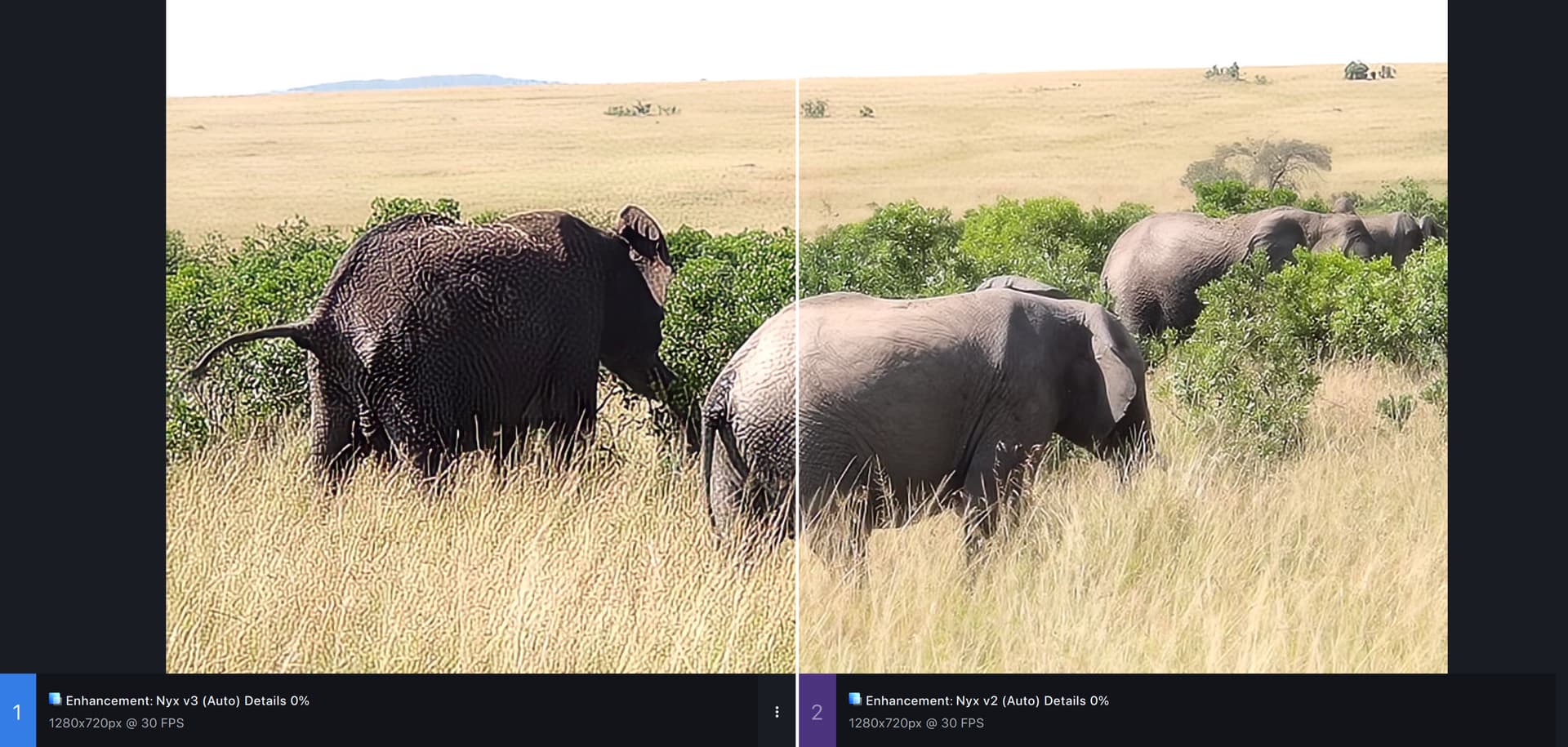
For higher-quality footage Nyx v3 auto is substantially worse than Nyx v2 auto. Though that said, I prefer v3’s manual settings over v2, since it’s far easier to control.
1 Like
When creating a preset with Nyx v3 the ‘recover detail’ slider isn’t saved. If I change the value of the slider and update a preset, then reload it, it still has the old value.
As long as I only have a preview, the comparison in full screen fits.
As soon as I generate a second one, the time is off again and the preview and the original no longer match.
(Proteus V4)
I can recreate it all the time.
But it works with two differently generated previews.
Focusfix has a very positive effect on highly compressed material (+ Proteus V4).
Iris LQ V2 has an advantage here in terms of fine details.
When I press remove group, the software partially crashes.
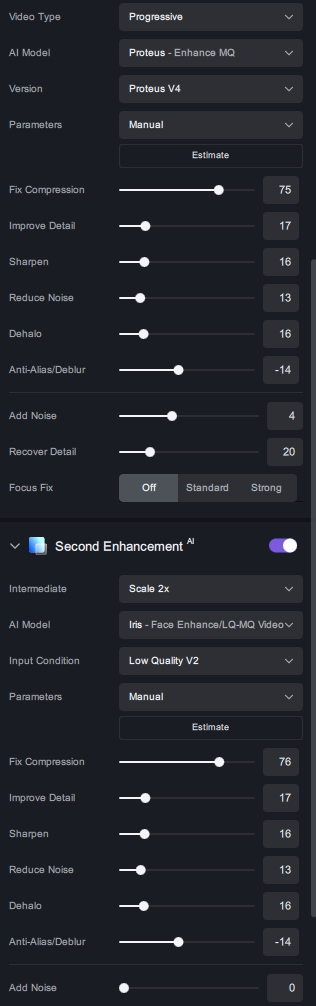
These settings belong to the “if you haven’t seen it you won’t believe it” category in the badly compressed video I have for testing.
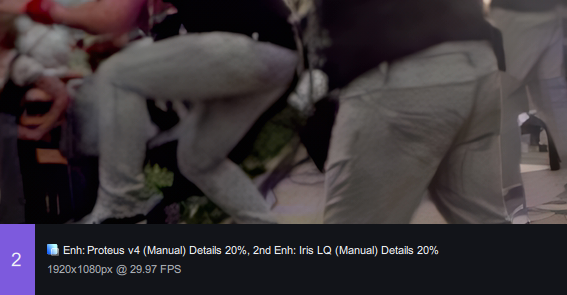
Unfortunately, I can only show you parts of the compression because the people in the still image are identifiable.
Of course, this still requires fine-tuning, but I’ve never seen it like this before.
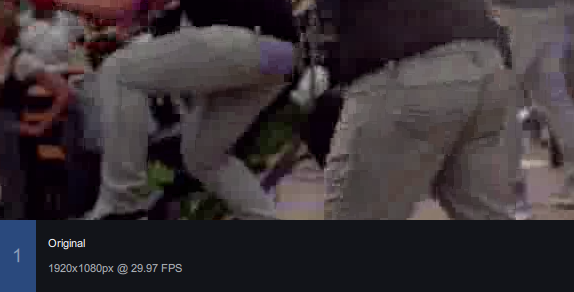
It is possible that there is a “different tile” problem in P4 or ILQ 2.
1 Like
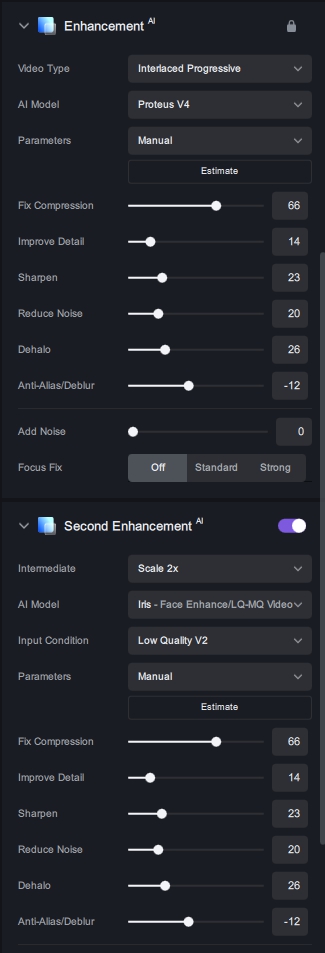
What are the manual settings you are using? I used Auto and it was really bad.
Is your video also compressed to death?
BTW. Where is your “Recover Detail” slider? ← ah i see, its interlaced.
With my Video:
I was told that the video was compressed so that it would fit on a DVD (850 mb).
But a DVD has 4 GB, so there would have been plenty of space.
Apparently nobody wanted to take the time to see what the best ratio would have been.
I’ve been playing with really subtle settings. So for Nyx v3 I just have everything at 0 except for ‘Reduce Large Grain’ to 15. I found dialing that up or down has a big impact on how strong the effect will be.
I’m using it on smaller videos without noise to see how Nyx sharpens things. I still think Proteus might be better for that use case.
