Frame interpolation still not fixed.
15fps x4 = 60fps (chronos) still creates dupes instead of real frames. Every 4 frames there is one exact same frame.
30 to 60fps is fine…
Frame interpolation still not fixed.
15fps x4 = 60fps (chronos) still creates dupes instead of real frames. Every 4 frames there is one exact same frame.
30 to 60fps is fine…
And another Beta that is basically unusable on MacOS / Apple Silicon:
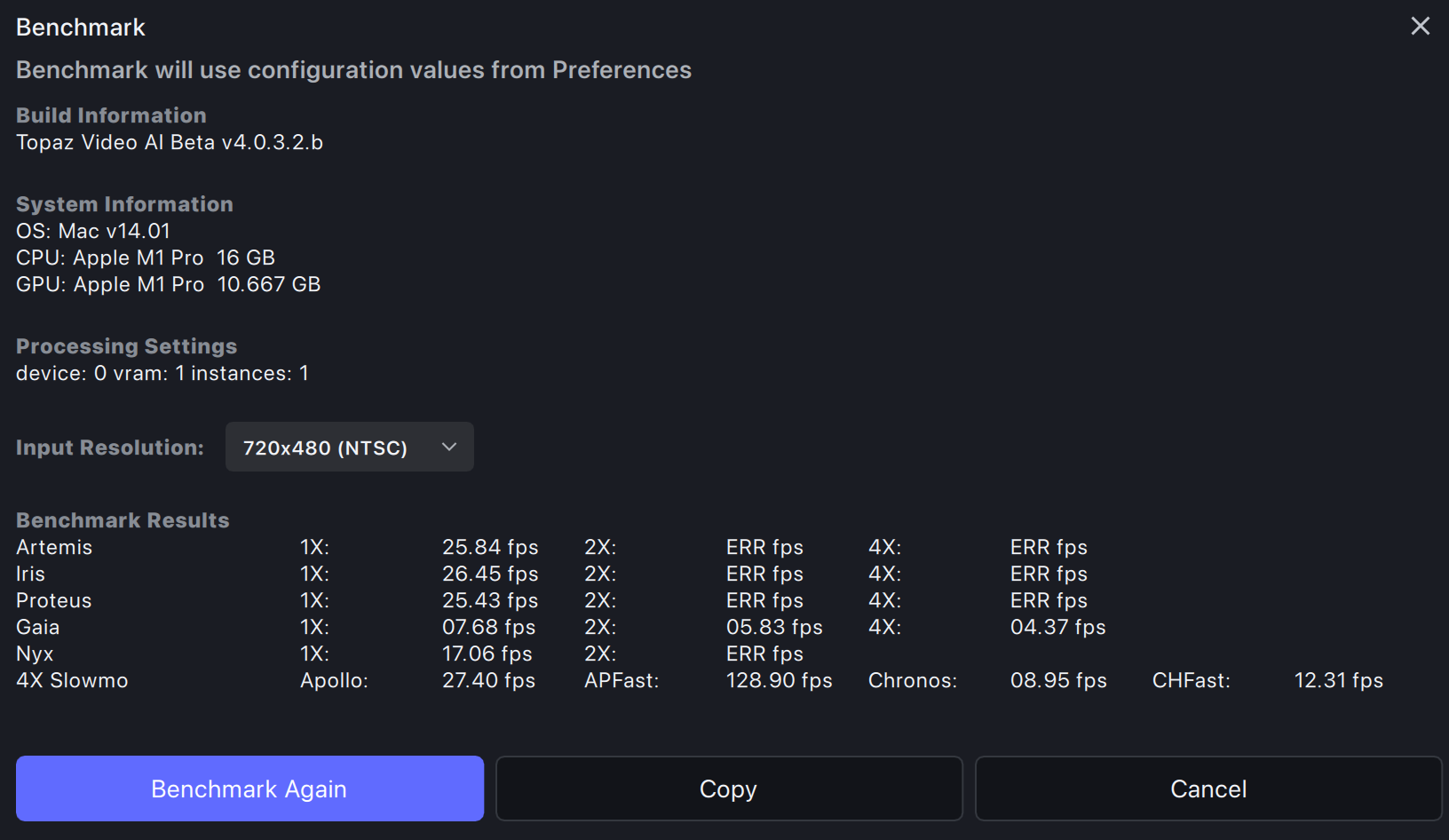
Only 1x works, everything other gives an error. This is also true for actual encodes:
And this with RAM set to 10% as well as 100% and on both an M1 Pro as well as a M2 Ultra.
Do you test on Apple Silicon at all?
Hi, I’ve no stability problem. But in my case it’s M2. And I installed from DMG, not from the app.
Topaz Video AI Beta  v4.0.3.2.b
System Information
OS: Mac v13.0502
CPU: Apple M2  24 GB
GPU: Apple M2  16 GB
Processing Settings
device: 0 vram: 1 instances: 1
Input Resolution: 720x480
Benchmark Results
Artemis		1X: 	31.69 fps 	2X: 	17.96 fps 	4X: 	07.10 fps
Iris		1X: 	28.67 fps 	2X: 	03.18 fps 	4X: 	01.88 fps
Proteus		1X: 	28.29 fps 	2X: 	17.78 fps 	4X: 	05.44 fps
Gaia		1X: 	10.13 fps 	2X: 	07.66 fps 	4X: 	05.83 fps
Nyx		1X: 	07.77 fps 	2X: 	07.08 fps
4X Slowmo		Apollo: 	32.27 fps 	APFast: 	131.71 fps 	Chronos: 	09.81 fps 	CHFast: 	12.57 fps
Hmm. here it’s on two different systems. And I always do a clean install from DMG.
Strange enough this is the second Beta in a row with severe problems while the release version does run normally (apart from the ridiculously slow Iris performance).
Just saw that you’re using an old version of MacOS Ventura.
Likely this is the reason why it runs for you but not here on MacOS Sonoma (on two different machines, M1 and M2).
Thanks for posting this, testing now to confirm… I sent a lot of old testing files, from when I first encountered the bug, and recently tests done with the last general release to a topaz researcher, so hopefully they have enough data to kill this bug, once and for all!
Yeah, the bug is indeed confirmed, Here’s the resulting test video, the duped frames are solid black in order to illustrate this issue… I used Virtuadub and the incredibly useful remove frames plugin for this!
The test footage was 30fps, and I de-duped it with the resulting frames at 23.824 fps interpolated to 90 fps using chronos…
EDIT: Interpolating with the last General release, the dupes continue, will test with new General release…
EDIT2: For the current beta, using my method of multiplying the input de-duped footage’s sum by 3 (3 x 23.824= 71.472) was successful at providing a proper interpolation without duped frames…
EDIT3: Yep, the dupe bug still exists for any footage under 25, and/or 30 fps, with the general release 4.0.3…
I believe there may’ve been an issue with the .deb we originally uploaded. I’ve reuploaded the file - could you redownload and try again.
Yup that fixed it, thanks!
I (try to) run the Linux version, I’ll probably skip this beta as it’s usually just a waste of time.
Can I ask if you’ve been able to run any (including this) beta reasonably well? I get 50% failed videos at best and I can’t really go beyond 2x upscale or it’s pretty much a guarantee to fail.
Well as harsh as it seems I unfortunately feel pretty much the same way. You can tell nobody at Topaz actually uses this software because they just took a UI that was fairly serviceable and threw up a ton of roadblocks that slow the whole process down. It takes way too long dealing with that silly new timeline thing to build up a queue. Why would anyone want to sit here and putz around with this UI rather than just get the exports started? Comparison between preview attempts is a nice concept but it could have been incorporated into V3 without driving everybody nuts. I can’t imagine anyone finds anything else in V4 of any value vs V3.
Honestly the only thing that will save Topaz is the lousy license crap from the competitors that are popping up. Most I’ve seen are trying to turn the program into a perpetual service and nobody wants to deal with that crap.
I found another “bug” 
I set the maximum processes to 2 in order to be able to do a preview.
And i done some previews…after that i forgot to set it back to 1 and startet a second running export.
Now that accidently 2 exports running i set it back to 1…
And set some additional exports into the queue.
So now 2 exports are running at the momment and the first is nearly completed what do you think TVAI is doing when maximum processes is set to 1.
Yes: When the running exports are now down to 1 it starts another one to be back with 2 running exports. Again looking into the settings there´s maximum processes set to 1.
Why is TVAI starting another export process when maximum processes was set to 1 ?!
The moment i added the additional exports to the queue i maybe have the setting on 2 processes.
Is it possible that TVAI remembers which settings were set when they go into the queue ?
And when you set max. processes back to 1 TVAI looks just at the variables that were set earlier when adding exports to the queue ignoring the present settings ?!
logsForSupport.zip (5.2 MB)
It would be nice to always allow the Preview function to use 1 process no matter what is set in maximum processes…this would help a lot…so you can always do a preview while do exporting in the background.
Same here. I discovered this bug today too.
I found another bug. If I select the 1080p Upscale profile and select the Artemis model, for example, then the video briefly shows a smaller image in the first frames when I play it in a loop. This makes the loop very messy. This is not the case in the final version of Video AI. It’s normal there. This only applies to short videos that have a running time of a few seconds and are played in a loop.