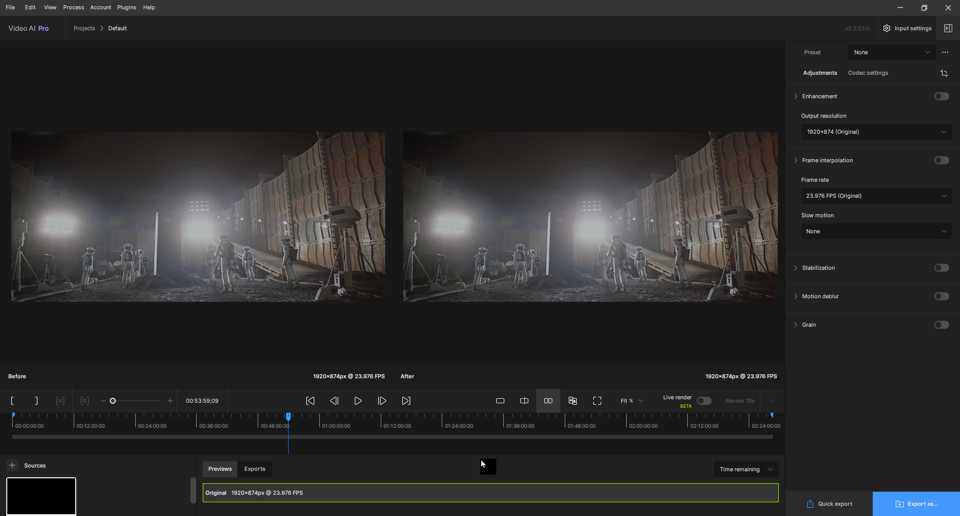
I also want new and improved models but they can do this in parallel with GUI improvements since they are different teams.
And for the GUI, as long as we don’t get another complete refresh, they can keep making it better and fixing bugs.
I also want new and improved models but they can do this in parallel with GUI improvements since they are different teams.
And for the GUI, as long as we don’t get another complete refresh, they can keep making it better and fixing bugs.
why does it say rhea is for 4 x upscaling in the gui for the model
while it should be
Rhea represents a combination of Proteus and Iris. The model is intended to be more accurate in preserving fine details across a wider range of subjects, while also handling text in a less destructive way.
This model and Rhea internally processes inputs at 4x scale and then downscales to your selected output resolution.
Hello. It’s been about three years since I started using Topaz products, and around two years for Video AI. However, I still don’t quite understand one thing: why? Why do I have to relearn how to work with the interface every 3-4 months? I “get” it – we’re all chasing the perfect interface. But the changes in this version really threw my universe off balance (lol)…
Has no one noticed that custom presets created in the previous version aren’t interpreted correctly? (Or is it just me?!) Also, in Proteus and Iris, if I have “live render” enabled and adjust more than 4 parameters, it crashes.
Ironically, I hope that by 2025 or 2026, dear developers, you’ll settle down with the major interface changes. Otherwise, for long-time paying users, you might have to offer training discounts (just joking). I fully agree that before developing other models, the current software should be debugged, but constantly changing the interface only brings new bugs.
Don’t tell me… Don’t tell me that the interface changes are a consequence of fixing old bugs (still being ironic). On another note, I am satisfied with what Video AI does, but when I see the phrase “very exciting” here on the forum, it almost makes me want to cry… Wishing everyone a wonderful day…
PS
I think I’ve gotten older and become resistant to the “new”. 
Another minor nit: I don’t think “Input condition” is a good replacement for “Version” when previous models are enabled, since the dropdown is still a list of models. “Model version” would probably be a better label.
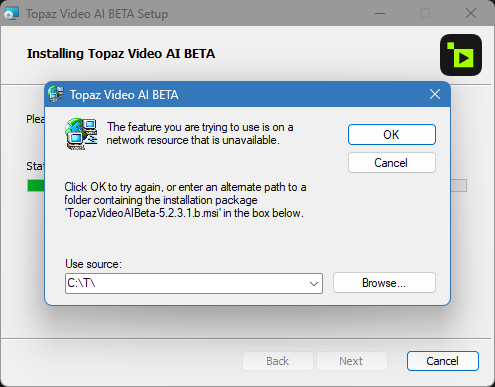
I don’t remember having this problem before, ie: with the install. It may have happened once, then I tried to keep going and it did. This time it’s stopped me in it’s tracks… Windows 11 - 23H2
LOL, I can’t argue with that! x^D
Although, rotoscoping unwanted elements from each frame imported to TPAI, is a long, tedious process! :^P
Huh, good catch, I did not notice that!
Hi everyone,
Thanks for the rapid feedback! 5.3.0.1.b is now available with the following changes:
Fixed:
Changed:
We have noticed this in certain cases – will be looking into it but does not seem to be 100% reproducible when updating.
i cant login , i cant activate the beta ???
If you haven’t already, make sure to make a new project file and save it to your disk location with multiple terrabytes. I had a similar issue with a previous upgrade where it loaded the default project file from the default disk location. It was only after I made a new project file on my desired disk that it worked correctly.
You can drag the bottom of the timeline down to reduce that space, but if you run multiple previews or exports you might need it.
Actually, I believe that extra space is perfect for when you want to enhance multiple jobs, mainly for short to medium-sized videos that is; for myself I like to enhance my videos in small batches, however, admittedly its aesthetics, are looking a bit empty, but it is functional though…
Thanks for the rapid response with the fixes!
When will we be entitled to model updates? And RHEA will be fast when? Thank (it’s been the second time I ask the question, you didn’t answer me at the first one)
@tony.topazlabs Is alpha 2 done?
Same here. My license is supposed to be active (checked online), yet I get “Not logged in” on macOS
Regarding jumping to the timeline dividers, can you provide an option when dragging the play head to have it ‘snap’ to each divider line? Make it an option than can be turned on and off with a check box.
Buttons to jump to previous and next timeline divider are needed too!
Thanks!
It worked! THANK YOU !!!